I am a new/trial user of Roon. I am testing roon on a folder with 375 tracks
Description of Issue
I have experienced two issues with Roon:
Roon is only importing 340 of 375 tracks from my library. The 35 missing tracks are either wav or flac files. They are no different than the files that are being recognized. The files are not corrupted. They still are recognized in other apps and function properly.
When adding new files to the library, Roon would not recognize the metadata associated with the files. Al of my files are ripped to wav using EAC and metadata is applied using Musicbrainz Picard. This is true for all of my tracks including the ones being correctly recognized by roon. After a reboot, the tracks that roon did not recognize the metadata for are now no longer being recognized at all in roon (i.e. issue #1 above)
Some things to check (if you have not already):
For issue one go to “settings\library” and look at “skipped files” to see if the missing tracks are there.
See this KB for more info (also check the “Special Characters” section):
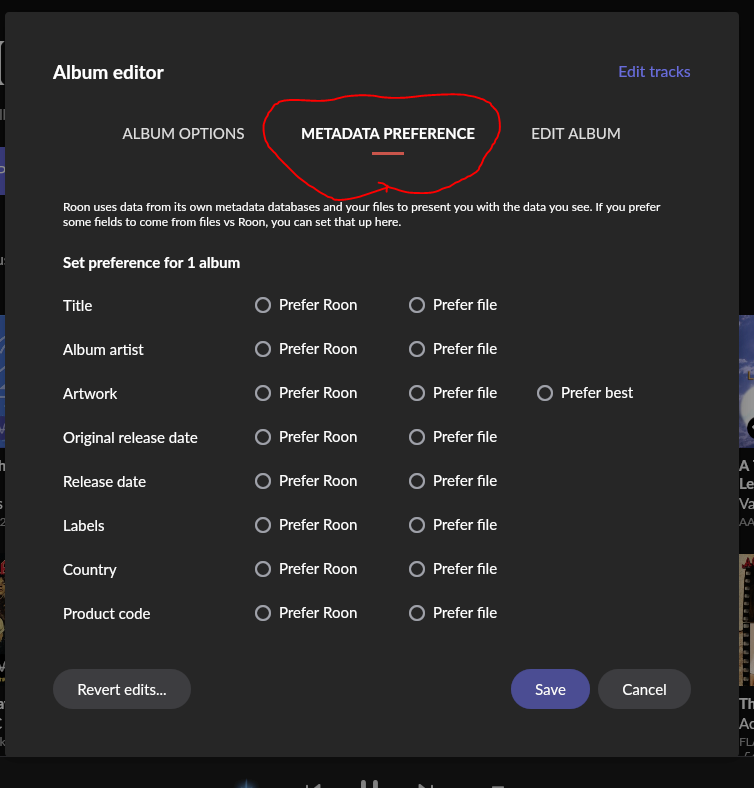
For the metadata issue you might try telling Roon to use the files metadata instead of Roon’s metadata. You can do this either in “settings\library\import settings” for the “global” setting or in the individual albums “editor” under metadata preferences.
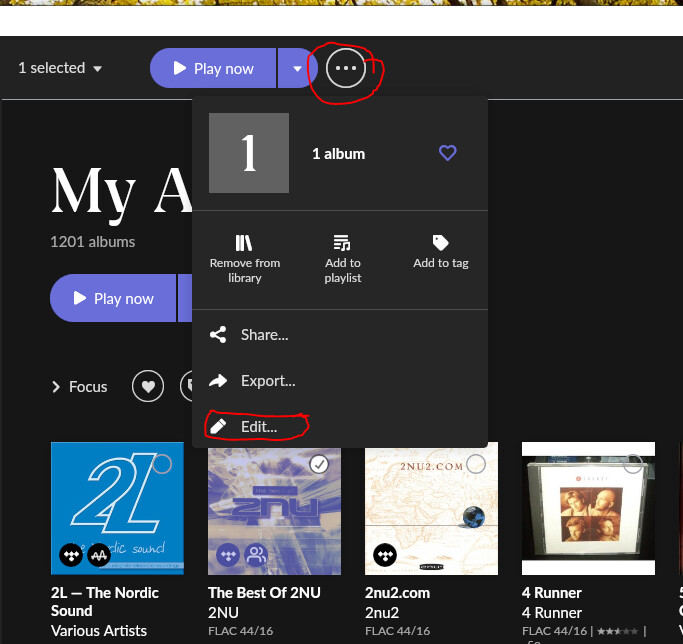
Select the album and then click the three dots and then edit:
Thanks, I was not aware of the skipped files section. Unfortunately, roon does not think it skipped any files. I have changed where roon tries to get its metadata (roon vs file) which did not make a difference. I have checked for any special character issues.
The strange issue is that when adding an album to my library, roon recognized it and imported it. Although it did not apply any metadata (roon was the default preference). I rebooted my computer (with roon core on it) and now roon does not even recognize this albums files.
I think both are happening. I am definitely missing entire albums. This was the situation that caused me to notice.
Scenario 1) Added new album to library, roon wouldn’t apply any metadata, changed preferences to use file metadata, roon would not recognize this either, rebooted PC, now album is not being recognized in library at all. I have only focused on the one album that had this specific issue. Roon is not recognizing roughly 10% of the small test library i created to trial roon. I’m not sure if that 10% is complete albums or tracks
Scenario 2) roon applies metadata to 9 out of 10 tracks on an album, 10th track is listed as unidentified
I am determining these tracks are missing simply by reviewing the library and not finding them. They are not listed by artist or album. They are not in unidentified category. They are not listed in skipped tracks. They do not show up in a search of my library.
I am new to roon and trying to decide if it is worth paying for vs. free options I am already using. If Roon is going to not recognize 10% of my collection, this will be an issue.
I’m not quite sure if the problem is albums/tracks that are marked as “Unidentified”, or not there at all, or both things happen.
Sometimes, individual tracks may not be recognized as belonging to an album. E.g., if Roon metadata does not know a particular release that has bonus tracks. Then the bonus tracks may appear as a separate album. You can then select the main album and the bonus tracks album and click Edit > Merge.
Depending on the state of Settings > General > Show hidden albums, duplicate albums may appear separately under My Albums (when the setting is Yes) or they may be grouped under the Versions tab of one album (setting is No).
How many albums are going to be “Unidentified” depends on the kind of albums you have. You can try clicking the “Unidentified” label, which will open a list of albums that Roon thinks may be applicable. Choose one if it fits. But if you have very obscure albums, like from the private live archives of certain artists who have such a thing, they will often be unidentified.
I never had a case of albums or tracks that where not there at all. In the worst case they were poorly tagged and I didn’t immediately find them. But they should always show up under Home > Recently Added, at least immediately after importing them.
How are you searching for them, with the filter in My Tracks or My Albums or with the search (magnifying glass in the top right corner)?
I would not import all albums at once but one by one, then check under Recently Added and fix any issues. At least until you are more comfortable and have some experience with problematic albums.
It would help if you could post screenshots of what you are seeing in Roon and of the file tags in problematic albums.
There’s a lot of guessing involved right now
Ok, I did some testing which resulted in more odd results but the album eventually was added to the library. Here is what I did:
I deleted the “trouble” files from my library folder. Number artists/tracks remained the same which helps confirm it was not in the library.
Re-added the “trouble” album to the folder and it was still not added to the library (with force rescan).
Removed another album from folder as test case. Number of artists/tracks decreased as you would expect. Re-added this same album that was just deleted. It appeared in the library as newly added.
Added/removed “trouble” album in my music folder two more times, and the album was finally added to the library and shows up in newly added section on home page
At this point the album is in. Im not sure how to determine the cause of needing to add it to the music folder 3/4 times before it was recognized. Now that the album is recognized by Roon, all the metadata roon would normally apply is available.
Ill keep trying to bring albums into roon in small quantities and see of the problem reoccurs and if I can find a common link between the files.
I wonder if it has something to do with EAC or .wav format? Are the files for the trouble album different sizes (like much larger?) then the ones that “worked”?
If you run across another trouble album, maybe try re-ripping it? or ripping in FLAC? or another ripping program like dBpoweramp?
I can certainly try using a different ripper. All of my files have been ripped with EAC to wav (a few in FLAC). The trouble files are not any different in size or format than all my other files. With that said, something odd could have happened with this particular rip and it would be worth a try should i have another issue.
I know I had a few CDs that would give EAC fits as it was trying hard to get it perfect.
I used a combination of re-ripping and even converting the files in some cases with dBpoweramp’s file converter (FLAC to FLAC in my case) to get them to work.
I still have two or three independent (artist made) CDs that just wouldn’t rip no matter what I did. Ended up real time re-recording them to get them digitally into my system. Not the best but it ?worked? sort of…LOL