What kind of performance/speed issue are you experiencing?
· Tracks take a long time to play
Please try to reboot your Roon Server
· No, the issue is still the same even immediately after a reboot
Please try to reboot your networking gear (Router/Switches/etc.)
· No, the issue is still the same even after a reboot
Is there any change in behavior if you try to navigate to Roon Settings -> Library and set both Background and On-Demand Audio Analysis to Throttled or Off?
· No, the issue is still the same
Does the issue happen on multiple Roon Remotes (controllers) or just one?
· Issue happens on multiple remotes
Router Domain Name System (DNS) change
· I don't know how to do this
What is the operating system of your Roon Server host machine?
· Nucleus
Which model Nucleus do you have?
· Nucleus Titan
Timestamp of issue occurrences
· March 24th 2026, 19.55 GMT
Describe the issue
Still Experiencing Lags In Playback Despite Purchasing A Nucleus Titan
Describe your network setup
Virgin Media Broadband/Nucleus Titan/Asus RT-AC86U Router
This highlighted the problems I was having with sluggish playback, particularly when shuffling playlists created on Qobuz, which were at the maximum size of 2,000 tracks.
It was suggested that lack of RAM was the issue, so I decided - having been advised that this would be something that would resolve the problem - to purchase a Nucleus Titan, which had both increased Ram and greater processing power. Regrettably I find that the issues I experienced before have returned, so I find myself in the unfortunate position of having invested in excess of £3,000 to rectify the playback problem, only to find that I am no further forward, and that I am still unable to experience Roon as I would wish. Quite a lot of money to spend to find that the issue has not been resolved, which is rather galling.
As you can see from the above response, I was led to believe that going down the Titan route would make things better, but unfortunately that has not been the case. Could you advise please?
Thank you for the prompt reply. I haven’t listened to any local library tracks since I purchased the Titan, so the issue has only been experienced by me when playing Qobuz tracks. The behaviour I encountered before when I had my overloaded Nucleus One returned, ie I would engage ‘Shuffle’ on a Qobuz playlist containing the maximum 2,000 tracks, and the first track would take 30 or 40 seconds before commencing playback.
I also encountered problems when selecting a track from a Qobuz playlist in Roon to ‘Add Next’, which resulted in the same stalling of playback when that track was due to commence playing.
I hope that you can resolve this issue swiftly, as I had rather hoped that by investing in a Titan I had consigned these problems to history.
Sorry to hear you’re still struggling with delayed playback on your large playlist. @alex_h is right; we’re nearing the release of some memory-related optimizations that should help with this issue.
In the meantime, could you please check if this delay occurs regardless of the endpoint? Try setting up the system output on your Mac to see if the delay persists. Additionally, from a recent Nucleus diagnostic report, the only playback failure we’ve observed is due to a lack of streaming URL from Qobuz:
Warn: [qobuz/media] could not get playback info for 202:0:63142833: Result[Status=NotAvailable, ErrorText=No streaming URL returned]
Info: [zone Media Room] OnPlayFeedback StoppedEndOfMediaUnnatural
If you can provide a specific timestamp or track name where this issue occurs, we’d be happy to take a closer look. Thanks for your patience as we work through this.
I’m sorry, but I don’t know what you are asking me to do in the first part of the above quote, and I don’t know what the second part means either. I am not tech-savvy.
I was listening to a playlist on shuffle today on the Mac between 4pm and 5pm GMT. Basically every track had a delayed start of a few seconds. Also, album art taking even longer to load, often ten/fifteen seconds after the track had commenced playback before the art work for the track uploaded.
I was led to believe that upgrading to the Titan would consign these problems to history, so I am obviously very disappointed to have spent in excess of £3,000 to find I am still plagued by these issues.
We pulled the logs from your Titan during that session, and they show exactly what you described. When you hit shuffle on your “Qobuz Chillout 1” playlist (which contains the maximum 2,000 tracks), the play command was registered immediately. However, the logs show the system sat there for exactly 30 seconds, blocked by a massive background synchronization of cloud data, album art, and metadata from Qobuz, before it finally allowed the audio stream to start.
Our R&D team is actively working on memory and queue optimizations to improve such behavior. Could you please provide us with a copy of your Roon database?
Please let me know once the upload is complete, and if there are any other specific playlists besides “Qobuz Chillout 1” that you frequently shuffle, please list them here so our team can test those as well!
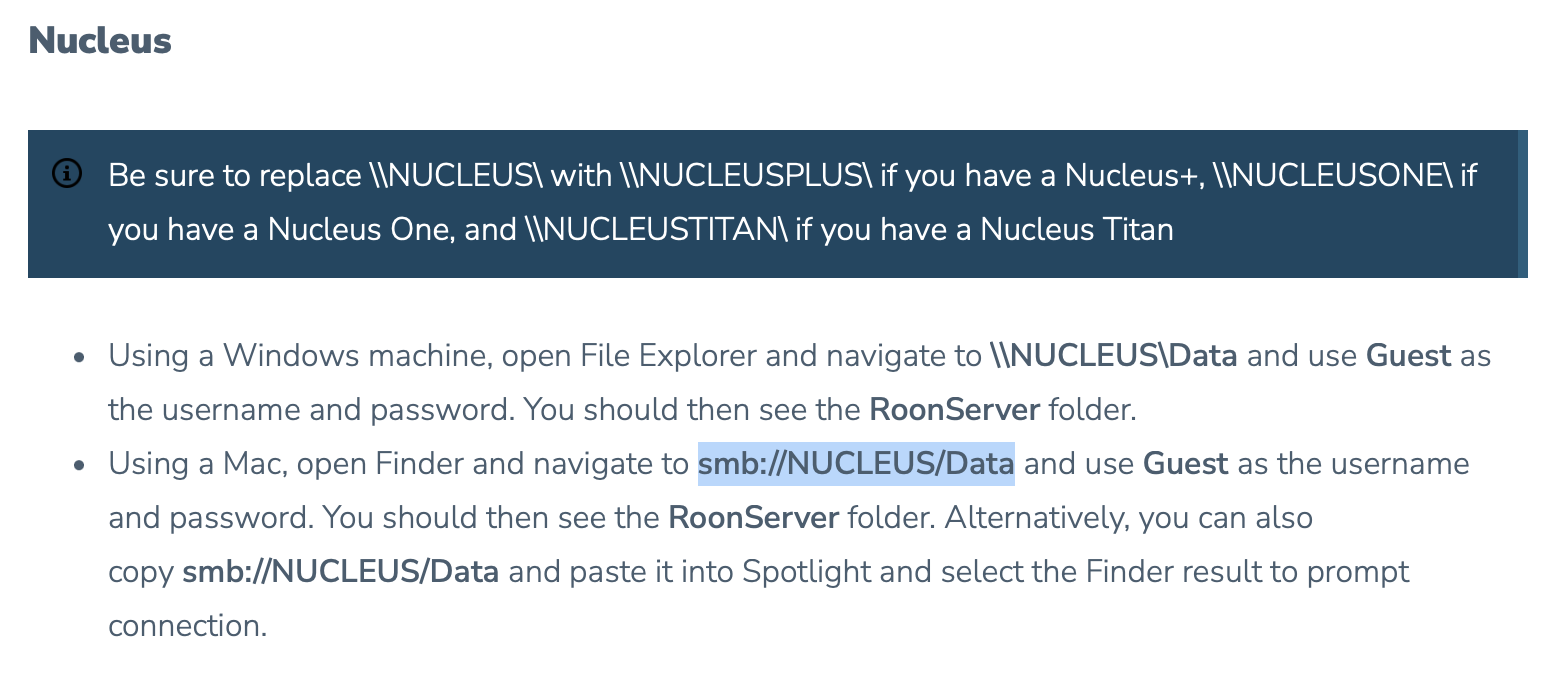
Step 2 - You ask me to find the RoonBackups folder in my drive, but when I follow the link it instructs me to find the RoonServer folder (see below). Are they the same thing?
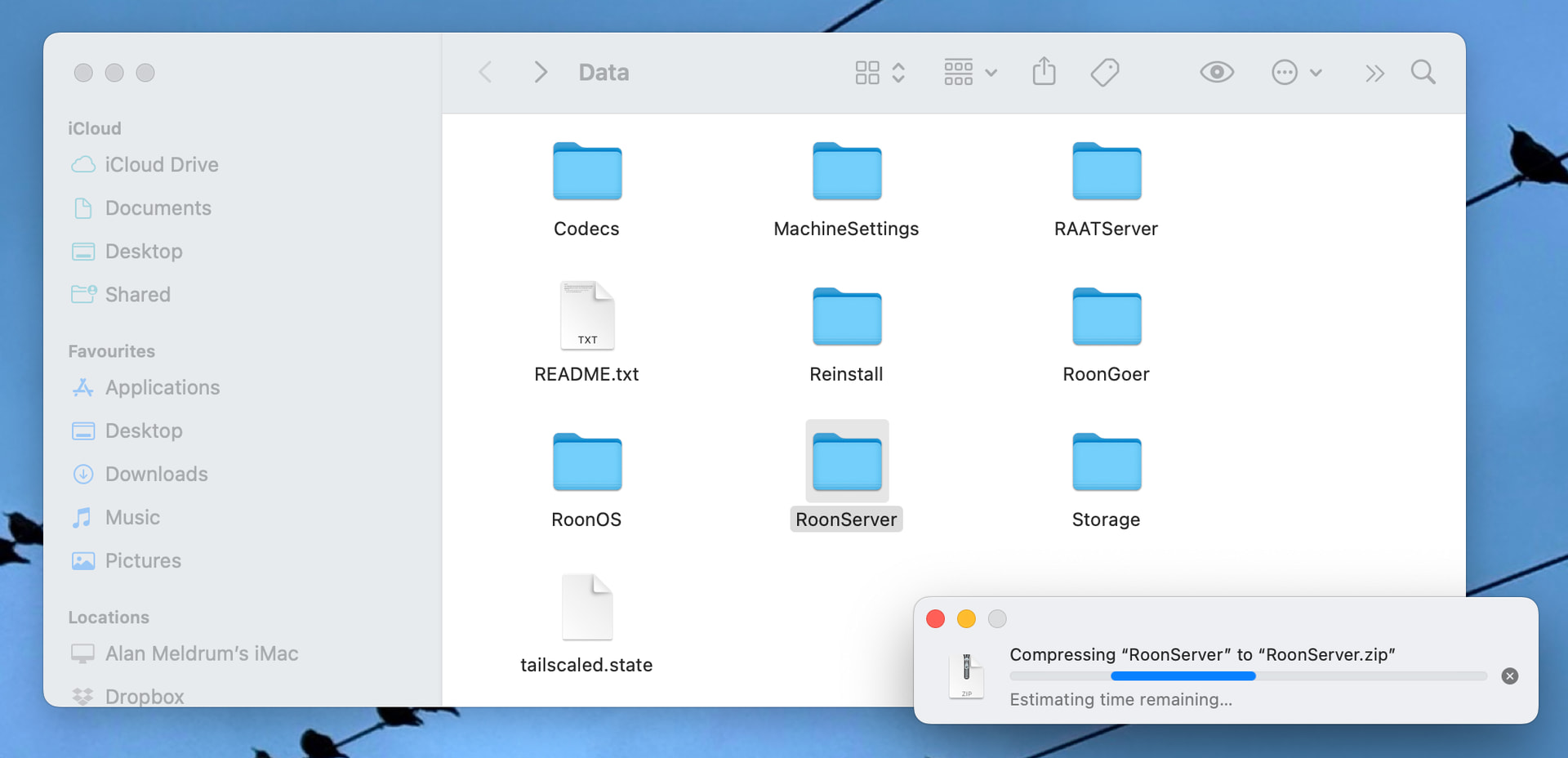
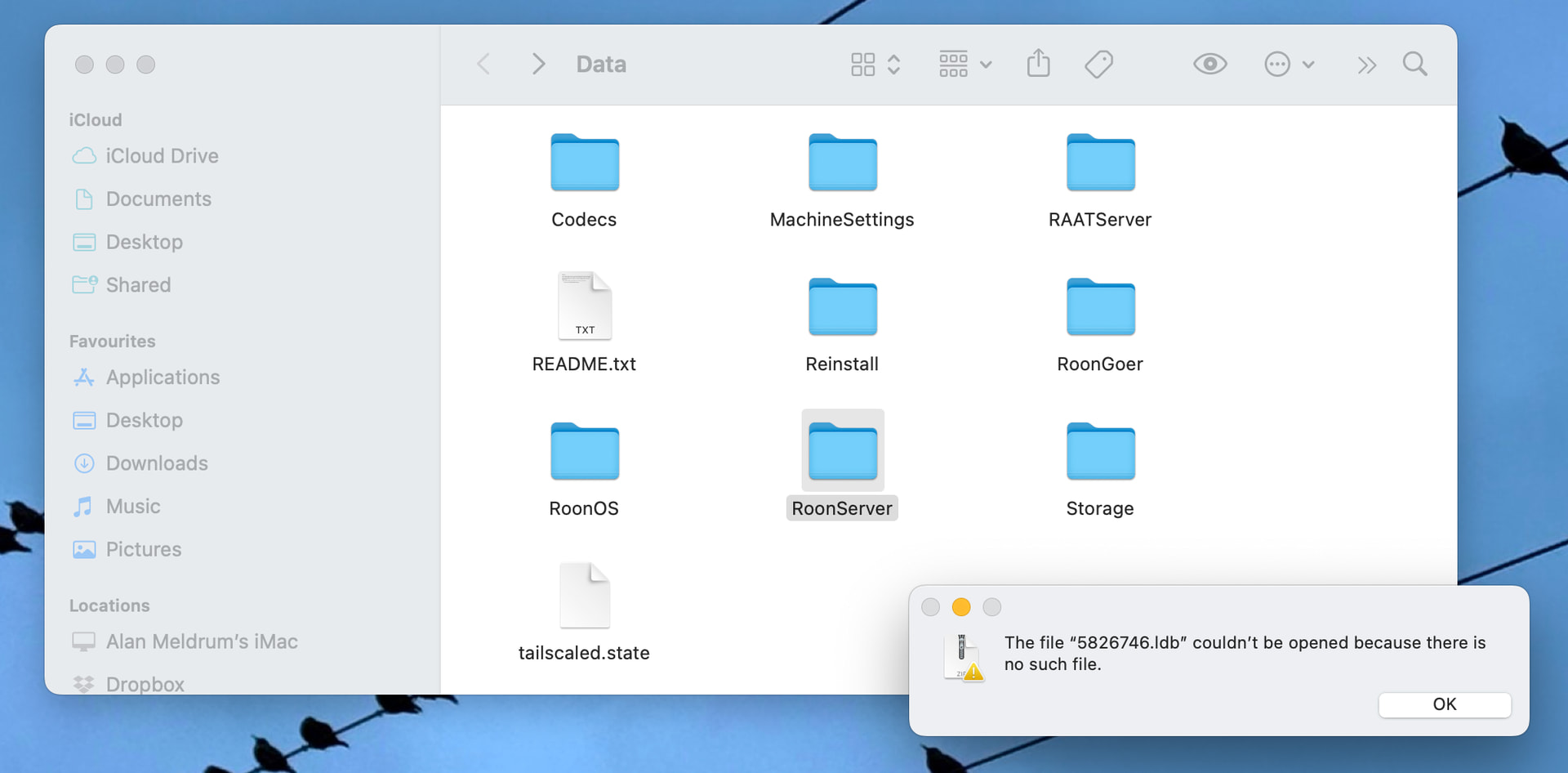
Step 3 - When I try and compress the RoonServer folder, which Step 2 above is telling me to locate, the window in the first pic below is visible for about ten minutes, then it is replaced by the window in the second pic.
So I seem to be stuck at the moment, although I am not exactly sure if I am trying to compress the folder you require, due to the conflicting info at Step 2 in your message.
Also
Are you trying to tell me that the issues are because Roon and Qobuz are not playing nice? If so, can I remind you that you gave me a very clear impression in my previous thread (see pic below, copied once more) that by purchasing a Titan the performance issues I had been experiencing would be overcome.
Have I the right to feel very disgruntled right now? Because I am £3,000 poorer, and that is exactly what I feel. Could you please advice further by directing me to the exact folder you wish me to compress and forward to you, because as I have pointed out you are giving me conflicting requests in that respect? Could you also tell me what to do should I encounter further error messages as shown above? Could you also make sure that any requests are communicated in plain, simple English. I note that you made no effort to respond to the request in my previous message shown below.
As always with Roon, it’s never like it is in the brochure.
Sorry for any confusion here, we’re looking to get a copy of your RoonBackups folder, nothing related to your Roon Server folder. Where are you currently keeping your backups?
Access this location, and compress this backups folder. Or if you need help navigating to where they live, please share a screenshot of where you save your backups via Roon Settings>Backup.
Then you can upload the compressed backups folder here:
I can certainly understand your frustration. Spending £3,000 and still facing performance issues is a significant investment to have hanging in the balance, and I’m truly sorry that the experience has reached this point.
Regarding our previous exchange, I want to clarify my intent to ensure we are on the same page. When you asked if a Nucleus Titan would solve the issues, I replied:
“I believe your current Nucleus with additional RAM should be completely fine, although the Titan would also certainly do the trick as well.”
My goal was to suggest that a simple RAM upgrade for your existing unit was the most direct and cost-effective path forward, rather than needing to purchase the Titan. However, I realize now that by confirming the Titan would also work, the messaging may have felt like an endorsement of that purchase. I am very sorry if that caused any confusion or led to a decision that hasn’t yet solved the problem.
Let us know how we can help you access your Backups folder, and we’ll be monitoring for your reply.
My confusion arose because the link you asked me to use provided me with instructions for a pathway that took me down the wrong path. Can you not see that? You were wanting oranges but your link showed me how to access apples. I think you need to review the information you send out to customers, otherwise I won’t be the only one getting confused.
if you want a copy of my Roon Backups folder, ie the folder where all my daily automatic backups are stored, then I know where that is. I will do this when I have the time, but it’s late now and I have an early start.
I know from the information shared in the last thread that I had two options available to me, which were stick with my Nucleus One and add more RAM, or get a Titan. I thought that with the built in extra RAM in the Titan, coupled with the more up to date technology, that the Titan would be the better option for future-proofing my set up. I am happy to own the choice I made there, but I have difficulty wrapping my head around the fact that it does not seem to have made a blind bit of difference, and I am now £3,000 lighter.
Also, you do not seem able to give me a definitive answer as to why the performance issues persist, when it seemed to be a given that either option moving forward would make things better. Things are just as bad, and it’s hard not to feel aggrieved.
I can’t remember the last time Roon just worked the way I wanted it to, and I’m tired of ending up on the Roon support merry-go-round, where a proper solution always seems to be just around the corner, except that there are an infinite number of corners. But hey, I’m stuck with you. I bought a lifetime subscription, then I bought a Nucleus One, and now I’ve doubled down and bought a Nucleus Titan. You guys must love mugs like me, always willing to believe that things will get better, even when all the evidence is to the contrary. As the old saying goes - there one born every minute.
I appreciate you sticking with me through the technical weeds here. I can see exactly where the confusion happened—the link I sent was intended to provide context on where backups could be stored, but it led you toward the RoonServer database folder instead. I’m sorry for that “apples and oranges” detour; that was certainly not my intent.
To clear the air on the technical side: we no longer need you to compress or upload anything. The reason you encountered those errors and long wait times while trying to compress that folder is that you were attempting to zip a “live” database while the Roon Server was still running. However, based on the detailed logs we already pulled from your Titan, our team has all the evidence we need.
he Good News: Ticket is with R&D
I have some definitive news for you. Our QA and R&D teams have officially reproduced the behavior you’re seeing with large playlists (like your 2,000-track Qobuz set).
The Issue: When a massive playlist is shuffled, Roon currently performs a heavy background sync to ensure all cloud metadata is up to date before the first note plays.
The Fix: This is now a priority ticket for our developers. They are working on optimizing how the queue handles these large cloud-sync requests so that playback starts immediately while the metadata updates quietly in the background.
While I cannot give you a specific date for the release, this fix will be delivered via a future Roon software update.
Regarding your Titan Investment
I also want to address your feeling that the Titan hasn’t made a difference. Looking at your diagnostics, the complexity and size of your library are significant—we are seeing your average memory consumption sitting at around 5GB.
On your previous Nucleus, this would have pushed the hardware to its absolute limit. The move to the Titan was certainly not in vain; it provides the “headroom” your library needs. Once this specific software bottleneck with large playlist syncing is patched by R&D, your Titan will finally be able to deliver the snappy performance it was built for.
Next Steps
I am moving this thread to our “Ticket In” status. This means the problem is out of the “investigation” phase and is officially in the “fixing” phase. I will keep this thread open and monitor the progress. As soon as the update containing this optimization is ready, I will post an update here to let you know.
Is there anything else I can clarify for you while the engineers work on this?
Forgive me for coming across as bellicose and a little antagonistic, but the frustrations were piling up, and I found myself languishing in a £3,000-sized slough of despond. I know you and your colleagues are doing your best to help me, but I just wish that the help was not required in the first place, and that the software performed as you would like it to, and I expect it to. As I have said before, when Roon does what it is supposed to do, I love it, but unfortunately in my years of using it I am afraid that consistency of performance still remains elusive. I look forward to further news regarding the resolution of this issue.
Thank you for your candor. Please don’t apologize—your frustration is completely understandable. When you invest in a premium solution like the Titan, you aren’t just buying hardware; you’re buying the expectation of a seamless, “it just works” experience.
Your feedback is incredibly important to us. It serves as a direct reminder of where we need to tighten up our software logic to match the high standards of our hardware. We are constantly striving to improve, and your specific case has given our R&D team a clear target to hit. Our goal is to ensure that the consistency of performance you’re looking for is no longer elusive, but the baseline of your listening experience.
I will keep this thread open and provide you with an update the moment the fix is scheduled for a public release.
Is there anything else—no matter how small—that has been bothering you with the interface or playback that I can look into while we wait?
Thanks once again for the feedback, it is much appreciated.
My IT knowledge base is somewhat limited, as I have pointed out in previous messages, so I suppose I am struggling to wrap my head around one thing: historically, I have always listened to music in shuffle mode from the large genre-based playlists I have compiled on Qobuz, where the track limit is set at 2,000, and in the past I have also on occasion compiled even larger Roon playlists, where the limit is 5,000 tracks, to do the same thing. I cannot quite understand why there were times in the past where playback was straightforward and not plagued by lags, but latterly with the Nucleus One and now with the Nucleus Titan the lags have become a problem issue. Why was your software able to cope with the demands I was placing on it previously, but it is unable to do so now? I am genuinely curious.
Also, while I wait for the bug to get fixed, what would be the best way to enjoy music at the moment? If I compiled smaller playlists to listen to, would the lags be absent due to there being less background metadata to process? Any advice would be gratefully received.
Yes, creating shorter playlists will very likely provide a smoother experience for you.
There is no single definite answer to your question here. Software is a living thing. As we add more features, security protocols, and deeper integrations with streaming partners, the way the software interacts with the hardware evolves. Sometimes, this means that processes that were lighter in older, simpler versions require a lot more coordination now.
We are always working under the hood to optimize these processes and make handling large libraries as snappy as possible, and your feedback helps us know where to focus our efforts.
Thanks for the info. I’ve tested out a couple of smaller playlists, which seem to be playing without any issues, so I’ll continue in that manner until the issues with large playlists are addressed.
Is the planned update due later in the month, referred to in the link below, going to resolve the lag issue that has been troubling me? Once again, just curious, I’m not getting restless.
I don’t believe the update mentioned above will cover anything related to the issue you’re suffering from. Our team is still in the process of analyzing things, and so we’re not able to land a detailed timeline quite yet. Thanks for your patience in the meantime!