Well said  In my case, I do have file tags, but much of what I do in Roon is not well represented by file tags, e.g. artist equivalence. So I end up editing much in Roon anyway and would prefer not to lose my db
That’s good new, I have similar issue. Actually from ROON version 2.0.xx with more cloud feature adding we get trouble with roon slow since seem ROOM keep trying to search something from cloud event I disable all background option. Can you share estimate release ?
Perhaps if you were to sell your core machine to someone else…this would set it to a clean system too.
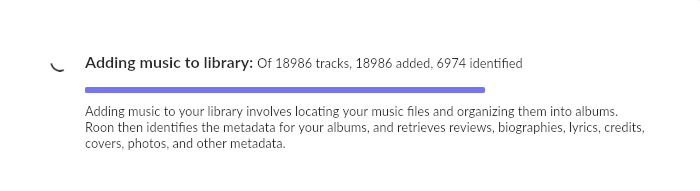
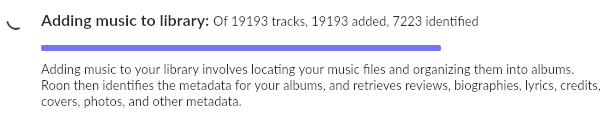
Thought I would check in here - it’s been awhile. After running Song Kong over the entire collection, Roon has been “Adding Music.” That started a couple weeks ago. At first there were just a few showing as having been added, but ever so slowly the number creeped up. It continues to creep up daily. With over 280,000 songs, this process could take all year. Here’s where I’ve gotten in two weeks:

That’s not good @Ronald_Lyster, you shouldn’t be seeing performance that slow. My library of 140k tracks was finished indexing in about a day. A couple of thoughts here…
- Are the two external drives plugged into their own USB ports? In other words, you’re not using an external USB hub? Likewise have you considered switching the USB cables for the drives and retesting the removal of one drive?
- Have you checked SMART data on the drives? I had a drive that had overheated once (it fell down behind the couch and had a cushion on top of it) and the performance was crappy when transferring data but other than that it appeared okay. SMART data can be pretty tricky to understand but there is plenty of info online to guide you through the process.
Final thoughts - as you have backups, have you considered starting over with the Roon database? You could always restore to the latest backup if this doesn’t help.
Drives are pretty new and plugged into separate USB ports. I ran Song Kong with one drive disabled and then re-enabled it and disabled the other drive to run Song Kong again. (Song Kong didn’t want to handle 285,000 songs.) Then I enabled both drives and got to where I am now. I find it hard to believe that two relatively new WD external drives would both be the problem. I have thought about replacing them (as I’ve mentioned here previously) with perhaps a single RAID 10 array, but the responses I’ve gotten here have not encouraged me to do this. I also posted here about whether to “nuke” the database, but nobody seemed to think that was a good idea or that it would help anything.
@Ronald_Lyster, I did comment on the Nuking of the DB, I mentioned that different people have different importance in the data - personally I wouldn’t lose much but others would be devastated. Only you can answer how it would impact you. To me though the performance is not something I would expect given your hardware and size of collection. Something seems to be wrong and I’m trying to help diagnose. I gave the example of the overheating because I did that myself to a brand new drive, I basically toasted it and the issue was documented clearly for me to see in the SMART data. USB cables might be an obvious easy thing to rule out. You’re kind of getting to the stage where it’s grasping at straws. Also remember spinning hard drives are mechanical in nature, they could have even taken a hit during shipping by a significant drop.
Bought these drives separately, so if they were dropped they had to have been dropped separately. They are different sizes (12 TB and 18 TB) as well. They seem to perform the same. They are never moved and are well ventilated. They are not positioned next to each other.
Can you sugggest how to check the SMART data? These drives are hooked up to my ROCK. Do I need to remove them and run a program on my windows machine? What program?
I certainly do appreciate the help those on this forum are trying to give me.
I have many multi-disk albums which are always placed in directories with the following structure - Album Artist (except for “various artists” - those all go on the separate 12 TB drive) / Album Name / Disk Number (if more than one disk). Roon doesn’t like this, and I’m forced to merge the separate albums that Roon invariably sets up for each disk. That didn’t used to take much time at all, but now it’s an irritating wait to edit and merge.
You mentioned that performance improved when only one drive was attached? Could that mean that only one drive has a problem?
Yes, you’ll need another computer to read SMART data or perform any other kind of HDD maintenance or diagnostics.
At one point I thought one drive was causing the problem. But that’s not the case. If I were to take the drives over to my Windows 11 computer, what program is best to diagnose problems?
some manufacturers have tools with which to diagnose drives. Otherwise, you can use Windows to do a basic check.
Many usb interfaces don’t support smart details. Normally mounting the internally on a SATA port is the best way
Rather not fool with dismantling the external USB drive to do this. The chances of both of these new drives being bad is minimal. Everything worked very well before the “big Roon changeover.”
My Western Digital EasyStore support SMART over USB without any problem.

Whether that will work depends…
Try I will. If that’s a “no go” there’s still the USB slot.
I think I’ll set up the directory on this huge single disk as follows:
______Named–
Music–|
______VA–
Should I have Roon scan at the parent (Music) or should I set up separate scans at Named and VA (to mimic what I have now with two separate disks)?
Status report (if anyone is interested). All files from my two WD Elements external drives have been copied onto my new San Disk Pro 22 GB drive. Put the new, faster, drive on my Rock; the connection is USB 3.2, using the front “C” port. (Found that the drive I purchased did not have Thunderbolt after all.) The files from the two former drives are now directories on the new drive, and I have Roon look at these two directories separately (just like it did in the past). Roon is beginning the task of adding music to the library (just as it had been doing before I upgraded the drive). Things are still quite slow, but it seems to be a bit faster than before. We’ll know in a few days or weeks if Roon can add all of my music to the library before Christmas!