I am running Roon Server 2.71 (build 1683) on ROCK, installed on a PrimeCore computer. My music library is stored on a Synology RS1619xs+ running DSM 7.3.
Since approximately one week, a very large part of my local library has disappeared from Roon. The library previously contained approximately 38,000 albums and now shows approximately 12,000. Playback of the remaining albums works normally.
The music files have not been deleted. They remain present and accessible on the Synology NAS.
Network/storage configuration
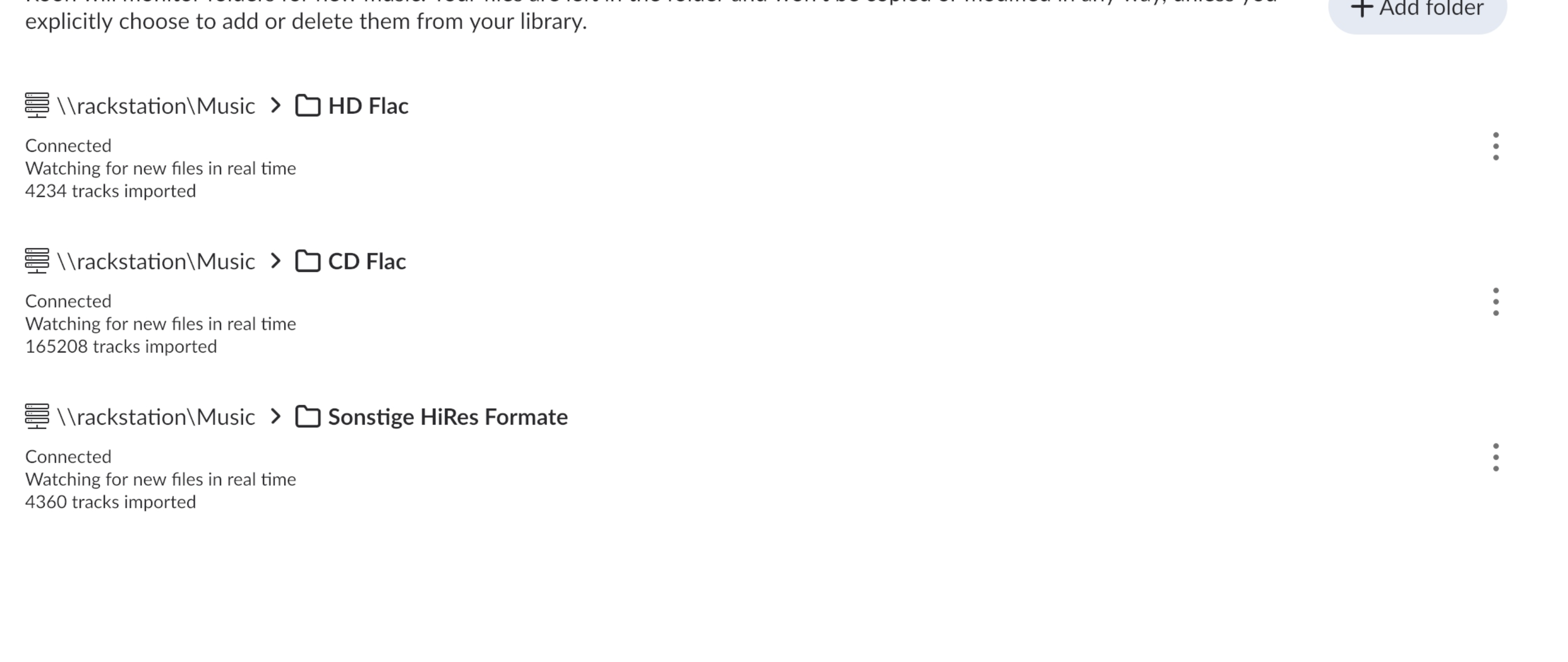
- ROCK Core IP: 192.168.178.46 - NAS: Synology RS1619xs+, DSM 7.3 - Music is stored under \\rackstation\Music - Roon monitors these three subfolders separately: - \\rackstation\Music\HD Flac - \\rackstation\Music\CD Flac - \\rackstation\Music\Sonstige HiRes Formate - All three storage locations show as “Connected” and “Watching for new files in real time”. - Roon currently reports: - HD Flac: 4,234 tracks imported - CD Flac: 165,208 tracks imported - Sonstige HiRes Formate: 4,360 tracks imported
Symptoms
1. Many albums/tracks are physically present on the NAS but completely absent from the Roon library.
2. A forced rescan does not resolve the problem.
3. In some cases, Roon’s folder browser opens the correct album directory but shows only the cover image and no audio files.
Example:
Folder: HD Flac/Benny Andersson - CHESS the Musical (2025 Broadway Cast Recording) (2026) [Hi-Res]
In macOS Finder, this folder contains more than 30 FLAC files, all readable over SMB.
In Roon’s folder browser, the same folder shows only: cover.jpg
None of the FLAC files are displayed or added to the library.
4. Library Maintenance offers: “Clean up 438,623 deleted files”
However, the music data is still present on the NAS. The HD Flac folder alone contains approximately 13.88 TB of data.
5. Restoring a recent Roon backup has failed twice. The last restore stopped at approximately 35% and simply displayed: “Restore failed”
I have not run “Clean up library”, removed any storage locations, renamed folders, or changed the music files.
Relevant log behaviour
The logs show that Roon can access the SMB storage and actually reads/imports the affected FLAC files. For example, the logs contain entries such as:
However, shortly afterwards, Roon processes the same tracks with entries such as:
- “musicstorage processing reshuffle and delete for track ...” - “musicstorage deletedtrack ...” - “musicstorage alternatedeletedtrack ...”
This appears to happen repeatedly for the same albums/tracks.
I also noticed that the logs sometimes show what appear to be different path/name representations for the same album, for example:
- Tonhalle-Orchester Zürich, Paavo Järvi - Tonhalle-Orchester Zurich, Paavo Jarvi
Could this indicate a Unicode normalization, SMB path identity, or database/storage-index issue?
Additional observations
- The problem affects many folders and formats, but it appears particularly frequent with Hi-Res content. - The files themselves are not corrupt as far as I can tell. They are visible and playable from macOS via SMB. - There were no deliberate changes to the Synology share name, folder layout, permissions, NAS configuration, or network configuration before the issue started. - An older log also contains repeated local RAAT server connection resets on localhost:9200, although I do not know whether this is relevant.
Could you please advise on the safest diagnostic and recovery procedure?
In particular, I would appreciate guidance on:
1. Whether the logs indicate an inconsistent or damaged
Whether the logs indicate an inconsistent or damaged Roon database/storage index, rather than an actual loss of files on the NAS.
Whether there is a known issue in Roon 2.71 build 1683, ROCK, or DSM 7.3 involving SMB shares, Unicode normalisation, path canonicalisation, or large music libraries.
Which diagnostic material you would like me to provide, in particular full ROCK logs, database diagnostics, screenshots of the affected watched folders, or SMB/NAS configuration details.
Whether I should avoid using “Clean up library”, removing and re-adding the watched folders, or restoring another backup until you have reviewed the diagnostics. Given that Roon currently identifies more than 438,000 files as deleted even though they remain on the NAS, I am concerned that a cleanup could make recovery materially more difficult.
Whether there is a safe, supported procedure to rebuild or repair the storage index while preserving my existing Roon metadata, edits, tags, play history, playlists, and identifications.
I would be grateful if this case could be reviewed as a potential indexing/database or SMB-path-identity issue. The combination of successful import activity followed immediately by deletion of the same tracks, together with the failed backup restores, suggests that this may be more than an ordinary rescan issue.
Your files are safe. Nothing has been removed from the Synology.
What the logs show is that Roon marked a very large number of tracks as absent in its own database. That is a flag on the records, not a file operation, which is why the albums vanished from your library while the FLAC files are still on the NAS and still playable over SMB. Your analysis was correct on the main point: this is an indexing and path identity problem, not data loss.
The normalization observation was also correct. The same folder shows up in the logs under two different byte representations, for example Zürich written once with a precomposed ü and once as u followed by a separate accent. Some paths are mixed, with the folder in one form and the files inside it in another. A number of your files alternate between the two forms on successive scans, which is why they import and then disappear again. Files with plain ASCII names in the same folders do not.
That explains part of this but not the scale. CHESS the Musical has no accented characters anywhere in its path, and it was marked absent without the folder being read at all. We are still working on that part.
Two questions that would help:
When did you install DSM 7.3, relative to when the library started shrinking?
Were the files on this share written from different machines over the years, for example some copied from a Mac and some from Windows?
Quick update: currently Roon, after an app update is now rescanning all albums BUT treating everything as new; restoring backup failed twice. Will report progress if any.
Thanks for the update on the rescanning behavior and the failed backup restores.
If you can send us the Logs, we can take a closer look at the corruption trace behind this. Please upload them through our secure uploader, and if you wish to look through the logs directly first for a Corruption trace, that would be helpful too.
Wanted to follow up on this. Were you able to send over the Logs through the secure uploader so we can take a closer look at the corruption trace, and if you have a chance, please check the logs for any Corruption entries as well. If you find anything there, let us know what it shows and we can pick up from there.
Please note, if we don’t hear back from you this thread may close automatically soon. If the thread auto-closes and you need further assistance, please submit a reopen support request via the technical support help form below and specify that the issue should be reopened. Thank you.
Somehow it got corrected after the latest update. It reads all the albums now. Unfortunately the date edit section does not work correctly anymore but I can live with that. Thank you for your support.
Latent corruption can manifest in a wide variety of symptoms, and often festers invisibly before you’ll notice anything amiss in Roon itself.
Roon will checksum the database during indexing to look for any unexpected changes. If it finds unexpected changes, the server will log it as corruption. If corruption traces show up in logs on subsequent Backups after you experience unexplained library loss, then it means the corruption event preceded the Backup. Another possibility is that persistent hardware or environmental conditions keep messing with the unit itself, and two databases in a row faced genuine corruption events.
All of this is to say, restore your earliest Backup as soon as possible and then check to see if you notice and continuing symptoms in Roon or with your library. Ideally, this will actually precede the corruption.
If the only Backups available were those that failed earlier in this thread, then let us know and we’ll provide next steps.
Our hope is that you were able to restore a backup and that your library is now fully available.
If that is not the case, would you please let us know, so our team can continue to help? Should this request automatically close before you have a chance to get back to us, please reopen it below and we’ll be here to continue to help:
(None of the above quite fits → Reopen a previous technical support request):