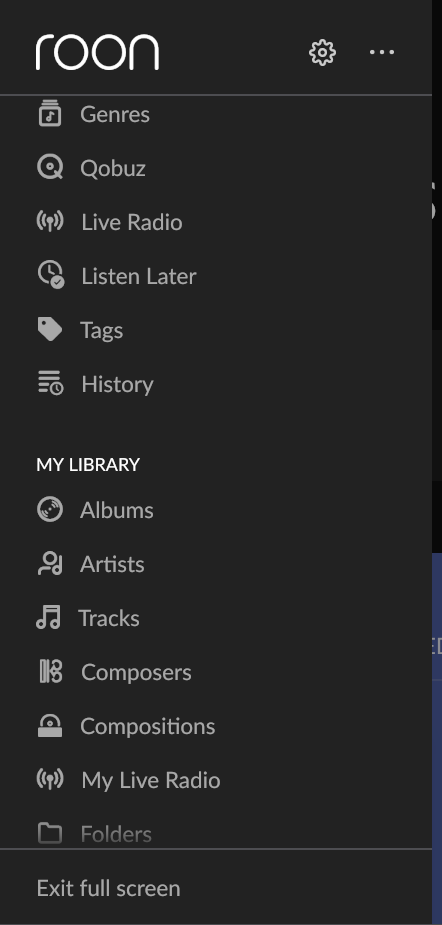
When running at 150% zoom is Windows, I can’t scroll lower than what you see in the first screenshot. When zooming at 125% all is well. Because I have an eye issue at the moment 125% isn’t possible for me a the moment, can’t read.
Here’s a screenshot at 125%. You can see options that are not reached in the other one.
We are sorry to hear you are experiencing this issue.
To help us investigate, would it be possible for you to record a short video of the problem with your phone? You can upload it directly to our media uploader here:
I uploaded a short video. You can see on it the scrolling issue, that the Folders is not detecting mouse events and that Playlists is not showing. Playlists do appear if I change screen zoom to 125% or 100%.
Thank you for taking the time to report this and upload the recording. The team will investigate promptly and respond with more information and next steps as soon as they’re available.
This is, unfortunately, expected at non-standard zoom levels on Windows with the current implementation of the main menu in Roon. Obviously, this doesn’t work for many users and there’s room for improvement.
The team will create a ticket to improve this zoom functionality, although it may take some time for any actual fix to be released in a Roon update. We will provide updates here as they become available from the team.
OK, but be aware that this is not a non-standard zoom level, this is exactly Windows commanded settings on my computer, see screenshot. My guess it’s probably the same on all 13" laptop with 1080p screen.
We understand exactly what you mean regarding the 150% zoom setting.
To clarify, Roon is primarily designed for a 100% (1:1) scale. Any setting other than this is considered non-standard and can occasionally result in scaling or layout issues within the application.
As Connor mentioned earlier, we have escalated this to our development team, and it will definitely be considered for future updates.
Current Status:
Timeline: We cannot promise a specific timeframe for a fix at this moment.
Updates: Once a solution is implemented, you will see a mention of it in our Release Notes.