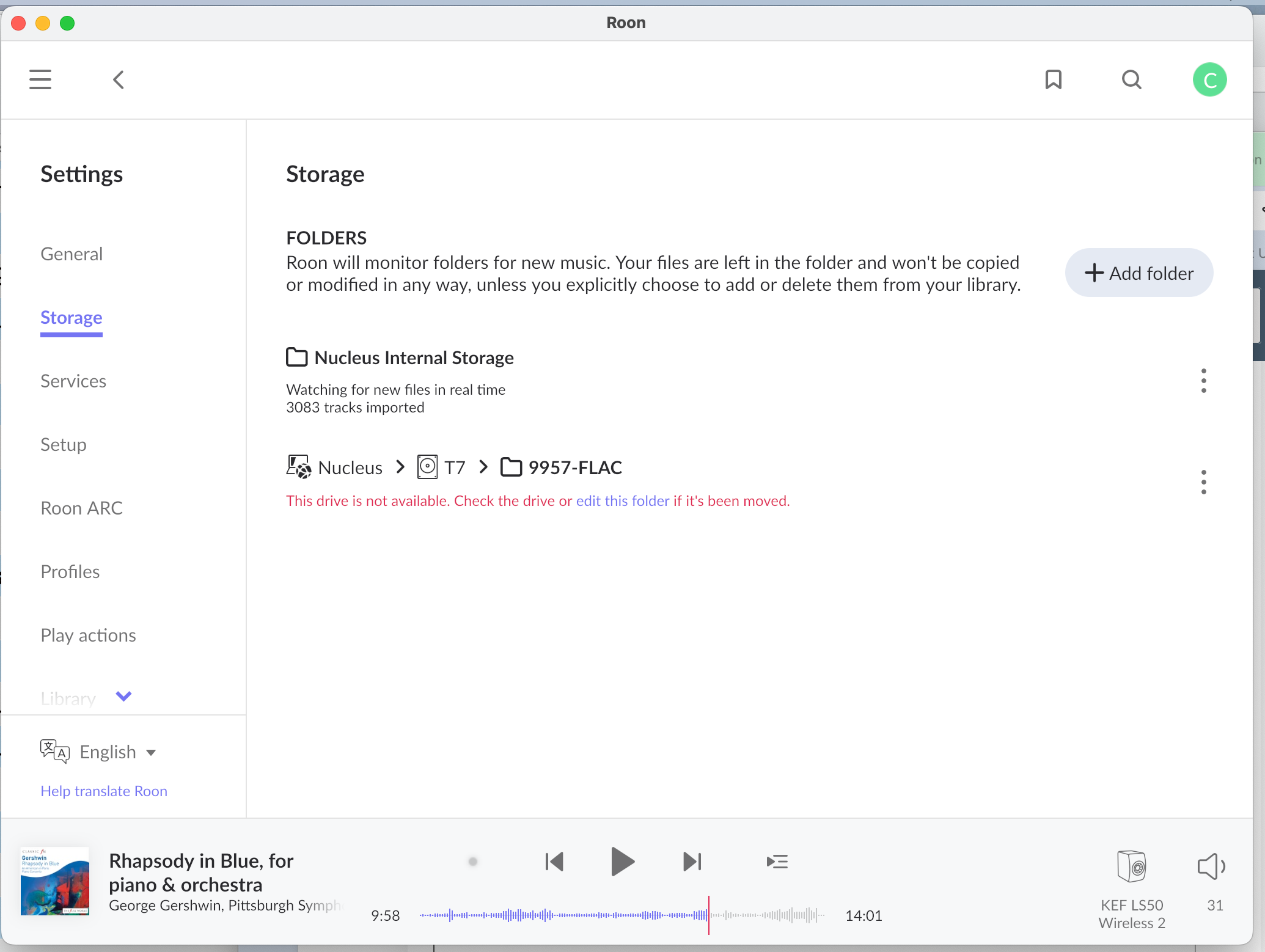
· Mu library won't backup after the Ventura update. All my music is in the hard drive inside my Nucleus. I have a screen shot of the information under "settings" but the instructions about what to do are entirely cryptic. How about step-at-a-time instructions about how to fix this?
Tell us about your home network
· Xfinity router, 18 months old, working fine; KEF widely **wireless** speakers and Nucleus both connected and working fine.
I hate autocorrect: My KEF speakers are wireless, not “widely.” And, please note, I’m an elderly audiophile, not a whiz at this new digital technology. I’m quite capable in my own scholarly domains, but I really do need plain, specific, step-at-a-time instructions not vague stuff like “check the drive” or “edit this folder.” Roon advertising claims that this system is very user-friendly, but that is clearly not the case. Heaven help those of us forced to downsize out of top-of-the-line Thiel floor speakers and custom cabinets holding hundred of CDs. Grandma needs you . . . or maybe your mother. Cate
Welcome back to the community! We hear you loud and clear—it’s time to skip the technical riddles and get straight to the “how-to.” It sounds like you’ve moved from the wonderful world of
Looking at the picture you sent, Roon is pointing to a specific problem. Even though you have music on the internal drive, Roon is “looking” for an external portable drive that it can’t find.
Here is your step-at-a-time guide to fixing that red error message:
Step 1: The Physical Check
The error message mentions a “Samsung T7” drive. This is usually a small, rectangular portable hard drive.
Go to your Nucleus (the black metal box).
Look at the back where the cables are. Is there a small Samsung drive plugged into one of the USB slots?
If yes: Unplug it, wait 5 seconds, and plug it back in firmly.
If no: If that drive is no longer used or has been moved, that is why Roon is complaining.
Step 2: Clearing the “Ghost” Folder
If you have already moved your music to the internal storage and you no longer need that Samsung drive, we need to tell Roon to stop looking for it.
In that Storage screen you photographed, look at the right side of the red error message.
Click the three little dots⋮ on the far right of that red line.
Select Remove.
This won’t delete your music; it just tells Roon, “Stop worrying about this missing drive.”
Step 3: Checking your Backup
You mentioned your Library Backup is failing. In Roon, a “Backup” is a safety copy of your playlists and edits.
On the left-hand menu, click Settings and then click Backups.
Look at where Roon is trying to save the backup. If it was trying to save it to that “Samsung T7” drive that isn’t there, the backup will fail every time.
Click Scheduled Backups and then View. If you see a red error there, click Edit and choose a folder on your computer or a different USB drive that is currently plugged in.
I removed the T7 as directed. I keep my files in Dropbox. Selecting that folder on my computer (using Mac “Finder” utility” generated multiple layers of entirely cryptic error messages: Roon was plainly refusing to use the Dropbox backup folder it had used prior to July 2025. So I went to dropbox.com, navigated to the proper folder, and generated a “share” link for that folder. I input this to Roon. And after the exchange of various codes and permissions, it seems to have worked. But, please, if you are going to market to general users, not just computer engineers, you need to put together a set of directions with screenshots to walk customers through perfectly ordinary problems like files on dropbox. Or icloud, or whatever Microsoft calls theirs these days. I could without any difficulty at all talk two of my brothers and I bet ten of my friends into buying a Nucleus and good wireless speakers like top-of-line KEFs and subscribing to your services as they downsize. Really I can. I am very much trusted for my research abilities and technologically savvy. But you guys have got to get your act together on documentation. Dr W