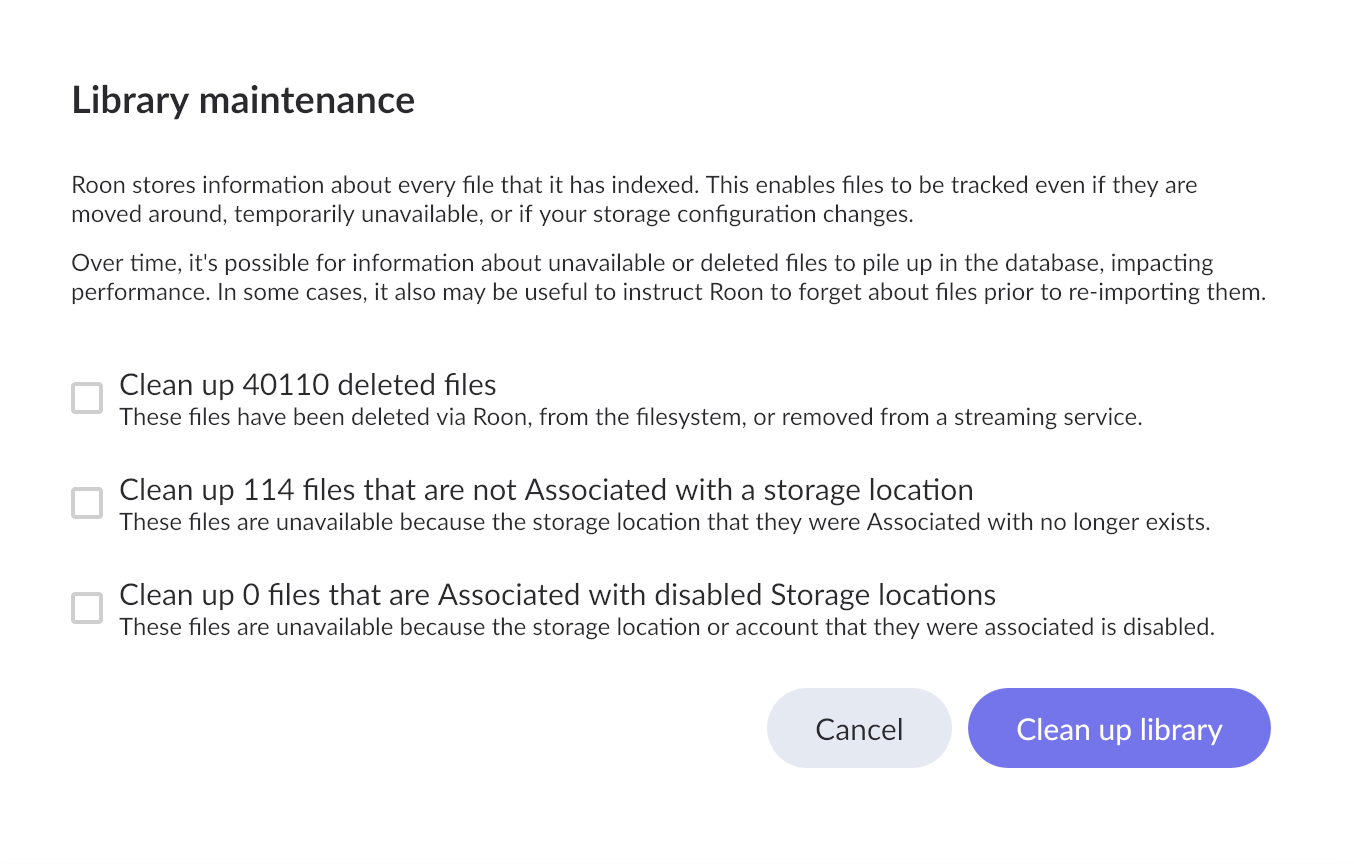
Library Maintenance shows 40,000 deleted files unexpectedly (ref#DS4LQQ)

Hi! What’s not quite right with Roon?

· None of the above quite fits

None of the above quite fits

· None of these quite match

Tell us what's going on

· Library Maintenance shows 40,000 deleted files. Why?

Tell us about your home network

· TP-Link BE11000

Streaming service is logged out?

Network attached storage is no longer reachable?

Local storage drive has failed?

1 Like

Hi @Quicksilver,

This indicates that Roon hasn’t found library items in the expected storage location. This can include streaming tracks, since Roon stores a record of those items offline, too.

Please verify that you haven’t inadvertently disabled, moved, renamed, or disconnected a Watched Folder. I’d also double-check that your streaming services are connected and synced in Settings → Services.

What do you see in Settings → Storage?

All streaming services are connected. I have very few tracks on my NAS server, about a thousand. Under storage it shows connected. I use Roon mostly for Qobuz, Tidal and nugs. I do notice that often albums or tracks from Qobuz and Tidal become unavailable. I assume it’s because the streaming services change paths. When I notice, I delete the album and re-add the one that’s now available. I can’t imagine I’ve had 40k songs that it’s happened to. Under “My Tracks” I have less than 10k songs.

Hello @Quicksilver,

I can completely understand why seeing “40,000 deleted files” would make you do a double-take, especially when your actual visible library is under 10k! It looks like a massive database crisis, but to be completely candid: this is totally normal behavior and nothing to lose sleep over.

Here is the secret behind that massive number: Roon’s database is incredibly thorough, and it remembers everything.

  • Catalog Shifts: Every time TIDAL, Qobuz, or nugs.net replaces an album with a new remaster, updates a publisher link, or removes a track, Roon marks the old link as “deleted” in your database.
  • Playlists: If you have ever synced a large streaming playlist that the curator later updated or deleted, all of those individual track links get tallied up in the background.
  • Database Duplicates: Roon keeps records or duplicate files

Roon holds onto these “deleted” records intentionally. If a temporarily unavailable Qobuz album comes back online, Roon wants to remember your play history, your heart ratings, and your edits for it. Over time, for a user who relies heavily on streaming, those dead database links easily stack up into the tens of thousands.

If your active library looks correct right now and your music is playing smoothly, this is just harmless database bloat. We can sweep it out in three easy steps:

  1. Create a Backup: As a golden rule of database management, head to Settings > Backups and force a quick manual backup first.
  2. Run the Cleanup: Go to Settings > Library > Library Maintenance and click Clean Up Library.
  3. Forget About It: Once the cleanup finishes, the database will be lean, and that scary 40,000 number will disappear.

If your music still plays perfectly fine after the cleanup, you can safely ignore this entirely moving forward!

Thanks. Does this mean that albums in my library that had their “path” changed by Qobuz or Tidal will disappear completely from my library rather than show up as “unavailable”?

Hello @Quicksilver

Yes, they will disappear completely. If you currently have albums in your library that say “Unavailable,” running the cleanup will wipe those records out of the database entirely. They won’t stay in your library as a reminder to find a new version; they will just be gone.

If you have albums you’ve spent a lot of time editing or “favoriting” that are currently unavailable, and you want to keep them as placeholders, do not run the cleanup. However, if you’re like most users and you’d rather have a clean, fast interface without 40,000 dead links dragging down your search speed, run the cleanup. It will only remove what is already broken.

I’m sorry, but what is being said means for each of @Quicksilver 10,000 tracks there are 4 dead links for each. This doesn’t ring true based on my experience with Roon and a streaming service.

Something here seems off to me.

Like @DrTone mentions, it’s like a streaming service has been completely removed.

Also, each time a track/album is replaced on Qobuz or Tidal with a different version you have to manually add the tracks/albums again. I’m sure @Quicksilver would remember having to do this 4 times for each.

1 Like

This topic was automatically closed 7 days after the last reply. New replies are no longer allowed.

Hello @Quicksilver ,

We noticed you requested to reopen the thread with the following comment:

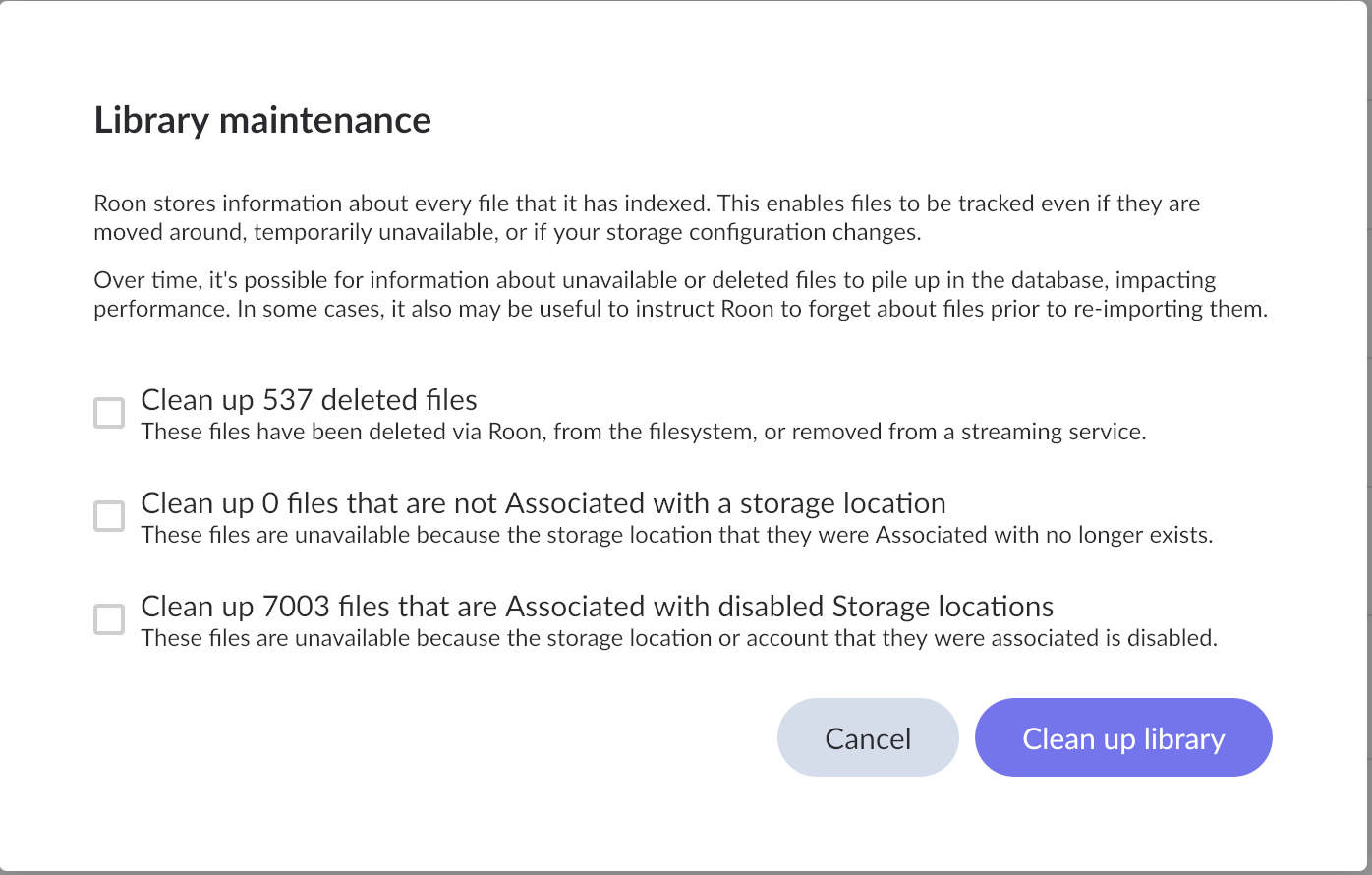
I cleaned my library a week ago and it already says I have 537 deleted files to clean up.

Are you by any chance able to pinpoint a few examples of albums/tracks affected by this issue? If you do happen to have a few examples handy, this can help us pinpoint the issue further.

Also, if possible, it would be interesting to know if the same issue happens with Qobuz temporarily disabled in Roon Settings → Service (or if the same deleted files drops down to 0 if Qobuz is temporarily disabled).

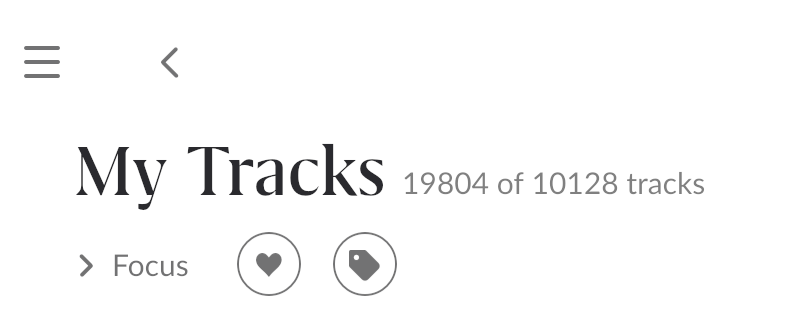
I’m out of town right now without access. I’ll let you know when I get back. Interestingly, I was looking at “My Tracks” last week and it looked like this. Does it make any sense? It has since reverted back to just showing the “10128 tracks”.

It’s a longstanding issue.

Interesting. Thank you for pointing that out. I wonder if it has anything to do with my outsized number of files that Roon says need to be “Cleaned up”?

I don’t think so. I clean up my library quite often and the track count still gets out of hand, until I reboot my server and the count os back to normal again.

Hi @Quicksilver,

Thanks for writing in and for sharing your report! Based on the description and screenshots, @Arlen may very well be correct in that this is a long-standing issue that has yet to be fully resolved for all users.

We were able to review a fresh Roon Server diagnostic report, and saw some interesting things we’d like to explore further.

First, we see your two SMB/CIFS network shares going offline (\Wishyouwerehere\music and \Wishyouwerehere\Uncompressed Music) at startup.

The shares finally mount successfully \Wishyouwerehere\music comes online a few moments later, and \Wishyouwerehere\Uncompressed Music as well. Roon rescans both.

But a few minutes later, around 01:52: Both shares go offline again (DirectoryNotReady), detaching within minutes of mounting. This triggers Roon to sweep those ~6,995 + ~674 + ~321 tracks (totaling ~9,000+ local tracks) as “deleted.” But Roon’s history has 40,000 play records loaded (you can see loaded 40000 plays), and since the library momentarily disappeared and reappeared, Roon’s database cleanup pass could be interpreting a large number of those historical entries as referencing now-deleted files.

So, it appears that the “40,000 deleted files” in Library Maintenance is Roon’s cleanup engine counting historical play records that point to tracks that were temporarily invisible when your NAS shares dropped off the network. It is not actual file deletion; your music files are safe. It seems to be a ghost cleanup artifact from the unstable SMB connection.

If you create a fresh backup, and then remove your play history, do you see the same number of tracks in your clean up library pop up?

We saw another interesting trace in your logs worth mentioning around the above issue:

loaded 40000 plays, 39,473 have tracks, 3,957 lib plays, 35,516 non-lib plays

Your 10,128 tracks are your local library. But you have 35,516+ “non-lib plays” in your history. These are tracks you’ve streamed from Qobuz, TIDAL, and nugs over the years that are not in your local Roon library.

When your SMB shares dropped at startup and Roon temporarily lost your local library, it may have showed all tracks from your play history as “My Tracks” combining your 10,128 local files with approximately 9,676 additional tracks from Qobuz/TIDAL streaming history that Roon had cached metadata for. That’s how you get close to 19,804.

Both issues trace back to the same root problem: your NAS (Wishyouwerehere) is mounting unreliably, with shares going offline within minutes of being available. You should investigate:

  1. SMB/CIFS stability on your NAS: check for timeout settings, sleep/hibernation of the NAS drives, or SMB version mismatches.
  2. Roon startup timing: Roon is starting before your NAS shares are fully available. Adding a startup delay or ensuring the NAS mounts before Roon launches would prevent this.
  3. Network initialization: The initial Network is unreachable errors (for api.roonlabs.net) at startup suggest your network stack wasn't fully up when Roon launched, which may have cascaded into the SMB mount failures.

We’ll be on standby for your reply! :folded_hands:

1 Like

Interesting. The NAS goes down when we get power losses and I forget to boot it for weeks at a time. I should get rid of it actually and move to another kind of server. Another thing I see today now that I’m home is many/all? of “My Albums” have been deleted and re-added, so when I sort by “date added” (which is my default sort as I really want to see what and when I’ve added things) it is incorrect. For example, I look at Claypool Lennon Delirium - South of Reality and it says it was added on 20 March 2026. It’s actually one of the first handful of albums I added back when I started Roon however many years ago. If I revert to a backup can I get these “added” dates correct again? It really, really affects how I listen.

Edit: I just looked at “Storage” on Roon and it says the directory is not available, but it is on and available, at least through Finder on my computer. See attached.

One more edit: Does this mean 35k+ songs I’ve listened to are no longer available or their path has changed? That seems far fetched either way. I know I listen quite a bit but 35k songs no longer available? When I’m home I seem to listen about 47 hours per week or 564 songs if each song is about 5 minutes. That would be 62 weeks worth of music that’s disappeared.

I just disabled Qobuz and there was no change. See attached picture. I do see those 7003 files are new.

Hi @Quicksilver,

Thanks for the follow-up! It’s worth noting that the date-added issue you’re seeing is likely separate. If you’re only seeing this issue with Qobuz content, it’s a known issue our team is on the cusp of releasing a fix for, which is a bit of good news!

You’ll want to click ‘edit’ and see if you’re able to restore or refresh your network shares for the watched folders you’ve shared via your screenshot.

As long as your local storage path hasn’t changed from the folders you’ve already set up (but not currently available) you shouldn’t lose any information when re-establishing the connection.

I hope this makes sense, and certainly let us know if you have any additional questions. Thank you!