· Geoff Coupe and I agreed that the bug is in your firmware. I don't think the community can help with this topic. How can I raech someone from your tech-team?
Erm - I did not “agree that the bug is in the Nucleus firmware” - it is caused by the encoding of some of your MP3 files not being recognised by the MP3 decoder used in RoonOS.
As I said in your other thread, you should use an application such as the batch converter of dbPoweramp to re-encode those files.
I’ll merge your other thread into the Support Request thread to give the tech support team more information.
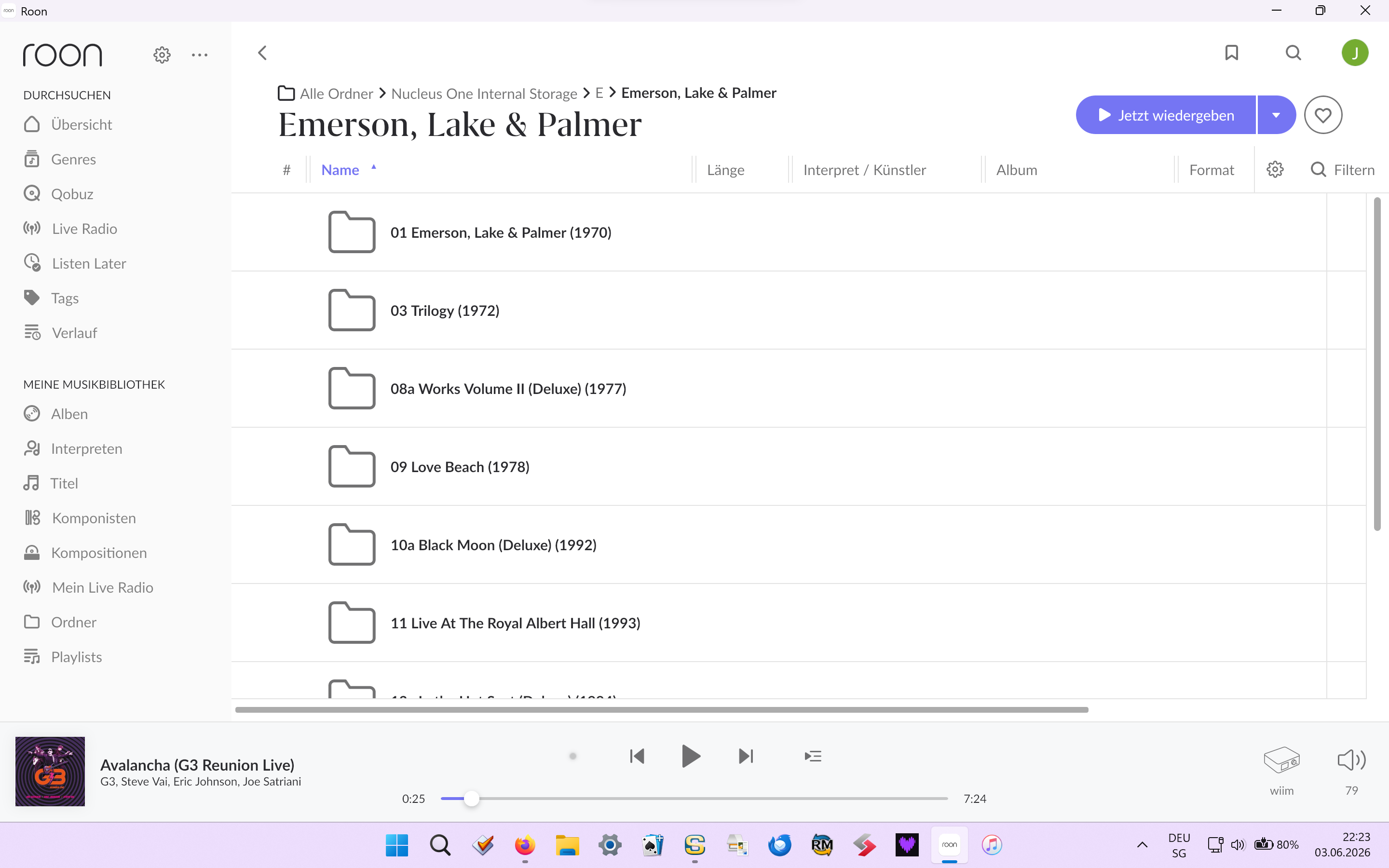
· I have a roon nucleus. Internal storage: 2tb. I can see the files using ms explorer (win11) or speedcommander ("better" version of explorer). But when I go to "ordner" (in german) the files (MANY files) are missing. Eg: I habe all elp discs (numbered). I see them all (explorer), but my nucleus shows only 1, 3, 8 etc. I've formatted my ssd and started the whole process (copying etc.) twice; same result.
Welcome to the forum! What file format are the other disks that are not showing up? If we manually add one of the disks that is not showing in Roon Settings > Storage, are we able to find it via albums → Focus → Storage location? Let us know!
what do you mean by other disc. maybe i was not clear. i have an ssd as internal storage (2tb). formatted (= empty). i copy my elp files (eg 10 albums ALL mp3 files) to the ssd. i can “see” ALL the files on the ssd (explorer). then i go to the roon app, folders: there are several albums “missing”! i see the firts album, but NOT the tarkus-album. ALL files equal, ALL files copied same time? i can’t explain why thiswould happen. (i have more than 1000 albums, many of them “missing”) it must be a bug in the nucleus firmware (no offense!) i can’t explain it in another way. i don’t want to sound self-opinionated (?) but i’m not new to computers. did i make the problem clear? did i make a silly mistake? help appreciated! greetings from switzerland
yes it says that they are corrupted. But they are NOT! I use them with sonos, i use them in my car-audio. It’s the nucleus firmware that can’t cope with them files (I guess)
Right, so what this appears to be is that Roon is much more exacting on what it needs to see in MP3 files. This has been noted before…
I had a few examples of this myself. What I did to resolve it was to use the Batch Convertor of dbPoweramp to recode the MP3 files. Now Roon is happy with them and they are added to my Roon library.
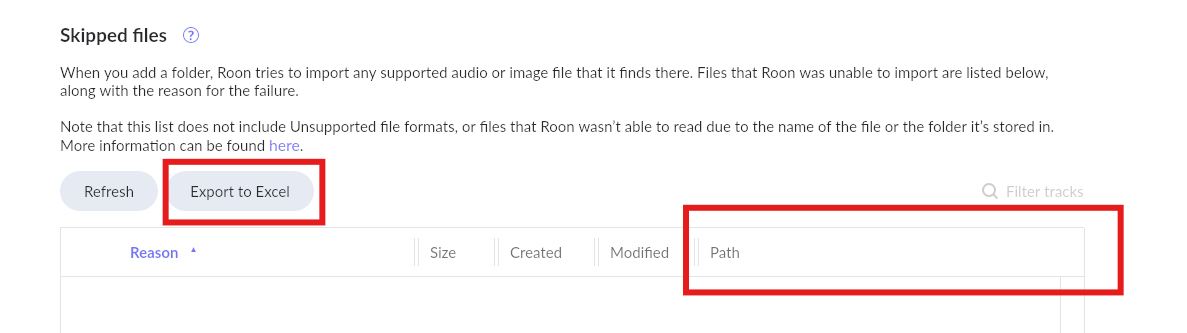
Hello Geoff. Thanks for the help. I got another problem (considering your answer): I can’t delete all the messages (they’re not specific) about the skipped files. I think there are many I’d try importing ONE disc, but (because of the many messages) I can’t find the actual comment.
What happens when you click the Refresh button? The entries are probably still in Roon’s database and need to be cleared out from there - I think that’s the purpose of the button…
I could reset the list. I started importing my library album by album (like 20 albums or so) until I encountered the first “corrupted album”. I’ve seen now that it says with every file “unknow type” (tough it reads the mp3 tag and ALL the other albums were converted using dbpoweramp (lame). When I was working as a computer scientist we used to make (in order to find mistakes) a so called dump (we used the english word in german): Don’t you think that roon (the technicians) could do something similar. I can’t think of not having my music on the internal storgae (ssd) because of a mistake.
Sorry! I didn’t mean to embarrass you, but your words “much more exacting” were for me simply a euphemism for “bug”. I thought that as part of Roon, you wouldn’t want to be so direct.
I followed your advice: No luck. This reinforces my opinion, since the “LAME encoder” is considered the best. And: By the way, I’ve been using dbpoweramp for years for ALL my files.
I must confess, I’m a little regretting buying the “Roon Nucleus” and buying a lifetime subscription. I used to enjoy troubleshooting bugs like this one, when I was younger :). Now I just want to be able to listen to music without any problems. This is — I want to emphasize this — not meant in a bad way! I know that we all amke mistakes. So either Roon or me …?
I’m not “part of Roon” - I’m a customer, just like you.
Try using the Batch Convertor to convert the MP3 to FLAC - I’ve just checked and that’s what I did when I had MP3 files that would not play using RoonOS.
Doesn’t mean it cant mess up header information. Transcode 1 album that failed to flac and see if it imports. As Geoff mentioned roon is very strict about file headers being correct, where other media players are not.
Roon server is a database. Just because you delete a file doesnt delete the database information. You have to manually remove them using the clean up function after you have deleted the actual files.
Any computer can run RoonServer if it is in the required specs.. The nucleus is a pc running a purpose built linux and RoonServer. You can easily use MacOs or Windows.
Hello Big Dan! I get your and Goeff’s point. BUT: why should lame encode 1000 albums without any mistake and then 1 in a incorrect way? AND: Do you think it is helpful that Roon is the only “soft- or hardware” that can’t cope with “my” files?
I don’t criticise if Roon works “exactly”. But what’s the point? I didn’t have any problems until now. Probably: We agree that we don’t agree (as we say in german). Thanx for your answer
· How do I get in contact with a tech from ROON. There's a limit to the knowledge of the community. I've seen that last year someone tried to solve a (technical) problem but couldn't get an answer. I have the same problem (Roon not able to read correct files (instead marking them as corrupt)) which obviously is still not solved. That's a question that only someone knowing/seeing the firmware/software can tackle. I feel sorry for the community.people because they can not help in this case. I'm surprised that nobody from the tech-team seems to care. And please de NOT POST this in the community. That doesn't help!!
 > Library > View Skipped Files to view it.
 I’d try importing ONE disc, but (because of the many messages) I can’t find the actual comment.