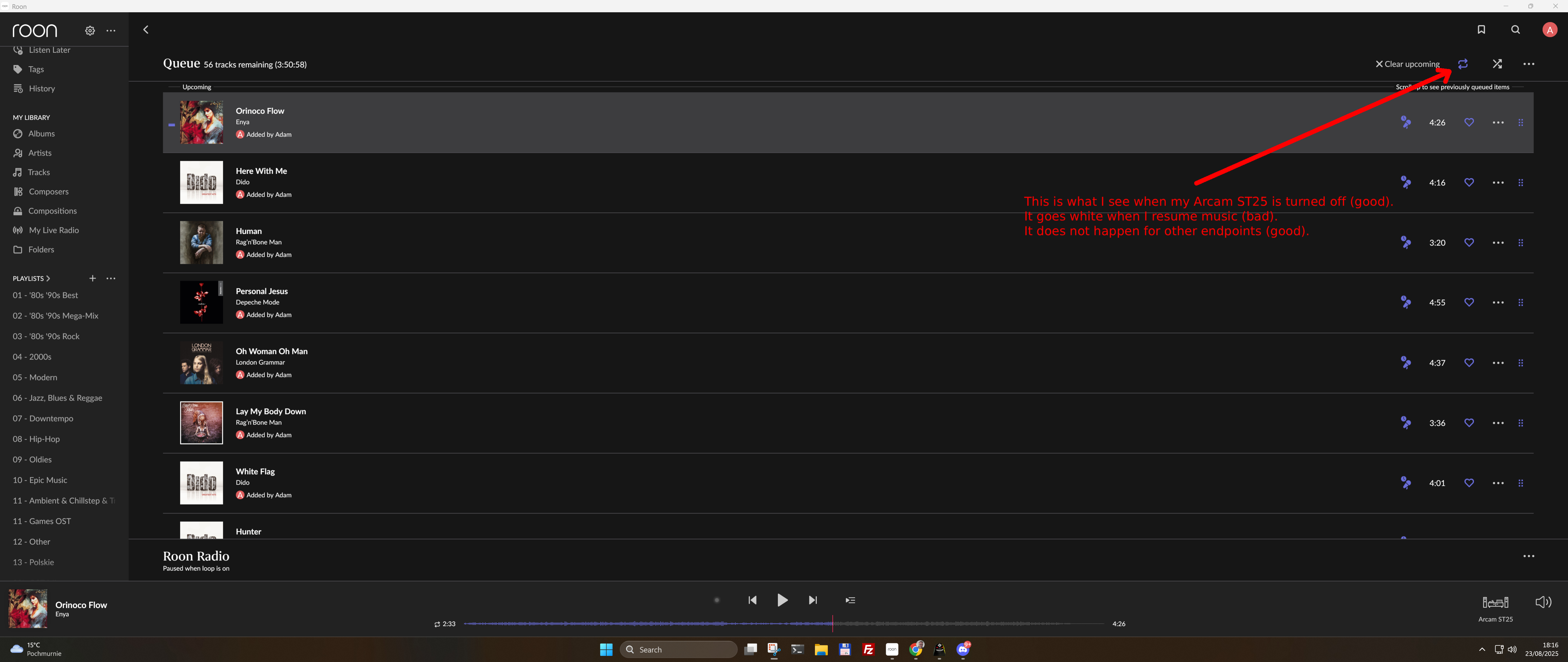
Hi, I am having issues with loop playback. When I use my Windows PC, Raspberry Pi (HiFi Berry OS), or Arcam ST25 via AirPlay, it preserves loop playback without issues. I select my playlist, pick shuffle, click loop in the queue, and that's it. Every time I resume playback, it is still looped. However, it does not work with Arcam ST25 as a Roon Endpoint. When I stop playback and ST25 goes off, I can see the loop still turned on in the Roon app. Sadly, when I resume the playback, it instantly goes off.
Describe your network setup
Huawei DN8245X6-10 router from ISP, Intel NUC 12 i5 for Roon Core
I think the next step here is to enable some diagnostics on your account so our technical staff can get some more insight into what’s going on here.
However, before I enable this feature, I’d like to ask for your help ensuring we gather the right information.
First, can you please reproduce the issue once more and note the time at which the error occurs. Then respond here with that time, and I’ll make sure we review the diagnostics related to that timestamp.
18:30 - Started playback of a playlist named 01 - '80s '90s Best on my Arcam ST25. The first song was No Son of Mine by Genesis.
18:37 - Stopped the music and turned off the ST25. It was still visible in zones.
18:38 - Turned on the ST25 (the loop was still enabled in the queue).
18:39 - Resumed playback. Loop was disabled.
From a fresh Roon Server diagnositc report, we can see that the the device itself (the Arcam ST25 endpoint) is the one disabling the loop function, not Roon Server itself.
That means the Arcam ST25 RAAT client reported a “loop_off” transport control event.
Immediately after, Roon logs:
[zone] Arcam ST25 received transport control from endpoint integration: loop_off
[zone Arcam ST25] Arcam ST25 received transport control from ARCAM ST25: loop_off
[zone Arcam ST25] SetLoopDisabled
So Roon is reacting to the Arcam ST25 telling it “loop_off,” not the other way around.
You see the same with shuffle just before:
{"control":{"button":"shuffle_off"}}
The Arcam ST25 hardware endpoint is issuing the “loop_off” (and “shuffle_off”) commands, which then override Roon’s playback state. It could be the case that the ST25 firmware initializes its playback session with shuffle=off, loop=off every time playback is (re)started.
I don’t believe there is a direct way to prevent this from happening, but as a follow up test - If you group the Arcam ST25 with another endpoint (like System Output or a Roon Bridge device) and set loop/shuffle there, Roon may preserve the setting for the group even if the Arcam individually resets.
I’d also confirm you have the latest firmware installed on the Arcam as well. We’ll be monitoring for your reply and results, thank you!
It’s definitely a good idea to report this behavior to Arcam. Please let us know the outcome of your discussion with them. If they are unable to help you, we can discuss this with our RND team to understand how difficult it would be to circumvent this behavior from our product side.
Hi, Arcam told me that they had just discovered this issue and have no ETA to fix it. Not impressive, frankly speaking. Considering the time they took to obtain Roon certification after the release, I am not enthusiastic about their potential fix.
At this point, there isn’t anything new we can add from the Roon side.
As confirmed earlier in this thread and in diagnostics, the loop / shuffle state is being explicitly reset by the Arcam ST25 itself via its RAAT implementation. Roon is only reacting to the transport commands (loop_off, shuffle_off) sent by the endpoint — it is not initiating or enforcing those changes.
Because of that:
This is not something Roon can fix unilaterally
There is no supported workaround we can apply from the server or UI side
The fix must come from Arcam firmware changes
Our partnerships team has already raised this with Arcam, and Arcam themselves previously acknowledged the issue on their end. Until they ship a firmware update that preserves playback state correctly, the behavior you’re seeing is expected.
So the right next step is indeed to follow up directly with Arcam and ask for:
status of the fix,
whether it’s scheduled for an upcoming firmware release,
or confirmation if they consider this a known limitation.
If Arcam provides new technical details or claims a fix is in place, feel free to post that here and we’ll be happy to review it.