Lost connection to NAS server but Qobuz albums still accessible (ref#E40NQY)

Hi! What’s not quite right with Roon?

· None of the above quite fits

None of the above quite fits

· None of these quite match

Tell us what's going on

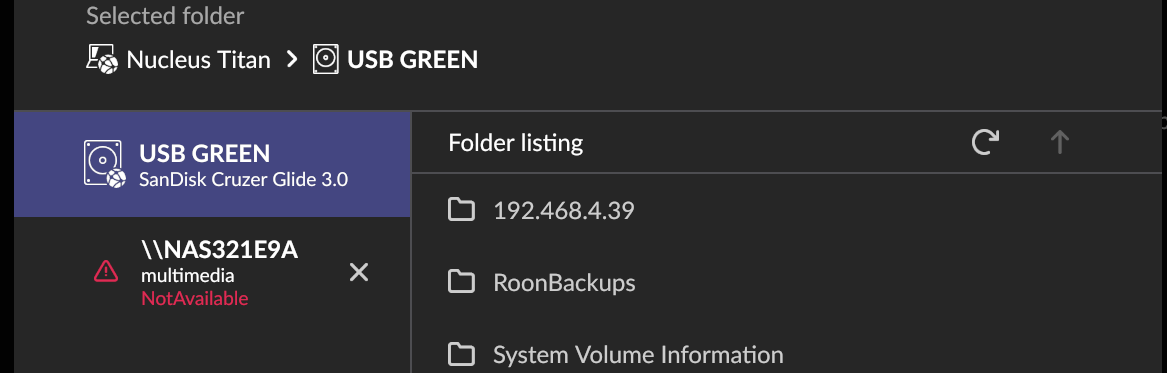
· I lost my connection to my NAS server. It still connects to my Qobuz albums. The music on my NAS should be located at \\NAS321E9A but when I type that it, it says the address is invalid. The NAS server is still connected to my home network, becuase I can see it in Finder.Help!

Tell us about your home network

· QNAP NAS Model TS-251+, operating system QTS version 5.2.9.3499

Hi @Andrew_Schau,

Thank you for your post.

Have you tried using the IP address when you add the network share from this Watched Folders page in Roon Settings → Storage (instead of the hostname, NAS321E9A)?

Do you have a static IP assigned for the NAS? If not, the DHCP server might have rotated its address, and Roon can’t resolve the hostname.

We’ll watch for your reply and proceed from there.
Thank you!

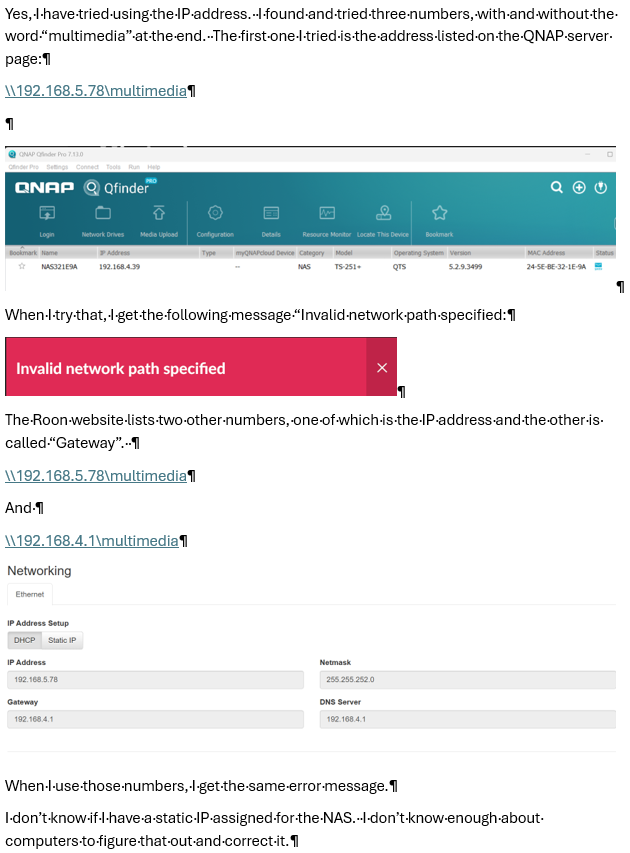
Correction. The first one I tried was \\:192.168.4.39, which is the one listed on the QNAP page.

Hello @Andrew_Schau

Thanks for the screenshots. They show what is happening, and it is a network configuration problem rather than anything wrong with Roon or with the NAS.

Your devices are on two different networks. The Qfinder window in your document lists your NAS at 192.168.4.39. Your Nucleus Titan, which runs Roon Server, is at 192.168.5.78. On top of that, the gateway address your Nucleus has been given belongs to the 192.168.4 network, not to its own. That combination is not a working configuration.

This is not something we can work around from the Roon side. Our networking guidance is explicit that multiple subnets are not supported and that all devices must be in the same IP range:

Everything you have run into follows from this. The name NAS321E9A no longer resolves, because name discovery does not cross between networks. Entering the IP address does not help either, because that address is not reachable from where the Nucleus sits. And you can still see the NAS in Finder because your computer is on the same network as the NAS while the Nucleus is not.

One thing to clear up as well: 192.168.5.78 is the address of your Nucleus itself, which is why entering it as a storage path did not work. The two numbers you found on the Roon page are the Nucleus address and the gateway, neither of which is your NAS.

Since this used to work, something in the network changed. Please could you tell us:

Does your Ubiquiti Dream Router have more than one network or VLAN defined, for example a separate guest, IoT, or secondary LAN? If so, which one is the Nucleus on?

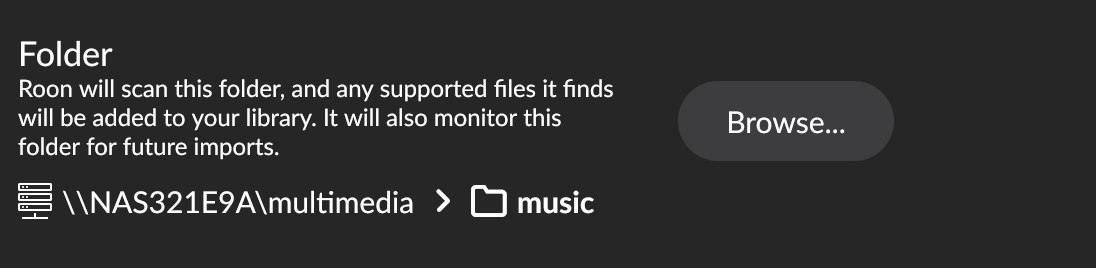
The goal is straightforward: get everything onto one network, with the Nucleus on 192.168.4.x alongside the NAS and your computer. Once that is done the existing share should reconnect by itself, since it is already configured as \NAS321E9A\multimedia with guest access.

There is also a guide specific to your hardware that is worth a look once we know how your networks are laid out:

One important thing in the meantime: please do not delete the existing storage entry in Roon, even though it shows as unavailable. Your playlists, tags and play history are tied to that entry, and removing it and adding it back as a new one breaks those links. Once the network is sorted we can edit that same entry if anything still needs changing.

I’m confused, probably because I’m not a networking expert and the terminology is unfamiliar to me.

Here’s what I can tell you.

I don’t believe I have a “Ubiquiti Dream Router.” I have an eero Pro 6 mesh network. The IP address for my mesh network is 192.168.4.1.

The IP address for my QNAP NAS is 192.168.4.39, and the Current WAN IP for the QNAP NAS is 148.75.79.33.

The IP address for my Nucleus Titan is 192.168.5.78.

I do not, to the best of my knowledge, have a “VLAN.” I have a guest network, but it is turned off, and it has been turned off for months.

I don’t believe I have a “IoT, or secondary LAN” but I’m not sure what those are.

So, I guess the question is, how do I get my NAS and my Nucleus Titan back on the same network?

Hello @Andrew_Schau

First, an apology: we referred to a Ubiquiti Dream Router and sent you a guide for it. That was our mistake, it is not your equipment, and you can ignore that link entirely.

Second, please do not worry about the terminology. You do not need to understand any of it. What you have told us is actually enough to narrow this down a lot, and the fix is likely to be simple.

Here is the plain version of the problem. Your eero hands out addresses that begin with 192.168.4, which is why your NAS is 192.168.4.39 and your eero itself is 192.168.4.1. Your Nucleus has an address beginning with 192.168.5, which your eero does not hand out at all. So something other than your eero is giving the Nucleus its address, and that something is keeping it on a separate network from everything else.

Nine times out of ten this is an extra piece of equipment still sitting in the chain. Very often it is an older router that was never removed, and which is still acting as a router rather than just passing the signal along. It would not look like a second network to you. It would just look like a box.

So the one thing we need from you is this: please follow the network cable out of the back of your Nucleus and tell us what it plugs into. Then follow the cable out of that, and tell us what that plugs into, and keep going until you reach the eero. A photo of each box is fine if you would rather not identify them, and the brand name and model printed on the front is even better.

While you are at it, please do the same for your NAS. Knowing whether the NAS and the Nucleus plug into the same box or into different ones will tell us a great deal.

Please open the Nucleus web page in a browser. Since yours is a Nucleus Titan, the address is:

http://nucleustitan.local

If that does not load, try http://nucleustitan on its own, or the address Roon shows for the Nucleus, http://192.168.5.78. Please send us a screenshot of the whole page, including the network section. We want to see whether the network setting is on automatic or whether a fixed address was entered at some point, and what the subnet mask says.

One reminder from before, since it still matters: please do not remove the existing NAS entry in Roon’s Storage settings, even though it shows as unavailable. Your playlists, tags and play history are attached to it. Once the addresses are sorted it will reconnect on its own.

Hello @Andrew_Schau

Would you kindly share the screenshot from the QNAP network configuration page?