M3U Playlists Not Importing from Synology NAS — Roon Server on Ubuntu
What’s happening?
Other
How can we help?
None of the above
Describe the issue
M3U playlist files placed in a watched folder on a Synology NAS are completely invisible to Roon despite “Import other playlists” being set to Yes. Roon logs show zero references to the M3U files — they are never detected, never parsed, never mentioned. Full server restarts and forced rescans do not change this.
Setup
-
Roon Server: Ubuntu 24.04 LTS on HP EliteDesk 800 G6 Mini (headless), Intel i5 6-core
-
NAS: Synology DS1010+ (192.168.1.98), connected via SMB
-
Library size: 62,110 tracks (55,405 from iTunes migration + Tidal)
-
Storage locations in Roon:
-
All devices wired Ethernet via Ubiquiti UniFi network
Background
I migrated my iTunes library (55,405 tracks, 448GB) from a Mac Pro to the Synology NAS. Roon successfully indexed all 62,110 tracks. However, iTunes XML playlist import failed because the XML file paths reference the original Mac structure (file:///Volumes/WD%201TB/Music/iTunes/...) which doesn’t match the NAS location. I attempted multiple path corrections (Linux mount paths, SMB paths, even Roon’s internal /mnt/RoonStorage_... path) — none resulted in visible playlists, despite Roon logs showing it parsed the XML and found 40 playlists.
As an alternative approach, I wrote a Python script to convert all iTunes playlists to M3U format with correct relative paths. This should be the simpler, more universal solution.
M3U Files — What I Created
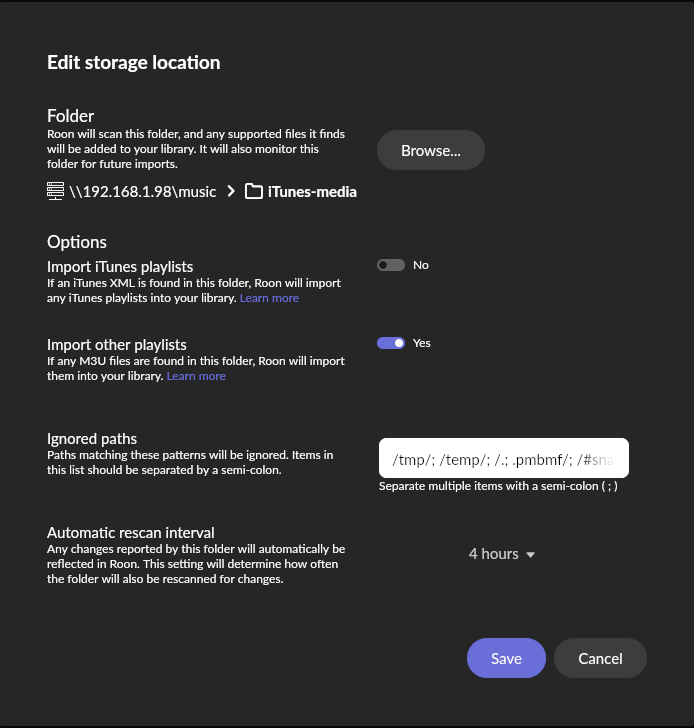
40 M3U playlist files placed directly in the root of the watched folder (\\192.168.1.98\music > iTunes-media).
Example file (5 Stars.m3u, 1998 tracks):
#EXTM3U
#PLAYLIST:5 Stars
ABBA/The Albums _2009/3-30 I Do, I Do, I Do, I Do, I Do.mp3
ABBA/The Albums _2009/3-24 Gimme! Gimme! Gimme! (A Man After Midnight).mp3
...
Format verification:
-
File encoding: UTF-8 text (confirmed via file command)
-
Paths are relative from the watched folder root (no leading slash, no absolute paths, forward slashes)
-
Path format matches the confirmed working example from this community thread where Sharon_Westfall got M3U import working with relative paths
-
Files are not album-matching playlists (they span multiple artists/albums, ranging from 50 to 18,000+ tracks)
-
#EXTM3U header present
-
#PLAYLIST:Name tag present
-
Files are in the root of the watched folder, same directory as the music subdirectories
File verification on NAS (via Linux CIFS mount):
$ ls -la /mnt/nas/music/iTunes-media/*.m3u | head -5
-rwxr-xr-x 1 pavel pavel    8571 Feb 18 21:42  1 Star.m3u
-rwxr-xr-x 1 pavel pavel   16012 Feb 18 21:42  2 Stars.m3u
-rwxr-xr-x 1 pavel pavel   34557 Feb 18 21:42  3 Stars.m3u
-rwxr-xr-x 1 pavel pavel   94039 Feb 18 21:42  4 Stars.m3u
-rwxr-xr-x 1 pavel pavel  141021 Feb 18 21:42  5 Stars.m3u
All 40 files confirmed present, non-empty, valid UTF-8.
Storage Settings
For the \\192.168.1.98\music > iTunes-media folder:
-
Import iTunes playlists: No (turned off — the XML approach failed)
-
Import other playlists: Yes
-
Ignored paths: /tmp/; /temp/; /.; .pmbmf/; /#snapshot
(Screenshot available if needed)
What I’ve Tried
-
Force rescan — multiple times. No effect.
-
Full server restart (sudo systemctl restart roonserver) — no effect.
-
Toggle “Import other playlists” off, wait, toggle back on, save — Roon scanned ~70 files but no playlists appeared.
-
Created minimal test file (TEST.m3u with single track) — also invisible.
-
Turned off “Import iTunes playlists” to eliminate interference from failed XML import — no effect on M3U detection.
-
Verified files exist from multiple approaches (direct ls, file command on NAS mount).
Log Evidence
After full server restart, Roon logs show:
Trace: [storage] [directory] Begin queuing fs events, ignoreitunes: True, ignoreplaylists: False
Debug: [storage/directory] case sensitivity test, rootpath: /mnt/RoonStorage_243f2bddf4f87190f6eec904c2fdcb69a7b0c8f7/iTunes-media, result: False
ignoreplaylists: False — so Roon IS configured to look for playlists. But there is zero mention of any .m3u file in the entire log. Not “5 Stars.m3u”, not “TEST.m3u”, not any of the 40 files. They simply don’t exist as far as Roon is concerned.
The only playlist-related log entries are:
-
[itunes] playlist key: 87:1:ba33e255-... — these are internal Roon playlist references from the (failed) iTunes XML import
-
Intentionally ignored playlist: 87:1:ba33e255-... — Roon ignoring its own internal playlist files
-
[library/playlist] saving playlist folder ... [TIDAL] — Tidal playlists working fine
-
finished updating 20 dirty playlists — all 20 are Tidal playlists
The Core Question
Why are M3U files in the root of a watched folder with “Import other playlists” set to Yes completely invisible to Roon? The files exist, the encoding is correct, the format matches documented requirements, and the server configuration shows ignoreplaylists: False. Yet Roon never even attempts to read them.
Is there something about Roon’s SMB mount of the Synology NAS that prevents it from seeing .m3u files? Could Roon’s internal file enumeration skip certain file types on network shares? Is there a cache that needs to be cleared beyond a full server restart?
Describe your network setup
Synology DS1010+ NAS → Ubiquiti UniFi Switch Ultra 60W → Ubiquiti Dream Router 7 → HP EliteDesk 800 G6 Mini running Roon Server on Ubuntu 24.04 LTS. All wired Ethernet. SMB shares configured and working (Roon indexes 62K+ tracks without issues). Roon Remote controlled via Google Pixel phone and Samsung tablet.