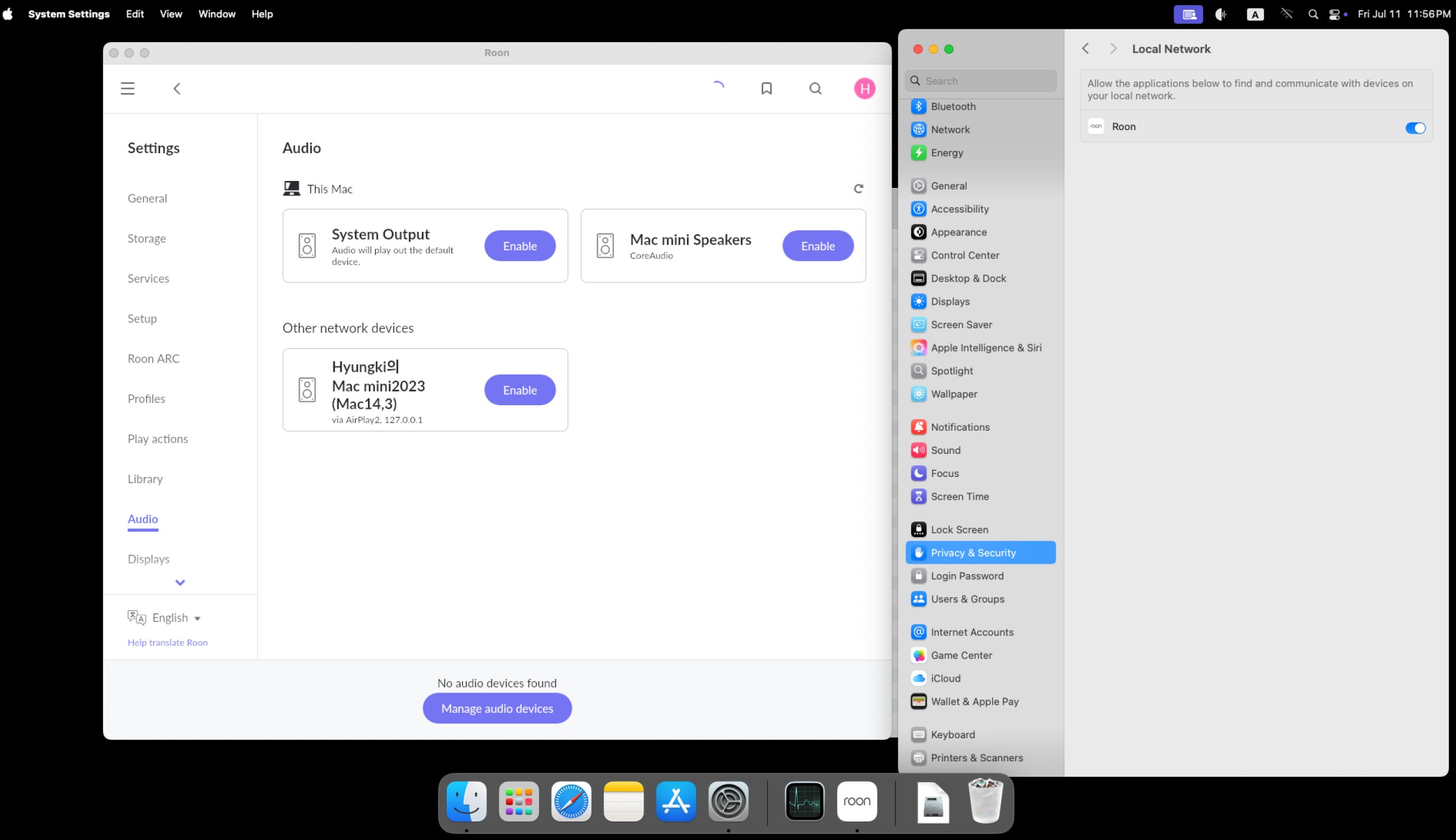
Mac OS Sequoia roon server connectivity problem I have Mac Mini 2023, Sequoia 15.5, My DAC is Meridian Ultra Dac via ethernet. I read "https://community.roonlabs.com/t/macos-sequoia-roon-server-device-connectivity-issue-roon-status-workaround/299636/1" But It can not solve my problem. If I tried in windows 11, it works well. I re-installed roon in mac, reboot, and so on. But it does not work. Roon still can't recognize ultra dac in mac os. What can I try to do? .
Describe your network setup
PC: Mac mini 2023, Router : ipTIME BE19000, End point : Meridian ultra dac
Thanks for writing in and sharing your report! Welcome to the community as well, we’re happy to have you here.
I realize you’ve attempted the known workaround for now - we’ve seen reports of users attempting the process a few times before success, if you haven’t yet. That said, we’ve also enabled diagnostics to take a closer look, what this action will do is auto send us a set of Roon Server logs and upload them to our servers for analysis.
Based on this recent report, we’re seeing the ID41 properly connect with playback attempted. Are you still having issues?
Are you able to use the device outside of Roon? And, do you run into this issue no matter the remote device you use?
it may be worth temporarily disabling your Mac firewall, and reboot the Meridian device. Then, re-test the connection.
First, I have used Meridian ultra dac(ID41) with Roon for about 4 years.
There have been no problem to play music via ethernet(not wi-fi).
(I used mac mini as roon server, I-Pad as roon remote controller. I have only one router in my home. Mac mini and Meridian ultra DAC are connected via wired network to Router)
But two weeks ago, Roon couldn’t recognize ultra dac and other network device.
I stop firewall as you said then re-installed - erased ROON from application folder to trash and then re-installed Roon on my mac mini, it started to recognize my ultra dac(ID41).
But when I shut down and turned on my mac-mini, roon didn’t recognize meridian ultra dac again. In this situation, roon didn’t recognize other network music device that include IPad(I use i-pad for remote control of Roon)
Thus, whenever I turned off my mac-mini, I have to reinstall Roon to play music.
Thanks for writing in and for the additional details! My apologies if there was any confusion from my above response - you shouldn’t need to reinstall Roon in order to get your devices to connect (or after rebooting your machine). More so, I was referring to disabling the mac firewall temporarily, then rebooting your Meridian device, and attempting to re-connect in Roon.
Could you please re-try the below steps:
Navigate to macOS System Settings > Privacy & Security > Local Network, and make sure Roon is allowed.
If it is already enabled, toggle it off and on again. Thenreboot your Mac, and see if the same issue persists.
What was the status of your firewall settings when this happened? It may be good to review our best practices around ensuring Roon has proper access when your firewall is enabled:
“My apologies if there was any confusion from my above response - you shouldn’t need to reinstall Roon in order to get your devices to connect (or after rebooting your machine). More so, I was referring to disabling the mac firewall temporarily, then rebooting your Meridian device, and attempting to re-connect in Roon.”
I know that you don’t mean that roon have to be reinstalled.
I tried to 1) diable the mac firewall, 2) reboot meridian device, 3) at macOS System Settings -> Privacy Security -> Local Network, toggle off and on. - roon was allowed. 4) reboot my mac.
These trials were useless, so I reinstalled Roon, then Roon started to recognize Meridian Ultra Dac.
But, as I said, if I reboot my mac, Roon didn’t find any other network devices again.
In this condition,
Mac firewall setting was “off”
Meridian app in my I Pad could connect Meridian Ultra dac and control it(select source, adjust volume, monitoring status and so on)
Additional information : Internal IP addresses of my mac and meridian ultra dac were fixed by my router settings.
I’m now in business trip, so I will try some attempts next weekend then let you know the result.
Thank you for the update and for sharing what you’ve already tried. We’ll be standing by and ready to assist further once you’re back from your trip. Safe travels!
Threads close in the support section without response from the OP - if you find that the thread has closed automatically, please re-open a support request to continue the conversation.