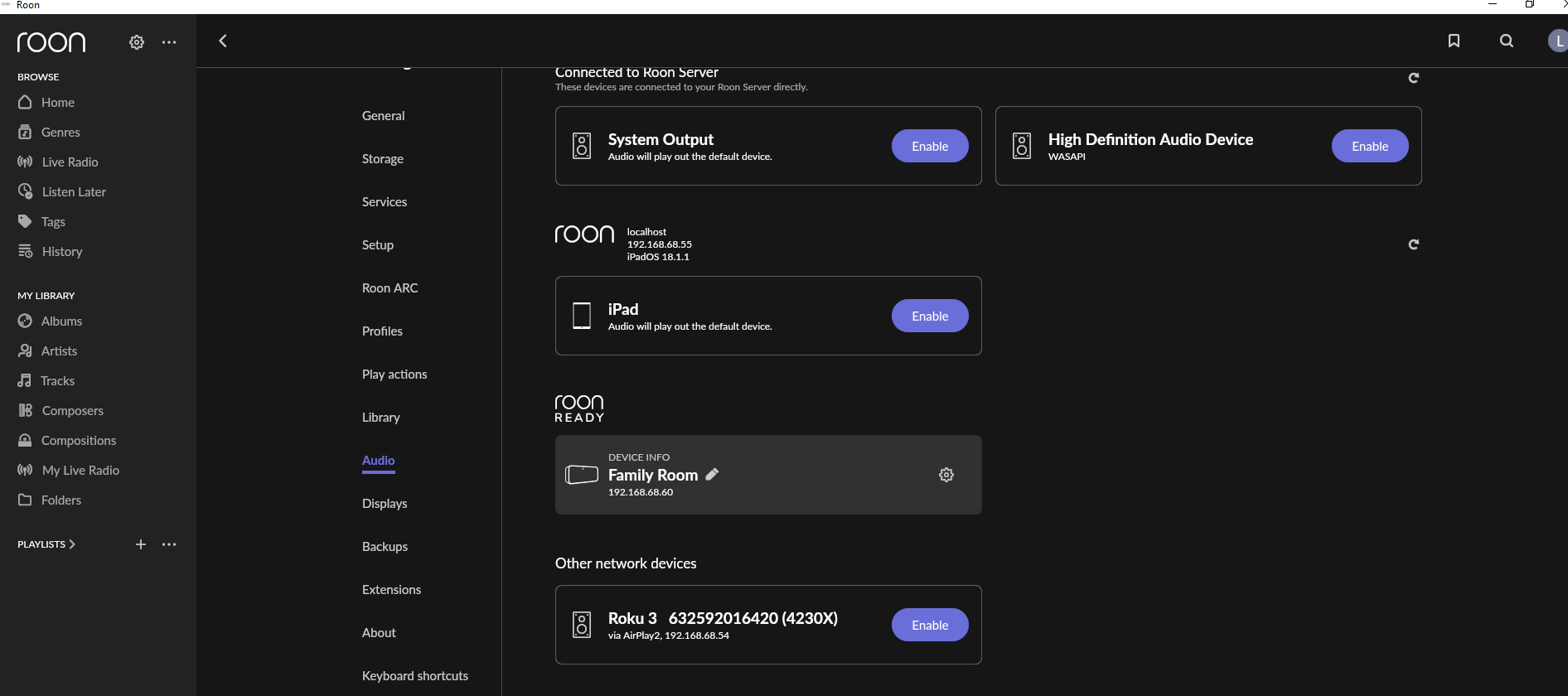
· One audio zone missing while others appear as expected
Restart Affected Device
· No, the issue is still the same even after a restart
Restart Roon Server
· No, the issue is still the same even after a restart
Restart Network
· No, the issue is still the same even after a restart
What is the operating system of the affected device?
· Windows
Windows firewall / private network
· No, these suggestions didn't resolve the issue
Describe the issue
My "Main System" is no longer appearing in Roon. Roon Server is running and Roon displays other Zones/devices. Main System is typically my default Zone. Now, only a secondary Zone entitled "Family Room" displays. Main System is comprised of my Ethernet connected SOtM sMS-200ultra Neo Special Edition (a Roon Ready DLNA renderer) that passes the digital music signal to my DAC (T+A PDP 3000 HV). The DAC indicates completed connection to the LAN via the SOtM device (with "PCM 32kHz" indicated as would be expected given the SOtM device is passing signal to the DAC).
Roon Server is running on a dedicated HP Workstation tied into my LAN. Roon Server appears to be working normally. I even deleted and reloaded a new instance of Roon Server from scratch to determine if the reload would allow for "Main System" to be identified. Didn't work.
Everything has been rebooted included the LAN switch. "Family Room" continues to be identified, but not "Main System". I need help.
Describe your network setup
All audio system components are connected via Ethernet (i.e., I'm running no wireless items with Roon, except the iPad which I use to select my Zones and Music.) I've most recently utilized the above described Zone "Family Room" but have otherwise not done anything except download numerous Roon Updates as presented. "Main System" (typically my default Zone) is no longer appearing. LAN switch is a Netgear GS724TP -200NAS which is working normally. I rebooted it to give Roon Server every opportunity I could think of to identify "Main System". Didn't help.
I'm using a Deco mesh network for the iPad on which I launch Roon to control my music. All appears normal with Roon (except for the absence of my "Main System" Zone).
I have gone ahead and enabled diagnostics mode for your account and what this action will do is next time your Roon Server is active, a set of logs will automatically be generated and uploaded to our servers for analysis.
I wanted to reach out because I’ve been keeping an eye on our servers, waiting for the aforementioned diagnostics report.
For some reason it is not reaching our servers, even after I tried re-enabling diagnostics on your account. I also ran a quick test and I was able to submit a similar report from my setup here, so something else is going on.
So we can move forward, I was hoping for now you could use the directions found here and send them to our Logs Uploader Service and let us know after, thanks!
Vadim,
I turned off my music server after experiencing the malfunction. Therefore, Roon Server was not running. Please reinitiate your diagnostics as I will have Roon Server up and going for about an hour at this time. I typically do not run the music server and Roon Server unless I’m going to have a listening session.
Thanks for your assistance.
Lon Baugh
Thanks for the update! Oddly enough, we’re not seeing any signs of other RoonReady devices in your Roon Server logs other than your Pulse 2, dating back to August.
Can you temporarily simplify your network chain and get your main system hardwired directly to your primary router, as well as your Roon Server machine?
Have you rebooted the DAC yet? Perhaps testing out using different cables and ports may help as well - let me know if it helps.
Yes. I’ve not been able to play my Main System for about six months owing to travels.
Your suggestion re: simplification is impossible. I’ve rebooted everything and please note, it is only the sMS-200 that is not recognized by Roon; I’m investigating that device itself; Roon seems to be behaving as expected. I’ll let you know if I need more substantive assistance.
Are you able to access the SMS-200 web configuration tab to try to gather more info there? If I recall correctly, the SMS-200 had to have a DAC plugged into it and the DAC needed to be turned on before it would appear as a Roon zone. Do let us know how your investigation goes.
The complete chain was connected and powered up (including the DAC). I spoke with the SOtM distributor today and he’s sending me another OS instance contemplating that the installed instance became corrupted somehow (this has been reported in forums). Let me see what happens when I load the new instance and I’ll reach out for additional Roon assistance as necessary. Thank you!
· One audio zone missing while others appear as expected
Restart Affected Device
· No, the issue is still the same even after a restart
Restart Roon Server
· No, the issue is still the same even after a restart
Restart Network
· No, the issue is still the same even after a restart
What is the operating system of the affected device?
· Windows
Windows firewall / private network
· No, these suggestions didn't resolve the issue
Describe the issue
My "Main System" is no longer appearing in Roon. Roon Server is running and Roon displays other Zones/devices. Main System is typically my default Zone. Now, only a secondary Zone entitled "Family Room" displays. Main System is comprised of my Ethernet connected SOtM sMS-200ultra Neo Special Edition (a Roon Ready DLNA renderer) that passes the digital music signal to my DAC (T+A PDP 3000 HV). The DAC indicates completed connection to the LAN via the SOtM device (with "No Signal" indicated as would be expected given Roon is not connecting with the device).
Roon Server is running on a dedicated HP Workstation tied into my LAN. Roon Server appears to be working normally. I even deleted and reloaded a new instance of Roon Server from scratch to determine if the reload would allow for "Main System" to be identified. Didn't work.
Everything has been rebooted included the LAN switch. "Family Room" continues to be identified, but not "Main System". I need help.
Describe your network setup
All audio system components are connected via Ethernet (i.e., I'm running no wireless items with Roon, except the iPad which I use to select my Zones and Music.) I've most recently utilized the above described Zone "Family Room" but have otherwise not done anything except download numerous Roon Updates as presented. "Main System" (typically my default Zone) is no longer appearing. LAN switch is a Netgear GS724TP -200NAS which is working normally. I rebooted it to give Roon Server every opportunity I could think of to identify "Main System". Didn't help.
I'm using a Deco mesh network for the iPad on which I launch Roon to control my music. All appears normal with Roon (except for the absence of my "Main System" Zone).
I’m in the process of troubleshooting the hardware and getting an updated OS for the SOtM device. I’m trying that as the device cannot currently be accessed through it’s web interface. I want to make sure the device is working correctly before I mess around with Roon. I’ll keep you and your team apprised. Thank you!
Once SOtM is back up and running with the latest software update that is not recognized by the device, please collect a new set of logs and update it using the link provided earlier.
Will do! I feel that Roon is operating correctly as it is finding my other endpoints. That, and the fact that the SOtM device is not accessible through it’s Eunhasu interface makes it seem clear that it’s the device or it’s OS/firmware, even as the device is properly connecting to the LAN and boots in what appears to be normal fashion. I’m waiting on Kamal at the US distributor to send me the SD card with the updated OS. I’m hopeful he’ll be sending that this next week and keep you apprised.
Thank you again to you and your associates!
Lon
It has been some time since our last communication, have you been able to recieve the new SD card with the updated OS? If you still need assistance regarding this issue, please let us know!
We wanted to give this thread a final ping before allowing it to auto-close under the assumption that the issue was resolved offline. Please let us know if you require further troubleshooting.
If you require further assistance moving forward, you can always submit a new tech support requestand our team will promptly review the report. Thank you!
Thank you for your follow-up. Presently, the SOtM renderer is in for servicing and I’m confident that Roon is operating properly within my system. Thanks again…
Thanks for letting us know. If this issue returns after servicing the unit, please let us know, in the meantime there is not much more that we can look into, so we’ll close the case. Feel free to open a new request, reference this one, and we can merge it when the device is delivered. Thank you!