I'm having trouble with my DAC, speakers, streamer, etc.
What best describes the issue with your audio device?
My device has 'Uncertified' status
For many months my Marantz Cinema 50 AVR has worked flawlessly with Roon. Today I receive notice that the device is "uncertified." What on earth has changed? Everything was working fine until today.
You will have been using it via Airplay before as you still can today. , if you updated the Heos firmware then in the latest one they added code for Roon Ready which isn’t certified yet and for some oddity the Roon Tested status has disappeared. You can still use it but it now shows under Other Network devices select that and it will work as it previously did. God knows why Marantz added early code to all devices but they have and this is the current outcome waiting for it get full Roon Ready status.
Thanks, but no, I was NOT using Airplay before. I was using my Mac Mini as my Roon Core with the HDMI output from it to my Marantz Cinema 50 “Media Player” input on the receiver.
It has worked absolutely fine this way for many months, but suddenly, today, Roon seems to think the AVR is not certified. Quite obviously, the receiver is compatible with Roon (“Ready” or “Certified”). But for some strange reason, Roon has taken away the functionality.
Thanks, but who is the “Sound United team?” And what are THEY working on this and not Roon or Marantz? I don’t understand, and why such an unknown timeline? I had a fully functional system, but now I have nothing.
I was NOT using Airplay before. I was using my Mac Mini as my Roon Core with the HDMI output from it to my Marantz Cinema 50 “Media Player” input on the receiver.
It has worked absolutely fine this way for many months, but suddenly, today, Roon seems to think the AVR is not certified. Quite obviously, the receiver is compatible with Roon (“Ready” or “Certified”). But for some strange reason, Roon has taken away the functionality.
It’s still an issue with endpoint selection. The (non-functional) Roon Ready endpoint is for devices connected by ethernet/WiFi (and using that connection for streaming). Since you are connected by HDMI, there should be another endpoint to represent that connection.
Then you can keep using the HDMI. The point is that the “uncertified” refers only to Roon Ready status, and the Marantz has never been certified Roon Ready. It’s just that this information is displayed now in error because they are apparently working on this.
It doesn’t matter, but Sound United is the parent company that owns Denon, Marantz, Polk Audio, Bowers and Wilkins, Definitive Technology, Polk BOOM, HEOS, Classé Audio and Boston Acoustics.
HDMI has nothing to do with Roons certification thats for Roon Ready over network not HDMI. Your hdmi should work the same as before and shows up connected to the core at the top of the audio page. Show a screen grab of your settings for audio. Their update might have unenabled it for some reason.
Sound United is the group that owns Marantz/Denon Heos and others. They rebranded to Masimo quite recently though as the Sound United brand was acquired by Masimo which also does other tech.
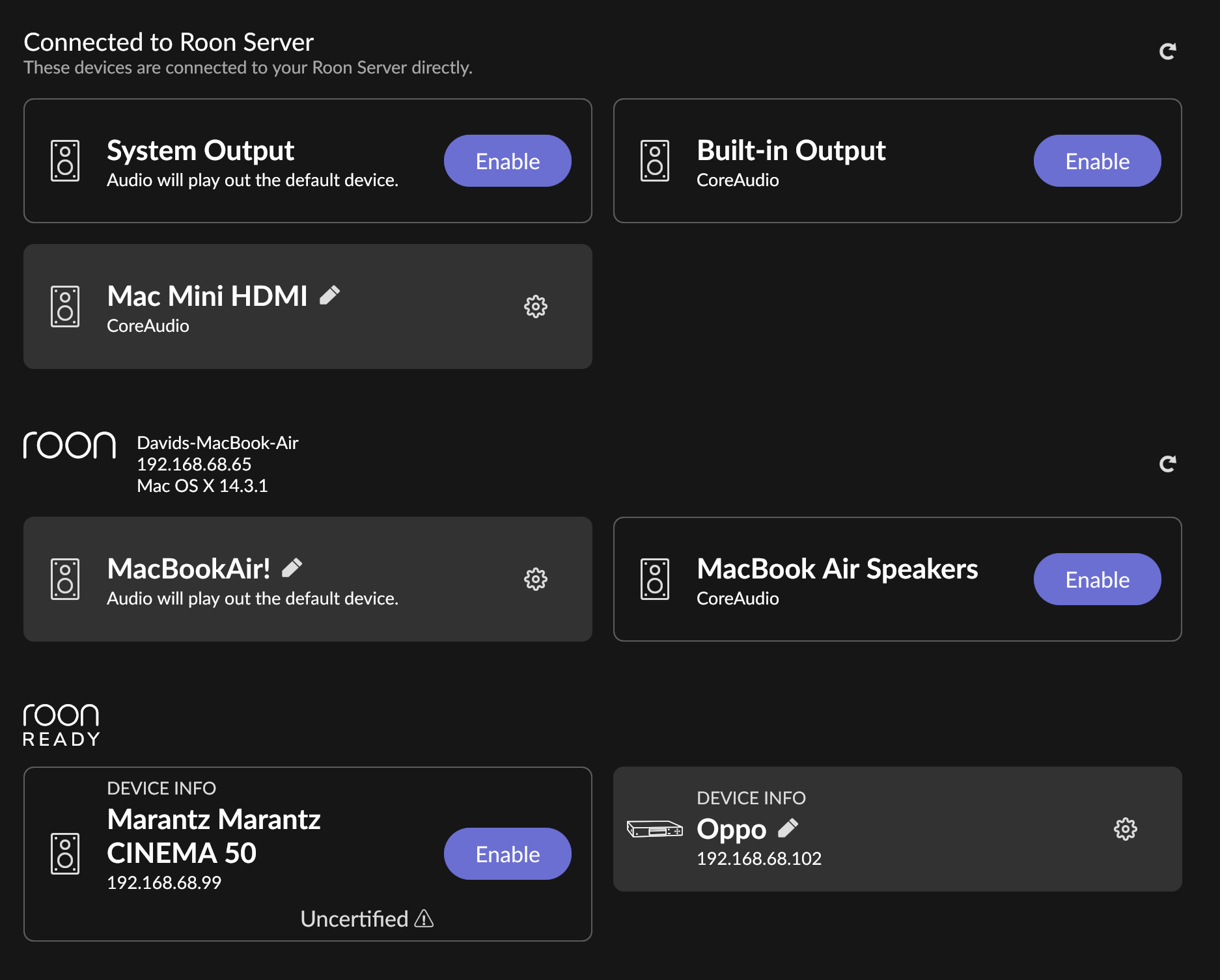
No, I can’t use HDMI to connect the Roon output from my Mac Mini to my receiver because Roon will no longer allow me to make that connection. See screen shots.
I’m just amazed this type of connection worked fine for many months. So “certified” or not, it works. . . but no now longer. I truly begin to wonder if HARMAN is selectively “decertifying” products it doesn’t make, now that they own Roon.
I’m using my Oppo 203 temporarily as the work around. It’s inconvenient, but works.
When I click on “Enable” for the receiver, I get the “not certified” popup.
When I set up the receiver many months ago, it “enabled” just fine and operated directly playing music from the HDMI connection out of my Mac Mini (my Roon Core) connected to the “Media Player” HDMI connection on the Marantz Cinema 50 AVR. Now, all of sudden that no longer is possible.
Again, Roon Ready is a network protocol and its certification status has nothing to do with HDMI.
Your screenshot shows the Roon Ready settings. Please post complete screenshots of the whole page so that we can see all of your Settings > Audio devices and state.
You said you were using HDMI, which is unrelated to Roon Ready.
The post I linked to explains precisely what happened. Please don’t spread made-up conspiracy stories.
I understand that Roon Ready is a network protocol. I undstand it has no relevance to the Roon Core connection via ethernet.
As noted, my Roon core (Mac Mini) connected to the internet and my home network played music (audio signal) through HDMI to my AVR for many months. I was able to “Enable” my receiver to work with my Roon core. Now I can’t do that. Certification seems almost irrelevant because it worked - certified or not.
Why do you need this? The other settings and audio devices have no relevance to my Cinema 50 AVR not being enabled.
Not making up stories, just expressing an opinion and posing a question.
To be clear: It doesn’t have no relevance to the Ethernet connection, it only has relevance to the Ethernet connection. But you were using HDMI and it has no relevance to that.
Because your screenshot was showing only the Roon Ready section which has no relevance to HDMI.
Like I said, the link I had posted had already explained it sufficiently as an error in software release management on the side of Marantz / Sound United
We already explained this isnt anything to do with a direct connection from a computer to the Marantz at all. Its for playback via network connection only and this side of things has not completed certification. It has nothing to do with HDMI input to the reciever or output via HDMI from Roon and thus should not affect it. HDMI has nothing to do with Roon Ready certification.
If your not seeing your Roon server under Audio devices then there are other issues at play. I would restart both receiver and Roon server as perhaps the firmware update has caused Roon to not see it.
Thanks for the explanation. I now better understand the certification process (playback via network connection, not HDMI connection).
The reason for my concern regarding the HDMI connection is that that is how the Marantz AVR was previously connected to my Roon core (Mac Mini). That option was no longer available in audio settings. The only option shown was the “Roon Ready” connection, which shows as uncertified. The entire section shown on the screenshot as “Connected to Roon Server” was not displayed as an option for me. It was in the past, and it worked fine.
So, as you suggested, I rebooted my Roon Core and restarted the receiver. Now, my Mac Mini HDMI (Roon Core) is connected to the Roon Server directly, as it was in the past. Thanks for the suggestion and, apparently, the solution. We will all wait for Marantz to complete the “Roon Ready” certification process.
However, when I connect to Roon via my Oppo 203 (which IS “Roon Ready,” . . . certified?), is it not using the Oppo’s DAC? If I unplug the HDMI output from it, I get no sound at the AVR. Apparently, it’s transporting the audio via the HDMI connection (not via ethernet) to my AVR . . . even though it’s “Roon Ready?” So, even it is not using playback via network connection? Obviously, I’m having a hard time grasping the concepts.
The Oppo is Roon Ready and if you select that then the stream is going over the network to the Oppo using Roons network protocol RAAT it’s not sending anything direct to the Marantz from Roon and it’s not being sent from Roon over HDMi. The Oppo is acting as a streamer and network bridge receiving a network audio stream and converting it to analogue if using its inbuilt dac or converting it to another digital output where the Marantz acts as the DAC.
Once Roon Ready the Marantz will operate like the Oppo, you can send streams over the network direct to the amp without anything in between. However it won’t work for multichannel as HEOS system which is the tech inside all Marantz for music streaming doesn’t support multichannel music playback so HDMI from a pc would still be needed to achieve this.
Thanks for that! That helps clear up the transmission process as well as HEOS indiosynchrasies. Since the Oppo is connected to the Marantz for audio via the HDMI output, that’s why is it the audio source for the AVR. Evidently I could hook up the AVR to the Oppo vis RCA cables if I wanted to use its DAC. However that would prevent. any DVD’s with multi-channel encoding from being transmitted to the AVR.