What kind of performance/speed issue are you experiencing?
· The app takes a long time to respond to commands
Please try to reboot your Roon Server
· Yes, rebooting helps, but the issue returns after some time
Please try to reboot your networking gear (Router/Switches/etc.)
· No, the issue is still the same even after a reboot
Is there any change in behavior if you try to navigate to Roon Settings -> Library and set both Background and On-Demand Audio Analysis to Throttled or Off?
· No, the issue is still the same
Does the issue happen on multiple Roon Remotes (controllers) or just one?
· Issue happens on multiple remotes
Router Domain Name System (DNS) change
· I was able to change my router's DNS servers but it did not help
What is the operating system of your Roon Server host machine?
· Linux Server (Ubuntu, Fedora, ArchLinux...)
Timestamp of issue occurrences
· continous build up of memory usage on the NAS combined with increasing slowlyness of the entire Roon System
Describe the issue
Memory usage increases over a few days on a Synology NAS. Library size small with 15.000 tracks, memory usage exceeds 4 GB. My NAS is upgraded to 18 GB RAM.Roon becomes sluggish, music starts after several seconds, search slow. Latest build on NAS container, all remotes up tot date
Describe your network setup
ISP Vodafone Germany Fritzbox 6690 Netgear unmanaged switches Fritz 1750 access points Synology NAS 720+ upgraded, latest firmware 3 Elac Discovery Z3 speakers wired/wireless 2 Elac Discovery 101g as endpoints wired 1 Elac Discovery amp as endpoint wired 1 Audiophonics streamer endpoint wired 3 Raspberry Pi as endpoints 1 Onkyo RZ730 as endpoint 1 Win 11 laptop as endpoint 1 Win 11 Mini PC as endpoint
Thanks for writing in and for sharing your report! We have good news for you surrounding memory related issues, our development team has a handful of memory optimizations that are currently on our Early Access branch of Roon, which will eventually make their way over to the full Production version.
So, the next Roon update prompt you recieve should contain a handful of optimizaitons that should help with the performance issues you face a few days after rebooting Roon Server.
Until then, I’d suggest a daily reboot of Roon Server. Or, if youre intesreting in migrating over to our Early Access version of Roon, I’ll share the KB on this process below:
Thank you for the heads up. Please check the content of the link for NAS installation of the early access version. There are still some references to RoonOnNas that could confuse users.
Question to the container version of Roon: Can I install EA as a second project and run it? The production version will be disabled before that.
Thanks for the heads up. For the NAS installation link, we can take another look at the content, especially where RoonOnNas could cause confusion.
As for your question about the container version of Roon, please make sure you have a recent backup and go ahead and try it. It is not something we specifically tested, but it would be a useful data point for future reference. If you do, please let us know how it goes.
We recently released a new Roon build with memory improvements. Have you had a chance to try it, and have you seen any improvement on your end? Please let us know when possible, otherwise this thread will close soon and if you need further assistance, you’ll have to submit a reopen request:
Checking in on this. When you have a moment, could you let us know whether the steps we mentioned earlier made any difference? If you were able to try them, please share what you saw so we can pick up from there.
Please note, if we don’t hear back from you this thread may close automatically soon. If the thread auto-closes and you need further assistance, please submit a reopen support request via the technical support help form below and specify that the issue should be reopened. Thank you.
The update did not go through. I deleted the Roon installation, the container and every little bit of remains of the installation. Then I reinstalled container and Roon on an e-sata drive and restored the database from the backup. I experienced an issue with the installation that may be worth sharing. When I installed the container app, it installed automatically a shared ‘Docker’ folder on Volume 1. If you follow the instructions and try to install the Roon along with the container on the e-sata, you are getting nowhere. I then mapped the installation to the e-sata which is by design shared and all works now.
Memory usage is low and stays lower for a few days now. With some caution, i would call it success.
I responded here post 78 ff already and uploaded the files requested for analysis.
Good result, and thank you for the detail rather than just telling us it works.
One thing before we call it settled. Your original report was a build-up over several days, so a few good days is encouraging rather than conclusive. Please keep an eye on it for another week or two.
Concretely: in Synology’s Resource Monitor, note the memory the Roon container is using, then check it again after five or six days without a restart. If it sits roughly where it started, this is genuinely fixed. If it climbs back past 4 GB, tell us and we will pick it up again with figures to hand.
On the Docker folder: that behaviour is actually covered in our Synology guide, and it is worth reading those two paragraphs because they will save you trouble next time. Step 1 notes that installing Container Manager creates a top-level docker shared folder and tells you how to move it to another volume via Control Panel, then Shared Folder. Step 2 gives the path as either /volume1/docker/RoonOnDocker/Roon or /volume2/… depending on where your fast storage is, and Method 1 warns that the generator defaults to /volume1 and that you must change it if your docker folder is elsewhere.
So what you worked out by hand is the documented route. Your way, mapping the Roon paths to the e-SATA, works equally well.
Your point about the Early Access article still referring to RoonOnNAS is a separate matter and is with the people who maintain those pages.
We will keep the update problem in the other thread where you have already posted the files, and leave this one for the memory question. When you have a week’s worth of figures, please post them here.
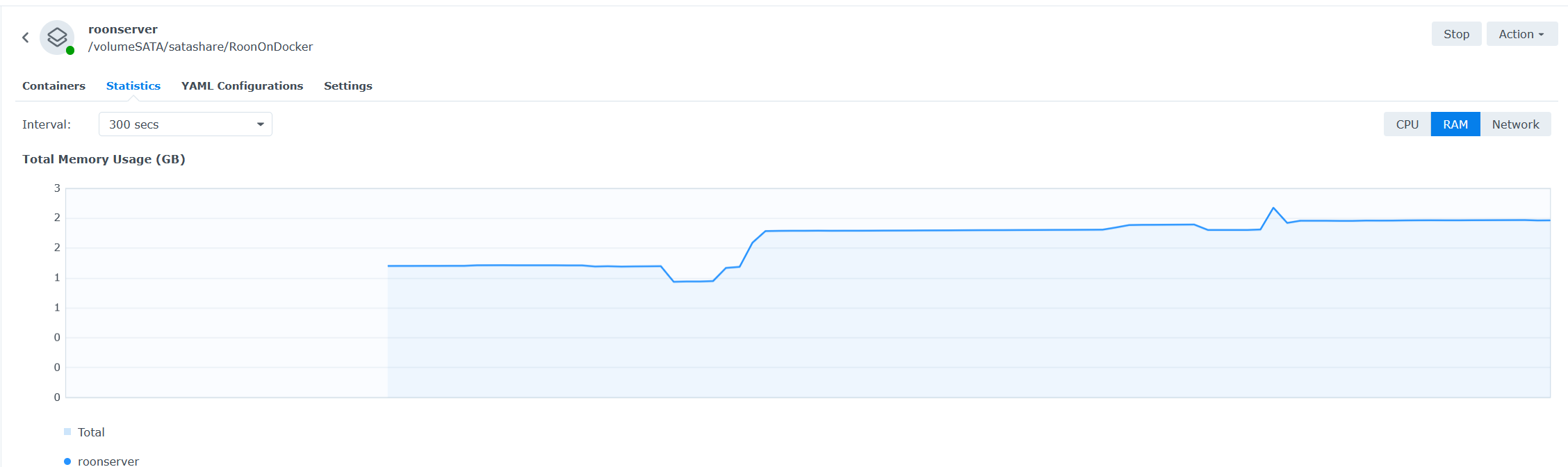
Here is some more information on the RAM usage behavior, I checked the RAM usage of the process in the container periodically. About 15.000 tracks on the server.
it appears to me that my backups trigger a jump in memory usage. I will check it one more time tomorrow and will report. After that I will be out of town for several weeks and I keep everything running
Thanks for the numbers, and for trying to get to the bottom of it.
On the backups: we checked the readings around your backups on the 23rd. Memory does jump, but it comes back down within about 20 minutes. So that spike isn’t the problem. The slow climb over the days is the real one.
From the current logs we can’t say what’s actually causing it. The proper test is a memory profile, but that’s awkward on a NAS. So we’ve enabled additional logging instead. It won’t name the culprit, but it should narrow down where to look.
Restart the server and let it run as usual. Once you’ve had a couple of days and can see the memory build up, ping us in the thread and we’ll grab a fresh set of logs for another round.
Checking in on this one. How is the memory looking now?
If you have a current figure from Resource Monitor, please post it. And if Roon has become sluggish or unresponsive at any point since you left, roughly when would be useful.