Metadata changes not reflecting in ARC without rescan on Nucleus One (ref#J29VXE)

Hi! What’s not quite right with Roon?

· None of the above quite fits

None of the above quite fits

· App interface looks or behaves oddly

Tell us what's going on

· I currently am running the latest versions of ARC and Roon for iOS and macOS. my roon server is a nucleus one. Haven’t had any issues with it until recently.

Any metadata changes I make to an album will reflect intially in the ARC app, however after a few days, whether that be an album cover, tracklist change, or bonus track addition, it will revert back to the way it was before the edit unless I rescan the album in the roon app, which obviously is only available on my home network. This happens for about 30 different albums in my library and oftentimes if I don’t rescan those albums before I leave the house, I can’t play them as intended because they revert back to the way they were before any metadata changes were applied.

Is there anything I can do to solve this? It was happening daily when I was using a NAS as my roon server, but I purchased a nucleus and it stopped until a couple weeks ago, where it happens at least once a week. Unfortunately now i have to rescan my albums right before I leave the house every time now which is a pain.

Tell us about your home network

· AT&T Fiber internet, eero mesh system, nucleus is connected via ethernet to eero mesh.

Hello @Evan_Adams ,

Thanks for the report. Just to clarify here, you are making the change at home, using the (full) Roon app, and then you notice the change appear in ARC, and then it reverts after a few days? Can you please provide any example albums that display this behavior, along with any screenshots and timestamps you can share? Thank you.

Thanks for the reply!

Yes, I have updated all metadata via the roon app on my macbook. The metadata is fine in the roon app and never reverts. However, after a few days, or sometimes overnight (i’m unsure of the frequency) my ARC app reverts the metadata changes to what they looked like pre-edit. Here’s a few examples.

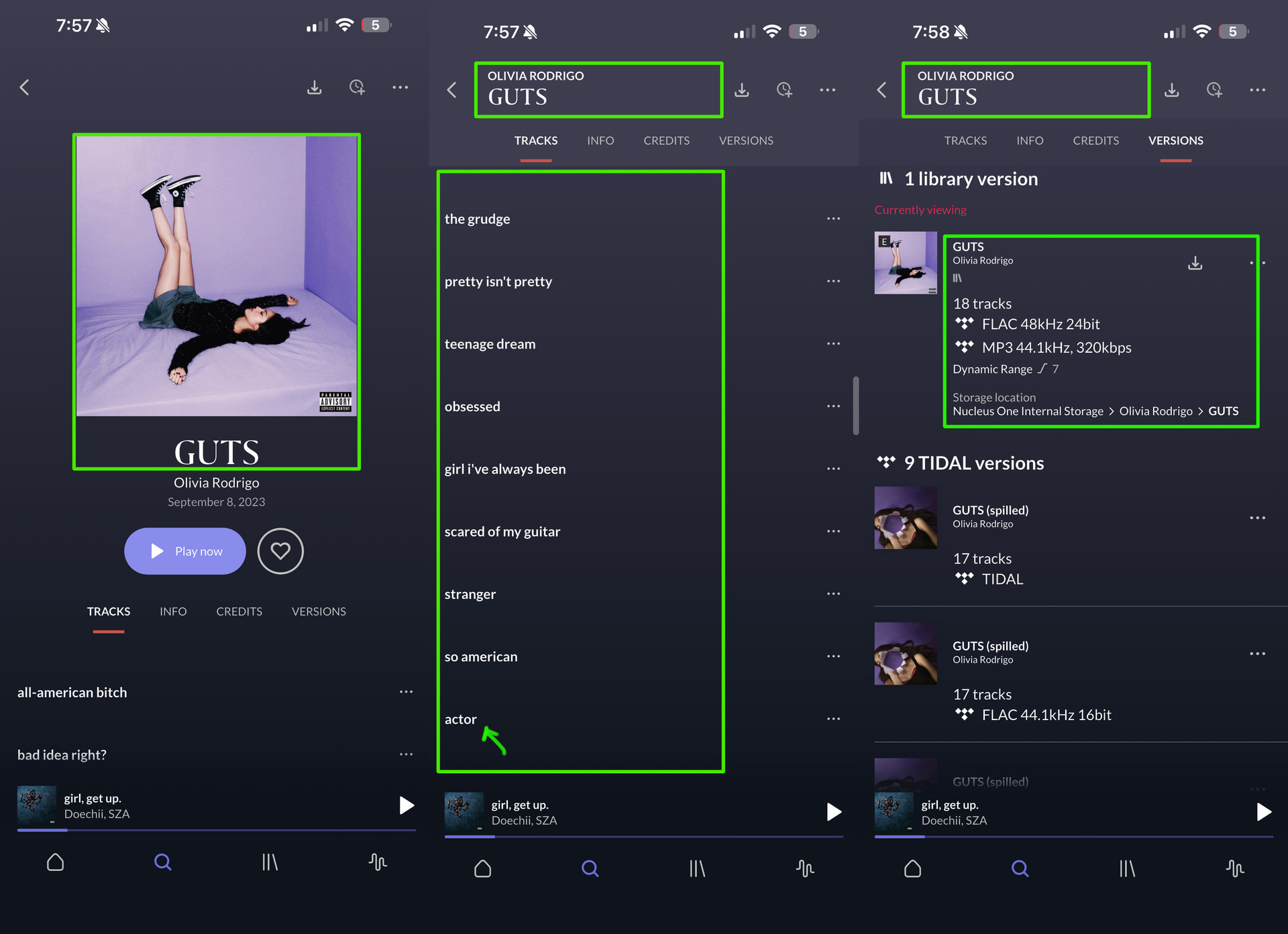
This particular album is a mixture of a Tidal album, an internal library track, and a merge of a single. In roon it displays the album perfectly. This is what it looked like last night:

and then this morning when I was at work I noticed it had reverted. note that the correct title still shows when i scroll, and that I was able to play other songs from the album from a playlist (which is showing on now playing) but the album page looked like this:

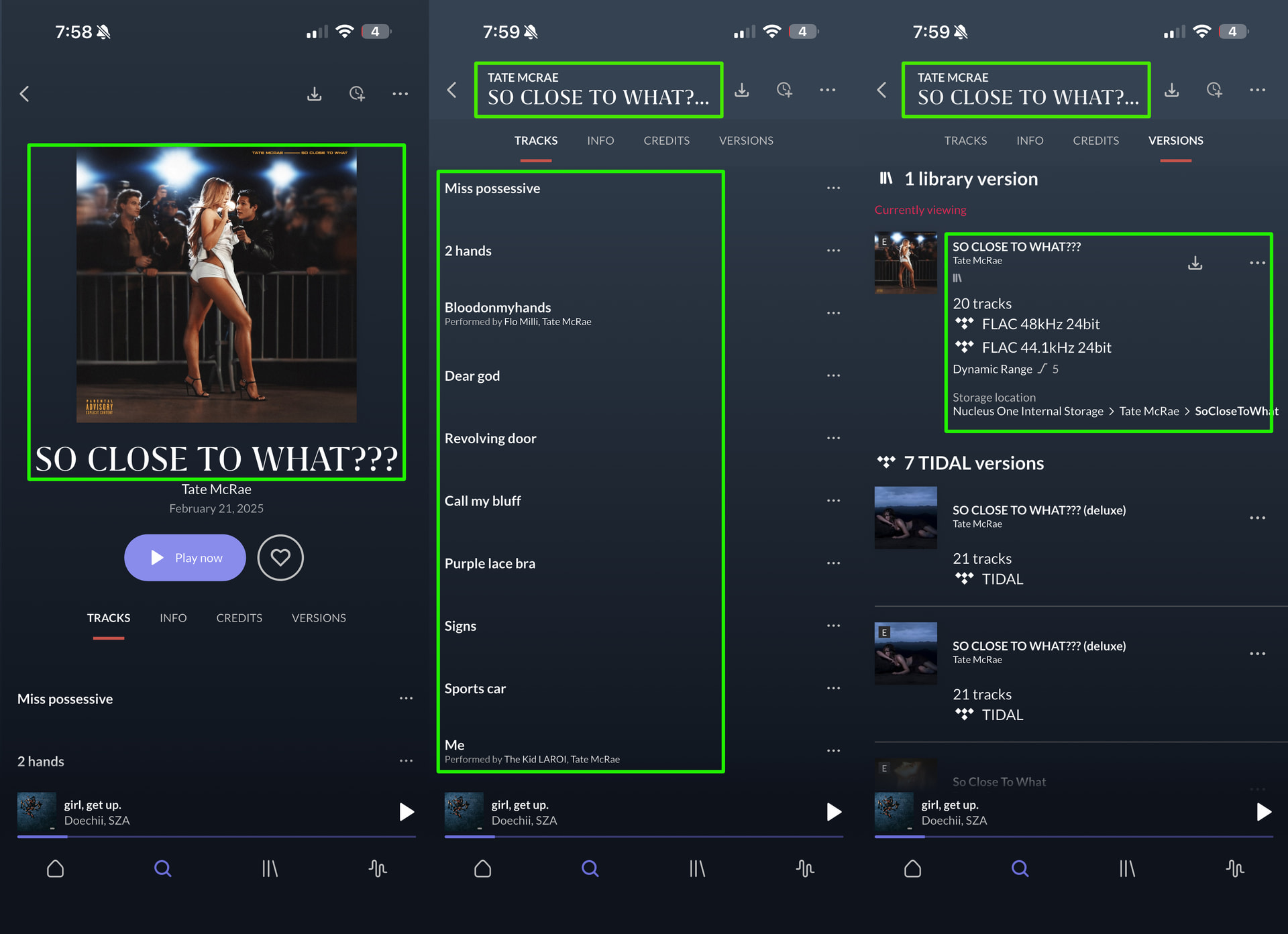
This one is a Tidal album with a single bonus track from my internal library:

and this morning it lost the bonus track and reverted back to the tidal album:

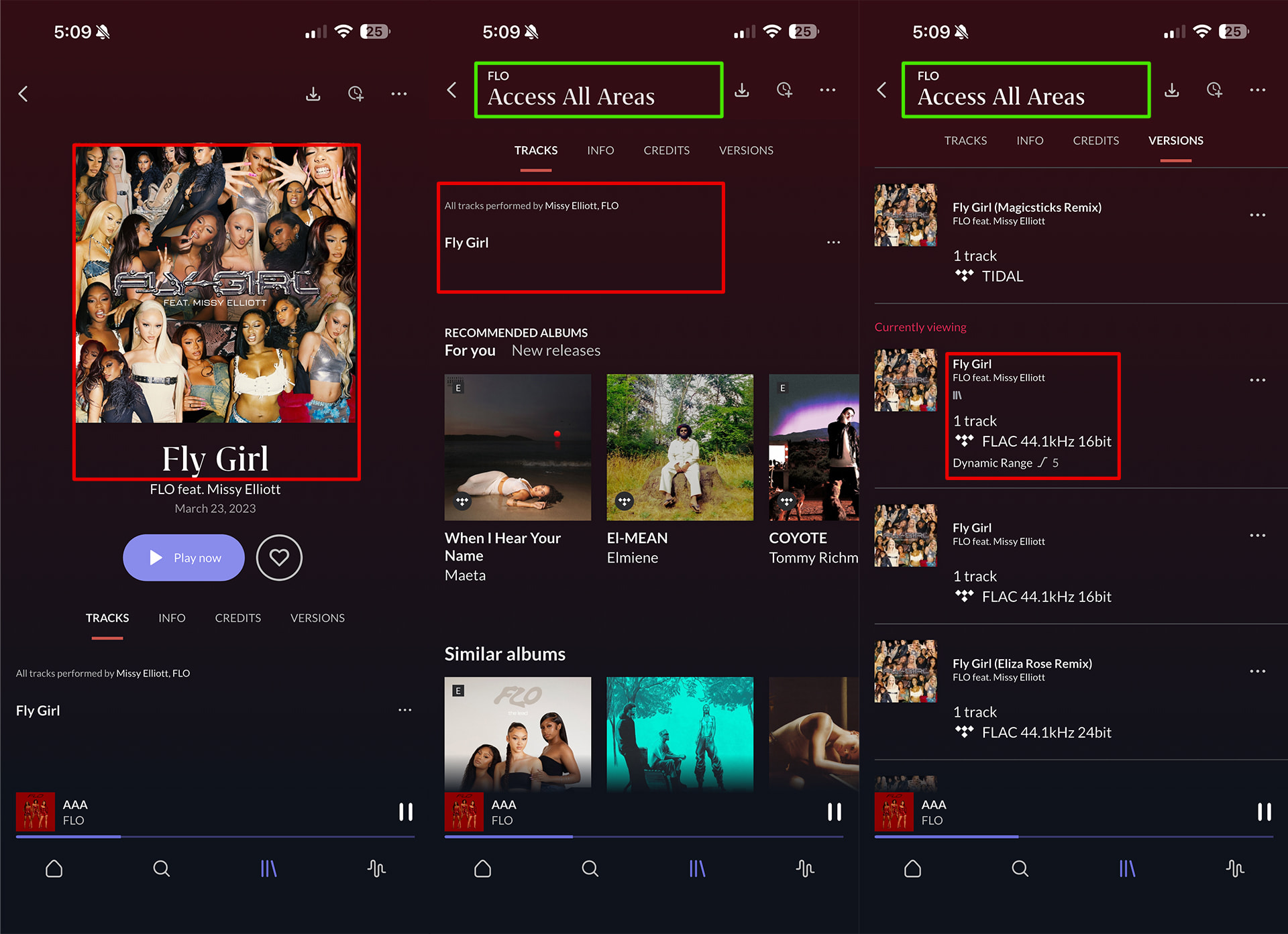
and another:

I can only get it to show the correct metadata changes when I go into the roon app on my computer and rescan each album. Then it shows correctly again. So something in ARC is not keeping the changes.

Do you still use the NAS for storing your media files?

Hey @Evan_Adams,

Thanks for the extra screenshots, these are really useful, and they actually pin down what’s going on.

First, we can rule out the NAS: your library files all seem to be on the Nucleus One’s internal storage now.

The key detail your screenshots show is that this isn’t ARC losing your metadata, it’s the version being displayed that’s changing. Each of these albums (Access All Areas, SO CLOSE TO WHAT???, GUTS, etc.) is a grouped set of multiple versions, with your edited multi-source version set as the one to show. When an album reverts, the title stays correct (which is why you still see the right name when you scroll), but the “Currently viewing” version has quietly switched to a different member of the group, for example, Access All Areas dropping to the single-track “Fly Girl,” and SO CLOSE TO WHAT??? flipping from your 20-track version to a 15-track one with a different cover and tracklist.

Your server logs line up with this. Roon re-checks album identity after the server restarts and during an automatic metadata refresh that runs overnight (around 1am your time). On these grouped/composite albums the identification is intermittently failing, I can see it happening on Short n’ Sweet, where it came through split into two pieces that both returned “could not identify.” When that happens, Roon falls back to a different version in the group, which is the revert you’re seeing. A rescan re-runs identification and re-applies your chosen version, which is why it fixes it every time.

A couple of the failures also coincided with the Nucleus briefly not reaching our metadata servers, which explains why it’s intermittent rather than every night.

Two things that would help me confirm and move this forward:

  1. Next time you catch one reverted, note the date/time (your local time) so I can match it to the exact refresh or restart in your logs.
  2. If possible, make sure the Nucleus has a stable, uninterrupted internet connection overnight, anything dropping its connection during that ~1am window could be contributing.

Could you temporarily connect your Nucleus directly to your primary router?

We’re having our QA team attempt to reproduce this in the meantime. Thank you!

No, everything is stored on my Nucleus One now. The NAS library has been decomissioned.

Thank you for your help! This all sounds correct as to what’s happening.

I did a rescan last night when I returned home from work. This morning, I did catch that Access All Areas was reverted 11:54am PST. The others appear fine at the moment.

I’m at work now but will connect the nucleus to my modem when I get home this evening.

Sounds good @Evan_Adams! We’ll be monitoring for your reply and results whenever you’re able to give it a try. :+1:

Alright, nucleus has been connected directly to the modem as of 11:55pm PST. Rescanning tonight and will report back with anything that changes in the AM.

Thanks for the update @Evan_Adams, if you do see the same issues revert, take note of the general date and time and we’ll see about taking a closer look. :folded_hands:

My server just crashed. Its 11:05pm PST on July 25. The roon app on my computer went into a “looking for roon server” loop. ARC would not load. I restarted the nucleus. Several of my albums reverted on ARC in the process. They had been fine since I connected it to the modem 3 days ago.

Hey @Evan_Adams,

Sorry you hit this, thanks for the exact time, that made it easy to pin down from fresh Roon Server logs.

Good news first: your server didn’t actually crash. There’s no error, no out-of-memory, nothing like that in the logs, the RoonServer process was healthy on memory right up to the end. What happened is it got progressively bogged down until it stopped responding, which is why the app landed in the “looking for Roon server” loop and ARC wouldn’t connect. Rebooting the Nucleus (which you did) was the right call to clear it.

Here’s the sequence I can see. Right around 10:54pm your time, a remote connection started rapidly connecting and dropping over and over, reconnecting every couple of seconds and repeatedly failing mid-handshake. At the same time the Nucleus was having trouble reaching our cloud cleanly (timeouts and dropped SSL connections). Between the two, the server piled up more and more stalled connections until it couldn’t keep up with normal requests, including talking to its own audio service. That’s the unresponsiveness you experienced. Then on the restart, Roon re-ran identification while things were still settling, and several grouped albums fell back to a different version, the same revert behavior we talked about earlier.

The common thread is the network change. Since moving the Nucleus directly onto the modem, its remote/internet path looks unstable, we can see the remote-connectivity checks failing (502/504), and with no router in front there’s nothing handling port mapping, which lines up with that reconnect storm and ARC struggling.

A couple of things I’d suggest:

Put the Nucleus back behind a router rather than directly on the modem.

And as before, if you catch another revert, note the local date/time so I can match it to the exact moment in the logs.

Let’s get the network back to a stable setup and see if the freezes and reverts stop together. :+1:

Thank you so much for your help so far! I will connect it back to the router tonight.

Sounds good @Evan_Adams, keep us posted on how things go.

Hi @Evan_Adams,

Wanted to follow up on this. Were you able to keep an eye on things after the steps we mentioned and see whether the issue changed at all? If you ran into anything different, or if there is still more we should look at, just reply with the latest details and we can take it from there.

Please note, if we don’t hear back from you this thread may close automatically soon. If the thread auto-closes and you need further assistance, please submit a reopen support request via the technical support help form below and specify that the issue should be reopened. Thank you.

Hey there. Things have been ok since i plugged my server back into the router. Haven’t had anything revert yet!

Morning! I spoke too soon.

Just opened Roon ARC at my office and several of my albums have reverted. GUTS by Olivia Rodrigo, Access All Areas by FLO, Dopamine by Normani, Future Nostalgia by Dua Lipa are a few that i’m noticing immediately.

However, other albums that usually revert like SO CLOSE TO WHAT?? by Tate McRae, Something Beautiful by Miley Cyrus, and MAYHEM by Lady Gaga are currently displaying correctly.

I noticed this around 11 AM PST. Last night before I went to sleep, around 10PM PST, I made the post above this one, where everything was fine. So it occured overnight or early this morning.

Let me know what you think, thanks!

Hey @Evan_Adams,

Thanks for the Aug 10/11 timestamps, and for your patience while we chased the network angle. I’ve been through your Roon Server logs and I want to redirect us, because the logs don’t support a connectivity cause: your server hasn’t restarted since Aug 9, and ARC’s connectivity checks have been returning success throughout, including across the whole window you flagged. Please leave your setup as it is now, behind the router. Nothing more to change there.

What the logs do show is on the library side, and I think it explains the pattern you’ve been describing since post 1.

Every album on your Aug 11 list is a hybrid. GUTS, Dopamine, Future Nostalgia and Access All Areas are TIDAL albums grouped with local files, and Access All Areas is assembled from tracks belonging to two different TIDAL releases alongside your local copies. Each time ARC builds a page for one of these, the server logs a warning that it’s encountered a mixed local/TIDAL source. That warning appears over 2,000 times in your logs, and it only appears on albums shaped this way.

More significantly: there are 199 albums sitting in your server’s identification retry queue that never actually get retried. Every check, every night, for the full twelve days of logs, the queue reports itself as not ready, and the count only climbs. The albums you’ve edited are among them. So when your library refreshes overnight, those albums can’t re-confirm which version they are, and they settle on whichever one is available. Re-scanning in the desktop app forces identification through, which is exactly why that keeps fixing it temporarily.

I can see the switch itself, too. Your album records get a new internal ID each time you edit one, and I can watch a single ARC album ID resolve to one record and then to a different record minutes later, same album, two different underlying versions.

One correction worth noting: there’s no library activity at all in the 10pm–11am window you gave me. The nearest event was about twenty hours earlier. That tells me the reverts are happening earlier than you’re catching them, which is why I’d like to tighten the timing.

Three things that would help a lot:

  1. Pick one album and check it on a schedule. Access All Areas is the best candidate. Fix it, then check it in ARC the next three mornings. Your server’s overnight maintenance runs 1am–5am, so checking right after it closes should pin the change to that window.
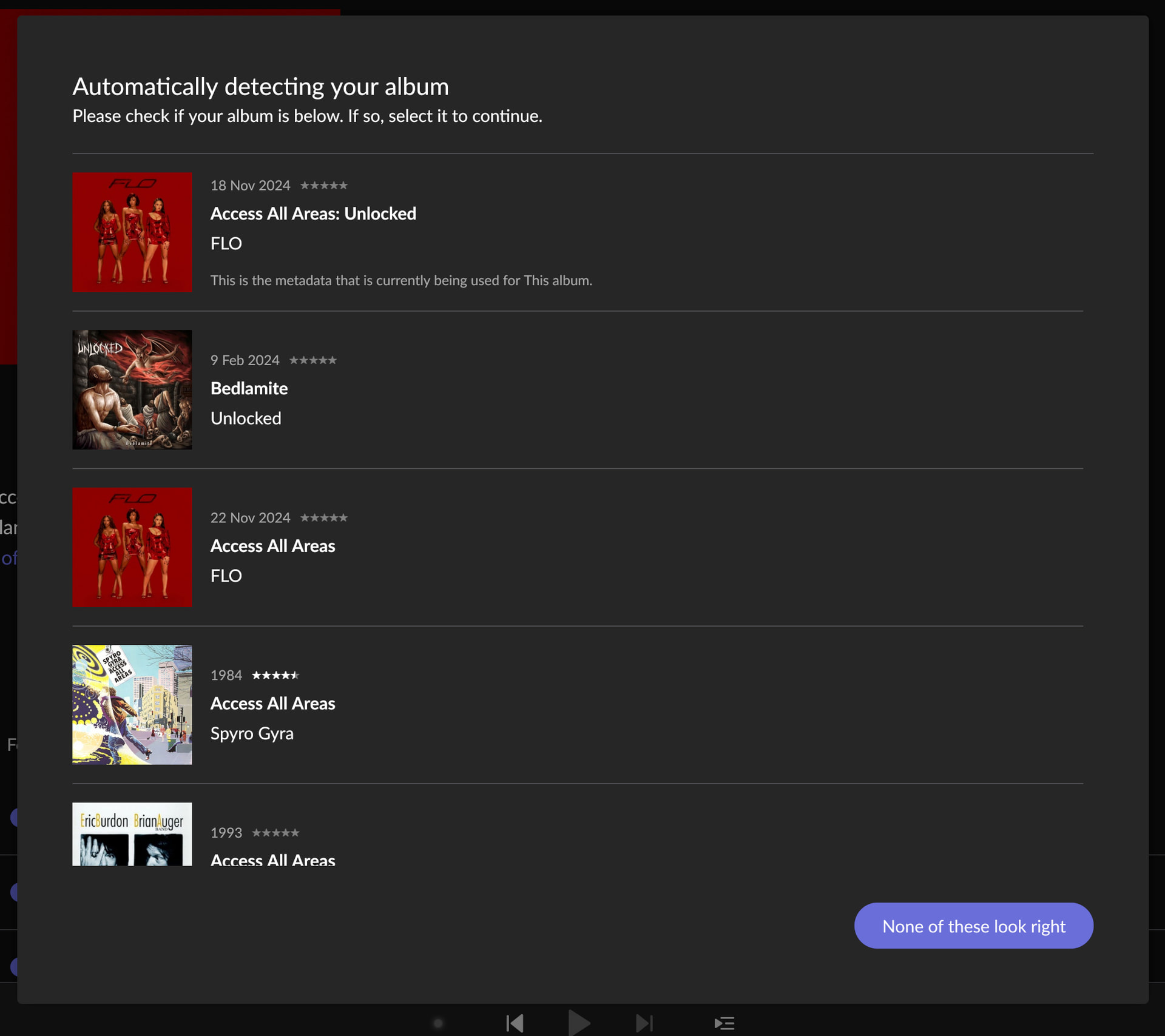
  2. On that same album, open Album Editor → Identify Album in the desktop app and screenshot what Roon offers you. With 199 albums stuck unidentified, I’d like to see what identification actually returns for one of them.
  3. Try ungrouping one affected album, separate the local version from the TIDAL version so it’s single-source, and leave it three nights. If that one holds while the others keep reverting, we’ve confirmed the trigger and you’ll have a workaround you can apply to the rest immediately.

And when you next catch a revert: force-quit ARC and reopen before doing anything else. If the album is still wrong, the server changed it. If it corrects itself, ARC was serving a cached page. That distinction narrows things considerably.

Hi there, thanks for continuing to look into this for me.

I will monitor Access All Areas starting tonight and will post the Identify Album page when I return home this evening.

Want to note on your second point, I typically identify any albums (including the hybrids) that include Tidal tracks using the proper metadata, only things like live albums and mixtapes or things that don’t have official metadata I leave unidentified. So it will likely show Access All Areas as an identified album.

To your third point; the whole reason I have roon is to have the ability to have my local files with my streaming albums, so is ungrouping them the ONLY way I can get it to work? A lot of these are not full local albums, its a full streaming album with 3 or 4 local songs added in, some of which are gapless albums. Does that mean I would need to start loading any hybrid album as a fully local album from this point forward if that’s the trigger? If so it kind of defeats the purpose of having the tidal integration for me.

Will update soon, thanks!

here is the identify album for Access All Areas