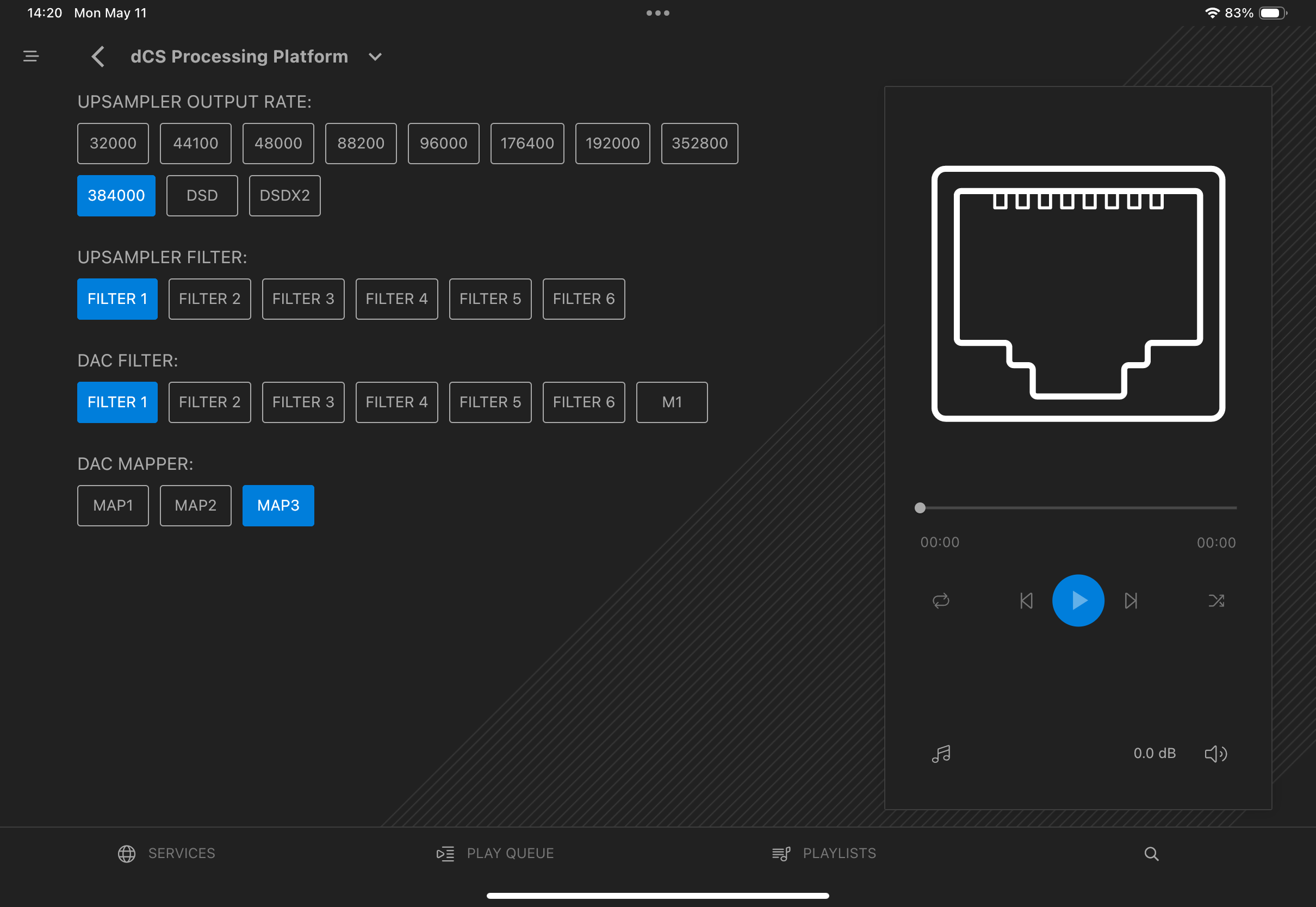
In this setup the Nucleus+ streams to a dCS Vivaldi stack (Upsampler, Master Clock, APEX DAC). There is no problem with the streaming and playback of musical content per se. The problem is with the music files’ metadata.
Normally, the artist, track name, album title, etc. scroll across the bottom of the Upsampler window during playback. But the scrolling metadata is missing. Album art, elapsed time, audio format, artist, track name, etc. should also be displayed on the right side of the dCS Mosaic iPad app. But metadata is missing from the iPad app as well (see screen shot).
It is possible to restore metadata to the dCS world by going into the Roon Queue, pausing playback of the currently streaming track, immediately reselecting that same track in the Queue, and saying “Play from here.” At that point, the missing metadata reappears in both the Upsampler window and in the dCS iPad app. In addition, everything will continue to work properly for subsequent tracks in the Queue – until you pause playback in Roon for more than a couple minutes. Once you’ve interrupted playback, you have to go through procedure described above to get music files’ metadata appearing again in the Upsampler and in the dCS iPad app.
Note: The first time you launch playback in the Queue following a Roon Server restart, everything works properly, with metadata appearing as expected in both the Upsampler window and in the dCS iPad app. But as soon as you interrupt playback for more than a minute or two, the metadata disappears, and you have to go through the steps described above to get it working again.
Tell us about your home network
· Comcast cable modem (~940Mbps download speed); eero routers (~2 years old); Araknis switches (~9 mo. old); local music files stored on Mac Studio 8TB SSD.
The Nucleus+ and the dCS hardware are both hardwired to the home network. They connect via network switches to the eero Gateway router. There are no WiFi hops between the Nucleus, the Upsampler endpoint, and the eero Gateway. The iPad obviously connects to both the Nucleus and the Upsampler via the eero mesh network into the hardwired ethernet. There are 3 eero routers in the household, one of which is within 4 feet of both the Nucleus and the Upsampler.
Thanks for the details on the network path. Please reproduce this again, and let us know the exact local time and date, along with the track that was playing when it happens next. We hope there may be clues in the Roon logging, so we’re going to enable diagnostics. Please send the info over when you have it, and we’ll take it from there.
Wed, May 13, 16:14 local time. Streaming track: You’re My Thrill. Album: Dreams and Daggers, Cécile McLorin Salvant (Qobuz 96/24). Metadata is missing.
16:15 local time. Paused and immediately restarted playback. Metatdata is now there.
Perhaps it would also help you to know that when you first start playback of a track, the track metadata flashes for just an instant on the bottom of the Upsampler window before IMMEDIATELY disappearing.
It appears my Mac Studio (same Nucleus+, same network, hardwired) has now been disabled as an Audio zone. On the Audio Settings page it says “Enabling” in red, but that’s obviously not happening. Can I get my Mac Studio Audio Zone turned back on? Thank you.
FYI - I tried rebooting the Mac Studio, and now that Audio Zone is back in business. So that issue is solved. Missing metadata on dCS app/Upsampler remains a problem.
Thanks for the timestamp and additional information! Glad to hear you got your macOS audio zone back up and running properly as well.
We were able to capture the timestamp you shared, and found some valuable diagnostic information that we’ll need to share with our development team for further insight.
In the meantime, can you run through the following:
In your Araknis switch admin panel: look for any "port power saving," "EEE (Energy Efficient Ethernet)," or "link down on idle" settings on the port the Vivaldi Upsampler is connected to. Disable these.
In your eero app: check if any "device sleep" or "low-power" mode is active for the Vivaldi's IP (192.168.7.78).
On the dCS Vivaldi Upsampler itself: in its network settings, check if there is an auto-sleep or network power-down option in the Mosaic setup.
Check dCS firmware - ensure it’s running the latest version.
See if you can assign a static/reserved IP to the Vivaldi in your eero DHCP settings if you haven’t already. DHCP lease renewals can occasionally cause brief link interruptions that trigger the reconnect cycle.
The Araknis switch features you reference are not applicable to the simple (“passive”) Araknis switches used in this network. They have no such capabilities.
Similarly, in my version of the eero hardware/eero app (eero Pro 6), there are no “sleep” or “power-saving” settings anywhere to be found.
Same for the Vivaldi gear – the only power-saving feature is to place the entire device in sleep mode.
dCS firmware is all up-to-date.
Finally, the Vivaldi had already been configured with reserved IP.
Thanks for the follow-up! We’ll have our partners team attempt to reproduce this issue in-house, which may take some time.
We’ll be in touch once this happens, or if any additional information is found along the way.
In the meantime, I’d attempt to set up the simplest and most straightforward network connection between your devices - try to bypass any and all network gear to get a simple, direct connection to your dCS and see if you experience the same issues.
Unfortunately, the floorpan of the home - external internet connection in one location, Nucleus/Vivaldi in a different room on a different floor - make it impractical set up the Nucleus+ and Vivaldi with no network switch in the signal path.
Thanks for your patience so far. Additional investigation has shown that the iPad running Roon Remote may be the primary culprit behind your issues, as the device repeatedly drops its connection at the times you’ve shared so far.
Specifically, when playback is interrupted, the Vivaldi enters an Idle state. On resume, Roon normally sends a request_source command with the display app URL (uwqUzTaPCR.rda) to re-establish the metadata overlay on the Upsampler. But when the iPad drops its RAAT connection mid-session, the transport layer gets confused about zone state, and the request_source either isn’t sent or doesn’t get acknowledged before playback restarts.
That, paired with your macOS discovery issues, is strongly points to network-related hiccups that should be further inspected.
While it may be impractical to set things up in a simplified session, it looks to be a critical next step in ruling out any network-related errors. Is this something you’d reconsider, as you’d only need to test things temporarily?
Does this issue happen no matter the Roon Remote device that you use? Even setting up a temporary direct Ethernet connection from your macOS machine to your primary router may be helpful here.
Benjamin, Thanks for your continued attention to this.
I don’t normally use the iPhone to operate Roon, but I tried it just now.
On the very first try, it did NOT work. Metatdata was missing in both the Upsampler and in the dCS app, same as with the iPad. Though I could recover the metadata with the same pause-reselect-play procedure as on the iPad.
Then I waited 4 minutes, tried it again on a different track, and it worked normally - the metadata was there on the Upsampler and in the dCS app, just as you’d expect.
The iPhone OS is still at version 18, while the iPad has been updated to version 26 (the latest). It’s misleading, because iOS 18 is actually only one major release behind the 26 version.
Sorry, but I’m still not understanding what you’re asking for by way of further troubleshooting. For anything to work at all, both the Nucleus+ and the Upsampler have to be connected to the local network. Which means there has to be at least one switch in the signal path (in my case there are two before you reach the eero gateway router). Not sure what I’m missing here.
FYI, the Mac Studio is at the opposite end of the house and on a different floor from the gateway router. There is an ethernet cable run from the Mac to the same network switch that the Nucleus+ and the Upsampler are connected to in the listening room.
With the Mac in a different area of the house from the listening room, I obviously don’t use the Mac to control Roon on the Zone with the Vivaldi gear. However, I went ahead and tested it. I used the Mac to start playback of 12 different tracks over two days, trying tracks from all sources (local, Tidal, Qobuz), and with a variety of audio formats. After starting one track, I waited at least 5-10 minutes before launching playback of another track.
On Day 1, everything worked perfectly. Music started playing almost instantly on every single track, and there was absolutely no issue with the metadata. It appeared on both the Upsampler window and in the dCS app exactly as you’d expect.
Different story on Day 2. The metadata worked properly on 5 tracks. But on 1 track, it was missing from both the Upsampler and the dCS app.
A separate question: Should I install the latest Roon software update on my devices? All my devices are currently running Roon version 2.66 (build 1658) production. Please advise.
Thanks for the additional information! Based on your testing, it does still potentially point to an underlying network condition that causes confusion around zone state and the request_source either isn’t sent or doesn’t get acknowledged before playback restarts.
The unfortunate reality of this is that our team isn’t able to set up a similar system to test things on our end.
Yes, I’d say definitely update. We’re pushing out some optimizations that will help overall performance.
Wanted to follow up on this. Were you able to update your devices to the latest Roon software version, and have you had a chance to revisit the network checks we mentioned around the zone state and networking best practices? If you’ve seen any change in playback or the request_source behavior after the update, let us know what you found, thanks.
The Nucleus+, the iPhone, and the Mac Studio have been updated to Roon version 2.67 (build 1661). There appears to be no similar update available for the iPad.
There is no change in behavior – metadata still goes missing from the Upsampler window and from the dCS iPad app. You can still recover the metatdata by pausing and immediately restarting the currently streaming track.
The network is what it is. With the floorplan of the house, the location of the listening room (Nucleus+, Vivaldi stack), and the location of the Mac (well removed from the listening room), the network topology (including the 2 Araknis switches) cannot be changed. The only possibilities would either be to physically replace the Nucleus+, or replace the 2 network switches with a different model/brand.
I should mention. however, that the network works perfectly well for every other device/app we use in the household. For example, streaming video on a Mac, or an iPhone, or the iPad, or on AppleTV works fine. Whatever the problem is, it seems to be specific to Roon software/Roon hardware and/or the dCS environment. As one indicator, network speeds are regularly ~940Mbps for download and ~120Mbps for upload, as measured at the Mac Studio. Note that the Mac is at the farthest point in the local network from the gateway router and has to traverse both network switches to get there – with never a problem.
It is also true that there was never any problem with disappearing metadata until 8-10 months ago. Prior to then, it was exactly the same physical network running exactly the same devices (Nucleus+, Vivaldi stack, iPad, iPhone, Mac). Other than Apple OS updates, the only thing that has changed are the Roon software updates. In fact, I waited several months before reporting the metadata issue, thinking that a Roon software update would eventually fix it.