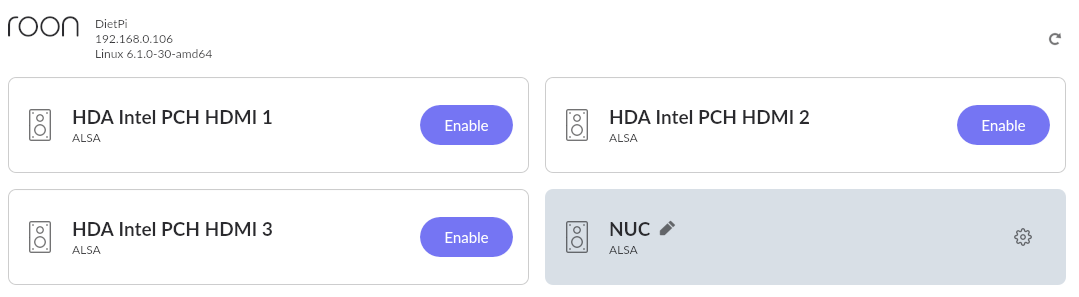
I am running it on a NUC10, never needed to try it on a Pi, and with the mini HDMI outputs it is always a pain. I do have 6 about, but all permanently running Ropieee or RooExtend
Regards
Mike
I am running it on a NUC10, never needed to try it on a Pi, and with the mini HDMI outputs it is always a pain. I do have 6 about, but all permanently running Ropieee or RooExtend
Regards
Mike
I’m on a NUC11, seems like I remember seeing some issue with the HDMI audio on the 11 or 12 when they first came out?
There were issues with Roon Rock as it didn’t support the chipset, but I don’t remember there being an issue with DietPi, but I have only been running it for the last year so do not want to claim any kind of expert status. It is something I use regularly with my setup, but i have never tried it with a Marantz system
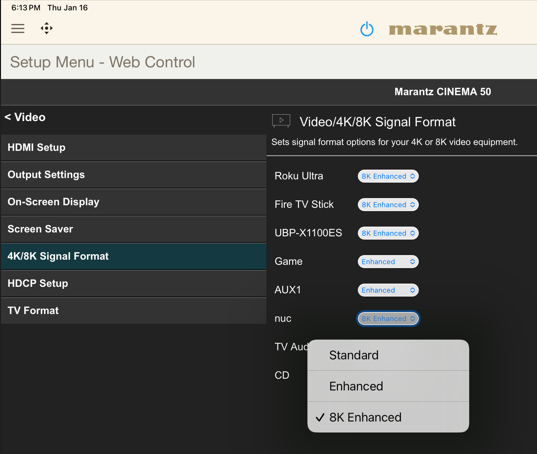
Tried a new C2G “HDMI with Ethernet - 4K 60Hz” cable and got the same results. Changed an HDMI input setting on the Marantz from “Enhanced” to “8K Enhanced” but no difference.
Very odd, I take it you have the intel HDMI driver installed?
Tried a fresh re-install of Diet-Pi with only (121) Roon Bridge installed, in case some how the Chromium display or Dashboard were causing some issue. Still get the same results.
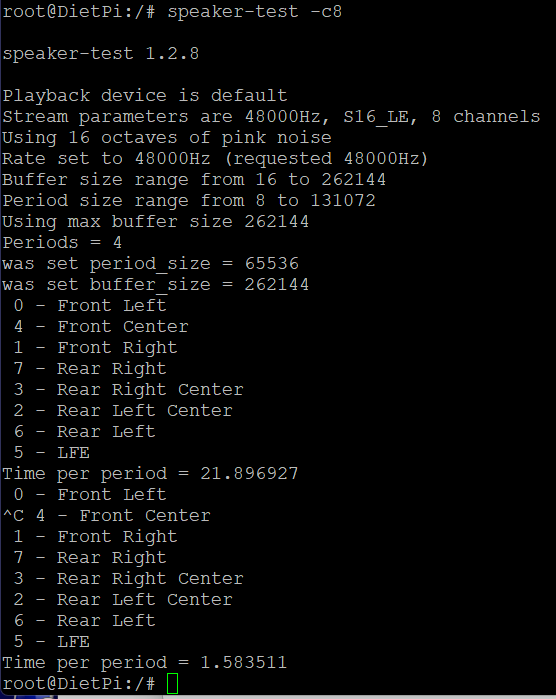
Now reading the ALSA man pages, tried “speaker-test” but got the error “playback open error: -2, No such file or directory”, I’m assuming I don’t have the syntax correct
I’ve tried it with and without the Intel drivers, same result.
Are you using HDMI 0 (audio settings Roon)?
Torben
Good call, Roon Bridge should expose more than one HDMI device HDMI 0 is the one to use.
Yes, using HDMI 0 in Roon, and it works when set to 2.0. It also works when Roon is set to 5.1 or 7.1 when I play a 2 channel track, it only fails when I send a multi-channel track when set to 5.1 or 7.1.
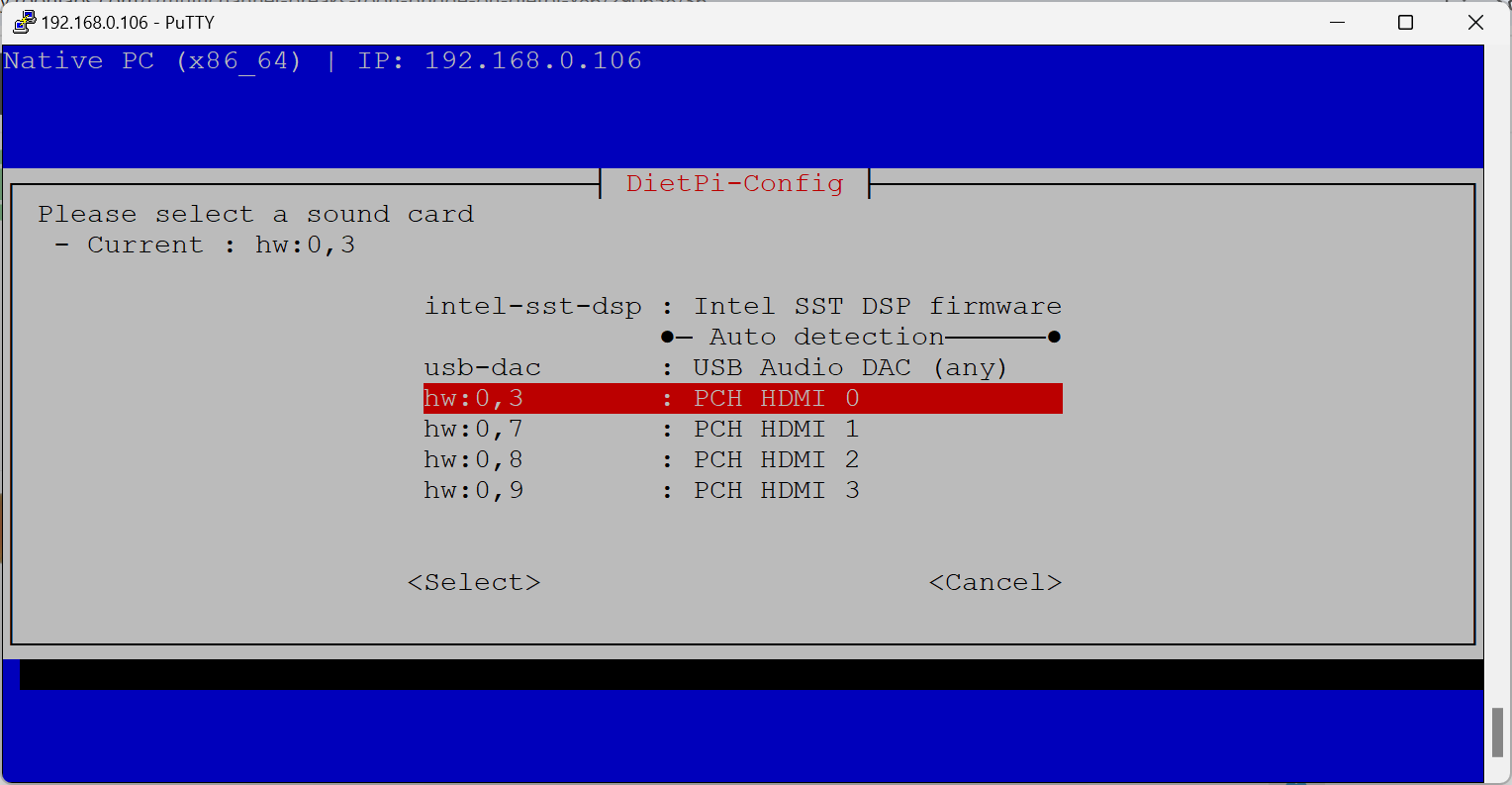
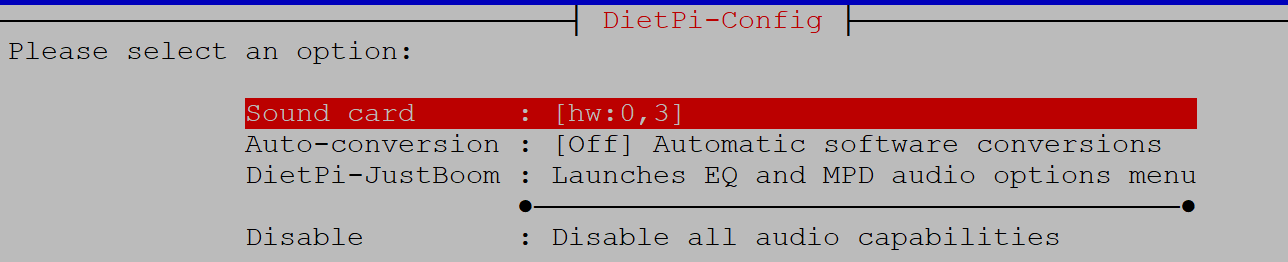
I set the default sound card in dietpi-config, and then was able to get speaker-test to work with -c2, -c6, and -c8, but I’m unfortunately not at home to hear if it is actually passing through the Marantz receiver. Will report back this evening.
I confirmed speaker-test works with 2 (2.0), 6 (5.1) and 8 (7.1) channels. So it is not the HDMI port, not the HDMI cable, and not the Marantz receiver.
Seems the failure occurs somewhere between the Roon Bridge and ALSA.
Anyone have anything else to try?
Sorry out of options here it’s an odd one. @MichaIng any more advice for David?
Odd indeed, I just wanted to ask whether HDMI ports has been ruled out, but when speaker-test can do 7.1, then it is. Though, just to be very sure, do you have or can generate a little more complex 7.1 wav file that you can play with aplay?
As Roon uses the bare hardware device directly, and no ALSA plugin that could be configured, channel number enforced at ALSA end or any such, we seem to be a little out of options on the OS level software side.
What can be tried is a kernel upgrade to Linux 6.12 from backports:
apt install -t bookworm-backports linux-image-amd64
Can be done as well for the Intel firmware:
apt install -t bookworm-backports firmware-intel-sound
After installing the kernel and intel firmware speaker-test no longer works and no audio from Roon, not even 2 channel.
root@DietPi:/# apt install -t bookworm-backports linux-image-amd64
Reading package lists... Done
Building dependency tree... Done
Reading state information... Done
The following package was automatically installed and is no longer required:
  linux-image-6.1.0-30-amd64
Use 'apt autoremove' to remove it.
The following additional packages will be installed:
  linux-image-6.12.9+bpo-amd64
Suggested packages:
  linux-doc-6.12 debian-kernel-handbook
Recommended packages:
  apparmor
The following NEW packages will be installed:
  linux-image-6.12.9+bpo-amd64
The following packages will be upgraded:
  linux-image-amd64
1 upgraded, 1 newly installed, 0 to remove and 51 not upgraded.
Need to get 105 MB of archives.
After this operation, 108 MB of additional disk space will be used.
Do you want to continue? [Y/n] y
Get:1 https://deb.debian.org/debian bookworm-backports/main amd64 linux-image-6.12.9+bpo-amd64 amd64 6.12.9-1~bpo12+1 [105 MB]
Get:2 https://deb.debian.org/debian bookworm-backports/main amd64 linux-image-amd64 amd64 6.12.9-1~bpo12+1 [1476 B]
Fetched 105 MB in 3min 40s (477 kB/s)
debconf: delaying package configuration, since apt-utils is not installed
Selecting previously unselected package linux-image-6.12.9+bpo-amd64.
(Reading database ... 30390 files and directories currently installed.)
Preparing to unpack .../linux-image-6.12.9+bpo-amd64_6.12.9-1~bpo12+1_amd64.deb ...
Unpacking linux-image-6.12.9+bpo-amd64 (6.12.9-1~bpo12+1) ...
Preparing to unpack .../linux-image-amd64_6.12.9-1~bpo12+1_amd64.deb ...
Unpacking linux-image-amd64 (6.12.9-1~bpo12+1) over (6.1.124-1) ...
Setting up linux-image-6.12.9+bpo-amd64 (6.12.9-1~bpo12+1) ...
/etc/kernel/postinst.d/initramfs-tools:
update-initramfs: Generating /boot/initrd.img-6.12.9+bpo-amd64
/etc/kernel/postinst.d/zz-update-grub:
Generating grub configuration file ...
Found linux image: /boot/vmlinuz-6.12.9+bpo-amd64
Found initrd image: /boot/initrd.img-6.12.9+bpo-amd64
Found linux image: /boot/vmlinuz-6.1.0-30-amd64
Found initrd image: /boot/initrd.img-6.1.0-30-amd64
Warning: os-prober will not be executed to detect other bootable partitions.
Systems on them will not be added to the GRUB boot configuration.
Check GRUB_DISABLE_OS_PROBER documentation entry.
Adding boot menu entry for UEFI Firmware Settings ...
done
Setting up linux-image-amd64 (6.12.9-1~bpo12+1) ...
root@DietPi:/# apt install -t bookworm-backports firmware-intel-sound
Reading package lists... Done
Building dependency tree... Done
Reading state information... Done
The following package was automatically installed and is no longer required:
  linux-image-6.1.0-30-amd64
Use 'apt autoremove' to remove it.
The following additional packages will be installed:
  firmware-atheros firmware-brcm80211 firmware-iwlwifi firmware-misc-nonfree
  firmware-realtek
Recommended packages:
  firmware-nvidia-graphics firmware-intel-graphics firmware-intel-misc
  firmware-mediatek
The following packages will be upgraded:
  firmware-atheros firmware-brcm80211 firmware-intel-sound firmware-iwlwifi
  firmware-misc-nonfree firmware-realtek
6 upgraded, 0 newly installed, 0 to remove and 45 not upgraded.
Need to get 48.6 MB of archives.
After this operation, 8389 kB disk space will be freed.
Do you want to continue? [Y/n] y
Get:1 https://deb.debian.org/debian bookworm-backports/non-free-firmware amd64 firmware-atheros all 20240709-2~bpo12+1 [22.9 MB]
Get:2 https://deb.debian.org/debian bookworm-backports/non-free-firmware amd64 firmware-brcm80211 all 20240709-2~bpo12+1 [5375 kB]
Get:3 https://deb.debian.org/debian bookworm-backports/non-free-firmware amd64 firmware-intel-sound all 20240709-2~bpo12+1 [823 kB]
Get:4 https://deb.debian.org/debian bookworm-backports/non-free-firmware amd64 firmware-iwlwifi all 20240709-2~bpo12+1 [13.1 MB]
Get:5 https://deb.debian.org/debian bookworm-backports/non-free-firmware amd64 firmware-misc-nonfree all 20240709-2~bpo12+1 [4249 kB]
Get:6 https://deb.debian.org/debian bookworm-backports/non-free-firmware amd64 firmware-realtek all 20240709-2~bpo12+1 [2163 kB]
Fetched 48.6 MB in 1min 41s (481 kB/s)
debconf: delaying package configuration, since apt-utils is not installed
(Reading database ... 35538 files and directories currently installed.)
Preparing to unpack .../0-firmware-atheros_20240709-2~bpo12+1_all.deb ...
Unpacking firmware-atheros (20240709-2~bpo12+1) over (20230210-5) ...
Preparing to unpack .../1-firmware-brcm80211_20240709-2~bpo12+1_all.deb ...
Unpacking firmware-brcm80211 (20240709-2~bpo12+1) over (20230210-5) ...
Preparing to unpack .../2-firmware-intel-sound_20240709-2~bpo12+1_all.deb ...
Unpacking firmware-intel-sound (20240709-2~bpo12+1) over (20230210-5) ...
Preparing to unpack .../3-firmware-iwlwifi_20240709-2~bpo12+1_all.deb ...
Unpacking firmware-iwlwifi (20240709-2~bpo12+1) over (20230210-5) ...
Preparing to unpack .../4-firmware-misc-nonfree_20240709-2~bpo12+1_all.deb ...
Unpacking firmware-misc-nonfree (20240709-2~bpo12+1) over (20230210-5) ...
Preparing to unpack .../5-firmware-realtek_20240709-2~bpo12+1_all.deb ...
Unpacking firmware-realtek (20240709-2~bpo12+1) over (20230210-5) ...
Setting up firmware-iwlwifi (20240709-2~bpo12+1) ...
Setting up firmware-atheros (20240709-2~bpo12+1) ...
Setting up firmware-misc-nonfree (20240709-2~bpo12+1) ...
Setting up firmware-brcm80211 (20240709-2~bpo12+1) ...
Setting up firmware-realtek (20240709-2~bpo12+1) ...
Setting up firmware-intel-sound (20240709-2~bpo12+1) ...
Processing triggers for initramfs-tools (0.142+deb12u1) ...
update-initramfs: Generating /boot/initrd.img-6.12.9+bpo-amd64
root@DietPi:/#
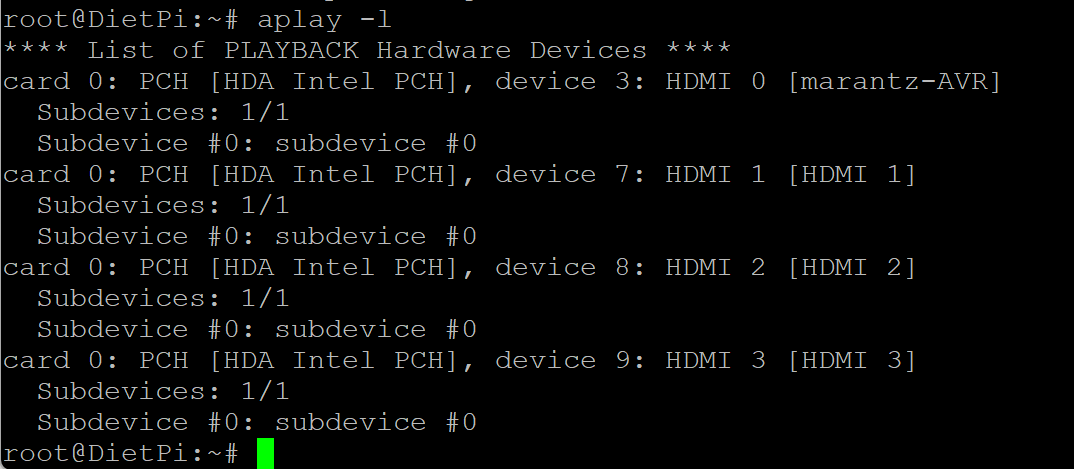
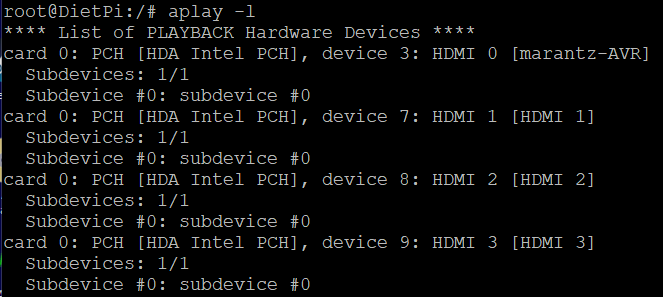
You did a reboot? What is the output of:
aplay -l
Uncommon that the Debian backports kernel has any issues  .
.
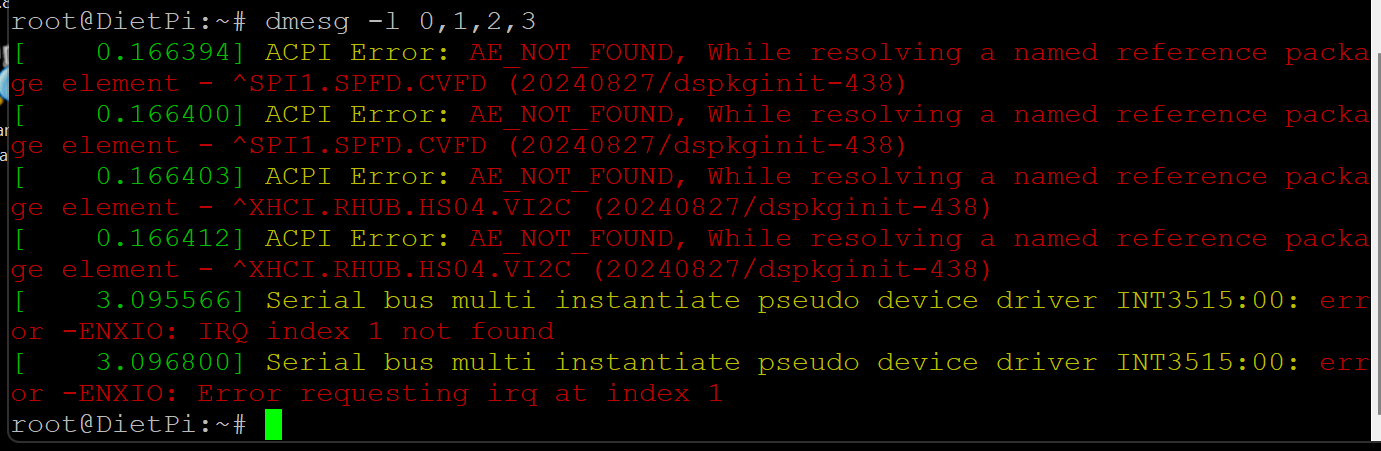
Any kernel errors?
dmesg -l 0,1,2,3
Very surprising, and then I hope whatever the issue is, it is fixed until Debian Trixie is released, which is expected this summer. Freeze dates have been published already: Bits from the Release Team: trixie freeze dates
Since Linux 6.12 is the LTS, that won’t change anymore (only patch versions).
However, you can downgrade the kernel like this:
apt install -t bookworm linux-image-amd64
root@DietPi:~# dmesg -l 0,1,2,3
[ 0.166394] ACPI Error: AE_NOT_FOUND, While resolving a named reference package element - ^SPI1.SPFD.CVFD (20240827/dspkginit-438)
[ 0.166400] ACPI Error: AE_NOT_FOUND, While resolving a named reference package element - ^SPI1.SPFD.CVFD (20240827/dspkginit-438)
[ 0.166403] ACPI Error: AE_NOT_FOUND, While resolving a named reference package element - ^XHCI.RHUB.HS04.VI2C (20240827/dspkginit-438)
[ 0.166412] ACPI Error: AE_NOT_FOUND, While resolving a named reference package element - ^XHCI.RHUB.HS04.VI2C (20240827/dspkginit-438)
[ 3.095566] Serial bus multi instantiate pseudo device driver INT3515:00: error -ENXIO: IRQ index 1 not found
[ 3.096800] Serial bus multi instantiate pseudo device driver INT3515:00: error -ENXIO: Error requesting irq at index 1
root@DietPi:~#