Hi! What’s not quite right with Roon?
· None of the above quite fits
None of the above quite fits
· None of these quite match
Tell us what's going on
· i need help forRoonOS Reinstall Directory
Tell us about your home network
· ORANGE LIVE BOX 7
· None of the above quite fits
· None of these quite match
· i need help forRoonOS Reinstall Directory
· ORANGE LIVE BOX 7
· Nucleus Rev A
· Other
· The Nucleus boots up and I can connect to it in the Roon app without issue, but I have a question about configuration/storage/attached devices
RoonOS Reinstall Directory please, my nucleus is the first nucleus, i don't know if it is A, B or else
Please don’t open duplicate support requests - I’ve merged them to make it easier for the tech support team to deal with your issue. Thank you.
Does this clear things up?
If not, could you elaborate? It’s not easy decoding what your question is, or it’s context.
What do you want to do with the Reinstall Directory?
Hi @Pierre_Masse,
Diagnostics indicate that this is a Nucleus Rev B. What is your specific question regarding RoonOS and the reinstall directories?
Do you have a problem with your Nucleus? Our account servers show you might have spun up a second Roon Server in the meantime on another machine, but you mentioned the Nucleus is accessible.
Hi @Pierre_Masse,
Wanted to follow up on this. Were you able to clarify what you were asking about with the Nucleus Rev B and the RoonOS reinstall directories, and confirm whether the Nucleus itself is still giving you trouble? We also saw signs that a second Roon Server may have been started on another machine, so let us know if that is the setup you are using now and how things stand. Thanks, and please reply with any updates or questions.
I set up Roon Server on my Mac a bit by chance, but I made a few mistakes along the way.
Before that, I’d tried just about everything to get my Nucleus working via the Roon.app on my Mac
It still appears on my network as operational, and I’d even deleted my storage via ‘Data’ – which I’m forced to open as a ‘guest’! – and which hadn’t opened for a long time with Roon.app
So currently, I can play music on my Mac via Roon and access Qobuz
I don’t want to load albums onto my Mac, but to use Nucleus
How do I sort all this out?
Cancel Roon Server on Mac, make Nucleus operational from my Mac, open ‘Data’ as a ‘referenced user’ (my Roon password isn’t recognised) and get Roon ARC back
Hi @Pierre_Masse,
Thank you for the explanation - let’s sort this out step by step.
1. Switch your Core back to Nucleus
Open the Roon app on your Mac, go to Settings → General, and click Disconnect. Roon will then ask you to select a Core - choose your Nucleus from the list. This will stop the Mac from acting as a Roon Server.
2. Access the Nucleus storage from your Mac
Open Finder → Go → Connect to Server and enter the address that matches your Nucleus model:
smb://NUCLEUS/Data/Storage/InternalStoragesmb://NUCLEUSPLUS/Data/Storage/InternalStoragesmb://NUCLEUSONE/Data/Storage/InternalStoragesmb://NUCLEUSTITAN/Data/Storage/InternalStorageWhen prompted for credentials, enter guest for both the username and password.
3. Roon ARC
Once the Nucleus is back as your Core, ARC should reconnect automatically. If it doesn’t, go to Settings → Roon ARC in the app and check the port forwarding status.
Let us know how it goes!
Hi Vadim,
Many thanks, Roon is on Nucleus and ARC on my iPhone.
But there is no more some things like:
Viewing an artist’s other albums, and, after the last track on an album, continuing playback via a playlist of similar tracks or accessing radio stations.
Thank you again for helping to sort out these issues.
Hi @Pierre_Masse,
To confirm, if you navigate to Roon Settings > General, which Roon Server is being displayed for you? Your Mac, or your Nucleus?
Please share a screenshot if you can.
If you’re seeing your Mac, then you’ll want to press the ‘X Disconnect’ button. This will bring you to a screen that will show you all your available Roon Servers, in which your Nucleus should be included on this list. Select your Nucleus as your server, and you should be all set to go.
Here’s an example screenshot, except you’re seeing my ROCK, rather than a Mac or Nucleus:
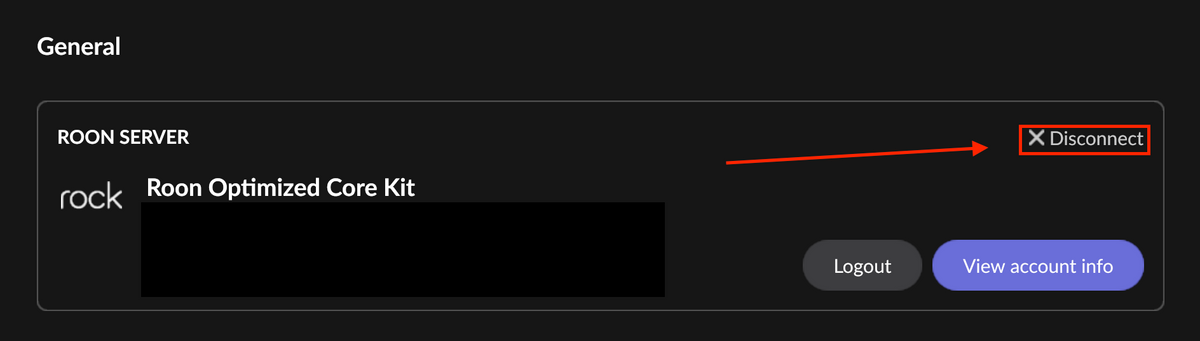
I hope this helps!
Hello @Pierre_Masse ,
According to our diagnostics, it doesn’t look like you have any internal storage installed on the Nucleus. To save content to the Nucleus directly, you’ll need to install an additional hard drive to it. If you’d like to keep the content on the Mac, then you can share it over the network to the Nucleus, but keep in mind you’ll need to have the Mac powered on and on the network to access the content, please see the guide below if you’d prefer to set things up this way:
