Thanks for sharing the ARC diagnostics — that helps clarify what’s going on.
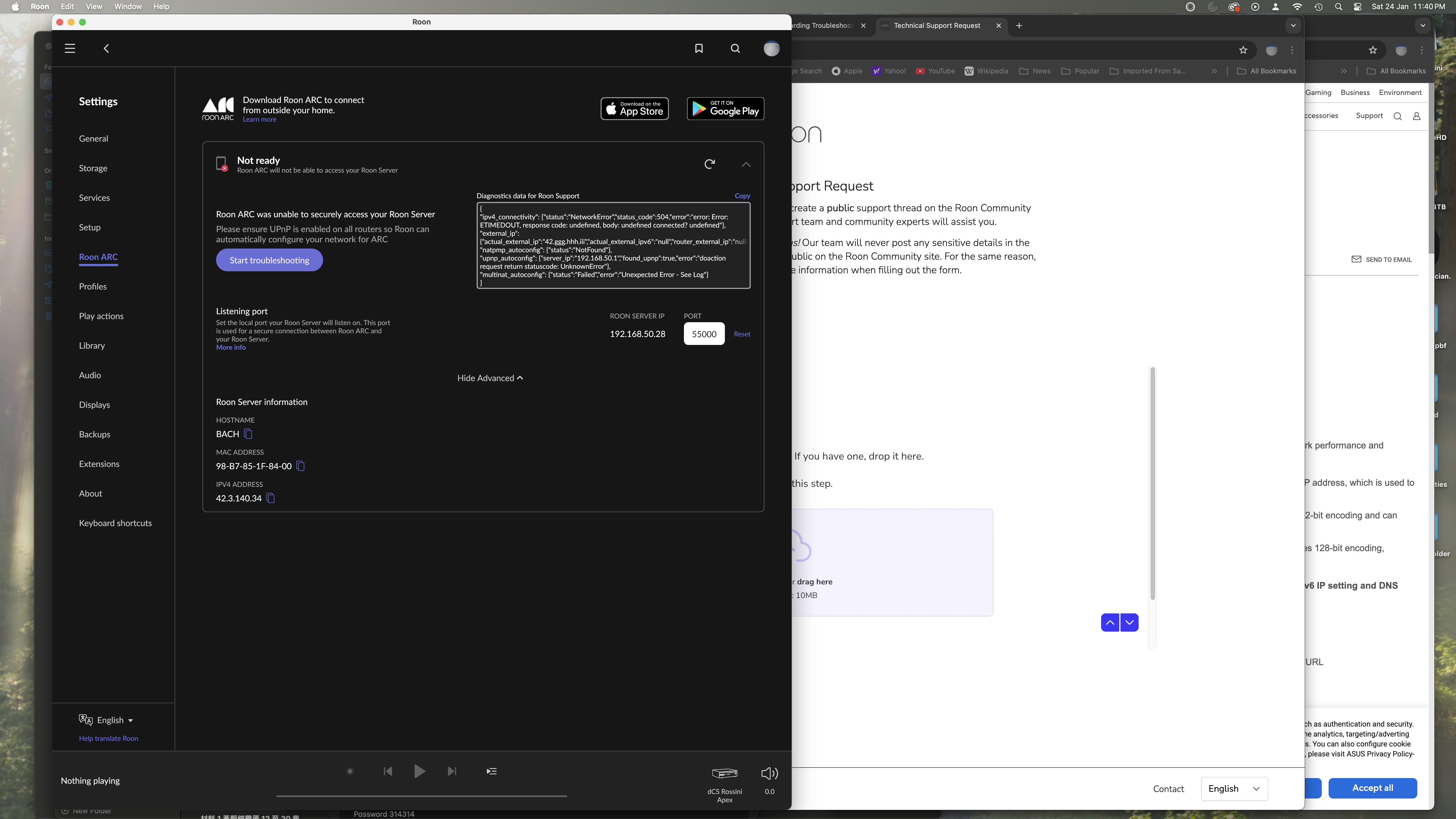
From the results you posted, Roon is unable to establish IPv4 connectivity from outside your network, and automatic port forwarding is not succeeding. A few key points from the diagnostics:
IPv4 connectivity:
status: NetworkError (ETIMEDOUT / 504)
This indicates that inbound IPv4 connections to your network are timing out.
UPnP / NAT-PMP:
UPnP is detected, but returns an error
NAT-PMP is not available
Multi-NAT detection failed
External IP mismatch:
Roon can see an external IPv4 address, but the router is not reporting one back. This often suggests an ISP-side limitation.
Taken together, this most commonly points to one of the following:
CGNAT (Carrier-Grade NAT) or similar ISP-level NAT
A router configuration that prevents inbound IPv4 connections
Port forwarding being blocked or unsupported on the WAN side
What we recommend checking next
Confirm with your ISP whether your connection uses CGNAT or otherwise blocks inbound IPv4 traffic.
If so, ARC cannot work with standard port forwarding.
If your ISP can provide a public IPv4 address (sometimes as an add-on), that usually resolves this.
Alternatively, you can use a VPN-based solution such as Tailscale, which bypasses the need for port forwarding entirely.
At this stage, the behavior you’re seeing is consistent with a network/ISP-side restriction.
Let us know what you find regarding CGNAT or if you’d like guidance setting up Tailscale — happy to help further.
Diagnostics indicate that you’re in a geographic region in which internet service providers are known to have imposed georestrictions and/or carrier-grade network address translation (CG-NAT).
This will not only limit RoonServer’s ability to automatically configure port forwarding, but it may also limit Roon’s ability to reach essential upstream services for login, metadata, and streaming service playback.
Do you use a consumer VPN with Roon? I suggest posting in Tinkering to see what users who share your internet service provider have done in the past to circumvent these infrastructural obstacles. Unfortunately, this is outside of Roon support’s ability to resolve.