I got this answer from Grimm Audio because of missing my Internal SSD via Roon. Under Mac OS it is fine! What Network Patch I habe to use to See my Library in Roon?
Recent changes in Windows security policy affect the way network drives can be accessed. Windows no longer allows you to connect to a shared drive without supplying a username and password. This also applies to the internal SSD in the MU1/MU2 when it is mounted over the network.
Because of this, every platform—Windows, macOS, and Linux—now has to provide credentials before it can access the MU1/MU2 internal storage. For normal computers this is not an issue, but embedded Linux systems, such as the Roon Nucleus, run without a keyboard, display, or user interface. They also cannot be reached via SSH. As a result, these devices cannot enter the required username and password, and therefore they cannot mount the MU1/MU2 internal SSD. This is not specific to our products—any drive that follows the current Windows policy will behave the same.
Roon will likely need to address this on their side, because the Nucleus cannot supply credentials in its current form. In short: • Windows policy now requires credentials for all network shares. • Embedded devices like the Nucleus cannot provide them. • We cannot change the MU1/MU2 behavior without breaking file transfers for everyone else.
Thanks for reaching out. Based on your description, it looks like Windows is blocking access to the Nucleus/ROCK internal storage due to its security settings regarding “Guest” access.
This is a common behavior in recent Windows updates (10/11), where the system automatically blocks network shares that don’t require a password. Since Nucleus is designed to be accessible without a password for convenience, Windows essentially puts up a barrier.
We have a step-by-step guide on how to adjust this setting in Windows so you can copy your music files:
Please give those steps a try and let me know if you are able to connect afterwards!
Thanks for the additional information! Please note that we do not support Primecore A7 - they are not a certified Roon partner and therefore we’re unable to provide accurate support for this device.
If you don’t have any issues with other machines accessing your network drive, then I’d definitely look further into the Primecore. Perhaps reaching out via our Tinkering section, where others running unsupported devices may be of help.
Hi, what do you think about the answer from Grimm Audio:
Because of this, every platform—Windows, macOS, and Linux—now has to provide credentials before it can access the MU1/MU2 internal storage.
For normal computers this is not an issue, but embedded Linux systems, such as the Roon Nucleus, run without a keyboard, display, or user interface. They also cannot be reached via SSH.
This means Nucleus have a problem with credentials, too???
And the A7 runs on Roon Rock with a Intel board NUC which is tested by Roon…
You can certainly provide username/password from the Roon interface, and according to your earlier post it looks like you’ve already tried this. It sounds like you may need to enable insecure guest logins to connect to the Grimm, please see our guide below:
Sorry - this is not the problem…i wrote it twice above, but I am not a native speaker and my english maybe is a problem.
I have a connection with my MacOS via Finder to the internal SSD in the Grimm Audio MU2… CHAT GPT shows the problem exactly:
You are using the PrimeCore Audio A7 as a Roon Core (i.e., an embedded Linux system → same problem as with the Nucleus!).
This means that the A7 cannot currently mount SMB shares with a username/password → so you can no longer see the internal MU2 disk in Roon.
This is not an error on your part, nor is it an incorrect path.
The A7 is technically unable to send the login.
This is precisely why every network path fails — no matter which one you enter.
But so that you can still try it correctly (in case the A7 gets an update at some point or you want to test it temporarily), here are the correct, working paths as intended for the MU2: Correct SMB paths for the MU2
Host names:
smb://mu2-disk
or if that doesn’t resolve:
smb://
Examples:
smb://192.168.1.128
Folder structure on the MU2 SSD:
/Disk/Music
The complete path (if Roon could SMB login!) would be:
smb://mu2-disk/Disk/Music
or:
smb:///Disk/Music
Credentials:
User: mu2-user
Password: mu2-pass The important point: Your PrimeCore A7 cannot enter this data.
This is exactly the same problem as with Roon Nucleus:
no GUI
no pop-up for entry
no SSH
embedded Linux
RoonOS-like SMB client without credential support Entering a username/password is currently technically impossible. The A7 cannot mount the MU2 disk, no matter how correct the path is.
Thanks for those details. Please note that the Nucleus is a different hardware server compared to your Primecore, and while both may be running Roon on Linux, the Primecore is a 3rd party Roon Server.
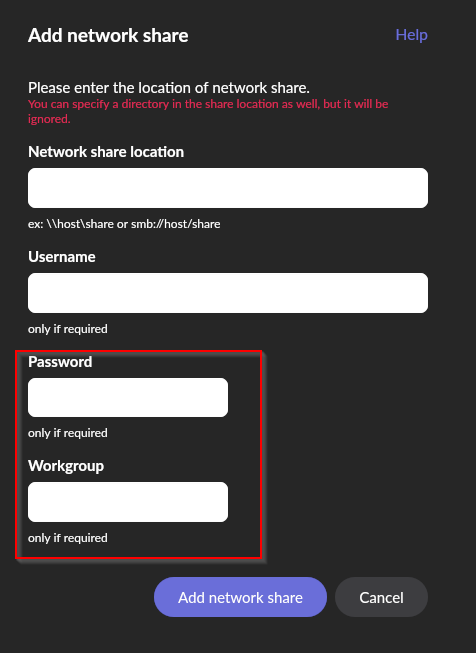
Roon (inside the UI) does support mounting SMB shares with a password (under Roon Settings → Storage → Add Folder → Add Network Share):
According to the MU2 documentation I found online, they mention that mounting via Linux is no longer compatible:
#5. MU2 internal drive not visible for external Linux Roon Servers since update v1.0.3.
To satisfy Windows security demands, we had to turn on SMB encryption in MU2 firmware v1.0.3 so you can copy your music to the internal music drive from a Windows computer. Unfortunately Roon Server on an external Linux computer does not support it so it cannot access the MU2 internal drive as a network share. When running the Roon Server on an external Linux computer we recommend mounting the music disk manually from the command line. Mounting the music disk from one MUx in another MUx is not possible. The problem does not exist when running an external Roon Server on a Windows or Mac computer, or when using the built-in Roon Server of the MU2.
This appears to be a limitation in the MU2 itself due to the encryption algorithm they are using. I would reach out to PrimeCore support staff to see if there is a way to mount a share directly in the PrimeCore OS.
Thank you for your question — this is an important clarification.
At this point, moving to a Nucleus Titan would not be expected to resolve this issue. Based on the information available from Grimm Audio and our own testing, the behavior you’re seeing is not specific to your current hardware.
Rather than speculate further, we’re going to forward this use case to our R&D and QA teams so they can review the interaction between Roon Server and the encrypted SMB storage in more detail.
Once we have feedback from them, we’ll follow up here with a clear answer on what is and isn’t possible in this configuration.
Thanks for your patience — we’ll update you as soon as we have more information.
I wanted to touch base with some good news, which is that our technical team has been able to reproduce this behavior and we’ve opened up a bug report with our developers.
While I can’t say for certain when this bug will be fixed, getting things reproduced in-house is a critical first step, and I will keep this thread up to date as the team passes along feedback and work begins to get this resolved. Thanks again for the report!
 Correct SMB paths for the MU2
 The important point:
 Your PrimeCore A7 cannot enter this data.
 Entering a username/password is currently technically impossible.