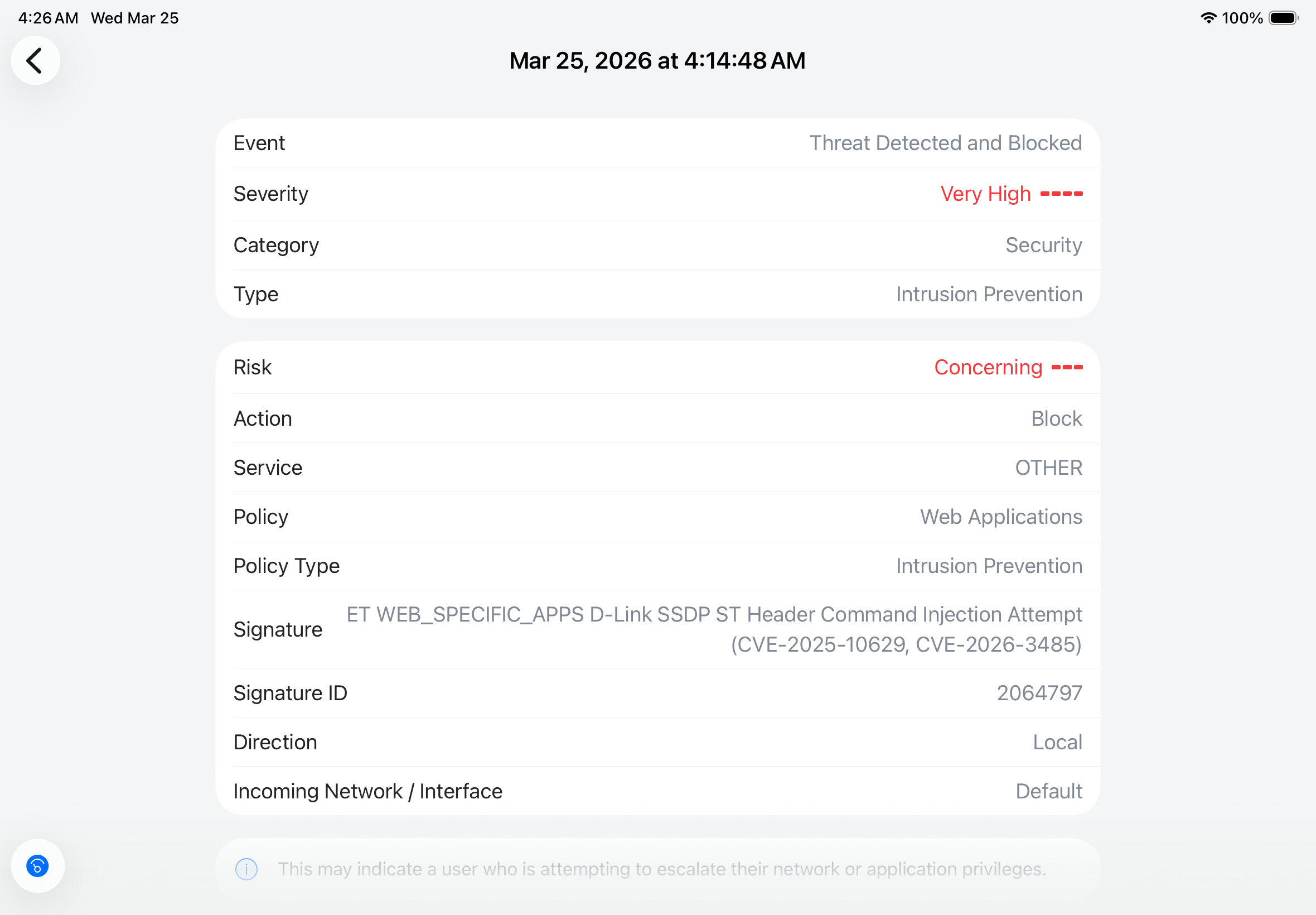
· Suddenly getting constant messages from my gateway that a network intrusion attempt from Roon has been detected and blocked. Is there anything Roon might be doing that might seem like a threat? I am considering factory resetting Roon as a last resort. I have more detail of the threat my Ubiquiti Dream Machine Pro has identified but I did not see a way to attach it.
Tell us about your home network
· Ubiquiti Dream Machine Pro, Ubiquiti Switch Pro 48, no VPN, on default vlan.
Thanks for sending the file over! It is completely understandable that seeing a “High Risk” security alert on your gateway would be alarming. However, in this specific case, it is very likely a false positive rather than an actual malicious attack from your Roon server.
The core of the issue lies in how Roon discovers other devices on your network.
The Protocol (SSDP): Roon uses SSDP (Simple Service Discovery Protocol) to find audio outputs and controllers. SSDP communicates via UDP port 1900, which matches the dpt=1900 in your log.
The Signature Match: Your UDM-Pro is flagging a specific signature: ET WEB_SPECIFIC_APPS D-Link SSDP ST Header Command Injection Attempt.
The "False Positive": Intrusion Detection Systems (IDS) look for specific patterns in network packets. Sometimes, the way a legitimate software (like Roon) formats its "Search" or "Notify" headers looks similar enough to a known exploit pattern that the system triggers an alarm. Because the signature mentions CVE-2025-10629 and CVE-2026-3485, your gateway is being ultra-cautious against command injection vulnerabilities.
The log shows your Roon server (192.168.1.160) talking to your gateway (192.168.1.1).
Destination Port 1900: This is standard for UPnP/SSDP discovery.
The "Target": It is common for discovery services to ping the gateway to see if it provides any media or network services.
Why now? If you recently updated your UniFi firmware or Roon software, the IDS signatures may have been tightened, or Roon's discovery broadcast frequency might have changed.
A factory reset of Roon is unlikely to solve this because this is a network-level interpretation of Roon's standard behavior. Instead, try these steps:
Suppress the Signature: In your UniFi Network application, go to Settings > Security > Detection logs. Find this specific event and look for an option to Allow or Suppress this signature. Since you know the source device (192.168.1.160) is your Roon server, it is safe to tell the UDM to ignore this specific SSDP signature from that IP.
Assign a Static IP: Ensure your Roon server has a fixed/static IP. This makes it easier to create "Allow" rules in the firewall if the suppression doesn't stick.
Verify the Device: Just to be 100% safe, confirm that 192.168.1.160 is indeed your Mac/Roon Core and not an unidentified device on your network.
Overall, given that the "attack" is targeting your gateway on the SSDP port, and Roon is famous for its heavy use of SSDP for multi-room audio, this is almost certainly a case of your security system being "too good" at its job and misidentifying Roon's "hello" as an exploit.
There was a recent gateway update that coincided with the notification. I’ve allowed it through and the notifications have stopped. Thanks for your help.