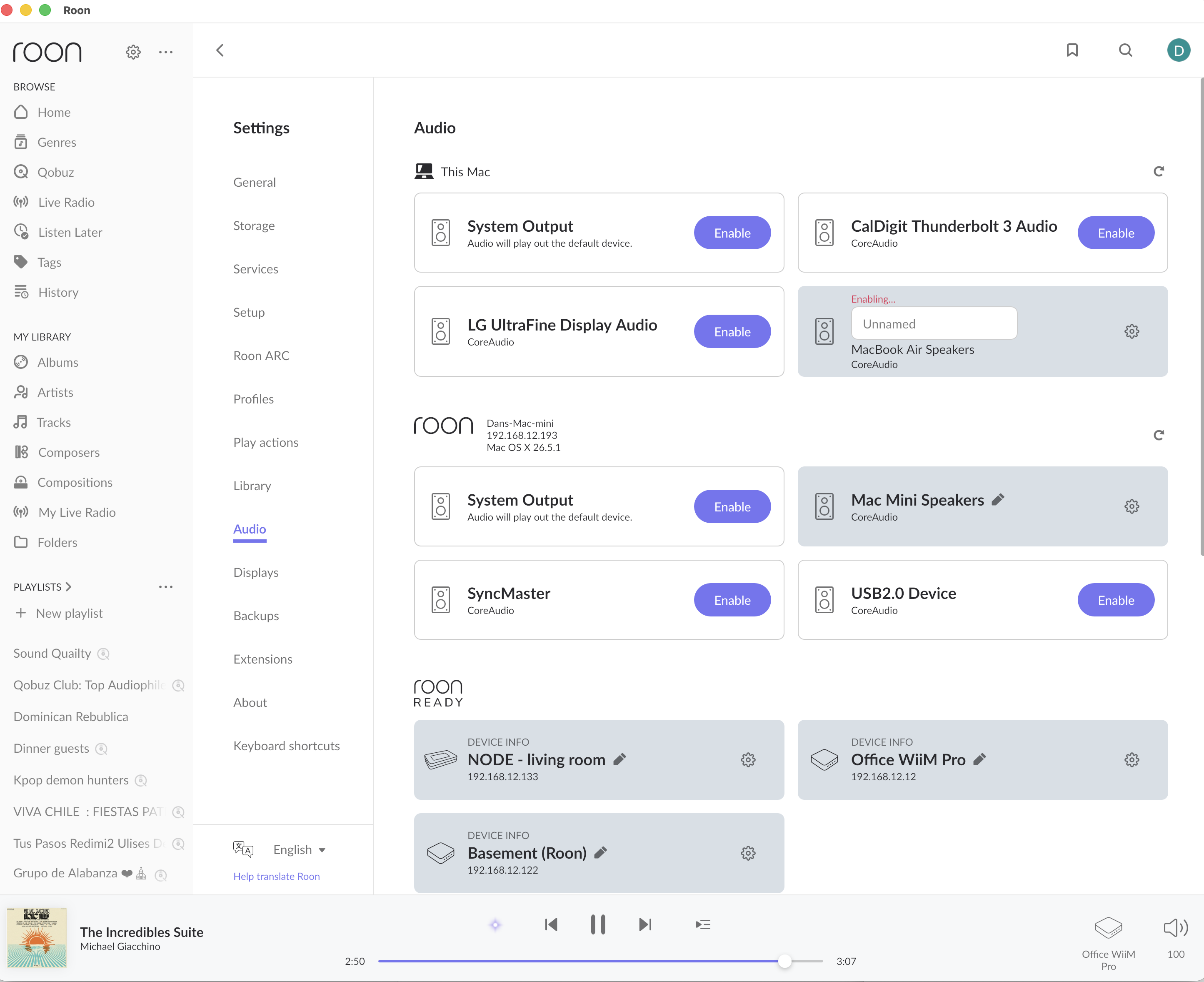
· New local audio endpoints are discovered by my Roon Core but cannot be enabled. They remain permanently stuck on "Enabling..." and never become usable playback zones.
Setup: Roon Server 2.57 (Build 1598) Mac mini running macOS 26.5.1 (Core) Qobuz Existing endpoints: Bluesound Node X and WiiM devices (all continue to work normally).
Problem: For at least the past few months, I have been unable to enable any new local audio endpoint (this affects my new iPhone 14 and new Macbook Air M5 computer)
Both devices are discovered correctly under Settings → Audio. When I click Enable, the device changes to "Enabling..." (red text) and never completes (stays frozen). The naming field remains "Unnamed" and I cannot proceed further. Existing endpoints continue to function normally.
What I've already checked:
Core and Remote are both running version 2.57 (Build 1598). Local Network permission is enabled on iOS. All devices are on the same LAN. Restarting the Roon apps does not resolve the issue. The problem affects multiple new devices, so it does not appear to be specific to the iPhone.
Tell us about your home network
· I have a T-Mobile router (over 5G), model: FAST 5688W
Thanks for writing in and sharing your report, it’s good to see you on the community!
As an easy next step, please update all your remotes and Roon Server to the latest version.
Then, if the issue still reproduces, share a more specific date and time of when the failures occur. We’ll be able to enable diagnostic mode for your Roon Server to take a closer look.
Thank you! I just updated all my remotes, and also updated the Roon Server. That wouldn’t update on its own, but when I manually downloaded the latest version to replace the old, reset my computer, and opened it, it was up to date and the problems were solved. Thank you! I’m wondering… I’ve had several issues with Roon since I purchased a lifetime subscription about 6 months ago. I’m curious if I were to purchase a dedicated Roon Core machine, would it mean I’d likely have zero problems (due to updates on my curren Mac Mini, etc.)? Thanks for the help!
Glad that sorted it, and thanks for closing the loop.
On your question: yes, a dedicated Core machine tends to be more reliable than running Roon Server on a general-purpose Mac. A Mac mini is built to be a full desktop computer first, so things like macOS updates, sleep behavior, and background processes can all end up interfering with Roon Server in ways they wouldn’t on a machine built just to run it.
Two paths worth considering: a Roon Nucleus, our own dedicated hardware built and tuned specifically to run Roon Server with nothing else competing for resources, or ROCK (Roon Optimized Core Kit) installed on your own hardware, commonly something like an Intel NUC. Both take Roon Server out of a general-purpose OS entirely, which removes a lot of the update and background-process variability you’ve been running into.
It won’t guarantee zero issues ever, nothing does, but it removes an entire category of the kind you just described.