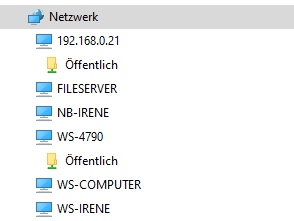
Your screenshot shows that the error message is “An extended error has occurred”.
Microsoft claims that it is associated with SMBv2 negotiation failures when using Windows Server 2012 or Windows 8, but I suppose it might also occur with other versions of Windows:
Hi Menzies. Thanks for your help. I turned off the firewall and still no joy. I agree that Rock should appear in the network automatically. However from what I am reading, Windows has been trying to close down the guest access for sometime now and it looks like this is the case for me. There is no way that a windows user should have to use the registry editor and other hidden Windows systems to access something like Rock. It has been suggested that this is a Windows issue. I have to disagree, this is a Roon issue. I am no expert, but if it is the guest access that is the issue, why can’t they bypass this and give the user the option to create a user name and password in the web interface. Very frustrating.
Thanks for reaching out Geoff. Unfortunately none of the suggestions in the link work for me. I am using Windows 11 Home edition. The PC is less than a week old and updated to the latest version shortly after I switched it on. I have tried access Rock with WFE and get the same results. Looks like, to me, that Roon is not keeping up to date with Windows security measures and that it is time they ditched the guest access. Meanwhile I am stuck.
Hi Menzies. I have already tried the powershell option with no luck. I can access my music on Rock from my phone, my streaming players and this very PC with the Roon app. My issue is accessing the data files so I can add music to them. I still have a pile of old CD’s I am ripping and need to be able transfer them. I bought this new PC so it would do it faster, which it does, but until I can access the share on Rock, I am stuck. Thanks for your input.
It is not a Roon or ROCK issue. It is your Windows 11 issue.
On a Surface Go 3, I just used File Explorer to connect to ROCK two different ways — both via the icon automatically populated under Network and via the Shortcut icon that I created on my Desktop.
It’s a Windows problem that they are disallowing an SMB feature that has existed for decades, that is perfectly fine in many home setups, and a reality with many devices, without providing any good way around it. Making the user dick around in the registry is squarely on Microsoft’s shoulders.
It’s a Roon problem that they haven’t yet dealt with this more gracefully.
My windows is on a brand new Surface Pro less than a week old. I should not have to tweak the OS to get software to work. It is the developer of the software that needs to ensure it works on the OS it is advertised to work on. It should work like yours did, straight from File Explorer.
I said nothing about tweaking the OS. If connecting to ROCK via SMB on my Windows 11 installation simply works, then why does yours not work? Think about it. The problem lies on your end, not on Roon’s end.
If Microsoft as developer and owner of the world’s most prevalent family of desktop operating systems decides to strongly discourage the unauthenticated guest access of network shares, any company developing systems which still depend on that feature must hurry to revise and change their software in such a way, that all access to networked resources is done with user/password authentication, or other provided authentication methods.
Not doing so amounts to aggravation of their user base, who have to deal with obscure and hidden workarounds or configuration settings not meant to be accessed by non-technical Windows users. Most users of Windows Home Edition will be non-technical by definition.
The discussion if this is Microsoft’s or Roon’s problem is missing the point. For Roonlabs it’s a matter of dealing with the things as they are, and not doing so, in my humble opinion, amounts to disrespect for their users. It’s equally missing the point to discuss if Microsoft is justified in having taken that decision. As is often the case, there might be arguments in favor and other arguments against such a decision, but the decision to discourage unauthenticated network resource access has been taken, and Roonlabs should have dealt with it a long time ago. But Roonlabs didn’t act on Microsoft’s change of policy for their OS, nor does it provide effective support for affected users. The OP is not the first Roon client affected by this, nor will he probably be the last.
Who says any change actually has occurred? You are jumping to conclusions, as if ROCK access via SMB no longer works on Windows 11 Home Edition. But that has not been proven at all. And therein lies the rub. Because SMB access has worked for me on Windows 11 Home Edition all year and worked again when I tried just this afternoon. Nothing has changed from my perspective, and if nothing has changed from Roon’s perspective, then Roon has nothing to fix.
Well, the possible change is a brand-new, factory fresh version of Windows 11 Home Edition delivered on a new Surface Pro.
If we start getting similar reports from other owners of new Surface devices, then we will know that Microsoft has done something that previous workarounds can no longer fix.
Personally, I support the view that Roon Labs should address this in RoonOS. If the Mountain won’t come to Mohammed…
You obviously haven’t read the whole thread. I am replacing an old laptop. They both have Windows Home Edition as the OS. My old laptop has no issues accessing the data folder on ROCK. My new Surface Pro does. They are sitting side by side and I have compared and made all the settings the same on both regarding network discovery, etc. Windows has been trying to close the guest access to shares for years and ROON must know about this. As I have already said, if software does not work with the OS it is not the OS that is at fault, it is the developer of the third party software that needs to ensure their software works with the OS. Which includes the latest (Security) updates.
SOLVED: I have finally managed to solve the issue. I compared the registry entries in the LanmanWorkstation entries on both my PC’s I have added RequireSecuritySignature to the parameters key and set it to 0 on my new PC and this has worked. I had the key enableSecuritySignatures bit not this one.
I stand by my comments that a user of ROON should not be going into the registry to change or add settings. This can easily be added to the install package at the developer end.
Oh, come on now, Geoff. Brand new computers do not ship with “factory fresh” OS versions. They have been sitting in warehouses for months. Existing hardware that has been out in the field for a while is what is far more likely to be running some bleeding edge beta or release version that causes a paradigm shift.
And there is the big “if.” Not when but if. Because if this is a real problem, then SMB access to ROCK would stop working for other Windows 11 Home Edition users like myself and we would be posting numerous Support requests. Thus far, that has not happened. It is just one user with a personal configuration issue.
could you please post the registry entry here? I installed the update to Windows 11 24H2 professional yesterday and can also not longer access my Rock over the network. I didn’t have this problem with the previous version (23H2). This issue affects all my Windows 11 PCs that I updated to version 24H2. Here is a screenshot of the error message:
It doesn’t work with \\Rock and also not with the IP address: \\192.16.0.99
I can ping the IP address without any problems. Deactivating the firewall doesn’t help either. And yes: My network ist set to privat.
Another note: I can easily reach my network server (Open Media Vault) using both its name and the IP address. The system is based on Linux and doesn’t cause any problems on the network. And I can also reach every other Windows and Linux PC on the network (I have more than 10). Just not Roon Rock.
Her’s a screenshot from my Linux Machine in the network. No problem, neither with his name nor with the IP address:
Oh come on now, AJ… It’s very clear from this thread that Windows 11 requires a specific set of registry keys to be configured in a specific way, to still allow non-authenticated guest access to shared network resources. And a Roon user with a new computer found out the hard way that the factory settings didn’t work with Roon.
Now, Roonlabs can make your position their own and say, ‘what gives, just a user with a personal configuration issue’… But… there is a beautiful Spanish saying of somebody who is of no help whatsoever… ‘Ni raja ni presta el hacha’ … somebody doesn’t cut (resolve a problem) nor give you the axe so you can easily handle the problem for yourself. Roonlabs don’t seem to give a jot about the authentication requirement, nor do they document and communicate the necessary registry settings, so that users running into problems can help themselves…
Their support of users running into this problem is of no use whatsoever, there has no effective help been forthcoming on this thread and to this particular paying customer. Roon’s customer had to painstakingly compare the registry settings of two Windows installations, one working and the other not, to find the offending configuration and resolve his problem.
No, that is a distortion. Factory settings for SMB access to ROCK numerous continue to work for numerous other Windows 11 users. No registry edits required.
What has become apparent only in the last hour from StereJo’s post is that this is probably a policy change due to the Windows 11 24H2 update. Billz never bothered to provide what Windows 11 version was installed. That information would have been useful, oh, maybe six days ago when this thread was started.