@Robert_Coppersmith
The Roon Server application (currently 2.66) updates fine on the original Nucleus and the Nucleus Plus. However, RoonOS (the lightweight linux based OS your Nucleus runs) does not receive updates anymore.
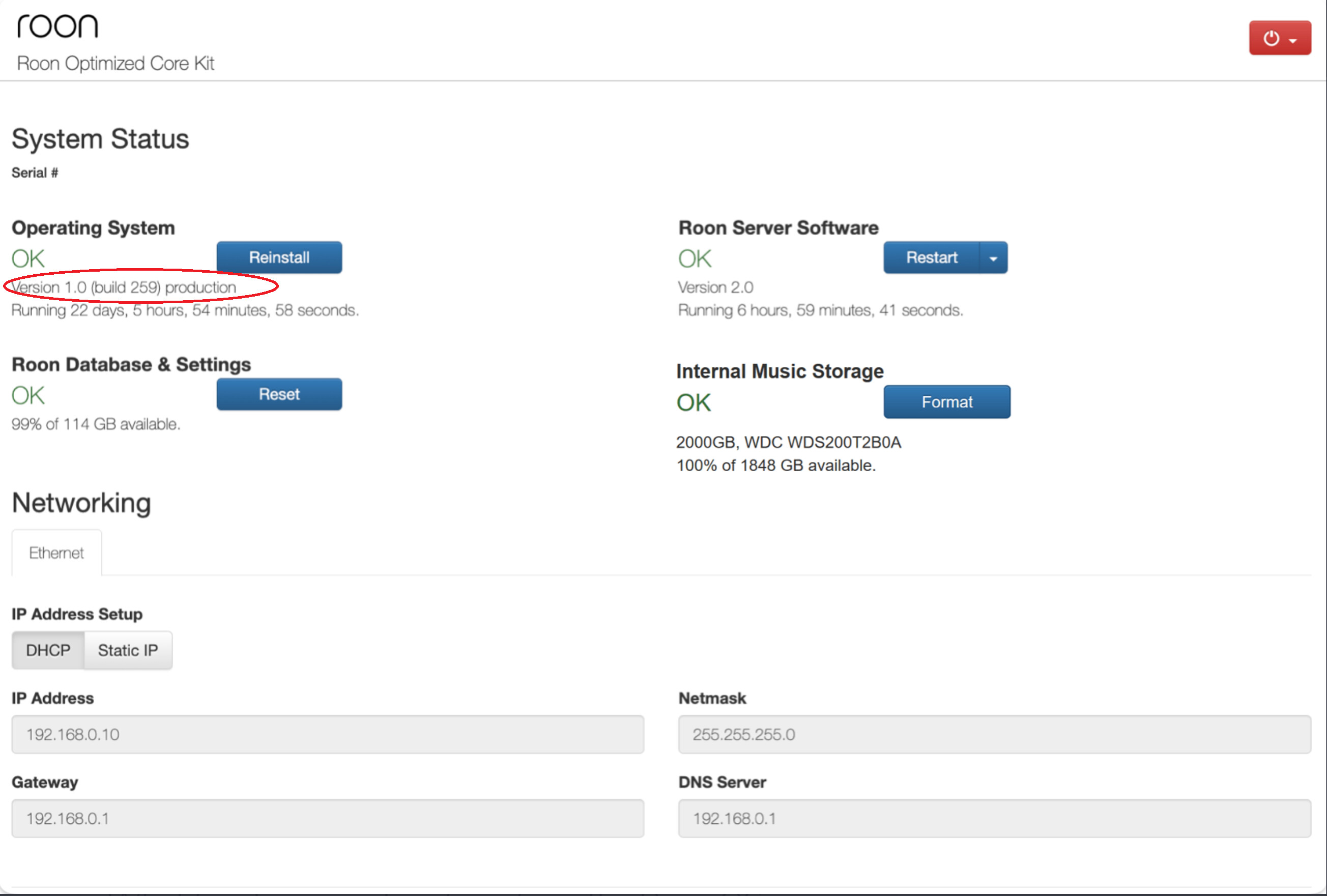
If you look at the WebUI of your Nucleus, you will see that the RoonOS version is still 1.0 build 259 as in this image from the Roon Help Centre image of the ROCK UI (The Nucleus and Nucleus Plus WebUIs are essentially identical except that they say ‘Nucleus’ or ‘Nucleus+’ instead of ‘Roon Optimized Core Kit’):
This is the last build that supports BIOS boot devices. Later RoonOS builds require UEFI boot and so will not work on your Nucleus, the Nucleus Plus and many ROCK installations which were originally done prior to the introduction of support for UEFI boot (RoonOS 1.0 build 254 was the first Roon OS to support UEFI boot).
Modern ROCK installations, the Nucleus One and the Nucleus Titan, will be configured (in the BIOS), to use UEFI boot and will have updated to RoonOS version 2.1 build 271 (assuming they are left on the production branch).
As present, the only advantage that RoonOS 2.1 brings is compatibility with a wider set of HDMI hardware (irrelevant to you because RoonOS 1.0 supports your Nucleus) and the ability to run Tailscale on the server to make using ARC in double NAT/CG-NAT situations easier or even possible. This may or may not be relevant to you.
However, going forward, RoonOS 3.0 is currently available in early access (but your Nucleus won’t support it) and that brings another couple of changes which may be valuable:
-
The SMB share that makes any music storage disk/SSD (internal or external USB) will no longer employ annonymous access so Windows 11 users will no longer have to change the security settings on their Windows Client machines.
-
The handling of disks that have not been unmounted correctly has been improved which should for example, eliminate the situation where a NTFS formatted USB drive becomes unaccessible if it was previously disconnected from a computer without first properly unmounting it.
So, on your Nucleus, whilst the Roon Server application itself will keep updating, the RoonOS operating system will not and your Nucleus will gradually fall behind, with respect to the administration features, compared to a Nucleus One or a Nucleus Titan.
If, your Nucleus is currently running fine on your network and you don’t need Tailscale (your ISP does not use CG-NAT) and you don’t use NTFS formatted USB disks/SSDs connected to your Nucleus, then for you, the updates to Roon OS don’t really matter. However, there is no guarantee that that situation will endure - for example, if you use ARC, then tomorrow, your ISP could decide to migrate the provisioning of your router external ip address to CG-NAT and then ARC will no longer work and, since RoonOS 1.0 does not support Tailscale running on the server, the workaround that you would have to employ (running Tailscale on another computer configured as a subnet router) would be significantly more complicated to set up and would likely require another device to be permenantly switched on when your are away from home (unless you are lucky enough to have a router that can run as a Tailscale subnet router as well).