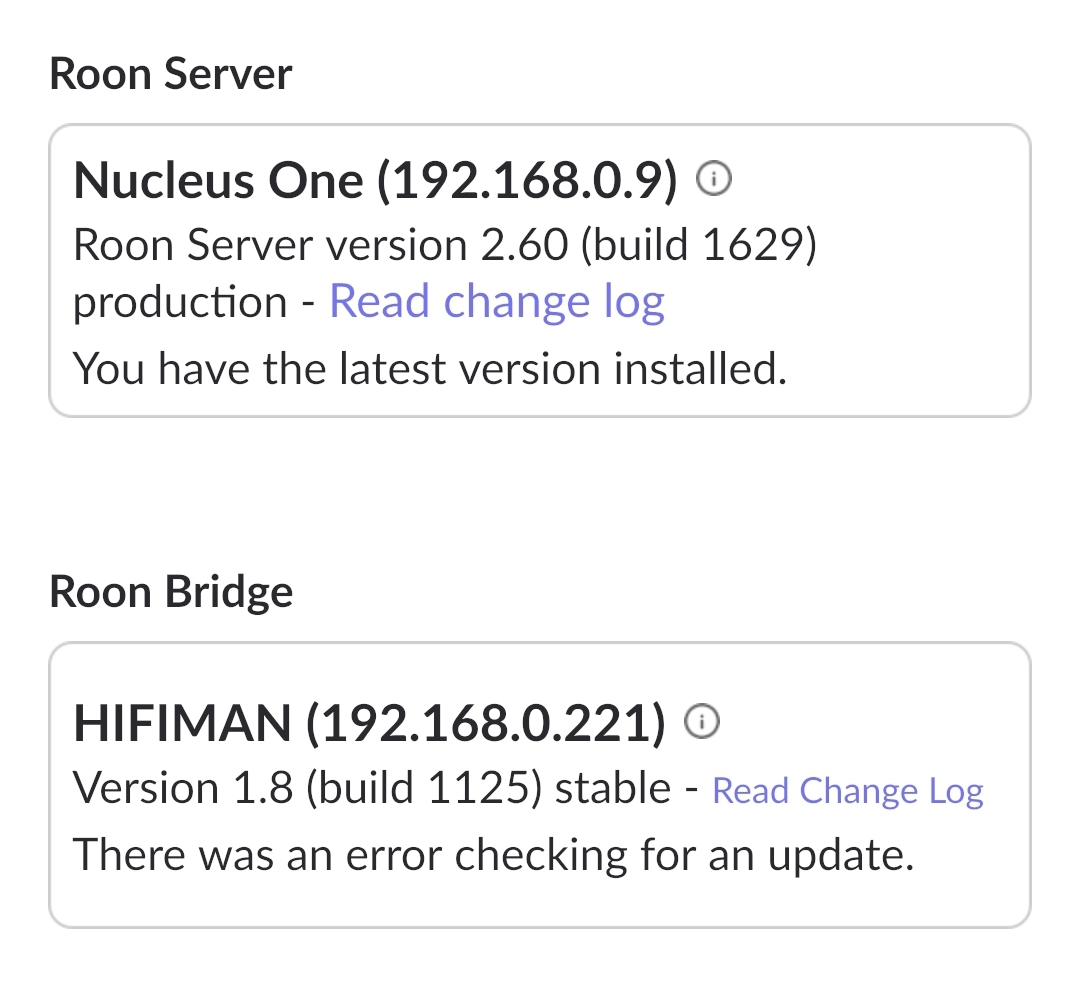
· Nucleus one roon server says that roon bridge update is ready to be downloaded. After clicking it downloads to about 80% and says "there wad an error checking for an update. -Jari
Tell us about your home network
· Router technicolor CGA437ATCH4, no VPN or switches or extenders.
To help us investigate this update error, could you please clarify which device is running the Roon Bridge software that is failing to update? (For example, is it a Raspberry Pi, a Windows PC, or another networked streamer?)
When an update hangs or fails at a specific percentage like 80%, it often points to one of two things:
Storage Space: The device might be running out of disk space to download and unpack the new update files.
Storage Health: If the device uses an SD card (common with Raspberry Pi), the card may have entered a “read-only” state or has corrupted sectors preventing the write process.
Could you please check the available storage on that specific device? If it’s a DIY device like a Pi, sometimes a quick restart of that endpoint or even re-flashing the SD card (after a backup) can resolve these stuck updates.
Let us know which device it is, and we can provide more specific steps!
Sometimes the Roon Bridge process on the EF500 hangs in a state where it can’t overwrite its own files.
If you could: Power down the Nucleus One and the EF500 completely. Unplug the EF500 from the wall for at least 30 seconds.
This clears the temporary RAM on the EF500 where the update is likely being staged.
See if this helps. If not:
Technicolor routers (like your CGA437) often have built-in “security” features that can interfere with the specific ports or protocols Roon uses to fetch update binaries.
Check DNS: If your router is using the ISP's default DNS, it might be struggling to resolve the Roon update server reliably.
The Fix: Try temporarily changing the DNS on your Nucleus (or router) to Cloudflare (1.1.1.1) or Google (8.8.8.8).
The "Advanced Security" factor: If your ISP is Cox or Comcast, they often have an "Advanced Security" toggle in their app. Try turning it off for 10 minutes and running the update again.
If that doesn’t help, it may be worth performing a factory reset on the Hifiman to clear any stale cache.
I have now completed the recommended troubleshooting steps:
• Power cycled all devices (router, Nucleus One, and EF500)
• Rebooted the network
• Changed DNS to Cloudflare (1.1.1.1 / 1.0.0.1) and tested again
Unfortunately, the issue still persists.
The Roon Bridge update on the HIFIMAN EF500 downloads normally to about 80%, after which the error appears:
“There was an error checking for an update.”
Additional information:
Roon Server: Nucleus One (working normally)
Network: Technicolor CGA437 router
No VPN, switches, or special network configuration
Other Roon endpoints update and work normally
Please note that a factory reset is not possible on this EF500 model, as there is no reset function available.
Since the download consistently fails at the same point, this may be related to the EF500’s internal storage, firmware, or compatibility with the current Roon Bridge package.
Are you still seeing this issue at the present time? We’ve been trying to resolve an outage, and I wonder if you were impacted by it earlier. If the issue is still ongoing, are you by any chance familiar with how to access RoonBridge logs on this device via the IP?
This thread is now closing due to inactivity. You can reactivate the conversation by submitting a new tech support request here and our team will pick up the case. Thank you!