What best describes your playback issue?
· Music doesn't start when I press "Play"
What type of Zone is affected by this problem?
· *Network Zones* are affected.
Is the affected network Zone connected with Ethernet or WiFi?
· Ethernet
Does the issue affect all file formats?
· The issue affects *multiple/all* file formats.
Does the issue happen with local library music, streaming service music, or both?
· *Both streaming and local* *library* music are affected.
Do you encounter any playback errors with the "System Output" Zone?
· I don't have a System Output available, but I'd like to keep troubleshooting
How is the affected Zone connected to your RoonServer machine?
· Network - Ethernet
Which network audio protocol is the Zone using with Roon?
· RoonReady
Does the device show up at all in Roon Settings -> Audio?
· Yes, it shows up there, but it isn't Enabled
Does the "Enable" button unlock the Zone?
· I can Enable the Zone, but the Zone disappears
Does the device play audio from another source when using the same connection?
· The device has no problems with another audio source
Have you checked that Roon is whitelisted in any firewalls?
· I've checked the firewall and the issue remains
If the device has multiple output options, do the other options work as expected?
· Only one output type is affected while the other output type works as expected
Is the device using the latest firmware as per the manufacturer?
· Firmware is up-to-date but the issue remains
Do you have an approximate timestamp of when the issue last occurred?
· 6:52pm 05/15 - Hoy Como Ayer by Hermanos Gutierrez. I've tried multiple different tracks.
What are the make and model of the affected audio device(s) and the connection type?
· Windows 10 Pro PC (custom build) via ethernet
Describe the issue
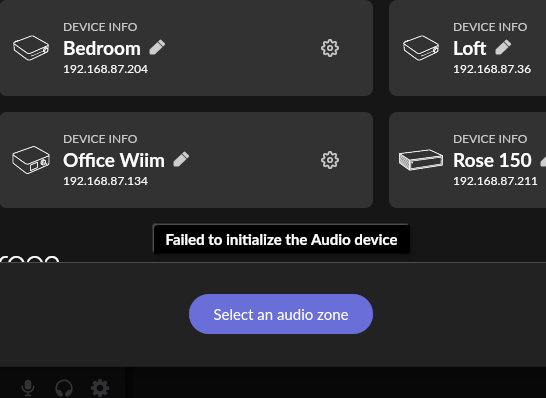
My PC is suddenly giving me the, "Failed to initialize the audio device." It is connected via ethernet to the NUC hosting the Roon server (thru an ethernet hub). This has been working for years with no problem. If I open sound settings (app volume and device preferences) on my PC + hit play, I can see it pop up briefly and then disappears and I get the failure message above on the roon app.
I have tested my other devices such HiFi Rose 150B, RS520, Wiim devices (all wifi) and they all work... it is just my PC. The PC shows up as an endpoint, but just won't play it. My windows drivers sound drivers are all up to date. Firewall has been checked and rechecked. Suggestions?
Describe your network setup
Directly wired from PC -> ethernet hub -> Roon server (NUK)