When I use roon on my window pc to play music, after about 20-30min, my pc will slow to the point of unusable even though music is still playing as normal. The progress bar of roon music player will hang and stutter and my mouse will be unresponsive or painfully slow. Usually this issue can only be solve by closing roon or shut down pc entirely. I am using a window 11 pro pc with 32Gb ram and ryzen 5 7600 6 core processor. It is connected to my asus AC86U router via LAN and is stable throughout. I am using a Intel NUC with 8Gb ram and 2Tb internal storage for music file which house about 900+ albums. I only experience this on my pc and have no problem playing on my Hifi system using roon endpoint.
Describe your network setup
Asus RT-AC86U router connected to pc and roon rock via LAN cable
Thanks for reaching out to us about this issue. It sounds like the issue you are experiencing is with the remote device you are using. The best next step would be to review logs from that remote device. We aren’t able to see this device in our system however. Can you please use the directions found here and send over a set of logs to our File Uploader? Once logs have been uploaded, please let us know so that we can check the server for your files, thanks!
Thanks for sending that log set over. Looking over the log, it looks like there is some analysis going on, you may want to set background and on-demand audio analysis to throttled in Roon Settings → Library. Can you please upload your PC Roon logs as well and let us know once uploaded? The PC logs may provide further clues as that is where the issue is occurring. Thanks!
Thank you for providing additional information. Based on your description, it sounds like your main PC—used as a Roon Remote—becomes unusable. This is quite unusual, as the Roon Remote application typically doesn’t place any heavy load on the system.
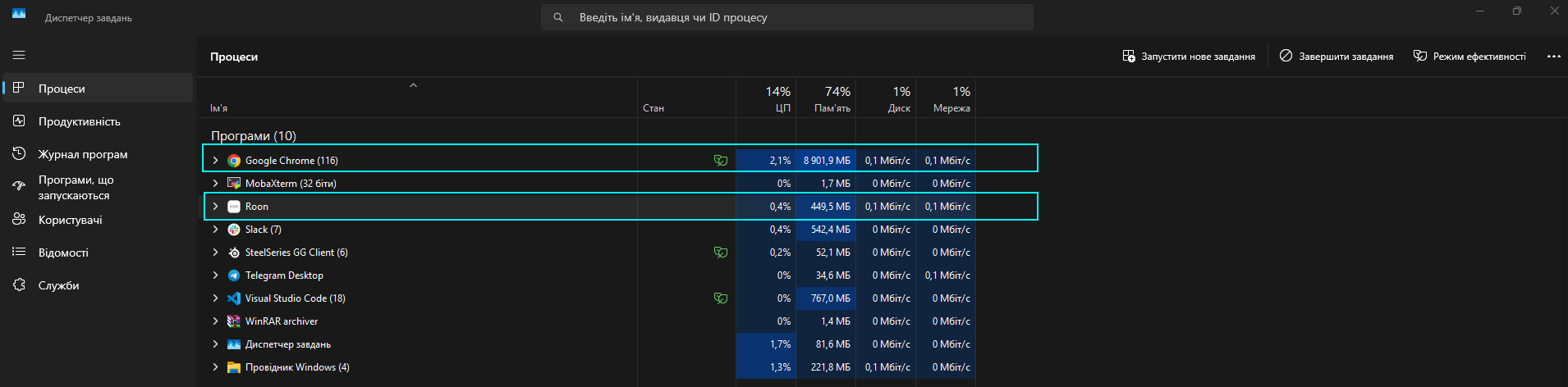
To illustrate, I’m attaching a screenshot showing the typical memory and CPU usage when running Roon Remote on a Windows PC: As you see, Chrome made much more system pressure.
Just to confirm, could you please share a similar screenshot from your PC while the issue is occurring? You can open the Task Manager by pressing Ctrl + Shift + Esc.
Also, based on your description, the behavior might be related to overheating. To check the CPU temperature, I recommend using a tool like Core Temp (Core Temp). It’s lightweight, free, and gives you real-time temperature readings for each CPU core.
Let us know what you find, and we’ll go from there.