Phantom albums appearing in Roon when Qobuz is integrated (ref#WOX8L2)

Hi! What’s not quite right with Roon?

· None of the above quite fits

None of the above quite fits

· None of these quite match

Tell us what's going on

· I have reached out to you guys regarding this issue a long-time ago and never got fixed. I have Tidal and Qobuz integrated on my Roon server. My issue is , when I sign into Qobuz I end up with about 600 phantom albums that aren't mine. If I log in on my app on my phone, everything is correct. I did try to sign out from Qobuz and re-started Roon several times, but it didn't fix it. Please advise me how to fix this once for all. Otherwise I will be canceling my services. Thanks in advance...

Tell us about your home network

· Nucleus 192.168.5.174

I can’t see a previous post by you (maybe different forum account?) but I thought it might be useful to say that there was a similar known issue on the Qobuz side a year ago (they mixed up Qobuz accounts) but this was fixed by Qobuz back then:

No idea if yours is related to that or why you still experience this.

1 Like

Hi @Steven_Alexander,

Thanks for explaining the situation — before we take any further steps, we need to clarify a couple of important details.

Could you please let us know:

  1. When did this behavior first start?
    Was it immediately after signing into Qobuz, after a specific update, or did it appear later on?
  2. Do you have a Roon database backup from before this issue began (from a time when your library looked correct)?

Knowing when the phantom albums first appeared and whether a clean backup exists will help us determine whether this is:

  • a service sync issue,
  • a database state problem, or
  • something that can be resolved by restoring from a known-good backup.

Once we have that information, we’ll be able to advise on the safest way forward.

Hi,

It started about 8 to 10 months ago when I first noticed. . For years this was working with no issues. And I do not have a backup.

Hi @Steven_Alexander,

Thanks for writing in! Our records indicate you’re running an outdated version of Roon within your Nucleus.

Could you please update your Nucleus to the latest version? If you’re having issues doing this, see if you can access the webUI:

From there, perform an OS reinstall. This should auto-update Roon Server for you.

I highly suggest creating a repeatable backup location, here’s a few simple KB articles that break down how to do this:

Thank you!

Hi,

I checked my version and I’m running on the latest software . I logged out of Qobuz again and signed back and I still have the same problem.

Please let me know the next step.
Thanks

Hi @Steven_Alexander,

Did you successfully set up a backup?

Let’s try clearing your Qobuz cache as a next step:

  • Stop Roon Server from running in the Web UI
  • Find and open your RoonServer database
  • Navigate to RoonServer/Cache
  • Move the contents of the /Cache folder elsewhere, like your desktop
  • Try restarting Roon Server via the WebUI and verify if the issue still occurs

Thank you!

Hi @Steven_Alexander,

If the cache clear hasn’t helped, let’s see if the problem occurs on a fresh database.

  • Make a Backup of your current RoonServer Database. This is essential to not lose any data.
  • Exit out of RoonServer
  • Navigate to your RoonServer’s Database Location
  • Find the folder that says “RoonServer”
  • Rename the “RoonServer” folder to “RoonServer_old”
  • Reinstall the RoonServer App from our Downloads Page to generate a new RoonServer folder
  • On the Roon Remotes, press “Use another Roon Server” and connect to the new database.

Now sign into Qobuz and see if the erroneous 600 albums sync on their own. If they do, let us know. If they don’t, try restoring the Backup you just created.

We’ll watch for your reply. Thank you!

Hi @Steven_Alexander

The team is eager to investigate this report but we have not seen a response to this topic thread in some time. Do you still see these erroneous albums after trying the cache clear? What about after resetting the database and restoring a Backup?

Please let us know if we can clarify any of the above questions. We need to ensure you’re not experiencing this symptom moving forward, but this thread will eventually close automatically after another few days if it receives no response from the OP.

Thank you and we’ll watch closely for your reply.

Hi there, I will be honest with you, I’m not much of a tech guy. I am not sure what you mean by * Stop Roon Server from running in the Web UI and all the rest. Is there a way that someone could call me and walk me thru it?

Thanks

Hey @Steven_Alexander,

No problem! While we’re unfortunately unable to offer phone support at this time, we’d be happy to break things down further for you.

Before anything else, see if a simple reboot helps. Power the Nucleus back on and see if you’re still having issues.

First, you’ll want to stop Roon Server from running before doing anything. There are a few ways to access the webUI to do this.

One way is to access your Roon Settings > Setup > Find RoonOS > click ‘Find.’

From here, you will see a pop-up of your Nucleus with a purple IP address. Click this address and it will open a web page displaying the webUI.

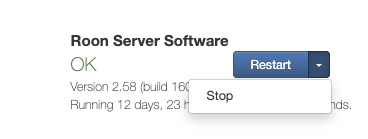
From there, you can click ‘Stop’ next to Roon Server

Do you have a computer you can use to access your Nucleus over your local network? If so, let us know which operating system you’re using and we’ll share next steps. Thank you!

Hi Benjemin,

I did everything you asked and I still have the same problem. If I access qobuz on my MacBook Pro I only have my albums and same on my iPad. As so as I open roon I have all the phantom albums. I use Tahoe 26 on my mac.

Hi @Steven_Alexander,

We haven’t completed the database resetting quite yet, so it makes sense you’re seeing the same issue.

You initially mentioned that when you access your Nucleus using Roon remote on your phone you don’t run into this issue. Is this still the case?

And just to triple confirm, if you access the Qobuz app, completely outside of Roon, are any of the albums added to your Qobuz library?

Let’s still also continue with the process of refreshing your Roon Server database. But first, you still haven’t let us know if you’ve created a fresh backup yet. Let me know when you’ve created a backup and we’ll move forward.

This topic was automatically closed 7 days after the last reply. New replies are no longer allowed.