Does the issue happen with local library music, streaming service music, or both?
· *Both streaming and local* *library* music are affected.
Do you encounter any playback errors with the "System Output" Zone?
· I don't have a System Output available, but I'd like to keep troubleshooting
How is the affected Zone connected to your RoonServer machine?
· Network - Ethernet
Does the device show up at all in Roon Settings -> Audio?
· The Zone is listed under the wrong protocol
Does the device play audio from another source when using the same connection?
· The device has no problems with another audio source
Is the device using the latest firmware as per the manufacturer?
· Firmware is up-to-date but the issue remains
What are the make and model of the affected audio device(s) and the connection type?
· DCS Bartok, Sonore ultraRendu
Describe the issue
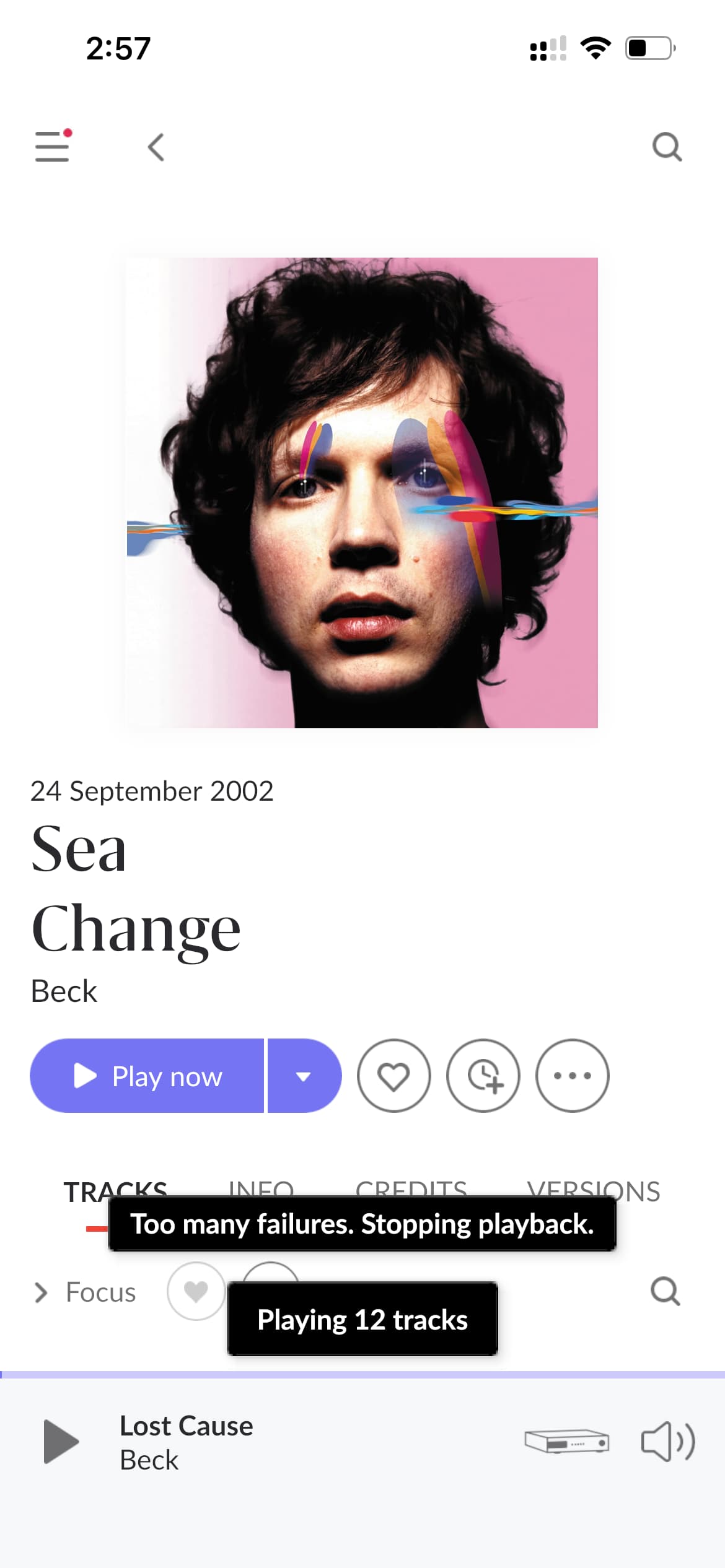
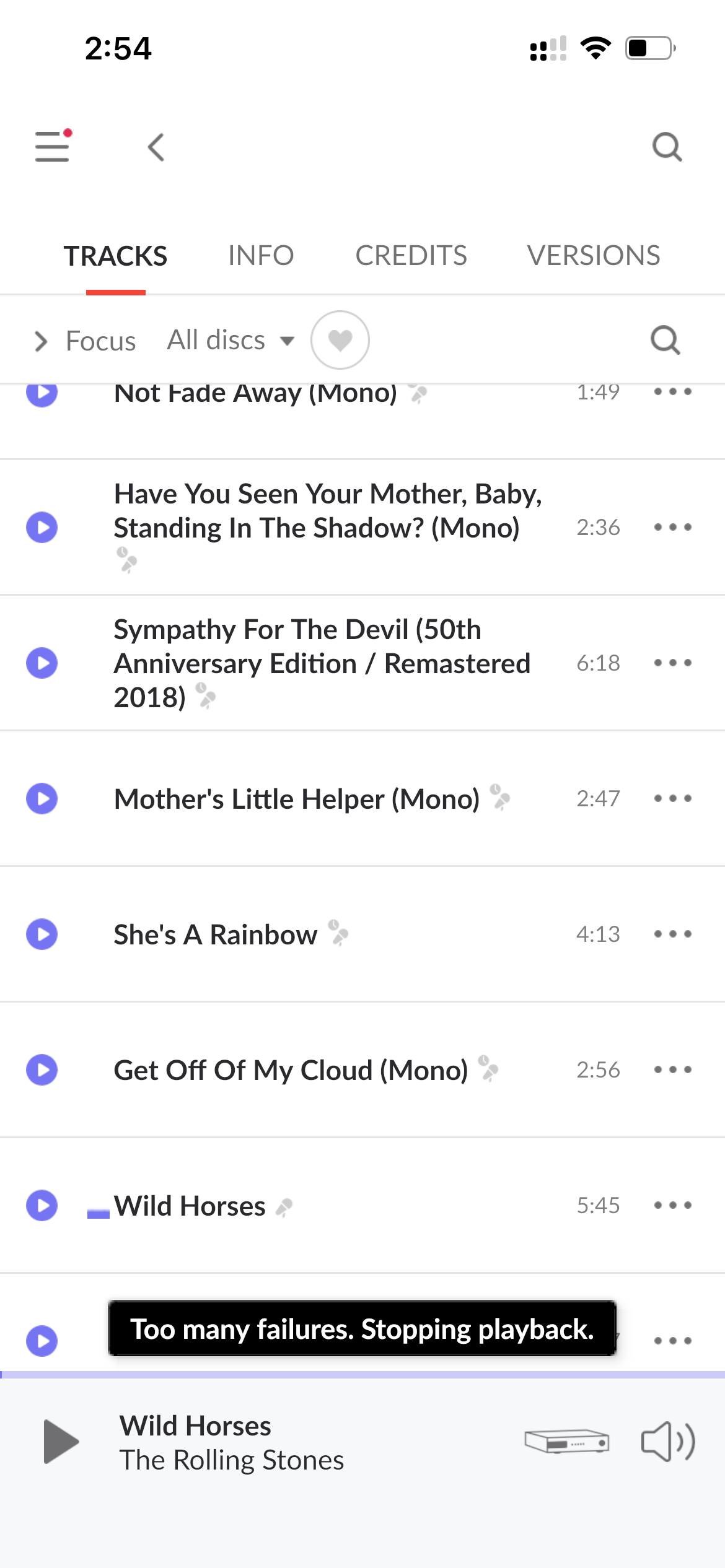
Some of your selections took me down the wrong path here. I am able to see a room ready end point but unfortunately, each time I try to play an album from my local files, or stream one off of Qobuz for example, I get the following error message “ Too many failures. stopping playback”. This occurs both on my DCS Bartok and a Sonore UltraRendu RoonReady Endpoints.
It seemed to work for one second and then stopped working. I was toggling back-and-forth between the bar talk and the Sonore to detect sound differences. And then I just got this error message.
Both DCS Bartok and Sonore ultrarendu support 24/96 as well as DSD. So I don’t think that is the issue. I don’t know the exact file format that was being streamed from Qobuz, but I suspect it was .flac and I have never had problems streaming anything from them on either of these systems either
I have been using the exact same network for years, and this is the first time I’ve had this problem.
Unfortunately, I don’t understand what Google DNS or Cloudfare are - so if you think this is the answer, I’ll need a little bit of guidance.
But I did just want to reiterate that I have been playing things on both of these platforms for quite some time without issues and they both definitely support 24/96 resolution.
When I looked up this alert, there seemed to be a number of different possibilities in many different threads.
Thanks for the follow-up! After reviewing another diagnostic report, we indeed are seeing some hiccups within output formats being supported, for example:
That message means RAAT tried to open the audio stream with the requested format, but the Sonore ultraRendu said it can’t support it.
The specific format is [Lossless, 16/44 AIFF => 16/44]
So Roon is delivering 16-bit, 44.1 kHz audio in AIFF container format. Normally, that’s very standard, but here are a few things that could explain the failure.
Things to try next:
Check in device setup for the ultraRendu, force Convert to WAV (disable “Send AIFF/FLAC”) so the stream is always PCM WAV.
Check the ultraRendu’s output settings (e.g., ALSA device chosen, DoP vs Native DSD, etc.).
Try playing another WAV or FLAC track at 16/44 — if those work but AIFF fails, then it’s definitely container incompatibility.
Make sure the ultraRendu firmware are up to date
We’ll be on standby for your reply and results, thank you!
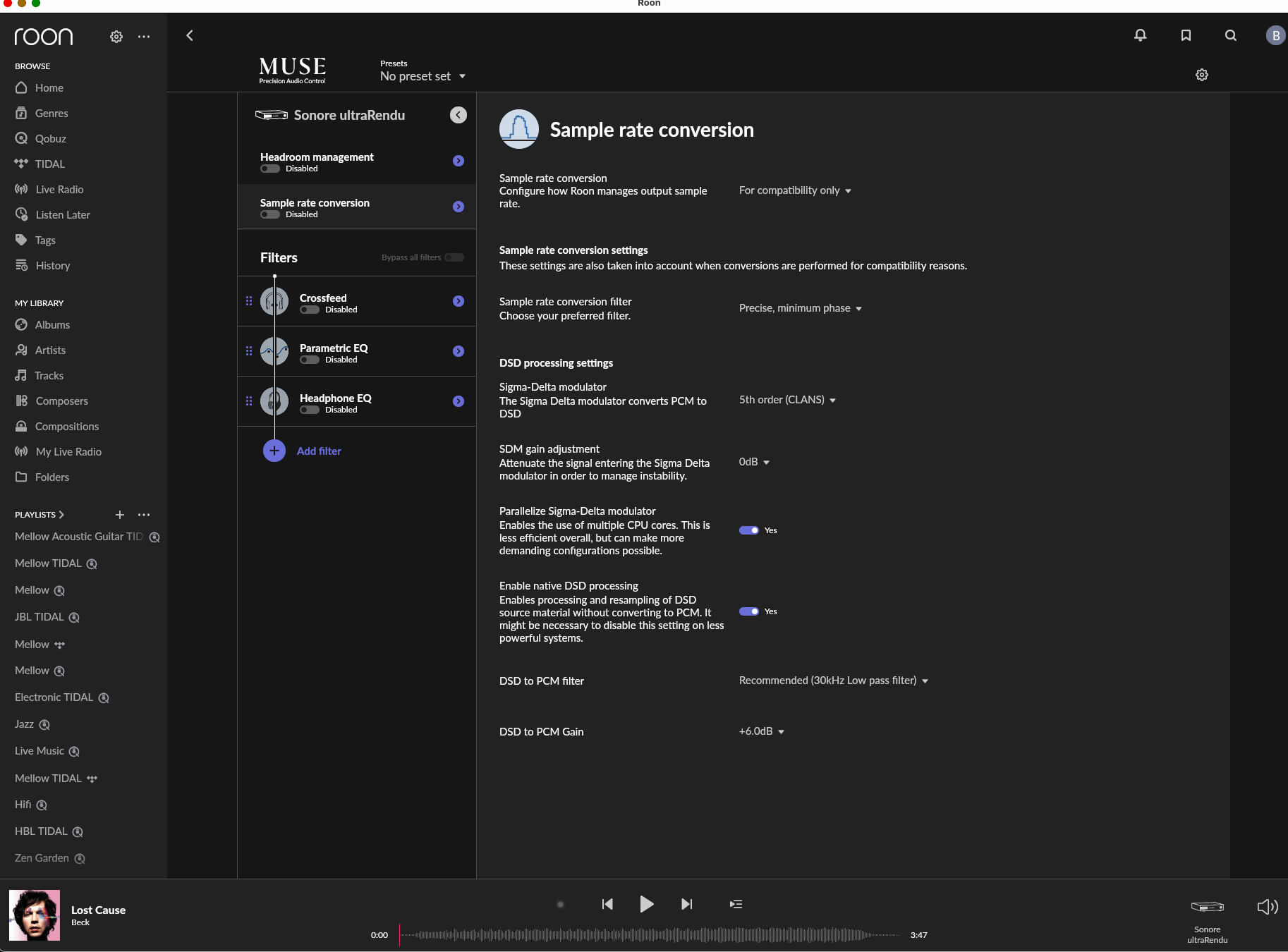
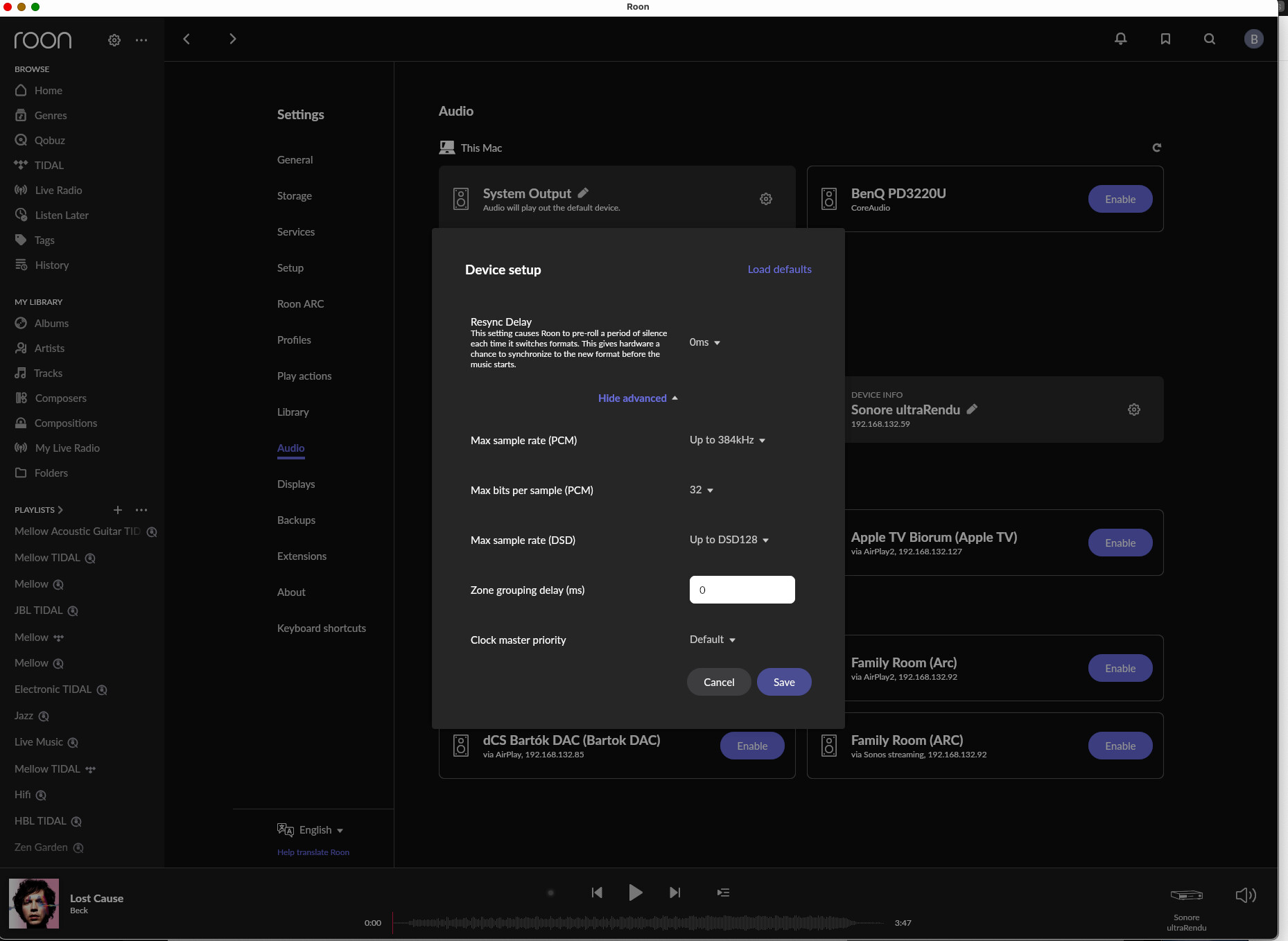
I am afraid I will need some more help with where to find these settings. Please see attached screenshots, I did not find them.
*Can you please share some directions as to how to find the Roon settings you recommend changing
What setting in particular do you want me to check or change to in the ultraRendu - is there a setting I need to change, or something ion particular you wish to know about?
On the Sonore ultraRendu you should be able to can force the output to always be converted to WAV (i.e. uncompressed PCM) by adjusting the DAC Output Mode and disabling the “Send FLAC” / “Send AIFF” options.
Here’s how you do it:
Open the ultraRendu web interface
Enter its IP address in your browser, or click through from the [url=http://Sonicorbiter.com]Sonicorbiter.com[/url] management page.
Go to the “Settings” page for your playback app (e.g., Roon Ready, DLNA/UPnP, HQPlayer NAA, Squeezelite).
Locate the output format controls
For DLNA/UPnP Renderer, you’ll see options like:
Send WAV
Send FLAC
Send AIFF
Auto
For Roon Ready, the Rendu normally just passes what Roon sends, but there’s a setting to prefer WAV over FLAC if the Roon Core supports it.
Set it to “Send WAV” only
Uncheck Send FLAC and Send AIFF.
This will force the ultraRendu to transcode everything into PCM WAV before sending it to your DAC.
Save and restart the app on the Rendu.
Let me know if this helps, and if not can you please run through the other steps I’ve listed, and let me know the outcome?
Hi Benjamin. I will work on that. I’m actually having some problems with the Ultra Rendu being recognized by Roon, but not being recognized by its own software so there are definitely some issues.
If I may, I wanted to be sure this was clear, but I had the same problem with my DCS Bartok. So if I’m only changing the settings in the Sonore device, how is that going to help with the same exact issue that was going on in the DCS DAC?
Thanks for the follow-up! With this additional information, the file not supported errors could be a bit of a red herring. Although I do think it may be worth checking out a handful of AIFF files just in case:
Warn: [storage] [directory] Failed to extract audio format from '/Volumes/MUSIC+ Dell/Aurender Backup (ROON Music Folder)/[Etc]/AllTrax/Low Rider.aiff': UnsupportedFormat
Info: Attach skipped file SkippedFile[660932b5-3c44-4bf1-9892-325e59bf6ebf::[Etc]/AllTrax/Father Figure aiff.aiff, Reason=audio_stream_format_not_supported] to folder LibraryFolder[660932b5-3c44-4bf1-9892-325e59bf6ebf::[Etc]/AllTrax]
Info: Attach skipped file SkippedFile[660932b5-3c44-4bf1-9892-325e59bf6ebf::[Etc]/AllTrax/Maybe I'm Amazed (1).aiff, Reason=audio_stream_format_not_supported] to folder LibraryFolder[660932b5-3c44-4bf1-9892-325e59bf6ebf::[Etc]/AllTrax]
Info: Attach skipped file SkippedFile[660932b5-3c44-4bf1-9892-325e59bf6ebf::[Etc]/AllTrax/Maybe I'm Amazed.aiff, Reason=audio_stream_format_not_supported] to folder LibraryFolder[660932b5-3c44-4bf1-9892-325e59bf6ebf::[Etc]/AllTrax]
Info: Attach skipped file SkippedFile[660932b5-3c44-4bf1-9892-325e59bf6ebf::[Etc]/AllTrax/Me and Bobby McGee.aiff, Reason=audio_stream_format_not_supported] to folder LibraryFolder[660932b5-3c44-4bf1-9892-325e59bf6ebf::[Etc]/AllTrax]
Info: Attach skipped file SkippedFile[660932b5-3c44-4bf1-9892-325e59bf6ebf::[Etc]/AllTrax/Riders on the Storm.aiff, Reason=audio_stream_format_not_supported] to folder LibraryFolder[660932b5-3c44-4bf1-9892-325e59bf6ebf::[Etc]/AllTrax]
Info: Attach skipped file SkippedFile[660932b5-3c44-4bf1-9892-325e59bf6ebf::[Etc]/AllTrax/Brothers in Arms.aiff, Reason=audio_stream_format_not_supported] to folder LibraryFolder[660932b5-3c44-4bf1-9892-325e59bf6ebf::[Etc]/AllTrax]
Info: Attach skipped file SkippedFile[660932b5-3c44-4bf1-9892-325e59bf6ebf::[Etc]/AllTrax/Hey Joe.aiff, Reason=audio_stream_format_not_supported] to folder LibraryFolder[660932b5-3c44-4bf1-9892-325e59bf6ebf::[Etc]/AllTrax]
Info: Attach skipped file SkippedFile[660932b5-3c44-4bf1-9892-325e59bf6ebf::[Etc]/AllTrax/People Are Strange.aiff, Reason=audio_stream_format_not_supported] to folder LibraryFolder[660932b5-3c44-4bf1-9892-325e59bf6ebf::[Etc]/AllTrax]
Info: Attach skipped file SkippedFile[660932b5-3c44-4bf1-9892-325e59bf6ebf::[Etc]/AllTrax/Say Something aiff.aiff, Reason=audio_stream_format_not_supported] to folder LibraryFolder[660932b5-3c44-4bf1-9892-325e59bf6ebf::[Etc]/AllTrax]
Info: Attach skipped file SkippedFile[660932b5-3c44-4bf1-9892-325e59bf6ebf::[Etc]/AllTrax/You Don't Bring Me Flowers.aiffR3.aiff, Reason=audio_stream_format_not_supported] to folder LibraryFolder[660932b5-3c44-4bf1-9892-325e59bf6ebf::[Etc]/AllTrax]
Info: Attach skipped file SkippedFile[660932b5-3c44-4bf1-9892-325e59bf6ebf::[Etc]/AllTrax/Low Rider.aiff, Reason=audio_stream_format_not_supported] to folder LibraryFolder[660932b5-3c44-4bf1-9892-325e59bf6ebf::[Etc]/AllTrax]
Outside of this, we’re seeing two different errors that could be affecting playback for you. First, we see the following dropout errors during playback:
Trace: [System Output] [HighQuality 94.1x, 24/96 TIDAL FLAC => 24/48] [20% buf] [PLAYING @ 4:29/4:37] Prince Johnny - St. Vincent
Trace: [dCS Bartok] [Lossless, 24/96 TIDAL FLAC => 24/96] [12% buf] [PLAYING @ 4:29/4:37] Prince Johnny - St. Vincent
Trace: [System Output] [HighQuality 66.1x, 24/96 TIDAL FLAC => 24/48] [PLAYING @ 4:35/4:37] Prince Johnny - St. Vincent
Trace: [dCS Bartok] [Lossless, 24/96 TIDAL FLAC => 24/96] [PLAYING @ 4:35/4:37] Prince Johnny - St. Vincent
Trace: [Data Conversion Systems Ltd Bartók DAC @ 192.168.132.85:38381] [raatclient] GOT [3351] {"samples":17526,"status":"Dropout"}
Trace: [System Output] [raatclient] GOT [1666] {"samples":13070,"status":"Dropout"}
Trace: [Data Conversion Systems Ltd Bartók DAC @ 192.168.132.85:38381] [raatclient] GOT [3351] {"samples":48000,"status":"Dropout"}
Trace: [System Output] [raatclient] GOT [1666] {"samples":24001,"status":"Dropout"}
Trace: [Data Conversion Systems Ltd Bartók DAC @ 192.168.132.85:38381] [raatclient] GOT [3351] {"samples":48000,"status":"Dropout"}
Trace: [System Output] [raatclient] GOT [1666] {"samples":24000,"status":"Dropout"}
Trace: [Data Conversion Systems Ltd Bartók DAC @ 192.168.132.85:38381] [raatclient] GOT [3351] {"samples":49920,"status":"Dropout"}
Trace: [System Output] [raatclient] GOT [1666] {"samples":24001,"status":"Dropout"}
Trace: [Data Conversion Systems Ltd Bartók DAC @ 192.168.132.85:38381] [raatclient] GOT [3351] {"samples":48000,"status":"Dropout"}
Trace: [System Output] [raatclient] GOT [1666] {"samples":24001,"status":"Dropout"}
Trace: [Data Conversion Systems Ltd Bartók DAC @ 192.168.132.85:38381] [raatclient] GOT [3351] {"samples":48000,"status":"Dropout"}
Trace: [System Output] [raatclient] GOT [1666] {"samples":24000,"status":"Dropout"}
Trace: [Data Conversion Systems Ltd Bartók DAC @ 192.168.132.85:38381] [raatclient] GOT [3351] {"samples":48000,"status":"Dropout"}
Warn: [System Output + dCS Bartok] [zoneplayer/raat] Too many dropouts (>3s dropped out in the last 30s). Killing stream
Trace: [System Output + dCS Bartok] [zoneplayer/raat] too many dropouts. stopping stream
Notice the buffer percentage during playback for both zones:
If local plays clean: the bottleneck is likely internet download/CDN.
If local still drops: it’s your LAN path to the Bartók.
Ensure Bartók is on wired Ethernet, not Wi-Fi; avoid powerline. Try a different switch/port/cable.
Reboot modem/router/switch/Bartók; disable any QoS/SQM rules targeting streaming devices.
If you use managed switches, disable IGMP snooping (or enable proper multicast querier) for the Bartók’s VLAN.
In Roon, avoid cross-device sync for critical listening; also check the device’s resync delay and try a small increase (e.g., 250–500 ms).
For the second potential issue, are you seeing your audio devices completely disappear and become unrecognizable during playback? If so, you may be experiencing a known issue our team is actively working on. Here is the tracking thread for this issue:
We’ll be on standby for your reply and results, thank you Brett!
I think there may possibly be some miscommunication I’m afraid.
I don’t have the Bartok grouped with the Sonore. I have nothing grouped at all.
The Sonore has a direct USB cable to the Bartok but I don’t have them as two different zones grouped together.
What I am seeing disappear is different than what you indicated. Sonore is showing up on software, but not showing up on its own sonic orbiter software. So that’s what I was explaining as I can’t go into the Sonore settings right now. I posted the problem on their own forum and have not heard anything back. I also sent a message straight to Jesus and have not gotten a response from him.
I have a lot of experience with streaming and, have multiple devices, but some of the stuff you’re suggesting might be a little bit above my understanding. While I have some knowledge, some of that is unfortunately a little confusing to me.
I know you guys typically don’t offer this, but is there any chance perhaps next week if it is still going on to try any sort of phone call or real time Support?
Thanks for the clarification and additional details. I wanted to address a couple of points:
In the diagnostics we can see Bartók and System Output only; there is no evidence of a grouped zone with your Sonore device for the case reviewed by @benjamin
At this stage, the issues you’re experiencing appear to be related to device connectivity and setup, rather than Roon itself.
Here’s what I recommend next:
Try playing a single local 24/96 WAV or FLAC file directly to the Bartók over Ethernet (no other zones active). This helps isolate whether dropouts are related to your LAN path or the files themselves.
Ensure the Bartók is wired directly to your router or switch and not using Wi-Fi or powerline adapters. If possible, test a different Ethernet cable or port.
For the Sonore ultraRendu, since it’s not appearing in its own Sonicorbiter software, this seems like a device-side issue. Make sure firmware is up to date and wait for Sonore support to respond.
Record the exact timestamp and track name in case the issue occurs with the single zone and post it here.
Once you’ve tried these steps, please let us know the results so we can advise on the next steps.