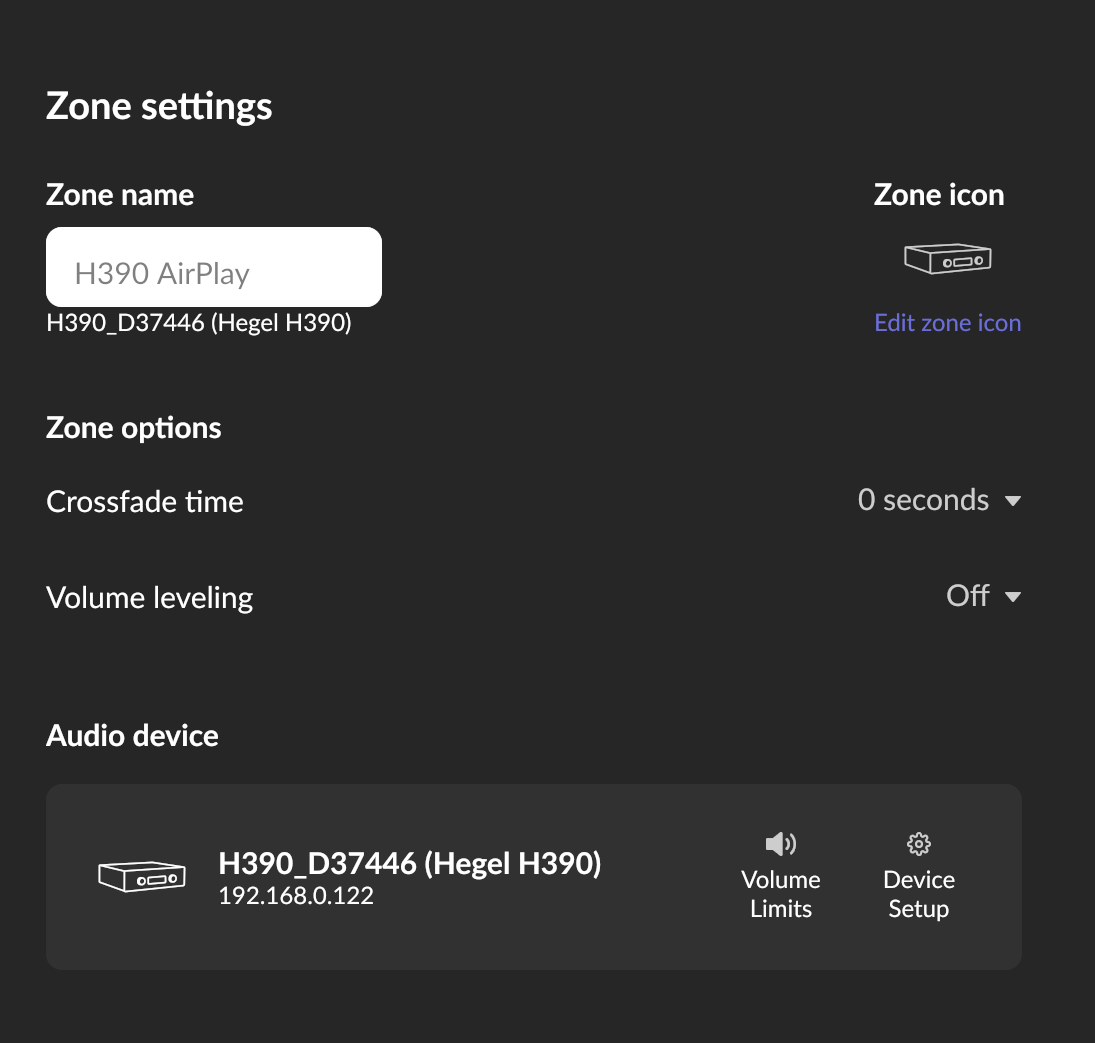
Does the issue happen with local library music, streaming service music, or both?
· *Both streaming and local* *library* music are affected.
Do you encounter any playback errors with the "System Output" Zone?
· I don't have a System Output available, but I'd like to keep troubleshooting
How is the affected Zone connected to your RoonServer machine?
· Network - Ethernet
Which network audio protocol is the Zone using with Roon?
· Airplay
Since this is an Airplay Zone, have you tried toggling Airplay Compatibility Mode for this Zone in the Device Setup window?
· There is no change in behavior.
Does the device show up at all in Roon Settings -> Audio?
· The Zone is listed under the wrong protocol
Does the device play audio from another source when using the same connection?
· The device has no problems with another audio source
Have you checked that Roon is whitelisted in any firewalls?
· I've checked the firewall and the issue remains
If the device has multiple output options, do the other options work as expected?
· Multiple output types are affected
Is the device using the latest firmware as per the manufacturer?
· Firmware is up-to-date but the issue remains
Do you have an approximate timestamp of when the issue last occurred?
· 06.04.2026 18:40
What are the make and model of the affected audio device(s) and the connection type?
· This is relevant for all audio devices I have. All my audio devices are Bang & Olufsen (BeoSound Core, BeoSound Shape, BeoSound 1 and BeoPlay M5). The issue first appeared when using Chromecast. I then switched to Airplay where the issue is less present, but still occurs frequently.
Describe the issue
Playback stops when the playing queue switches from local to Tidal and vice versa
Describe your network setup
A T-Mobile Router is the main source for Internet and Network. One of the audio outputs (BeoSound Core) is connected directly to the router. The router is then connected to an unmanaged switch where the NAS and the Roon Core are connected. This switch also connects 3 Access Points in my home (powered via PoE). I also use and Omada Hardware Controller to control the access points.
Two things to consider, although others might have more knowledge of Airplay or B&O…
Is there a possibility to alter your ‘resync delay’, under the settings for this zone? This option is not available for every type of zone, so you might not find this.
Could you try to change your settings for sample rate conversion in Muse? Try to change every input frequency to an output of 48 kHz.
Hi! Thank you for the reply and the suggested solutions.
Unfortunately there is no possibility to set a resync dealy. When it comes to Muse the sample rate conversion in Muse is greyed out, so this is also not an option.
I noticed that it does not happen all the time. For some time it plays without any issues and then it stops whenever it needs to switch from local to Tidal or vice versa. When it stops and I click play, it immediately starts playing without any issues.
I noticed that on my system too, now that you mentioned it. Maybe it’s because Airplay only accepts one single frequency. I’m afraid I am out of ideas. Hopefully someone else will have any good advice.
When you next notice this behavior with either Airplay or Chromecast in Roon, can you please share the names of both tracks? This would include the track that just concluded and the subsequent queued track that failed to play.
We’ll pinpoint the event in logs to see precisely what’s occurring.
Thank you for your reply. Here are the tracks (in todays playing queue I had 4 songs from local to Tidal to local and back to Tidal again). Time stamp around 18:15 CET today. Please find the tracks below:
Bring It Down by Mad Caddies (local file)
Idols Pt. I by Yungblud (Tidal)
Bouncing off the Walls by Sugarcult (local file)
One Night Stand by blink-182 (Tidal)
Each time the playback stopped and I needed to press play to start the song.
Thanks for sending over some timestamps! Looking at the log, the sequence is clear:
16:06:53 "Bring It Down" (local FLAC) finishes naturally (StoppedEndOfMediaNatural), and Roon queues up "Idols Pt. I" (TIDAL track) next.
16:06:54 The Küche zone starts loading "Idols Pt. I" at 3% buffer, but then:
16:06:59 The BeoSound 1 sends a suspend signal back to Roon via AirPlay, which immediately stops playback. Roon doesn't initiate this — the device does.
When the local track ends, there's a brief gap before the TIDAL stream is ready. The BeoSound 1 interprets this silence/gap as the end of a session and disconnects AirPlay, sending a suspend to Roon. Roon then obeys and stops the zone entirely.
If you temporarily disable this endpoint, do you still experience the same issue?
As a next step, I would check if the BeoSound 1 has a “keep-alive” or “always-on” AirPlay setting in the B&O app (some firmware versions have this).
Thank you for your response and the details. I checked the B&O settings, but there is no “always-on” option. I also double checked that the energy saving options are disabled.
Today the issue occured between Tidal tracks (around 18:40). The tracks were:
Delusional by 408
American Idiot by Green Day
Worst Case Scenarios by Set It Off
I saw that American Idiot was an MQA Version, while the other are FLAC. I also noticed that when press play when it first stopped it took 10 to 20 seconds until the track started. Also the fan of the NUC got pretty loud.
Just as a test, what happens when you enable crossfading? This will start a new track while the other one is almost finished. This means there are no pauses in between. You probably don’t want this all the time, but perhaps this will keep your B&O awake.
Hi! Thank you for the tip, but I do not want to use crossfade.
What I noticed today that it also takes a very long time to transfer the playing queue from one zone to another. Usually this only takes a few seconds, today it took I think approx. a minute. So I really think that there is an issue with the Roon Core, since there have not been any problems until a few weeks ago.
I also double checked the latest firmware update from B&O has been in October last year, so they did not change anything recently.
I hope you @connor and @benjamin can figure out the problem and advice on what to do.
I now switched to Chromecast instead of Airplay. Now the streaming does not stop anymore, but if the source changes there is a very long gap, until the next track starts playing. Happened for instance today between those two tracks:
blame me for everything by Lil Lotus and Mod Sun
Sheepdog by Mando Diao
So I still assume an issue with the Roon Core and not my B&O devices.
While I understand you do not wish to use crossfade, this was suggested only as a temporary troubleshooting step to give us more insight into the issue. Please let me know if you’re able to temporarily give it a try, and what the results are.
It’s also unclear if you’ve tested out temporarily disabling the BeoSound - can you please give that a try?
We’ll be monitoring for your reply and results, thank you!
Hi! I just tested it with the local output on my PC. It is the same. When the source switches from local to Tidal or vice versa, it takes about 10 to 20 seconds until the track starts. Tracks I tested:
Damn! by Patent Pending (Local)
Diamond by Jimmy Eat World (Tidal)
Secret Oath by The Spill Canvas (Local)
So in my opinion this has nothing to do with my B&O speakers or the BeoSound Core as it is the same when playing via the local output on my PC.
Please let me know if you have any additional advice.
Thanks for the additional timestamps! From a fresh diagnostic report, we can see that every single track transition triggers a library mutation cycle, and these take between 92 and 128 seconds to complete. This is the exact source of your 10–20 second delays (and sometimes much longer freezes):
11:38:01 [track ends: Soundtrack of My Life]
11:38:03 [LOADING @ 0:00] Damn! – Patent Pending ← stuck here
11:43:11 endmutation in 110511ms ← 110 seconds later!
11:43:13 [PLAYING @ 0:00] Diamond – Jimmy Eat World ← finally plays
It looks like your music is stored on a Synology DiskStation (\DiskStation\music) and mounted via a CIFS/SMB share on ROCK. Do you have the network share credentials inputted within the share?
If you temporarily disable and re-enable this share, does that help with the behavior at all?
Also check that your NAS’s SMB idle timeout is set high or disabled — Synology DSM: Control Panel → File Services → SMB → Advanced Settings → set “SMB2 lease” and disable idle disconnects.
With that, the endmutation running every 3–5 minutes continuously suggests the library is in a constant rescan state. Go to Roon Settings → Library → Clean Up Library, and also check if there are any “watched folder” errors shown in Settings → Storage. A stuck or erroring watched folder can cause this.
Lastly, if possible, I’d test with local storage directly on ROCK : Copy 5–10 tracks to a USB drive attached directly to your ROCK and add that as a watched folder. If transitions between those tracks (and Tidal tracks) are instant, it confirms the SMB/NAS path is the bottleneck.