The fastest you can get over a regular optical connection is DSD64 via DOP assuming Lumin allows it. Check the specification for both ends and follow what they say.
Lyngdorf, as a surround processor, cannot play DSD natively without conversion to PCM.
In Roon, please turn on resampling to set DSD conversion to 96kHz.
(Only if you’re not using Roon, then in Lumin app, turn on Audio Resampling for all DSD to 88.2kHz.)
If you wish to play DSD256 natively without conversion, you need a Linux native DSD compatible stereo DAC that does that, and a stereo amp that is not a surround processor.
This looks like a compatibility issue between the transport path and the format you are trying to send. A few things stand out: the Lyngdorf MP60 does not natively decode DSD, and optical/Toslink is not a path you can use for native DSD256 playback.
Please try this in Roon: open the audio zone for the Lumin U2X, go to its Device Setup, and set DSD Processing or resampling so DSD is converted to PCM at 96 kHz before it reaches the Lyngdorf. That should let the MP60 receive a format it can actually play.
We wanted to reach out to ensure you saw the response above. If you have a chance to perform the request test, we’ll be able to expedite troubleshooting by looking into logs.
Please share the name of the track you attempted to play and we’ll pinpoint the event. Thank you!
Thanks @noris and @Peter Lie, I will try that today. The way I see it (and Ideally) : in the long term and if Lyngdorf allow me to switch to an external DAC , I should acquire an external DAC able to decode DSD 512 such as Soulnote Audio: Soulnote D-1N DAC and then try to plug the external DAC into my Lyngdorf and use the Lyngdorf ass a passthrough PRE AMP. If feasible, this would deactivate the RoomPerfect feature for sure but leave the original source signal unchanged.
I will try that today. The way I see it (and Ideally) : in the long term and if Lyngdorf allow me to switch to an external DAC , I should acquire an external DAC able to decode DSD 512 such as Soulnote Audio: Soulnote D-1N DAC and then try to plug the external DAC into my Lyngdorf and use the Lyngdorf ass a passthrough PRE AMP. If feasible, this would deactivate the RoomPerfect feature for sure but leave the original source signal unchanged.
A. No, this is not what I asked you to configure. In your current setup you’re doing more times of audio resampling than necessary.
You need to do this with Roon DSP Engine via Roon interface from a computer or tablet, not Lumin app. In Lumin app, please turn off re-sampling.
You must not use a target sample higher than 96kHz. If you resample to 176.4kHz, Lyngdorf will need to downsample it another time, so there will be further degradation to music signal
Peter from LUMIN has provided the correct guidance here. To summarize: configure resampling via Roon’s DSP Engine rather than the Lumin app, keep the target sample rate at 96kHz or below to avoid double resampling by the Lyngdorf, and note that the 5.1 → stereo downmix is expected since the Lumin U2X is a stereo device. Please follow Peter’s instructions and let us know if you have any further questions.
Thankds @vadim and thanks @wklie : I did it and it does work I still don’t unerstand why ROON server is downsampling the file before sending it to my Lumin U2X (I am not talking about the channel). Especially since I did not give Roon Server any indication to do so and since I disabled re-sampling on my Lumin.
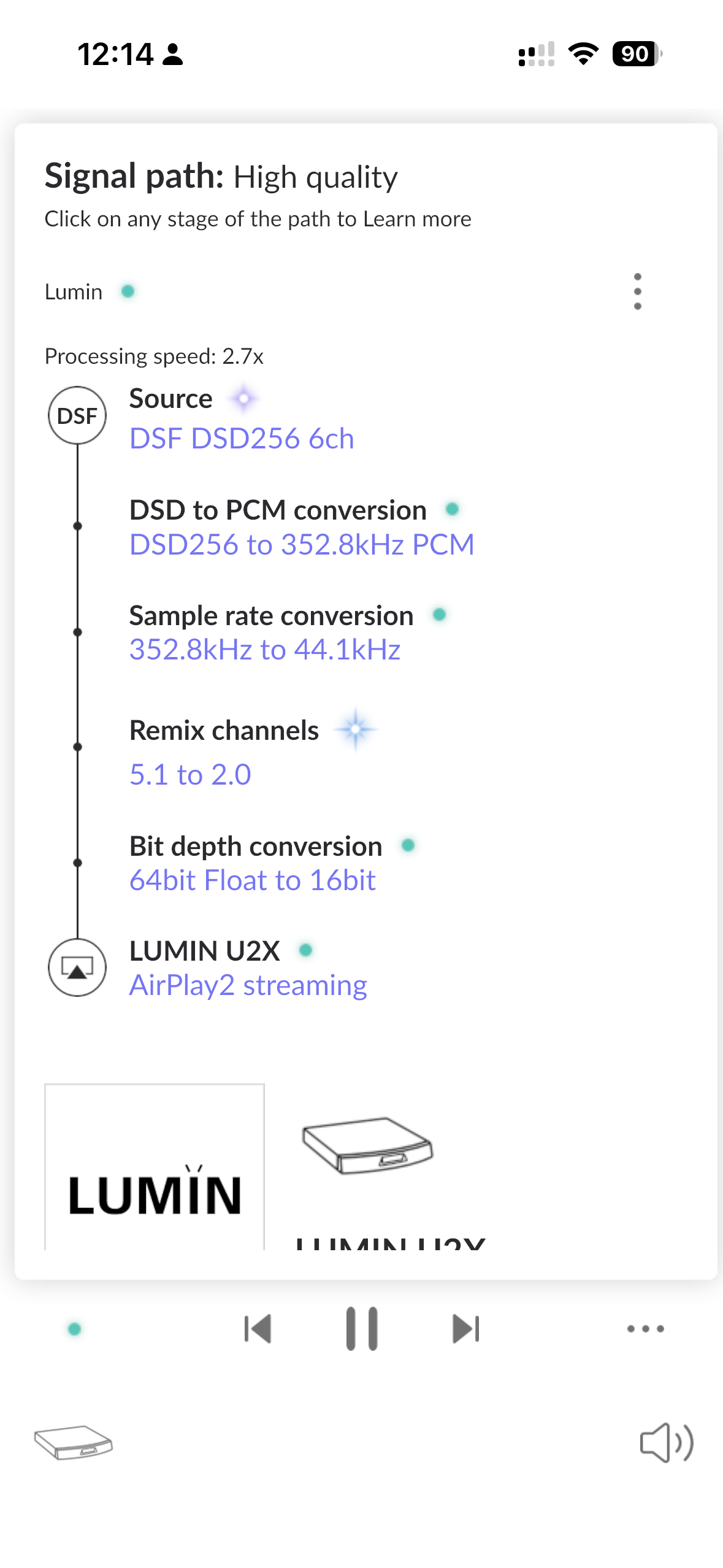
 > Audio - I suspect the Lumin U2X has two entries: one for AirPlay and one for Roon Ready…
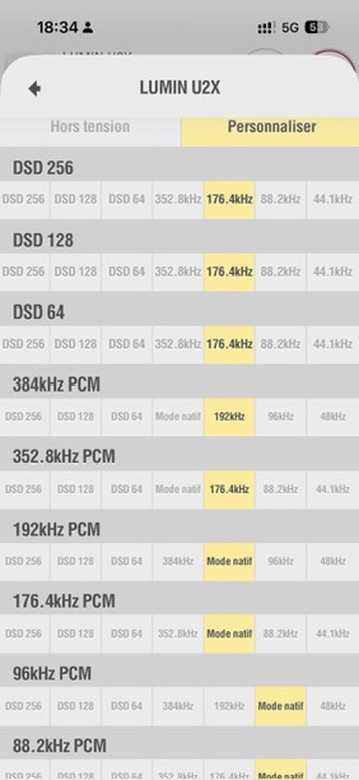
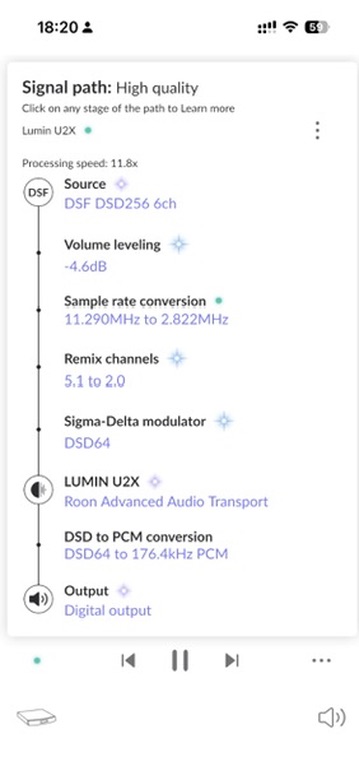
 , although I sill don’t understand :