What is the operating system of your Roon Server host machine?
· MacOS
What kind of device are you using to perform the login?
· Mac
Where are you trying to login?
· I can't log into TIDAL or KKBox
Have you been redirected to the Tidal/KKBOX login page in your browser?
· Yes
Please try clearing the browser cache and cookies for the [l](https://account.roon.app/)ogin page where you have been redirected
· No, the issue remains the same
Content / Popup Blockers
· No, the issue remains the same
Temporarily try to use a different browser
· No, the issue remains the same
Please try to restart your Roon Server by closing the Roon Server app in the taskbar (MacOS), task manager (Windows) or rebooting your Roon Server machine.
· No, the issue remains the same
Different device
· I cannot switch to a different device
Are you still facing the issue on the different device
· No, the issue remains the same
Record the timestamp
· 11:59
Describe the issue
Installed latest update. Now Tidal does not load, can’t sign in, constant spiny wheel. Recommended For You does not load.
Thanks for writing in, and I’m sorry to hear about your Tidal issues! If you could, please bring your Roon Server online and we’ll attempt to enable diagnostic mode to take a closer look.
To confirm - based on your initial description, you mention nothing loads and you can’t log in. Could you be more specific? Can you log in successfully, but the content itself isn’t populating properly, or, can you not log in?
If it’s a login issue, where specifically in the process are you getting stuck? Does Roon open a web browser for you?
Server is up and running. Qobuz service seems to be working and music is playing, but Qobuz page does not load. Tidal will not load. Login with the browser is successful, but once directed back to Roon it spiny-wheels until it says unable to authorize. I tried this on 2 different browsers. Also, restarted the server.
My home page has images that will not load and the Recommended-For-You section does not load at all and is missing on the home page.
Everything was working fine until I installed latest update.
Thanks for the additional information! Can you confirm that none of the following are active on the Server machine or network:
VPN (even if “not in use”)
Pi-hole / AdGuard / NextDNS
Router-level firewall with “deep packet inspection”
Antivirus HTTPS scanning
Temporarily disabling these and restarting Roon is a strong diagnostic step.
We’re also having a tough time reaching your server, if you could please use the directions found here and send over a set of logs to our File Uploader? Once logs have been uploaded, please let us know so that we can check the server for your files, thanks!
Thanks for the update! And my apologies for not being clearer - we’re actually after a set of your Roon Server logs if possible. If you could follow the same steps and upload a set of server logs, that would be most helpful!
In the meantime, it may also help to test out different DNS servers - we have seen users have a better experience in the past if they change their Router’s DNS servers from the ISP provided ones to Cloudflare DNS, Quad9 or Google DNS. Can you please give this a try and let me know if it helps?
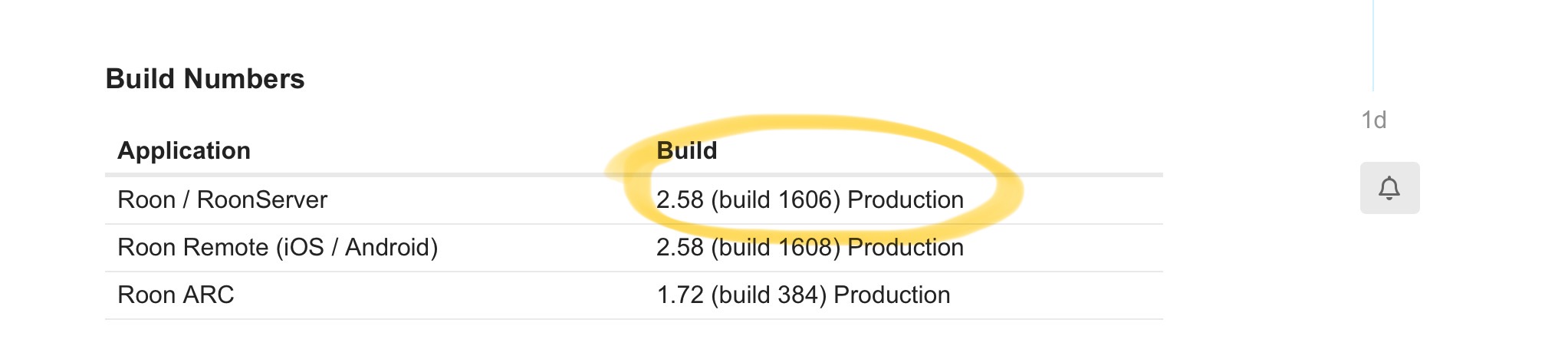
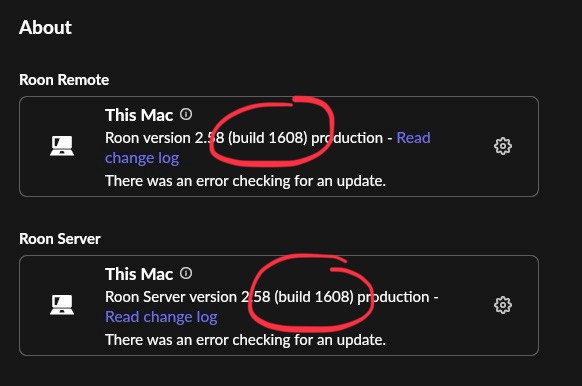
Thanks for sending those over! And thanks for the screenshots of your build numbers - you are actually all set here, there was an update and typo on the community page that has since been updated.
As a next step, let’s see if the below router settings help clear things up for you.
On the TP-Link AX50 admin UI:
Disable all of the following (even if they “sound unrelated”):
HomeCare / Security
Intrusion Prevention
DoS Protection
SPI Firewall
Traffic Analysis
QoS
Parental Controls
Any “HTTPS scanning” or “Web protection”
Any “AI” or “Smart” features
Then reboot the router, not just the Roon server. Let me know if this helps.
If not, a good next step would be to test out temporarily disabling IPv6 on both your router and Roon devices.
(??? = not sure what this is, or don’t have these features, or did not find these settings)
I turned off the 3 available security features on the router and rebooted. Roon Server was rebooted. Roon is functioning properly and I was able to sign on to Tidal again.
What are my next steps? I don’t believe turning off all my security settings is a long term solution.
Thanks for the update! Yes, having your basic router security enabled is the best call here.
That said, the issue is clearly tied to network-related settings, have you reached out to your ISP at all yet?
What 3 security features are you referring to specifically? Are you able to edit the whitelist for each feature? If so, adding Roon would be a great next step.
So I understand that there is a network related issues, but what issue is the problem? What am I reaching out to my ISP for? The wifi router is one I added and used in bridge mode with the supplied ISP modem.
As per your advice I had disabled Malicious Content Filter, Intrusion Prevention, Infected Device Quarantine, and Parental Controls were never activated. But note before your reply yesterday, I have these 3 settings turned back on and Roon is currently still working.
I have looked into the router model and it appears to have no “whitelist” setting available.
Please be patient with me, I have reached the end of my knowledge of networking technology here, so feel free to speak to me like a five-year-old.
Thats great news! It could be the case that toggling those settings (Infected Device Quarantine, etc.) often forces the router to flush its state table and clear its cache.
It’s possible that a specific “rule” or “block” was stuck in the router’s memory, and the act of turning the features off and on again reset the logic, allowing Roon to pass through.
Since things are now functioning, you likely don’t need to get in touch with your ISP.