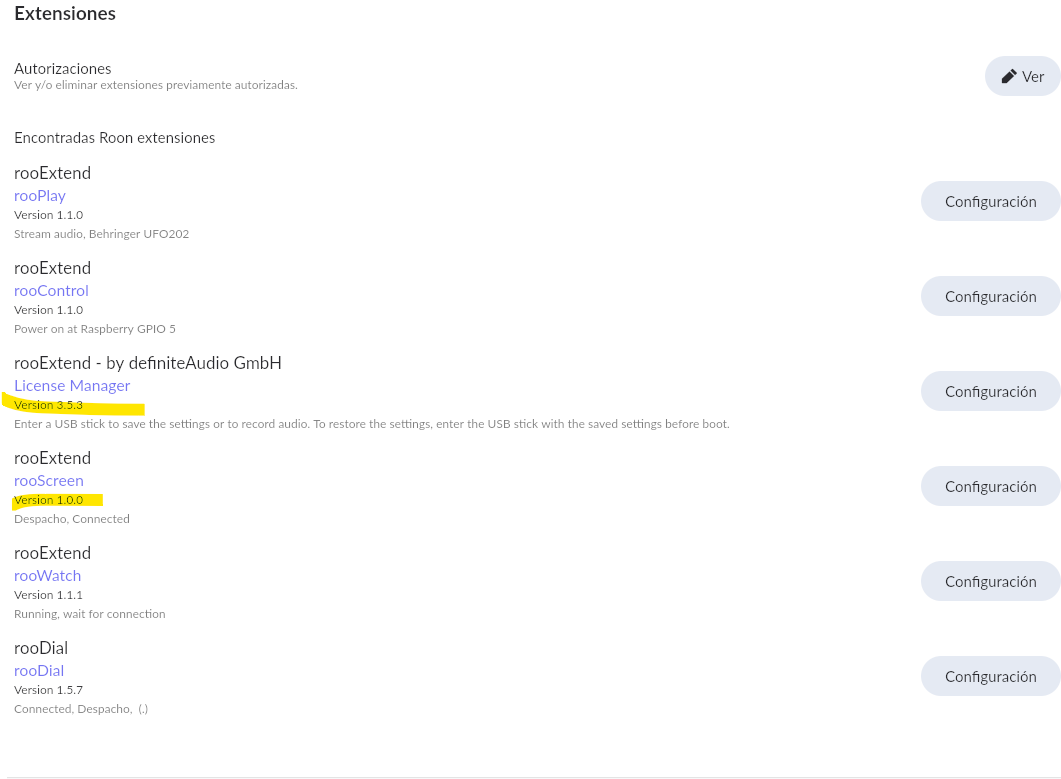
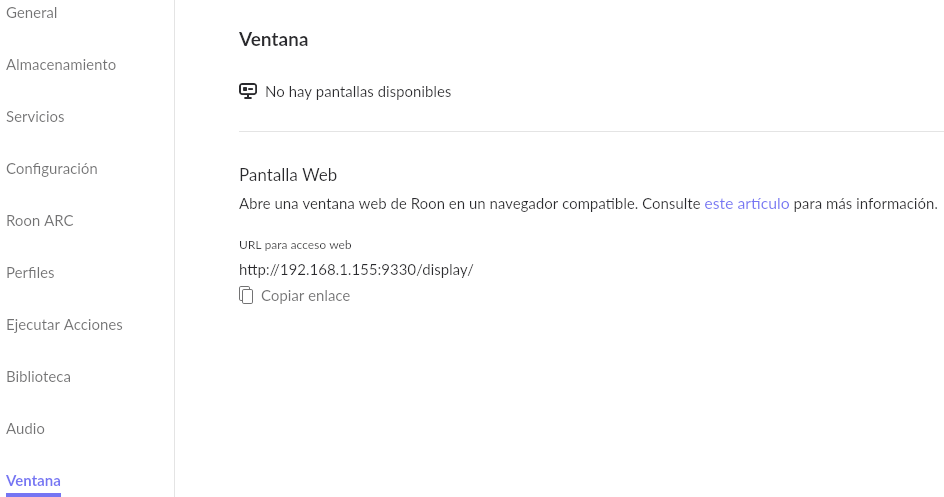
I don’t know.
Works for most customers but issues seem to have ROCK users only. As read above a popper update seems to solve this 
Best DrCWO
I don’t know.
Works for most customers but issues seem to have ROCK users only. As read above a popper update seems to solve this
Best DrCWO
Hello,
I have run through the proper update path from scratch and am still stuck with the same problem. The Roon-web-controller works fine though on the latest version.
Please let me know if there is anything I can do to debug.
Thanks!

Hi Paul,
have youe ever tried to reboot your Roon Core and if it is up and running again power on the Pi with rooExtend?
Please try this again.
Best DrCWO
Hi @DrCWO last night I sent the logs to you, please let me know if I can do something else. I think this the issue “Feb 17 19:17:51 rooExtend rooExtendUpdater[113751]: ***** Error with: apt-get -y install rooextend=3.5.3, Error: Command failed: apt-get y install rooextend=3.5.3 Feb 17 19:17:51 rooExtend rooExtendUpdater[113751]: E: dpkg was interrupted, you must manually run ‘dpkg --configure a’ to correct the problem.”
Hi again @DrCWO do you have any update on this ? Currently I have to SDs with Rooextend installed, one stuck in 3.4.4 and the other stuck in 3.4.3 both with the same error. ( the one in my previous post). Thanks for your support
Hi Cesar,
sorry for the delay but I was out of office for some days.
This error means you have interrupted the update process probably by powering off during the update.
Sorry, but this cannot be fixed. You have to do a fresh install starting with the ARMv8 image and the hotfix.
Best DrCWO
Ok thanks, you mean starting at 3.4 and progressively upgrade to 3.5.3 ? If that’s the case can I do it in less steps? I mean.can I do it in the same day and not waiting overnight? Thanks again. (…but i don’t think I powered it off before the process ends)
After that you should be at v3.5.x
Good luck
DrCWO
Hi @DrCWO , i´m finally back on 3.53. But I’m also back to the original problem, no available display (see the screenshots) . If this give you a clue, yesterday I could see the display available but last night rooextend rebooted unexpectly and after that reboot the display is no longer available, I can send you the logs if you need them. Thanks again for your support.
So it works and after next boot no more???
No idea at the moment…
Best DrCWO
My guess is that is an issue related to a WiFi network ipoor performance because of the Pi3 limitations . I’m considering migrating this to a Pi5. Is the current rooExtend DIY image compatible with Raspberry Pi 5?
Thanks again
Hi Cesar,
According to me, RPI5 has never been an option for rooExtend. It is RPI3 or RPI4.
rooExtend is not too CPU-power consuming, so RPI4 or even RPI3 should be sufficient. But if you are not confident about your RPI3, just step-up to RPI4.
Be sure that the power-supply of the RPI is powerful enough.
Kind regards, Frank.
Thanks! I think it has to be more with the WiFi throughput than CPU speed.
Pi4 is supported Pi5 not yet.
If you use WiFi I don’t wander about the issues you got 
Roon uses UDP and therefore lost packages that can happen with WiFi kill communication.
Please use wired Ethernet and your Pi3 will work fine.
Best DrCWO
Hi DrCWO,
A pure technical remark, I know that for RAAT, Roon is using TCP already since a long time. In the beginning of Roon, they started with UDP, but now it is TCP (which should be more stable).
Perhaps for ARC, they are using UDP. So I am a little bit confused with your remark that Roon is using UDP. Can you explain where I am wrong?
Kind regards, Frank.
Hi @Frank_M,
I know UDP is used for the discovery of the playback devices. If RAAT uses UDP for data transport I don’t know.
What I know is that using the Roon API via WiFi you I often often saw that the Roon Core terminates the connection. This nearly never happens with wired Ethernet. So my guess is that UDP is used here as via TCP packet loss should be avoided.
Also Roon says that they don’t recommend using WiFi for what reason ever.
Best DrCWO
I have done this multiple times. Is there anything else I can try?
@DrCWO my RooExtend-RPi4B is connected bz Ethernet. As you remember, rooScreen was running. Today I recognised, that it doesn’t work anymore (didn’t check the last days). The clock is showing up, but no more album covers.
In Roon/Extensions/licence manager I can see that the TV-Screen is recognised, but it is not available in Roon/Web-Display and also not when pushing the loudspeaker-button in Roon.
I tried rebooting Chrome, rebooting RooExtend and even rebooting my Roon Rock (NUC 8th generation), nothing helped.
The If I can send you any log files or if you have any other questions, don’t hesitate to contact me!
But it is not a big issue for me, it won’t sound better with rooScreen working.  It’s just a feature.
Hi @DrCWO,
I wanted to give you a comprehensive update on my ongoing rooScreen issue, including all the steps I’ve taken since my last post.
Hardware change: migrated from Raspberry Pi 3 to Raspberry Pi 4
Following the discussion about potential WiFi limitations with the Pi 3, I decided to migrate to a Raspberry Pi 4 Model B Rev 1.5. The Pi 4 has WiFi AC (802.11ac), which provides much better throughput and stability compared to the Pi 3’s WiFi.
Fresh installation on Pi 4
I performed a completely clean installation on the new Pi 4:
Current system state:
Roon Core:
What happens:
Ethernet test: in my opinion, WiFi is NOT the cause
Following your suggestion about WiFi and UDP packet loss, I connected the Pi 4 via wired Ethernet directly to the router. The issue persists exactly the same way — Roon still does not show the Chromium display. In my opinion, this rules out WiFi as the cause of the problem.
What the logs show:
The rooExtend log confirms that on the Pi side everything starts correctly:
So the rooExtend/rooScreen side is working as expected. The problem is that Roon (ROCK) does not register the Chromium browser as an available display, despite rooScreen being paired and Chromium running.
Summary of all troubleshooting steps taken:
 Migrated from Raspberry Pi 3 to Raspberry Pi 4 (WiFi AC) Connected Pi 4 via wired Ethernet — same issue, in my opinion rules out WiFi Complete fresh install of rooExtend v3.5.3 (ARMv8 image + hotfix) Restarted router Restarted rooExtend / Pi multiple times Restarted ROCK and then the Pi (in correct order) Verified rooExtend service page is accessible Verified all extensions are paired with CORE in logs Verified Chromium launches and WebSocket connects in logs Tried both LAN and WiFi connections (on the Pi 3 and Pi 4) Confirmed displays from other devices (PCs, smart TVs) work fine in Roon Previously confirmed that rooScreen works on v3.4.0 (as Aaron_Lang also reported)
This confirms the pattern you identified: the issue seems specific to ROCK cores and the v3.5.x branch. The rooExtend side is doing its job — the problem appears to be on the Roon/ROCK side not recognizing the Chromium display. In my opinion, it is definitely not a network issue.
I can provide the full log file if needed. Please let me know if there’s anything else I can test.
Best regards,
César