I have just updated my QNAP Roon server and it now is showing as ‘Stopped’ on the QNAP console. I have restarted the app and rebooted the who NAS - still stopped.
Anyone else have this issue?
Is there a fix?
I have just updated my QNAP Roon server and it now is showing as ‘Stopped’ on the QNAP console. I have restarted the app and rebooted the who NAS - still stopped.
Anyone else have this issue?
Is there a fix?
The Roon Server package no longer works, please switch to the official Docker image to run Roon Server on your NAS. See also:
Thanks for pointing me in the right direction - following the instruction gets Roon up and running, but I can’t find the right pathway for my music files.
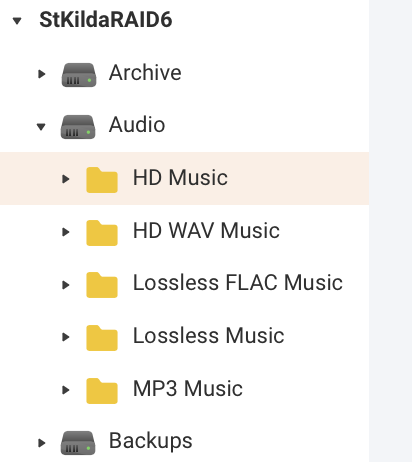
They are all on a Volume called ‘Audio’, in five embedded folders shown in the image below.
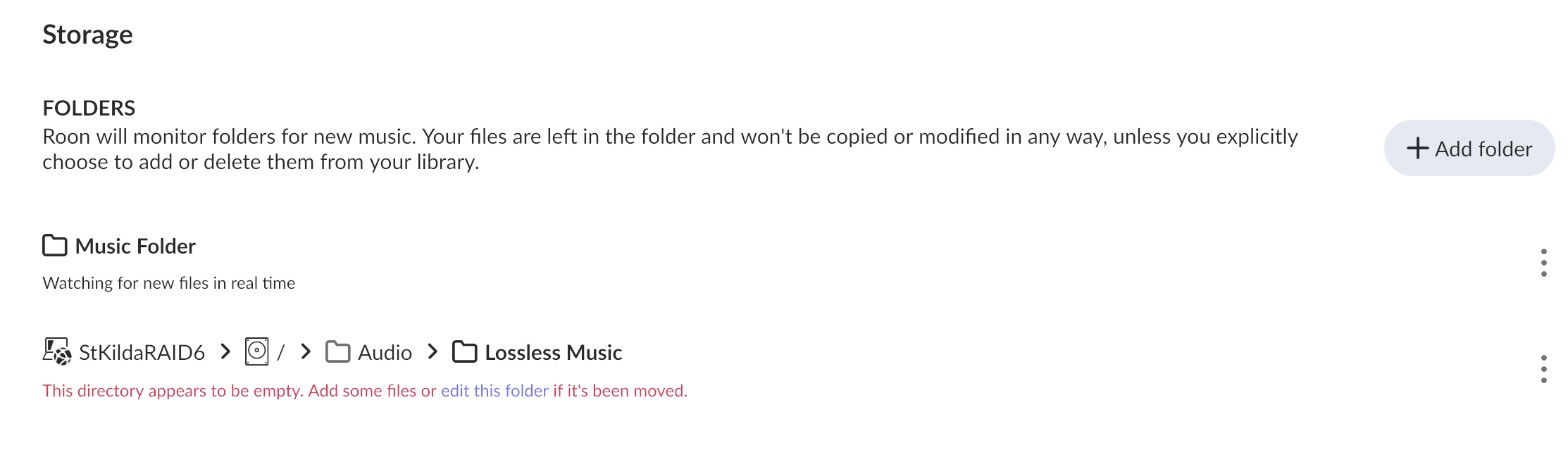
For example I’ve tried: share/Audio/Lossless Music and Roon just says the directory is empty:
What am I missing?
Try this:
https://forum.qnap.com/viewtopic.php?t=133951
What am I missing?
Idk but could possibly be an access rights issue?
You are connecting to a network folder when you should simply navigate to /music. This folder, which is in the container, should be mapped to Audio.
Are you using thin volumes? My NAS is set up with a thick volume so I’m not confident on the paths.
I’m going to see if I can research this a little bit and see if I can better understand how paths work on QNAP (the NAS I have at home)
Nice guide, however I cannot see where the de container is installed. I have a QNAP NAS with a raid 5 4 disc setup as the music library which shows as Volume 1 (I do not use the standard library shares) ROON server was installed on my 1TB SSD (one of the recommendations of ROON) on Volume 2. This all docker thing is not nice for me, I do not what I read in the installation guide. To difficult to read nor a user (may for a programmer of Linux User but for me is acadraba story), I have now a program which will not work anymore, please bring it back to qpkg stuff. The fee is to much for this kind of stuff. I am a user not developer. Sorry but the all thing is not understandable for me.
This isn’t possible because QNAP doesn’t support the minimum requirements for Roon anymore (they haven’t updated some components of their OS in a decade, and this is the issue.)
Thanks, I tried that - it didn’t work!
The paths are set/configured in step 3 of the linked guide. The first volume you setup (/Roon) is, as documented, the volume that will hold your Roon DB. Point it to a folder in your Volume 2 (the SSD).
The QPKG maintainer made this statement:
So you will likely not see an update to the NAS package for QNAP anymore.
This is what I understand from Container. In a container you can run a OS program on his own, will not interfere with the NAS QTS
What OS should be running in the container, Docker? If this is the case please tell me how to get Docker running in the container.
This is what I made of it in the docker file
services:
roonserver:
image: Package roonserver · GitHub
container_name: roonserver
network_mode: host
environment:
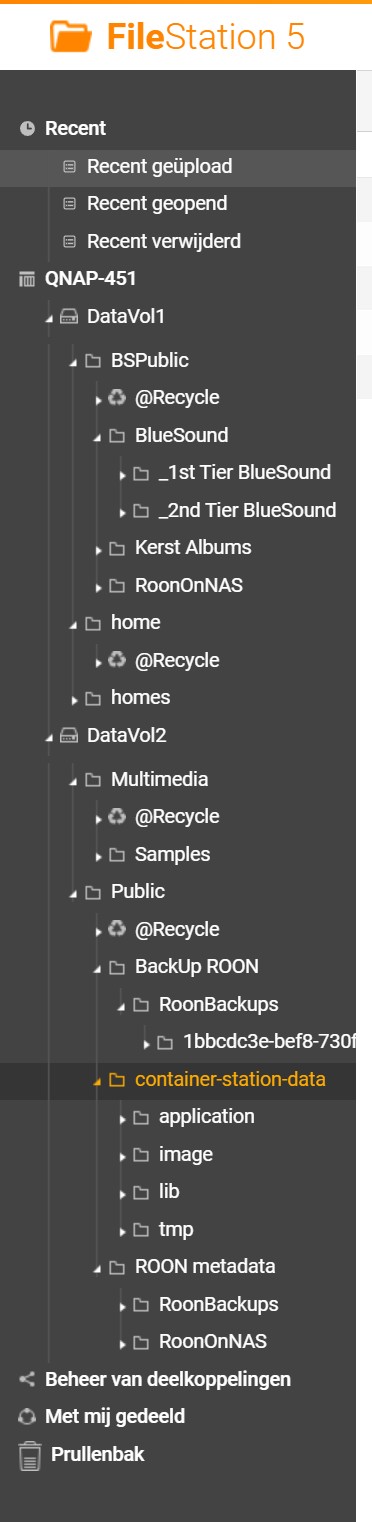
THis screenshot is how the Volumes en maps are organised.
Where is your step plan, point by point, do not refer to the QNAP site is the same problem, lots of words and lines and which makes no sense to me.
DataVol1 is the music library name as in BSPublic/BlueSound. Is a shared map.
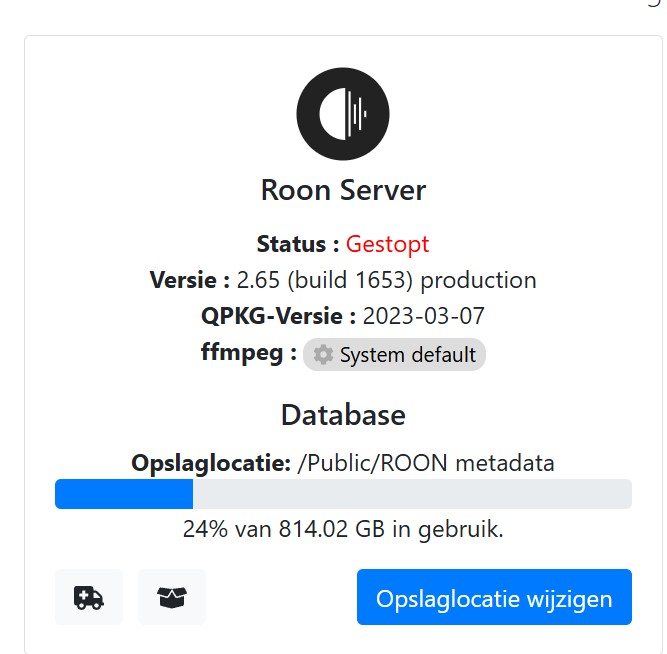
DataVol2 is the SSD. Here is currently ROON server 2.65 build 1653 installed, including back ups and metadata. The NAS Program Containers is (hopefully) here installed.
Please point out how to get this working.
Thank you for understanding, again I am an user not a developer. I understand Windows but my Mac is also full of terms and words which I can not give a place in het whole thing.
Okay, I think I’ve managed to get roon running in a container on a QNAP NAS. (https://help.roonlabs.com/portal/en/kb/articles/installing-roonserver-on-qnap-with-docker#Step_2_Create_a_new_Application)
It’s playing live radio and Tidal.  How do I link my Back-Up folder and my music folder? I’m also a user and no pro, so if there is a step-by-step walkthrough somewhere pls point me to it. I’m lost in all the info.
Thank you for your help so far.
[moderated] 2.65 shouldn’t have been able to install over the previous version if the environment did not meet the pre-requisites. Why didn’t the upgrade check that?
How can I downgrade until I have headspace to create docker image and move to 2.65?
For people like me the instructions are not easy to follow when you are constantly flipping between windows. looking at the guide I am not clear what the “Volumes Required” is referring to. Do I put in the directories where I have my music now /Multimedia or something else…. please advise
Several attempts to install ROON in Container via Docker. No luck what so ever.
according the log:
ice
tar: RoonServer/Server/Messaging.dll: Cannot write: No space left on device
tar: RoonServer/Server/MessagePack.dll: Cannot write: No space left on device
tar: RoonServer/Server/libroonbase.so: Cannot write: No space left on device
tar: Exiting with failure status due to previous errors
No space left on device, please explain which device.
It also crashes the File station 5. All Maps etc are set for read and write.
Remain on the SSD should be around the 800 Gb.
I downgraded the firmware of the NAS to december 2025, de ROOn app is still available in the QNAP App center, if it is not useable let it remove. But the App ROON in the app center wil not work.
Pls explain in detail how to set this ROON server in Docker via Container. Should I make maps, volumes. Should you remove the QNAP app ROON first, or can it stay. What to do with the backup and the database of ROON server.
Because now everything is crashing.
It is only a big music storage (7,3 Tb on 4 HDD’s in a raid 5 configuration) My Auralic player depends on ROON server.
Regards
This works for me. I don’t know however how to link my back-up folder and music storage. All online features work. (Tidal/live radio)
Can anyone tell me how I have to tell roon where my music and back-ups are? With the // and the \ etc. How can I find the path to my folder in the language roon wants?
Edit: I can not copy my back-up folder to the container/roon backup folder. Unable to acces the file. And in the Roon app I’m unable to find my old back-up folder.
your directory paths are incorrect , and based on the recent errors that you shared ( Cannot write: No space left on device ) , you filled up all available space in root filesystem (/); to recover from this state, stop & remove your roonserver container/app first, followed by connecting to you NAS through SSH ( How do I access my QNAP NAS using SSH? ) ; once connected follow these steps:
sudo -idf -hPT /; du -sh /publicrm -rf /publicdf -hPT /If you are unable to recover from a full root filesystem following the steps listed above, reach out to QNAP support for help and don’t reboot your NAS (note: i don’t have the time to fully investigate if QNAP’s root filesystem is a volatile one that is wiped/recreated at boot, and you can recover from this situation with a simple reboot or not; that’s why i recommended to do a manual cleanup)
When you installed “Container Station” (or when you started it for the first time), the app asked you to create a new dedicate volume / share (default being Container); what did you use? asking because based on shared “Filestation 5” screenshot it looks like you used Public (/Public). Please share a screenshot from “Storage & Snapshots” → Storage → Storage/Snapshots with all storage-pools in the right panel expanded; a screenshot of “Control Panel” → Privilege → “Shared Folders” would be a nice addition so we understand better how your volumes / shares are configured
From the info you shared so far (screenshot & docker compose file), later when you are going to recreate the roonserver container, you should use the following paths; note: double-check your RoonBackups directory , because you have two ( “/share/Public/BackUp ROON/RoonBackups” and “/share/Public/ROON metadata/RoonBackups” )
/share/BSPublic/BlueSound -> /Music
/share/Public/ROON metadata/RoonBackups -> /RoonBackups
for /Roon map, i don’t have any good recommendations for now
Thanks for this. But I’ám already stuck at putty, log in as administrator user name is picked up but typing password, nothing. Nothing happens in the screen.
Some misunderstanding here, Public is created by me, not the docker station.
I willl try later to get putty working but, as I said, al this kind of commands is nothing for me, I am user, thats it. What I like to see is a complete package which I can install somewhere and that is it. No more, no less.
I am running this library file for the music already over 10 years. Bought this Nas as a replacement, with the possibility to install a SSD for certain programs, ROOn e.g. Plex is also on this SSD. (I am using it now bue to the fact that ROON is not working. The Auralic streamer is only playing radio now, no music from the library, ROOn is not working.
But I will try tonight, more attempts.
Regards
you should be able to use the same username & password you use to connect to QNAP ‘s Web-GUI ; if that doesn’t work, i’m lost as well since i never had this problem; you can share a screenshot of your PuTTY window , maybe we can guess from that what the error/issue is
the Container share that i was expecting is also created by you, guided by the “Container Station”; anyway, we can worry about the odd layout (directory structure) some other time if we still have the energy to do so.
This screenshot is from the ROON server?