Hello everyone,
It’s been quite some time since my last post on the Roon community board. Over the past months, I’ve had to navigate some personal challenges, but despite that, I’ve done my best to keep the NAS apps across all platforms running smoothly and continue providing an easy way to install Roon Server.
From a technical standpoint, these apps were designed to create and manage the required environment on each NAS platform so that Roon could operate reliably. This approach has worked very well over the years, although it required addressing platform-specific quirks and implementing targeted adjustments where necessary.
Recently, the Roon team announced two important developments: a new version of Roon Server that may not run on all NAS platforms, and a shift toward a Docker-based deployment approach.
Unlike the native NAS apps — where the app tries to tailored the environment individually for each platform — a Docker-based setup provides a consistent and controlled environment. This significantly improves reliability and ensures that Roon Server behaves the same way across all systems.
Given that Roon Server may no longer run natively on the current QNAP OS (QTS 5.2.x),I’ve spent the past week working late nights to adapt the app to use Container Station (Docker) as its runtime, while keeping the installation process as simple as possible. I’m happy to say that this update is now complete and functioning well.
However, there are broader considerations. NAS operating systems evolve over time, introducing new features and requirements. For app developers, this also means increased complexity and maintenance effort. As a single developer maintaining these apps in my free time, I can’t guarantee that this approach will remain sustainable in the long run.
I had a call with the Roon team to discuss the future of these apps. Together, we concluded that embracing Docker as the primary deployment method — rather than continuing with native apps — is the more robust, flexible, and sustainable path forward. It will also improve supportability within the Roon community.
The existing apps have served us well for a long time, largely because they were designed as lightweight wrappers that always download the latest Roon Server during installation. While they continue to work on current Synology and Asustor systems, this may change in the future. Fortunately, all major NAS platforms now support Docker: Container Station on QNAP, Docker on Synology, and Docker CE with Portainer on Asustor.
I firmly believe that transitioning to Docker is the right decision. It reduces friction for Roon Server as a platform, simplifies support, and ultimately benefits users in the long term.
I feel incredibly honored to have had this opportunity and deeply appreciate the trust placed in me by the Roon team and the community. I’ve learned a great deal, and it has truly been a rewarding experience. Thank you all—and a special thanks to those who helped fuel this journey with coffee  .
.
I’m excited about this next Roon chapter: a unified docker future for Roon on NAS across all platforms.
@crieke thank you for all you have done. We appreciate how your work has contributed to the viability of NASs for running Roon over the years, which is still an excellent combination.
While your existing package still works wonderfully on DSM 7.3 as I attested to earlier today, I acknowledge that someday I will probably have to move it to Docker. In the meantime, I am still enjoying things with Roon on NAS.
Prost! 
I’ve watched from afar, since starting with Roon many years ago, and your work in this area was a significant contribution to the adoption of Roon. As a self-identified “Roon Fanboy” I appreciate all you’ve done to help others experience the world of Roon. Get some rest and enjoy your retirement
@crieke thanks a ton for all your priceless efforts over the years!
Particular for beginners, your package was intuitive, smooth to install, and in my understanding it brought several people to using roon.
Does this mean, there is a future for an easy installation of roon server via app center (for QNAP users), and a convenient way of setting the paths for database and music folder? I am afraid the docker generator is not as intuitive for beginners.
I also cannot figure out how to map to my music folder and other required folders. An additional section in the installation notes on how to link these up would be really helpful for those who aren’t Docker experienced.
If Container station is establishing the Container/ folder on an SSD volume, I would just use the path the docker configurator is suggesting (Roon backup folder accordingly):
/share/Container/roon
The music folder path depends on where you store your music. Take a closer look at the folder names/hierarchy, when copying files, or using SMB to access it, and replace the host name or volume by /share/
@crieke Thank you for your help and development the past years.
It took a few days for this noob, but Roon is running in container station, with back-up from previous version…
Only the displays show a black screen en only the titel/artist and timer. But I’ll check tomorrow after a rescan of meta data.
Once more thanks for your time.
Nice to hear from you again. I feared you were another casualty in the sale to Harman. Many thanks for all your hard work keeping Roon alive on NAS over the years. Best wishes for the future.
I’m curious since I used to manage million dollar Netapp and Emc SANs: why would anybody want to run Roon on an entry level/personal NAS with limited resources? I see how much resources are taking up on my standalone Linux server running Roon and if your NAS is rebuilding a failed drive or rebuilding a RAID, nothing else would be able to run concurrently while the NAS is doing maintenance or Roon would take resources away from the NAS to finish the process faster.
Running Roon server with hundreds of thousands of ripped tracks and upsampling everything to DSD256, I don’t think any NAS built for home use would be able to run Roon in this environment.
Because it works well and https://community.roonlabs.com/t/a-roon-on-synology-nas-primer/253298.
Because it works great with mid-sized libraries (75k tracks or so in my case, sometimes 150k or more), it is nice to have everything in one device with minimum of wiring, and the remote/backup/security options are just great. Doing this for 5 years or so. Had to run full RAID rebuild once, and despite the drives working for 40h, roon was still usable.
DSD256 upsampling is no problem for a Celeron-equipped home NAS:
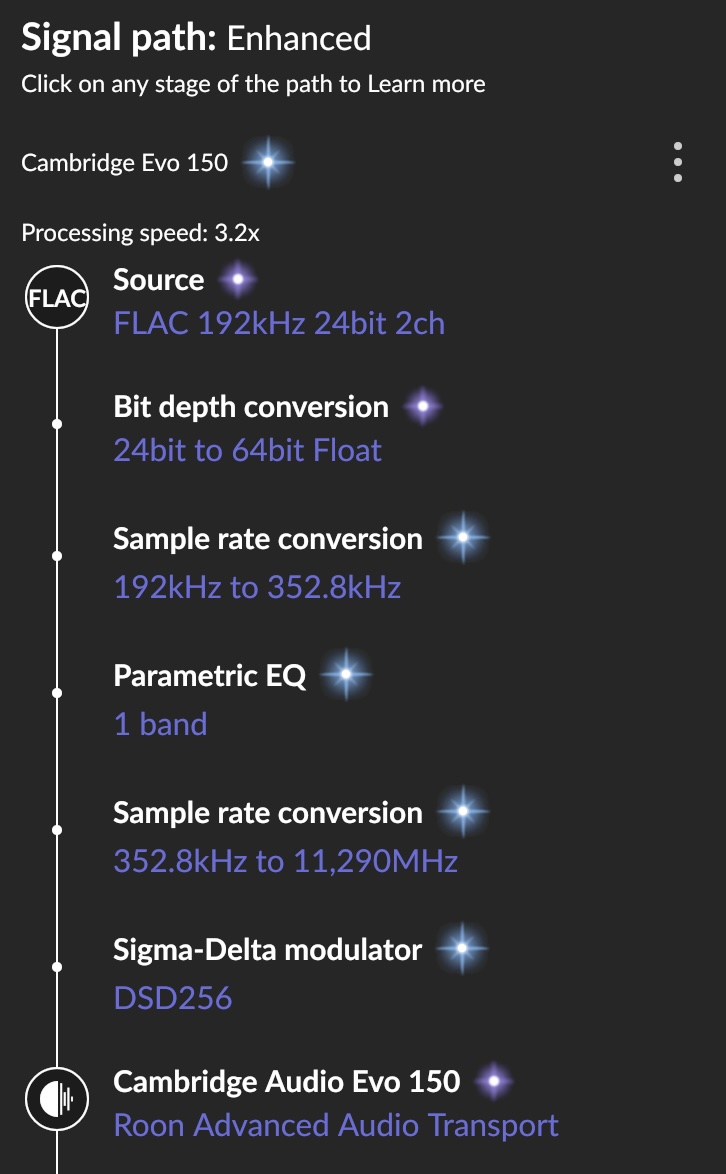
CPU usage is below 25% continuously, so could run three of such streams simultaneously. Q.e.d.
More than 200,000 tracks might call for something more powerful, but a QNAP TVS h674 should do the job even for biggest of all libraries.
I run mine on Synology 920+ and it is rock solid and the overall performance is good. No issues.
Thank you, Christopher, for your apps. It was your option to install Roon on my Synology NAS that led me to take the plunge with Roon back then, and I’ve always enjoyed using it. Even now, the latest version of Roon is running on the NAS and will continue to do so natively for as long as possible. When the inevitable time comes, I probably won’t use Docker, but will run Roon on a/my Mac instead. All the best for all your future projects. Flo
As they say, 
Audio processing is not video processing. It does not require gobs of power. That’s why they’ve been able to do it since the days of slow processors in the 80s. What we have now is embarrassingly overpowered for that sort of thing.
@crieke Thank you so much for your competent work over so many years. Your work was part of the Roon success; hopefully they honored it. The future will show if the Docker approach creates the same customer satisfaction in the Linux (NAS…) community (minority ?).
Again, thank you.
Bernd
Why we bother to run another 7x24 machine when it runs well on the NAS that already ran round-the-clock?
I`m currently using the RoonOnNas image on Synology 920 and its currently working well. I will eventually migrate over to docker solution, but at the moment im in the when its not broke dont poke it phase.
What would be the signs of RoonOnNas image not working, would it be a slow performance degradation or will it one day just not work?
Anyone want to take a stab at how long RoonOnNas can work as it does today?