I have been using Intel NUC as Roon Core/ROCK for four-year and it works 24/7.
As a back up plan to replace this NUC one day, I have a spare 2023 Mac Mini M2 headless 8GB RAM, 256GB hard disk, I am thinking to use M2 as my Roon Core. I have few queries below:-
a) Can Mac Mini M2 (headless) run 24/7? Is Mac Mini M2 as robust as Intel NUC?
b) Can I shut down Mac Mini M2 (headless) by turn off the power button since there’s no display or is there iPad/iphone apps that can shutdown Mac Mini M2 ?
Thanks for your reply Torsten. Do I need to install both Roon Server and Roon Bridge ?
Currently my Intel NUC is installed with ROCK at family room with external SSD (music storage) , using iPad 's Roon Remote to access Roon music , my music streamer is Eversolo DMP A6 at audio visual room. For Roon Music Library , i direct them to my Intel NUC external SSD\music\ directory.
If i substitute my Intel NUC with Mac Mini M2, can I place my Mac Mini M2 at family room? or need to be close to music streamer?
I would check out RVNC / Remote Pro apps.
But pressing on/off button without proper shutdown, would it affect macOS in the long run ?
I have used a 2019 Mac Mini icore 5 / 8 GB RAM for 5 years now without any problems and a very good sonic result. This is set up for handling ROON only. I also have all my music (aprox 1500 CD´s + hi-rez files) on a SSD disc connected usb-c to the Mac Mini/Roon server. Don’t install Roon bridge, just the Roon core. My Mac Mini Roon server is connected with cable direct to my router in a separate room, no audio output from the Roon server. No monitor connected.
All music/Qobuz/Tidal on Wi-fi from my router/Mac Mini to my Roon endpoints. Main Roon endpoint source is Auralic Altair G2.1.
I have Roon bridge on iPhone 16 pro/ iPad Air and a 2023 MacBook Air M2. I Use the “sharing screen” on the MacBook Air to enter my Mac Mini/Roon server and also to turn off the Mac Mini from time to time, but there should be no problem to leave it on most of the time. You can also use the on/off button on the back of MacMini.
Just set up the Mac Mini with no power savings or not go to sleep for the M2 drive. Also set up Roon core app/program to automatic start up after power off/ on again.
Thanks for the insight about your Mac Mini setup that’s what I intend to setup. I would try to install Roon Server only this weekend into Mac Mini M2 and also allow switch control from my iPad to view/access it when necessary. Will make sure my Mac Mini always awake unless I turn off or power disruption.
Can I set up two Roon Core (One from my existing Intel NUC, the other one from my Mac Mini M2 as backup/secondary) with single Roon user account?
You can. Create a backup from your NUC, then power it off. Next install Roon server on the Mac, and restore the backup. It at some point will say you don’t have enough licenses and ask you to unauthorize the old one. Go ahead and say yes it’s easily reversible - you just can’t have two “active” cores on the same license at the same time. But I have one license and two cores in different homes and I
swap back and forth all the time. After you restore the backup will be missing the storage location, so your library will be missing all your local albums. Go into settings/storage. Now do not add a new location - go to your existing location (which will say missing) and edit it, and point it to the location of your files. If you do that you’ll retain your play counts, play lists, etc. and you won’t have to reanalyze every song.
I suggest you decide which one you want active and leave it active, don’t switch back and forth unless you love restoring or don’t mind losing all your playlists or something, or you have a darn good reason.
Don’t retire it, put it out to pasture! Put Ubuntu server on it and learn how to do other useful things with the help of ChatGPT! Run rsync backup jobs, pihole, unbound, plex, whoogle, kuma uptime, other stuff… soon you’ll be writing your own docker compose files. Having a spare x86 box is a pretty good luxury to have…
I said the same thing, but then I basically asked ChatGPT to be my tutor and now I’m doing stuff I never would have believed. But yes, a media server is a good use too!
I would definitely to get some help from ChatGPT too (previously via search engine to know how). Btw, I saw your post on Fiio M23, I have one unit too but have not fully utilize it especially Roon, basically I use it as normal DAP. Many things to learn and explore. Life long learning an ya thanks again.
I took advantage of the fact that I’m in Hong Kong right now and picked up an M23, and a JM21 (because no way I’m carrying around the stainless M23!) - I justified it to myself because they were discounted, and you can’t find them in the states right now (umm… thank you tariffs!). And I got a pair of 64audio u4s, because I’ve never been someplace before where you can just audition IEMs. Love this place.
RoonServer is now part of the Roon app on Mac. There is an option to launch RoonServer on startup, it’s in the drop-down menu of the Roon icon in the top menu bar os macOS… it shows up once you launch Roon for the first time.
If you have Launch at startup selected, it runs RoonServer without the gui at startup, or should I say at user account login. That is the catch, you do have to have the Mac user account logged in for RoonServer to start, and it must remain logged in.
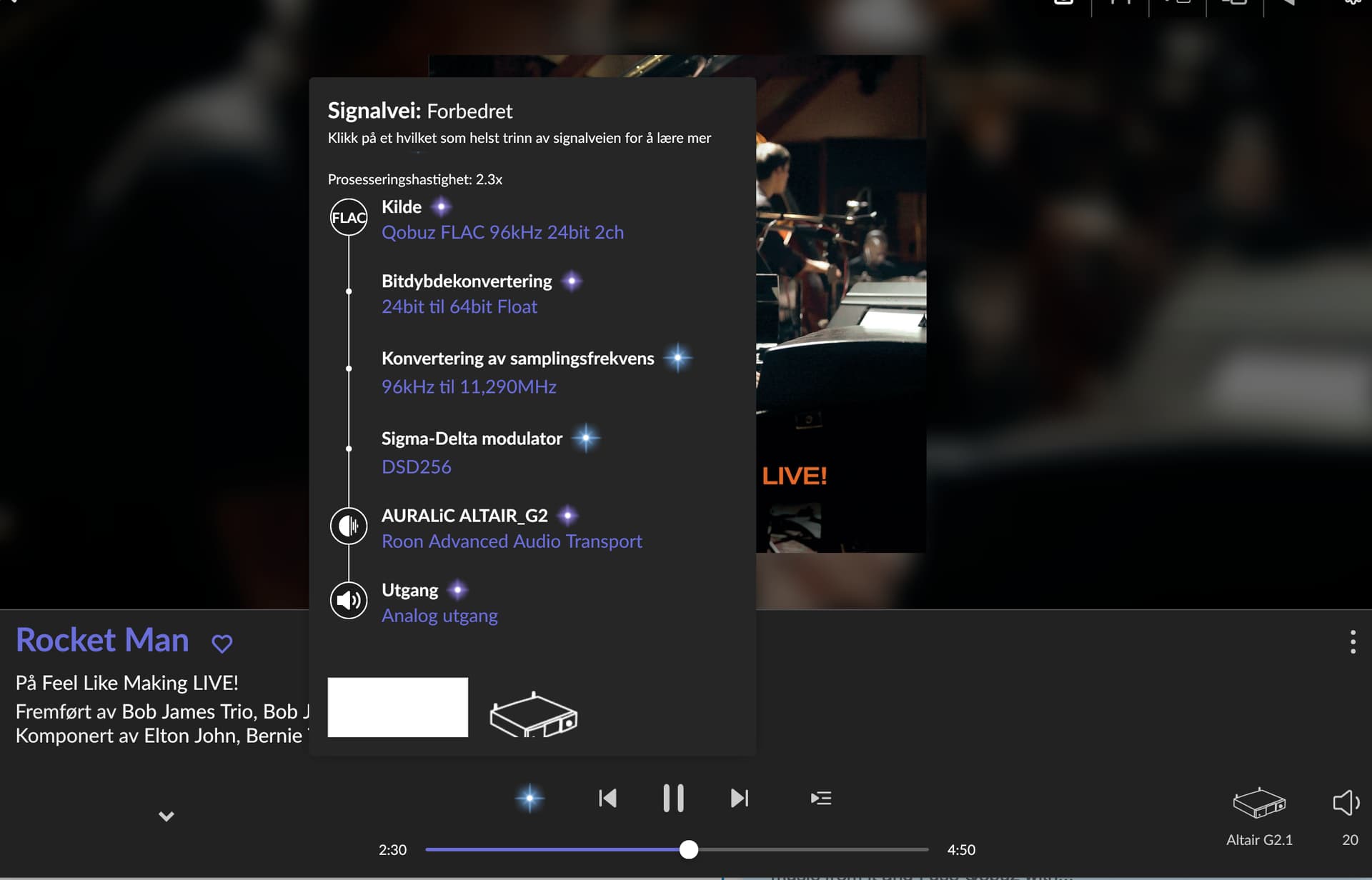
My Altair G2.1(built in dac) has never sounded any better than feeding the Altair G2.1 with sample rate conversion DSD 256 files from Roon. This requires a computer or Mac for the Roon Core with enough CPU power for handling the upsampling/converting job.
I have my Roon Core on a separate Mac Mini sat up just for handling Roon and now it uses aprox 25% off the available CPU power for converting all my music files /Qobuz/Tidal to DSD 256 files. The result are a bigger soundstage, better 3D and more space between instruments, voices are presented more natural and also more attack/volum in the lower frequencies.
There are some settings in this Roon DSD sample rate conversion menu and the default settings are fine but I not use the Parallelize Sigma-Delta Modulator ( set to “no”) .This require more CPU power/use from the Roon Core, but sounds the best. Give it a try if your dac handle DSD 256 (or DSD 512)
I agree. Don’t retire it. Use it as a Plex server and use Plex for remote listening. I found it better than ARC for sound quality and it is much less quirky. I could not get ARC to even work remotely until I installed the Tailscale VPN on my iPhone and Mac mini (Roon Server) as recommended by Roon. Good luck!