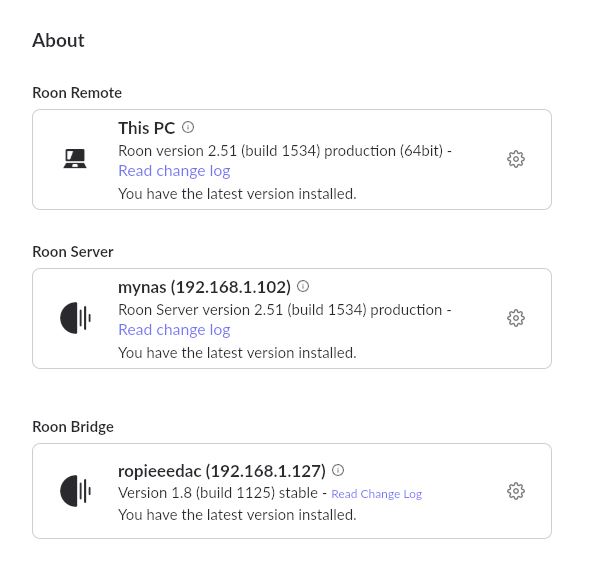
Raspberry PI stopped working; I have a Roon server on a Synology DS918+ NAS. If I log in the Roon app on my PC and go to settings - about, I see the roopiedac there. But if I go to settings - audio it's not there and I don't even have the option to enable it. The Raspberry PI used to work perfectly till a couple of days ago
I should add that I tried turning the Raspberry PI off an don again, to no avail.
The Raspberry PI is connected to my network via a LAN cable, and I manage the network with a UNIFI system. If I log in my UNIFI, I can see the device and I can’t notice any block or restrictions.
Roon Bridges themself don’t show in Audio. You need to add a DAC to the Bridge and turn it on, then go into Ropieee and configure the DAC there first. Please check the DAC and its settings in Ropieee as a first troubleshooting step.
Have you tried rebooting the server and network devices?
Also check firewall settings on the device you are trying to access RoPieee webUI with.
If you can’t get to the ropieee webUI it may mean something is in the way? Or RoPieee is not starting fully? Its a long shot but you could try hooking up a monitor and watching for error when the RPi is starting?
This topic really should be in the RoPieee area as Roon staff don’t support Ropieee installs.
Yes, I had. It seems the mcirosd had become corrupted. Let’s close this thread and I’ll open a new one in the Ropiee section (I can connect via the web interface but Roon still doesn’t find it)
Thank you for reaching Roon support. We are glad to hear that you found the root cause of the issue. Please let us know if anything else is required from the Roon support side.