Rescanning files issue and intermittent playback on Roon Rock with Intel NUC (ref#G33LAT)

Hi! What’s not quite right with Roon?

· None of the above quite fits

None of the above quite fits

· None of these quite match

Tell us what's going on

· Thanks for your attention to this matter. Please see the last paragraph first as the situation changes while answering the questions.

What I noticed first is that the running job indicator (i.e. the arch running along the edge of a circle in Roon) kept on running for days in a row. I rebooted the NUC on which Roon Rock is installed a few times, but the running job indicator returns back right after.
Clicking on the running job indicator gives a pop up window that indicates Rescanning files: 1/17 with a bar that is blue only at the beginning. There is a green tick mark left to "Adding music to library: Complete".
The amount of 17 does not make sense to me.
I have logged out of the services qobuz and Tidal one by one and reconnected. This did not make a difference.
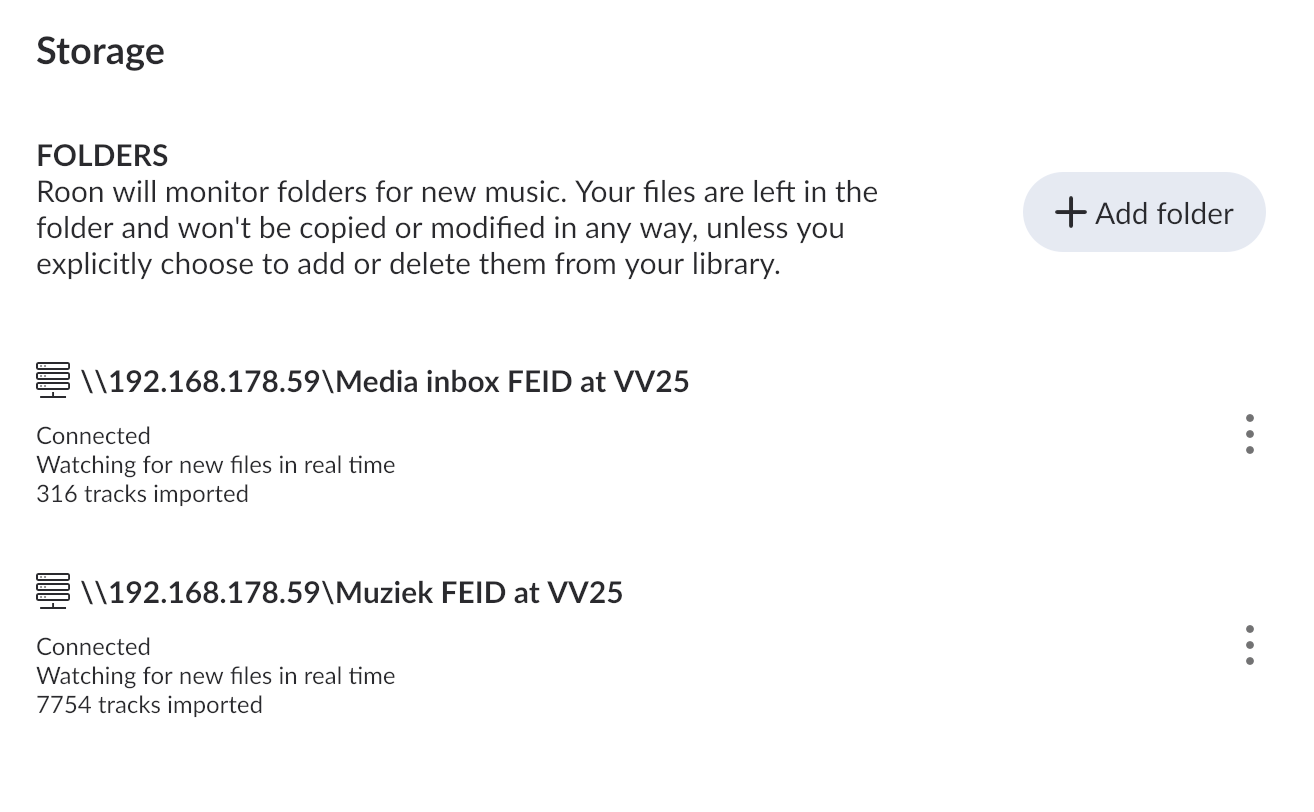
Rock is connected to 2 folders on a NAS. One indicates Connected/Watching for new files in real time/316 tracks imported and the other indicates Connected/Watching for new files in real time/7754 tracks imported. Hence, I cannot make sense of the number of 17 files.
In the past period Roon has been working fine.

Not sure if it is related, but lately Roon will sometime not play further tracks after a some tracks of an album have been played or will not play Roon radio after finishing playing an album.
The first thought is to at least solve an anomaly that is visible and then search for other reasons if that does not solve the playback/radio problems.

Roon Rock / Roon OS 1.0 (build 259) installed on an Intel Nuc
Roon Server: Roon Server version 2.64 (build 1646 production)
Roon Remote: Roon version 2.64 (build 1646 production)
Playback via Primare SC15 MKII

Hang on: Roon Server and Roon Remote indicated there was while answering the questions for filing the ticket. After answering the questions but before submitting the ticket, I updated and: the running job indicator is gone!
Cannot confirm yet if now subsequent tracks are started again every time or that Roon Radio starts as that was intermittent.

Tell us about your home network

· Main router Fritz!Box 7590.
Fritz!Box 7590 - UTP - Netgear GC110 (nr 1) - glass fiber - Netgear GC110 (nr 2) - UTP - Bonn Silent Angel N8 - UTP - NUC with Rock and
7590 - UTP - Netgear GC110 (nr 1) - UTP - Fritz!Box 7530 - UTP - Primare SC15 MKII
FritzBox 7590 - UTP - Netgear GC110 (nr 1) - UTP - NAS (comprising the folders to which the Roon Server has access.

This situation has been like this for several years now and so far no problems until recently. No updates performed on Netgear or Silent Angel Bonn N8. Automatic updates on all Fritz!Box equipment on.
Hi @Verver.

Thanks for the update. It looks like whatever was causing Roon to get stuck on scanning finally completed.

Did you make any changes to the storage setup after you answered the intake questions? Are you still having issues with playback, or has that resolved as well?

Hi Noris,

Not sure what is going wrong with my updates to the ticket. I added something, but don’t see it in this thread.
In any case, I added that the running job indicator is back and keeps running for days in a row now.
I did not make any changes to the storage setup: same location etc.

Qobuz just reported that they did a cache purge as many people had some problems. I disabled both Qobuz and Tidal. The job indicator is still running.
Tried several tracks from both storage locations: they play back fine.
Switched off the NUC and switched it on again.
The job indicator is running again.
Switched on Qobuz and Tidal again.
Job indicator still running.

Hi @Verver,

Could you please share a screenshot of your Roon Settings > Storage?

Do you have a backup that predates the issues you’re having? If so, restoring from this backup may help.

Thank you!


Please find the screenshot attached.
I definitely have had now several times that after starting a track, there are interruptions of the audio.

Furthermore: both folder are on the same NAS and the same access credentials are used. Also, the settings for the folders on the NAS are the same.
The one with less files is 42.5 GB, the larger one is 204.2 GB.

I disabled both again. The running job indicator stopped. Enabling the one with 316 tracks did not trigger the running job indicator, enabling the other one did.
Disabled the one wit the running job indicator.
powered down-cycle (down and up) the NUC on with Rock is installed
Roon returns without the running job indicator.
Enabled the larger folder again and the running job indicator came back

Force rescan does not help (as expected). Is there a log to be retrieved so it can be seen what problem Roon encounters to isolate it?

The backups that Roon stores date from after the problem started, so they are too recent.

Hey @Verver,

Thanks for the update and additional information! We were able to review a fresh diagnostic report from your Roon Server, and saw repeated corrupted library index with duplicate album entries. The logs show this warning firing thousands of times across the log period:

[ProfileDuplicateObjects] duplicate object in NotifyEndUpdates count: 60, total albums from query perform: 1118 — There are multiple albums with the same album_id in the SortedSet

This points to database corruption, and we’ll want a copy of your database for our team to take a closer look at.

It may be worth trying to perform a library clean up from Roon Settings → Library, use “Clean Up Library” and check if your issues persist afterward.

If not, please upload a backup following the steps below:

  1. Zip up your RoonBackups folder (right-click it and select “Compress…”): 2. Submit the .zip file to us through our Database Corruption Issues portal

In addition to this, the MacBook Pro is constantly switching between three hostnames: MBP-van-Frans-2.fritz.box, MacBook-Pro-van-Frans-2.fritz.box, and MacBook-Pro-van-Frans-2.local. This causes frequent RAAT connection drops and reconnects. While the MacBook is not your main playback device (the Primare is), this instability adds background churn to Roon’s connection management. The root cause is likely the MacBook’s network interface alternating between your Fritz!Box DNS domain and mDNS (Bonjour).

Let’s see if you can fix the MacBook hostname instability (minor, but worth doing).

On the MacBook: System Settings → General → Sharing → set a fixed Computer Name. Also, check that only one network interface (Wi-Fi OR Ethernet, not both) is active at a time, to prevent the mDNS/DNS flip-flopping.

Thank you!

Hello @Verver ,

This thread has been reopened at your request. Can you please update us on the latest status when you have a chance? Thanks!

Hi @Verver,

Wanted to follow up on this. Since you asked to reopen the thread, can you let us know the latest status on your end? If anything has changed or you have new details to share, just reply here and we will take it from there, thanks.

Hi,

Yes, I executed all 3 tasks, library clean up, uploading backup and MacBook single connection (it is manual to switch off WiFi so I hope I remember every time)

The problem is persistent.

Hi,

After reviewing the diagnostic logs from the June 25 upload, here is what the data shows.

Roon version in the logs: 2.67 (build 1661) – the server auto-updated since the last post.

The “Muziek FEID at VV25” share is the trigger. The logs contain 192 CorruptFile errors concentrated in Queen tracks on that share, plus one file with completely unreadable audio headers:

Unsupported stream parameters from ‘…/Queen II (DTS) v2.0.wav’: SampleRate=0, BitsPerSample=0, Channels=0

The scan pattern repeats roughly every 4 hours: an initial slow scan of about 88 seconds (Roon wrestling with the corrupt files), immediately followed by a 9-second validation pass. Because the corrupt files never resolve, the loop never stabilizes.

The ProfileDuplicateObjects warning (duplicate album entries) is a consequence of this, not an independent cause. Library cleanup clears the database symptom, but the corrupt files on the NAS regenerate the duplicates on the next full scan.

Steps to fix:

  1. On the NAS, open the “Muziek FEID at VV25” share and check the folder QRST/Q/Queen/mp3 other/. Files there (including “Gimme Some Lovin’.mp3”, “Bohemian Rhapsody.mp3” and others) are being flagged as corrupt. Re-rip, re-download, or remove them.
  2. Also remove or replace untested downloads/Queen/Queen II (DTS) v2.0.wav – this file has a 0 Hz sample rate and cannot be read at all.
  3. After cleaning up the files: Roon Settings > Library > Clean Up Library, then force rescan the folder.
  4. If duplicate albums persist after that, a database rebuild from a pre-issue backup may be needed.

Hi,
Thanks.
Executed steps 1 and 2.
Step 3: there were no files to clean up. I noted that in skipped files it is reported that it is impossible to read some image files as well. Didn’t change anything there. Rebooted the NUC: removed around 360 (I believe 363 files).
The running job indicator is still active.
Removed the corrupt image files.
Forced rescan of all folders.
Clean up library: nothing to clean up.
Skipped files: 0

Running job indicator is still active.|
Rebooted the NUC
Clean up library: 0 files to clean up.
Skipped files: 0
Storage: 316 tracks imported in 1 folder, 7432 tracks imported in the other folder.

I don’t think I have a pre-issue backup. How can I build up the database from scratch?
Will I loose my playlists when doing that?

Hey @Verver,

We were able to review a fresh diagnostic report from your Roon Server, and the good news is significant. The two newest log segments, the post-cleanup restarts on June 25 are clean:

  • Zero CorruptFile errors. The Queen corrupt files that were firing 32× per scan cycle through June 23 are gone. The cleanup worked.
  • Zero ProfileDuplicateObjects warnings. The duplicate-album database symptom flagged is no longer firing at all in the current logs.
  • Scans now complete fast and cleanly. Initial scans take ~1–5 seconds, then report "0 items modified, 0 items discovered" and complete. A healthy, stable library.
  • Library is intact: the stats read 9935 tracks, 1100 albums, 599 artists, and 69 playlists. The playlists are present and fine.
  • The Primare SC15 MK2 connects normally. There's one Object reference not set failure at startup, but it's a momentary RAATServer startup race, it connected successfully one second earlier (12:11:54 => Connected) and stayed connected. Not the dropout cause.
Nothing in the newest logs shows a stuck or looping scan job, scans start, find nothing, and finish. A couple of possibilities for the lingering indicator:

The most likely explanation is that the indicator just needs a clean restart cycle to clear, and/or background audio analysis is running. Roon’s “background work” is scheduled (the log shows background work scheduling start: 01:00:00 / end: 05:00:00), so audio analysis of the re-added/changed files may legitimately be queued and the arc reflects that, which is normal post-rescan activity, not a fault. Worth letting it sit overnight (it’s scheduled for the 1–5 AM window) and re-checking.

Additionally, the other live issue is the MacBook, which is still network-unstable. Vadim’s hostname fix hasn’t fully taken.

The current logs show the MacBook cycling across three IP addresses. The 169.254 address means the Mac’s network interface is repeatedly losing its DHCP lease. This causes ongoing RAAT connection churn and is the most plausible remaining cause of the intermittent playback dropouts, and it can keep Roon’s connection-management busy in a way that’s easy to misread as a stuck job.

Based on these logs, a full rebuild looks unnecessary and premature, the corruption symptoms (ProfileDuplicateObjects) have cleared and scans are clean. I’d hold off.

A from-scratch database rebuild will lose locally-stored Roon playlists unless they’re backed up or exported first. The logs confirm 69 playlists currently exist. Qobuz playlists (20) and Tidal playlists re-sync from those services automatically, but native Roon playlists do not. Before any rebuild, you should make a current Roon backup (even a post-issue one preserves playlists) and/or export playlists.

Since the DB is no longer showing corruption, a current backup is now safe to rely on for playlist preservation.

I hope this helps!

Hi, it now is Monday June 29, so days later, and the looping scan job is still ongoing. I understand that ht background work (audio analysis) should be finished by now.

What to do now?

Hey @Verver,

Thanks for the update! We were able to review another fresh Roon Server diagnostic report, and can still confirm:

  • Corruption is gone. Across the three most recent log segments, CorruptFile errors appear 1–2 times each (background noise, not the 32×-per-cycle storm), ProfileDuplicateObjects is zero, and Unsupported stream (the Queen II DTS file) is zero. The cleanup worked and held.
  • Library is healthy and intact: 9935 tracks, 1100 albums, 599 artists, 69 playlists. No database rebuild is warranted.
  • Scans are fast. Apart from a single 87-second outlier at 03:35 on June 29 (during the scheduled 1–5 AM background window, with no corrupt-file errors attached to it, it was just NAS latency during the nightly metadata push), every scan completes in 0.4–5.5 seconds.
So why is the job indicator still spinning?

Two things, neither of which is the original corruption:

1. The scans are periodic, not looping. The “force rescan requested” timestamps are almost exactly 4 hours apart. That’s Roon’s normal scheduled rescan of watched network folders, not a stuck loop. The earlier continuous loop is no longer present.

2. Three .m3u playlist files are being re-extracted on every single scan, always reporting itemsdidchange=False:

  • …/Muziek FEID at VV25/Compilations/Gouden Jordaan Successen/cd 2/Willy Alberti…cd 2.m3u
  • …/Muziek FEID at VV25/Compilations/German Top 100 2010.10.10 [MP3]/playlist.m3u
  • …/Media inbox FEID at VV25/test and reference/audio signals disc 1/Onbekende Auteur - Onbekende Titel.m3u
Roon re-reads and re-syncs these every scan but the result never "sticks" (itemsdidchange=False every time). This is the classic signature of .m3u files whose internal track paths don't resolve to files Roon can match, so they're reprocessed indefinitely and keep low-level background work queued, which is what's likely feeding the persistent arc.

Let’s see if the following help:

  1. On the NAS, locate the three playlist files above and either (a) move them out of the watched folders temporarily, or (b) open them in a text editor and verify the file paths inside actually point to existing tracks on the share. The Onbekende Auteur - Onbekende Titel.m3u under "test and reference / audio signals" looks like a test artifact rather than real music, a strong candidate for removal. After moving/fixing them: Settings → Library → Clean Up Library, then force rescan.
  2. Let one clean 4-hour cycle pass and re-check the indicator with no .m3u files in the watched paths. If the arc clears, the playlists were the cause.
Thanks, @Verver 👍

Done: all 3 m3u-files deleted (including from the trash-bin)
By the way: there were not files to clean up.
Rebooted the NUC as well.

5 Hours have passed and the job indicator is still spinning.
When clicking on it, a pop-up display says: Rescanning files 1/1

I disabled the folders 1 by 1: when disabling the folder “\\192.168.178.59\Muziek FEID at VV25” the job indicator then inmiddeately stops spinning. Enabling that folder again and it starts spinning again straight away.

316 tracks imported in “Media inbox FEID at VV25” and 7432 tracks imported in “Muziek FEID at VV25”.

No skipped files seen. Clean up library: 0 files to clean up (all 3 bullets)

Cleared image cash (via Roon on MacBook) → job indicator keeps on running.

By the way: the NAS on which the folders are, powers down every night for a couple of hours.
Is that a problem? If so, I can move the folders to a drive on the NUC which also stores the NUC OS / Roon. Alternatively: I can cancel the ‘power naps’ of the NAS in the night.

Interesting that corruptions are seen. I noticed Roon reporting one as well, and now it is gone.
The NAS is a Synology running on Synology Hybrid Raid (SHR) with 2-drive fault tolerance and the drives are formatted with btrfs. This means that any corruptions should be restored by the NAS itself. There is a SSD read-only-cash as well.

All drives and SSD cash are reported to be healthy.

Is it normal that corrupt files are seen even if they are not?
If not, it obviously poses a question if all data (not just the music) on the NAS is at risk because of some NAS or HDD problem.

However, it does not report any corrupted files and restoring them.


update 15 hours (and after NAS ‘powernap’) later: job indicator still spinning.
By the way: I found that the scans were not at the 4 hour cycle but randomly. Changed it to the 4 hour cycle now.

And noticed that 1 more file is corrupted. Really getting worried about the corrupted files (as I have many non-music files on the NAS as well).

Hello @Verver,

Thank you for the systematic troubleshooting - disabling folders one by one to isolate the trigger is exactly the right approach and confirms “Muziek FEID at VV25” is the source.

On the spinning indicator

Before anything else, please try removing the “Muziek FEID at VV25” folder entirely from Settings → Storage (click the three dots → Remove), then reboot the NUC, and add it back fresh. This clears any stale scan state Roon may have accumulated for that path and forces a completely fresh import.

The NAS powering down overnight while Roon has an active scan in progress is also likely contributing - when the NAS goes offline mid-scan, the job gets interrupted but never completes cleanly. We would recommend disabling the NAS power schedule temporarily while we investigate, or ensuring the NAS sleep window does not overlap with Roon’s background scan window (1-5 AM).

On the recurring corrupt files

This is worth taking seriously. btrfs with SHR should self-heal corruption, but if new corrupt files keep reappearing, it suggests either the files themselves have issues or something deeper. We would recommend running a full btrfs scrub via Synology’s Storage Manager → Volume → Schedule Data Scrubbing - this will compare all data blocks against their checksums and attempt repairs.

Could you also check Storage Manager → HDD/SSD and let us know if any drives show S.M.A.R.T. warnings?

Hi Vadim,

It seems as if not powering down the NAS at night did the trick. After disabling that function, for several days I did not see the spinning indicator. Didn’t know that Roon is not compatible with a storage location that is not present all the time.
If I remember correctly, it is advised not to store the music on the drive on which ROCK/Roon is installed in the NUC. Best to add a simple external drive to the NUC?
By the way: I noticed that I can’t update ROCK anymore (wrong BIOS type). things have progressed over the years: still best to have a NUC with ROCK or is a (dedicated) M4/M5 MacMini as good/better nowadays.

On the corrupted files:
There are no SMART warnings (even with SMART extended test). Also IronWolf tests do not give any signals.
Scrubbing is and was done automatically every 6 months. Running a manually triggered one now.

Indeed I am very worried about this.

Hey @Verver,

Great news, and the latest logs back it up. Your shares were dropping offline every night around 00:30 and not returning until ~03:30, which falls right inside Roon’s nightly background-scan window (01:00–05:00). Roon expects watched network storage to be available at all times, so when the NAS napped mid-scan the job could never finish cleanly, that was the spinning indicator. Since 2 July there are no more nightly offline events in the logs, which matches exactly what you’re seeing. Keeping the NAS awake is the right call.

On storage location: Yes, best practice is to keep your music off the internal drive that holds ROCK/Roon OS. Either option is fine: (a) keep it on the NAS as you do now, just always-on, or (b) add a simple external USB drive directly to the NUC. A directly-attached drive removes the network entirely and avoids exactly this “storage not always present” class of issue, so it’s a solid, low-fuss choice if you don’t need the NAS’s redundancy for your music.

On not being able to update ROCK (“wrong BIOS type”): That’s typically a BIOS boot-mode mismatch (Legacy vs. UEFI) on older NUCs. It’s worth checking your NUC’s BIOS settings, but if the unit is from a generation that’s no longer supported, a modern Roon Server host is a reasonable upgrade. A Mac mini (M-series) running Roon Server is an excellent, well-supported option today and would sidestep the ROCK/BIOS limitation, it’s a valid alternative to a NUC+ROCK setup. (Happy to point you to current supported-hardware guidance if you’d like to stay on the ROCK/Nucleus path.)

On the corrupted files: This is the reassuring part. Across the newest logs only one file ever flagged, “Amy Macdonald - No Roots.mp3”, and it stopped appearing after 3 July. There’s no sign of spreading or systemic corruption. Importantly, a Roon “CorruptFile” warning usually means Roon couldn’t parse that file’s audio headers/tags (a bad rip, incomplete download, or unusual encoding), it is not the same as block-level storage corruption. Your btrfs/SHR checks, SMART, and IronWolf tests all coming back clean strongly suggests the NAS and drives are healthy and your other data is not at risk. The manual scrub you’re running is a good final confirmation. If a specific file won’t play or keeps flagging, just re-rip or re-download that one file.

Let us know how the scrub finishes and whether the indicator stays quiet. :+1: