Thanks for confirming!
Thanks for the prompt reply, I can wait 
Hi
I just want to share my experiences from today
My Dial stopped working, and in Roon Extentions it’s displayed as Sleeping
Looking at previous support in this thread i followed the steps in the manual, page 53
After the factory reset it didn’t show up any more in Roon (of course), and I don’t know how that’s supposed to work since it’s unconfigured
Luckily I did a backup to a usb drive before, and since it was reset I thought I saw in Roon that to restore the settings again I should boot it up with the usb drive inserted
Tested that and sure enough, it turns up again
I activate Dial and it works again!
What I’m missing from the manual is also how to handle that backup/restore routine, since the instruction displayd in Roon istn’t available anymore when you do the factory reset of the pi
The guide is always available, click on the link…
I was reading the guide, the implication is I’m pretty stupid I guess =)
You’re not stupid at all, we’re all human (apart from Donald Trump) 
4 Likes
Is there any way of improving the BT range of the pi (zero 2W)?
This may be of interest…
3 Likes
My RooDial(Microsoft surface dial) has stopped working I replaced the batteries. Restated the raspberry pi zero. I can confirmed the pi is on the network. what else can I do to confirm its working as expected?
Please check:
- Can you see rooExtend if you open Roon Settings/Extensions?
- If yes, can you see rooDial in Roon Settings/Extensions?
- What can you see in the statusline of rooDial?
Have you ever connected the Surface Dial to a different device like a PC?
In the rooExtend-Box Manual in my Download area you can find tips for rooDial trouble shooting.
Best DrCWO
1 Like
Yes, I can see both RooDial and RooExtend. Status is “Sleeping, Bedroom, licensed (,) VolumeButton” I have tried to connect the surface dial to another machine but I will shortly. I will read the manual also. Thank you for your help.
This is the issue 
Best you start with a fresh SD-card. Also please read the manual. I described there what has to be done if the Dial was connected to an other PC.
Best DrCWO
Sorry I have NOT connected it to a computer or any other device. Should i still follow with a fresh sd card?
Bei mir seit ein paar Tagen das gleiche. Einer meiner Dials reagiert nicht, obwohl in Roon als sleeping angezeigt. Neu Verbinden mit Bluetooth funktioniert nicht.
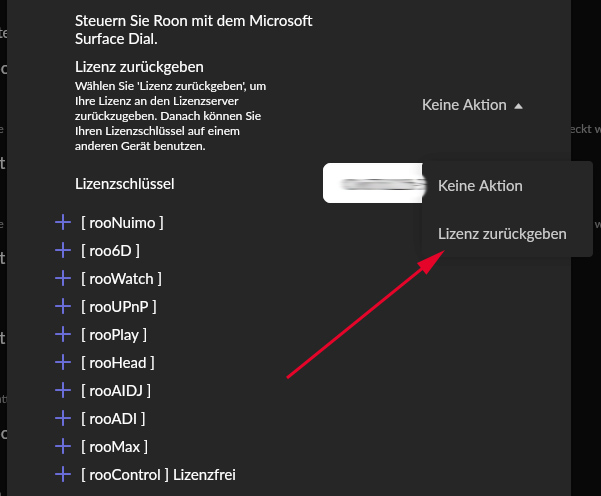
Wenn ich jetzt auf Werkseinstellungen zurücksetze, muss ich dann zunächst die Lizenz per USB sichern oder bleibt sie erhalten?
Translation
I’ve had the same problem for a few days now. One of my dials is not responding, although it is shown as sleeping in Roon. Reconnecting with Bluetooth does not work.
If I now reset to factory settings, do I first have to back up the licence via USB or will it be retained?
Hi @DrCWO, I had looked into rooDial a year or two ago, and from memory, the status, I think, was that no hardware dial for the extension was available.
Now I see this on the Microsoft store. is this dial compatible with the extension?
Another question: The hardware should be a RaspPi zero w2 or RaspPi 4, right? If I buy the Raspi now, which one would you recommend? (Performance-wise plus which one has neater case and power adapter integration?)
Many thanks for your advice in advance!
Entweder per USB-Stick sichern oder zurückgeben. Machst du beides nicht, ist die Lizenz verloren. Ist die Lizenz zurückgegeben, kannst du sie nach einem neuen flashen der Micro SD Card einfach wieder eingeben. Vorteil des USB-Sticks ist, dass dort auch deine jetzt gemachten Einstellungen gespeichert und bei einem Recover wieder importiert werden.
Sorry, I can’t open the link to look.
I recommend Pi4. Future proof and offers with Ethernet and USB more expansion capabilities.
Best DrCWO
As long as you don’t change the physical Pi you can re-use your License Key. Be sure you have it at hand after the reset.
Best DrCWO
Thanks for replying!
Strange, maybe it is a country issue…
In any case the MS Surface Dial seems to be internationally on sale again. rooDial works with the current version, right?
Never heard that it did not work. But I haven’t verified by myself.
Best DrCWO