Yes please 
Best DrCWO
Yes please
Best DrCWO
Hi Doc-
Any update on whether / when you might re-enable this? I’ve got my cables set up and am really hoping to try this. If it’s complicated, I realize this is a fringe use (at least right now)!
Thanks,
John
Next week I will finish the next release and it will be included.
Best DrCWO
Thank you! That’s incredible.
One question for you - I recently tried to get my RooDial back up and running in preparation (I’ve been using a 6D in my other system, just ordered a Xencelabs). Can I use RooExtend in a system with a HAT or just USB? I have a Pi2AES that is what I use for my DAC via AES input currently. I can’t find it in the manual where I’d change the settings or anything in the logs on Audio Interface when I don’t have USB plugged in. Thank you!
Officially only USB is supported. Id you like to tinker I can give you the credentials for self installing the driver.
Best DrCWO
Super generous. I’d be happy to give it a try. I’m not really a developer, but together with ChatGPT and my old skills from college 30 years ago I can usually with some stubbornness make things work. And I can always reflash if I get into trouble 
A couple questions, which we can revert to DM if you prefer…
dtoverlay=pi-digi or hifiberry-dac, or are those disabled entirely?aplay, speaker-test, etc.)?Thanks again — I really appreciate the work you’ve done and the opportunity to tinker a bit under the hood.
-John
Hi DrCWO,
I renewed my RooDial license last week and now it keeps losing the license and I have to keep re-entering it every day or so. The log has the entries below - I have used xx’s to obscure actual codes. It says the code is inactive. Can you please fix this or supply a working license code, thank you.
“rooDial”: {
“productId”: “7oWuMUUF”,
“licenseKey”: “xxxxxxxx-xxxx-xxxx-xxxx-xxxxxxxxxxxx”,
“machineId”: “10000000057a6556”,
“lastCheck”: “2025-04-19T09:45:29.205Z”,
“retryCounter”: 0,
“licensed”: true,
“text”: “The License key for given Product is inactive”
Please e-mail your License Key to info@definiteaudio.de.
Best DrCWO
Thanks for resolving this for me DrCWO!
I’ve just bought the Zexmte double antenna 5.1 version from Amazon for rooDial.
But the little blue LED doesn’t light at all.
It seems to be paired ok and working and shows up in the system logs with its MAC address.
So is that normal ? Or have I got a faulty one?
I can tell if I see the system log. Please open the rooExtend Service page entering http://[IP of your rooExtend]. The IP you find in the Settings of the rooExtend License Manager here:
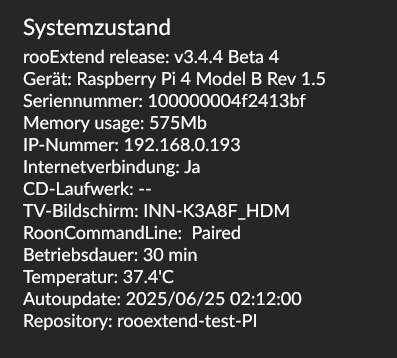
In this case you have to enter http://192.168.0.193
At the end of this page press this button:
In the page you get look for this line:
If you see Has Bluetooth: true hci0 USB the USB antenna is operating.
Best DrCWO
Hi DrCWO.
Yes it has that line in the system logs
So all good then 
Thanks for your help
Hi @DrCWO,
first of all thank you for all the effort you have put into the development of the product (writing in English, so that others can benefit from troubleshooting).
I used rooDial back in 2023. Then in 2024 it stopped working, but I never investigated what was the reason and it just sat there, idle, until today. Now I’d like to get it back to operational. The license is still active, I checked.
rooExtend release: v2.3.2
Raspberry Pi 3 Model B Rev 1.2
I have flashed a new microSD card with the latest rooExtend image.
Connected over Wi-Fi (that didn’t work in 2023), also checked over Ethernet - both work (I can access rooExtend.local from my browser).
Once the system boots, rooExtendLicenseManager appears in Roon Settings/Extensions section. When I click Enable next to it, I see the settings screen, but this triggers the system to self-reboot (at least looks like it: in a few seconds the settings cannot be saved in Roon, and the web interface of rooExtend is not available).
After a few minutes (I assume, once the reboot is done), if I remove the rooExtendLicenseManager from Roon Settings/Authorizations list, rooExtendLicenseManager appears again in the Roon Settings/Extensions page - but then the only thing I can do is to repeat the cycle. Behaviour is identical both on wired and wireless connections of Raspberry Pie.
Any ideas or troubleshooting info I could additionally provide?
Cheers,
Yan from HH
Hi Yan,
You should no ,ore use V2.3.2 for Pi3!
Pi 3 has arm V8 and so please use the image for PI ARMv8. V2.3.2 is deprecated and only there for very old Raspberrs Pis like Pi Zero W or Pi2 that only offer ARMv7 architecture.
The ARMv8 image also has OTA update and many more features. If you still use the same Pi your License Key shall also be accepted with the ARMv8 image.
Please try this and report back. Best start with a Ethernet connection to make sure anything is working.
Best DrCWO
Hi DrCWO,
updated:
rooExtend release: v3.4.0
Gerät: Raspberry Pi 3 Model B Rev 1.2
Seriennummer: 000000009fb0467a
Memory usage: 115Mb
WAN connection via Ethernet.
Same symptoms, but now when I enter hit Enable rooExtend License Manager in Roon Settings/Extensions, there appears a button Settings, and when I click it, I only get a pop up with header Extension Settings and text License Manager 3.4.0.
So I can’t even get to the settings page of the rooExtend system.
And when I click close on that pop up, the Pi is already rebooting - and I can repeat the process by removing the service authorization in Roon.
Cheers,
Yan
Please restart your Pi.
If you see the “Settings” button in Roon Settings/Extensions please open your browser and enter http://[IP of you r rooExtend].
At the end of page you see now you you see a button to show the system log. Please clock this, copy the content you get there in your e-mail client and mail to info@definiteaudio.de
Best DrCWO
Sent it immediately to the email address you mentioned - could you please have a look?
KR,
Yan
Got nothing at info@definiteaudio.de.
Sorry DrCWO
hmm, weird.
have copypasted the email address just now and sent again:
I get no NDR-messages, so maybe it’s lost somewhere in the spam/unwanted folders?
Nothing received until now.
Please pack the fine in a password protected ZIP and send the ZIP together with the password.
This should do.
Best DrCWO
