Hmm, I’m confused, as you you have answered over email yesterday that you received my second email:
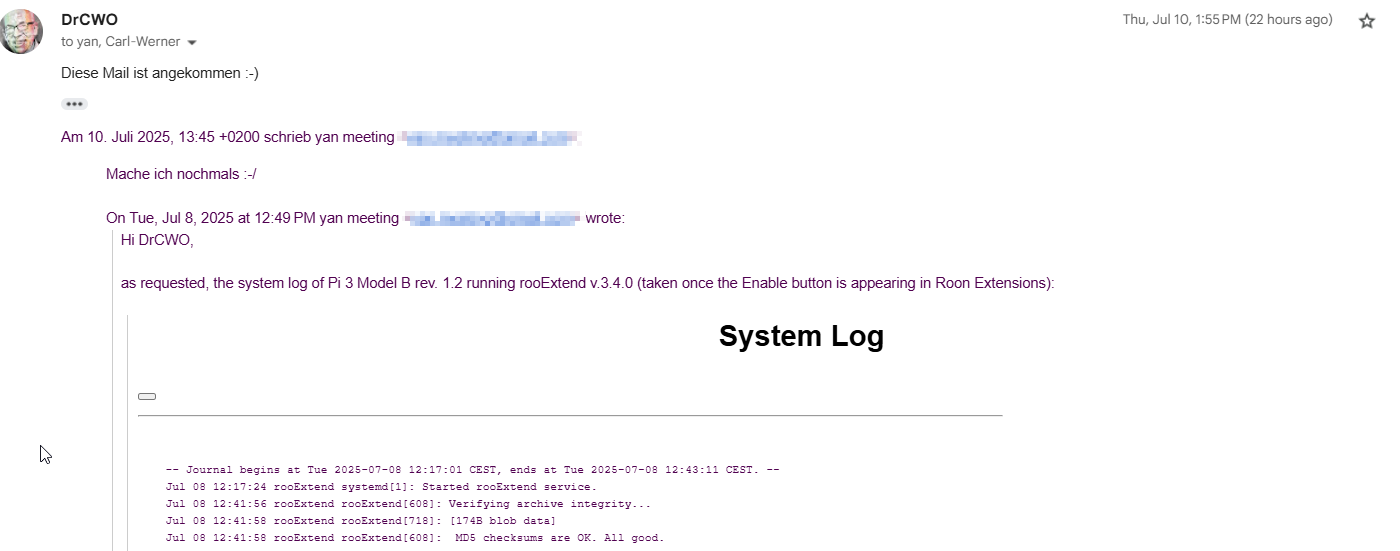
but I have sent the archived system logs, password is in the email text.
KR,
Yan
Hmm, I’m confused, as you you have answered over email yesterday that you received my second email:
but I have sent the archived system logs, password is in the email text.
KR,
Yan
Just thought I’d also mention it here (email sent), the download for RooExtend on your Google Drive seems incorrect. There’s a 50MB file in the zip named RooExtend with no extension. I believe my previous download was over 1.5GB. Anyhow, it’s not working. Could you please check? I’m in the proces of reflashing.
Thanks!
And already fixed. Thank you! @DrCWO
can anyone confirm you can use rooDial with rooextend on the holo red?
I think it should work but you have to insert a Bluetooth dongle, one of those I recommended. Best the one with the double antenna. But this is a guess only. I never tried.
Best DrCWO
Hi, DrCWO. I have a lifelong license for RooDial.
Everything went well with the install (I have a Raspberry Pi Zero W2). I’m using a Dragonfly DAC connected to my headphones (Roon endpoint is RoPieee Raspberry Pi 5). On Roon I can usually see these extensions:
rooExtend/rooControl 1.0.2/selected
rooDial/1.5.7/connected, Red Dragon [my Dragonfly Dac]
rooExtend-by definite Audio/License Manager/3.4.0
But those extensions disappear quite often, usually when I take a break from listening (and on Roon’s extension page I then see: “no extensions discovered”, although the authorizations for those 3 extensions listed above are still there: and they say “Last seen: Just now …). And I’ve no idea how to get those extensions to reappear. Am I doing something wrong? Anything I can do for a steadier experience?
Thanks.
Seams to be a WiFi issue that I see some times with customers using wireless PIs for rooExtend. In general WiFi is not recommended by Roon as the API protocol did not like to see lost packages.
To verify my doubt please send me the system log. To get it open a browser to the IP if your Pi like http://[ip you found]. The IP is displayed at the very end of the settings page of the rooExtend License Manager.
Best DrCWO
Thanks. I have emailed you the system log.
Previously I used my preamp for volume control - not Roon.
I setup my rooDial today. It went flawlessly. It worked perfectly the very first time.
However…
When I turn my stereo system off and then back on again the volume level resets to 100%. That is very bad. I’ve looked around the configuration in Roon but I don’t see any option to either save the volume level from the last use or have a default volume level on power up.
I must be missing something because this makes the rooDial or using Roon for volume control way to dangerous to use.
I think this is a local issue, I’ve been using Roodial for a few years and not experienced the problem you describe. However, this has previously been an issue with Roon which was “fixed” in a previous release.
If the problem is repeatable it might be worth raising a support ticket, in the meantime you could try setting Roon volume limits for your device(s) to limit the maximum volume.
OK, so this isn’t the normal behavior for Roon volume control. I am using Ropiee that interfaces with my McIntosh C49 preamp. So maybe it’s an issue with Ropiee?
I’m not sure, TBH my experience was resolved a roon release (hence a Roon problem).
The following Ropiee thread might be of interest :-
Thanks for the link. Yeah that thread is exactly what I experienced. I noticed the “force full volume” option in the advanced settings no longer exists.
However, I seem to have got it working by selecting DSP Volume instead of Device Volume. Since switching to DSP the last volume setting is stored and used upon a power cycle.
Thanks for your help.
Glad you’ve resolved it without wrecking your speakers 
Good decision. You won’t get any loss of resolution.
(2) The final truth about DSP Volume Control in Roon | Audio Science Review (ASR) Forum
Best DrCWO
I’m not sure about that. I did see a thread on audiosciencereview that stated it was an excellent method of volume control. But I noticed that when using DSP Roon downsamples my DSD files to PCM. I would rather have stay in DSD.
DVD-Audio versus SACD: Perceptual Discrimination of Digital Audio Coding Formats
To study perceptual discrimination between two digital audio coding formats, “Direct Stream Digital” and high-resolution (24-bit, 176.4 kHz) PCM, subjective listening comparison tests were conducted with specially recorded sound stimuli in stereo and surround.
To guarantee their reliability, validity and objectivity, the double-blind ABX tests followed three main principles: The signal chain should be based on identical audio components as far as possible; these components should be able to convey very high audio frequencies; and the test population should consist of various groups of subjects with different listening expectations and perspectives.
The results showed that hardly any of the subjects could make a reproducible distinction between the two encoding systems. Hence it may be concluded that no significant differences are audible
Thanks for that pdf file on the study. I can’t argue with the results. But, the purist streak in me would prefer to keep it in DSD if I can ¯_(ツ)_/¯ . I’m conversing with Harry (Ropiee author) about the volume behavior and he is looking into it. If the device volume doesn’t sort itself out I will use DSP volume though.
Thanks again for your help. I must say I was impressed with the ease of setting up the rooDial.
I’m struggling with 2.3.2 (on Pi Zero W (V1)) - when I try and enter ‘license key’ in my extension settings under radial, I enter the key, press save,
the "rooExtend - by… " looks like it ‘refreshes’ on the extensions page (the text for enter usb stick to save settings AND to resort the settings…) dissapears, then re appears after saving
but rooDial never actually appears, and if I reopen the ‘settings’ window, it says ‘enter license key’ again
Please sens your License Key to info@definiteAudio.de and I will check.
Best DrCWO