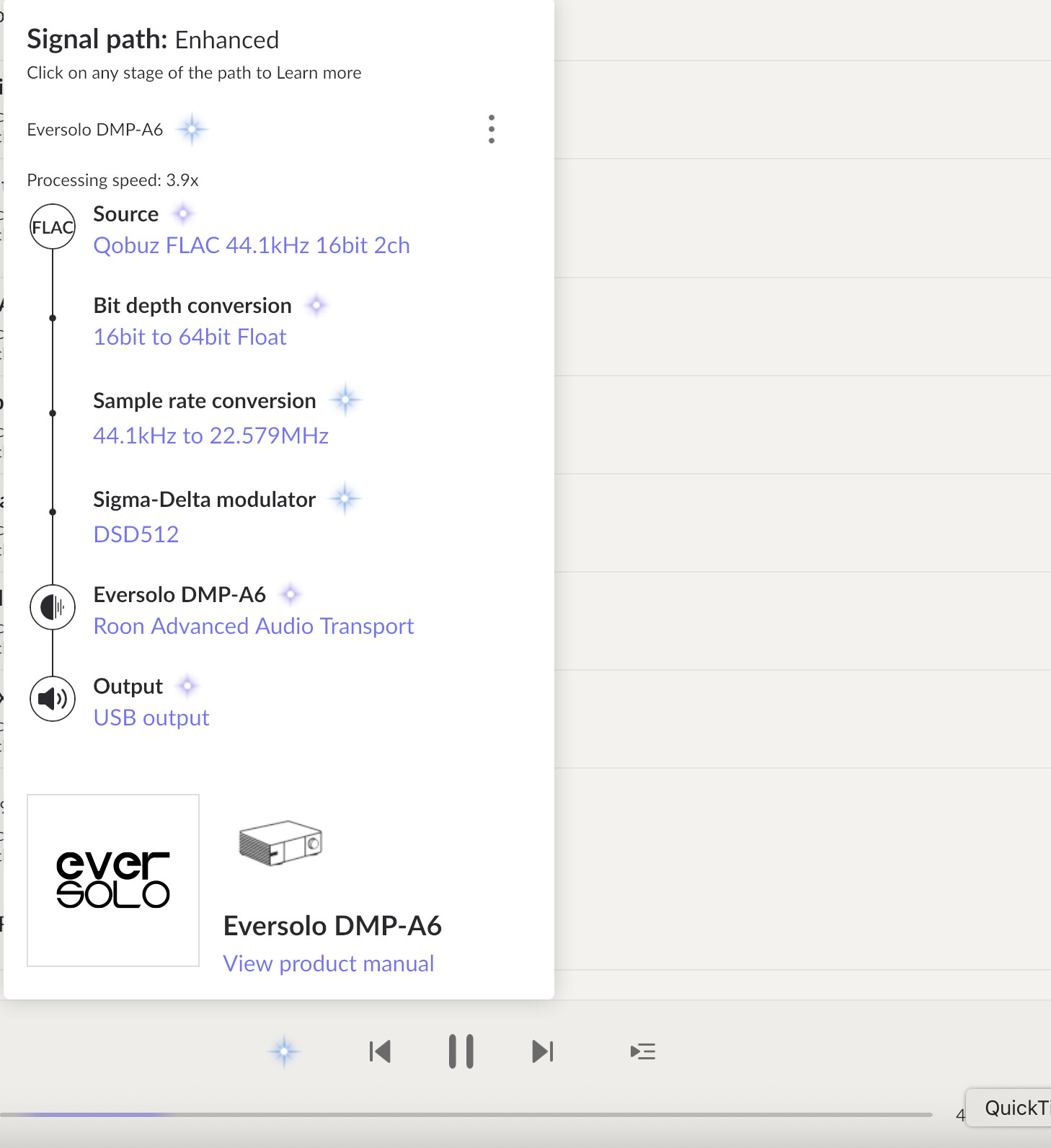
Roon 2.55 build 1559 becomes unresponsive on Mac M3 when using Qobuz and upsampling to DSD512.
If this problem cannot be solved would you please provide a “reset” button in the Roon Remote so we can easily restart the Roon server?
Roon 2.55 build 1559 becomes unresponsive on Mac M3 when using Qobuz and upsampling to DSD512.
If this problem cannot be solved would you please provide a “reset” button in the Roon Remote so we can easily restart the Roon server?
Hello @arazmj
Thanks for your detailed bug report and suggestion.
To help our team diagnose the unresponsiveness issue you’re experiencing on your Mac M3, could you please provide a bit more information?
Regarding your suggestion for a server reset button in the Roon Remote, the best way to support this idea and help our development team prioritize it is to vote for it in our Feedback > Feature Suggestions section.
Hi @arazmj,
We’ll need a little more context to take action on this ticket effectively, but we haven’t seen a response to the post above.
At your convenience, please clarify the Zone to which you’re playing and a timestamp approximating when the issue last occurred.
Thank you!
This issue occurs across all of my zones:
The Roon UI itself remains responsive. The problem is that playback fails — the music won’t play, and the seek bar repeatedly jumps between the beginning and end of the track.
I captured a screen recording of the behavior here: YouTube link.
It happens very frequently — typically after one to two hours of continuous listening. Unfortunately, I can’t provide an exact timestamp since the issue recurs so often
I’m not sure why a timestamp would be relevant for an independent service running on my own server.
Hey @arazmj,
Thanks for the update! We were able to review a fresh diagnostic report from your Roon Server, and saw a few repeated errors in relation to a lack of disk space concerning your Roon database:
Warn: [ae] report: LevelDb.Exception: IO error: /Users/arazmj/Library/RoonServer/Database/Orbit/orbit_v3.db/000009.log: No space left on device Based on your overall library size, this seems odd. Where are you currently storing your saved backups?
If you have a saved backup, I’d move it to a location outside of your Roon Server data folder, then follow the below steps:
Let’s try a fresh database and see if your issues persist:
Here is the process outlined from a macOS machine:
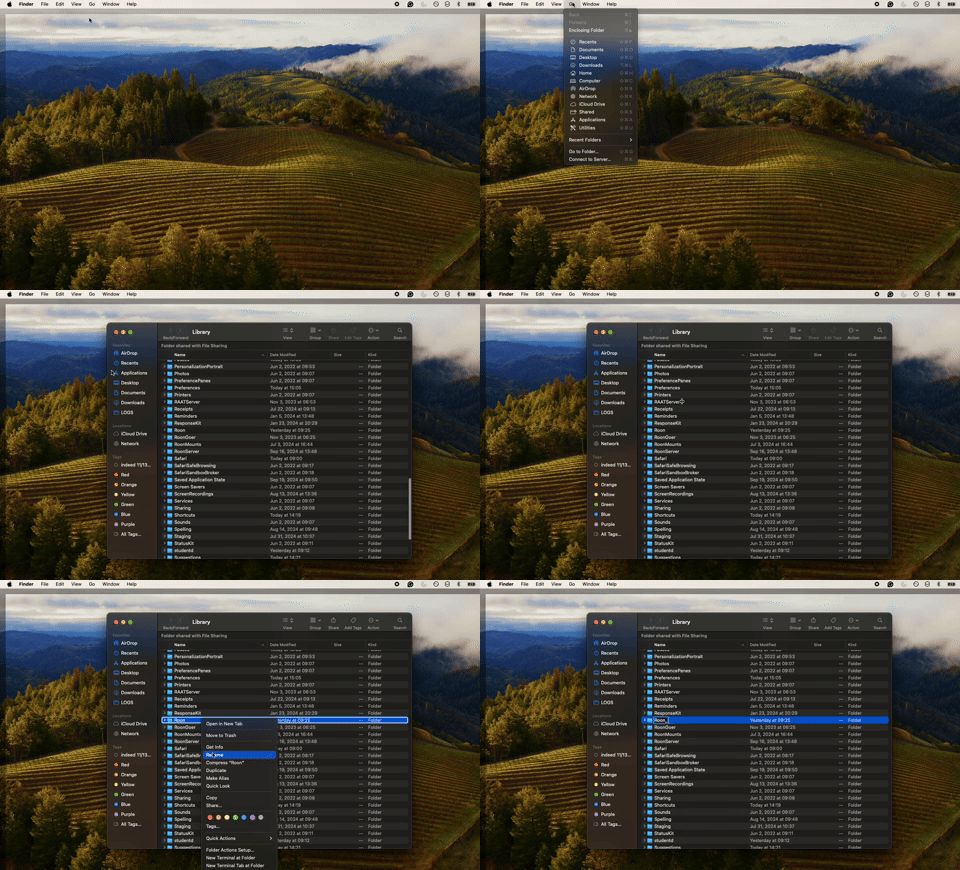
Let me know how the above goes, thank you! 
You are correct my disk was almost full. I have almost 400Gb space. The problem happens less frequent now but it happend again. Would you check what happend around 15:23:59 UTC.
and it happend one more time around 8:46 PM Monday, September 29, 2025 (UTC)
Good day @arazmj !
Can you please bring your M3 Mac online (Open it and run Roon on it) so we could retrieve diagnostic data ?
Or upload logs from it to our Log Storage :
https://workdrive.zohoexternal.com/collection/8i5239cc05950ac07456889838d9319545a82/external
?
Looking forward to your reply!
Regards.
I uploaded the log files
Good day @arazmj !
Thanks for sharing your logs.
Based on them we would like to ask you a few questions:
Does this issue happen when you are playing local files ?
Is the issue reproducible if you disable upsampling or keep it at DSD256?
Are you sitting during the playback on the Ethernet or Wi-Fi ? If you are using Wi-Fi - please try switching to ethernet since streaming in higher sample rates might be quite bandwidth demanding.
Let us know please once you test it !
Regards.
Hi @arazmj,
Recent logging shows successful playback over DSD512, are you still having issues?
If so, we’ll need the name of the track that failed to play, or a more specific date and time of the failure.
Thank you! 
Yes, it happens almost two times a day.
It just happend right now. 5:44 PM Friday, October 3, 2025 UTC
It happend again at 7:46 PM Friday, October 3, 2025 (UTC)
It happend again at 9:37 PM Friday, October 3, 2025 (UTC
It happend again at 11:20 PM Friday, October 3, 2025 (UTC)
Today I discovered this by accident. If I restart the streamer, DMP-A6 it will let the the Roon server to play music without having to restart it.
I know that this seems like the streamer problem but is it possible to make it more convenient for the user to have the system recovered from this problem automatically or even manually?
Hi @arazmj,
Thanks for the updates! We’re seeing the following errors leading to playback stopping:
Warn: [Eversolo DMP-A6] [zoneplayer/raat] Too many dropouts (>3s dropped out in the last 30s). Killing stream
Trace: [Eversolo DMP-A6] [zoneplayer/raat] too many dropouts. stopping stream
Warn: [zone Eversolo DMP-A6] Track Stopped Due to Slow Media
Info: [audio/env] [zoneplayer -> stream] All streams were disposed
However, we’re seeing the buffer at 100% before the dropouts begin:
Trace: [Eversolo DMP-A6] [Enhanced 3.4x, 16/44 QOBUZ FLAC => DSD512] [100% buf]So, this isn’t an issue between your server and upstream services from the internet, but more so an issue of bandwidth between your local devices within your local network setup.
As a next step in troubleshooting, I’d review your router settings and see if you’re able to allocate network priority to your Eversolo device as well as your server machine, and see if the same issues occur.
We’ll be monitoring for your reply, thank you!