What is the operating system of your Roon Server host machine?
· Prebuilt Branded Roon Server (SonicTransporter, Innous, Merging...)
What kind of device are you using to perform the login?
· iOS
Where are you trying to login?
· I can't log into TIDAL, KKBox or nugs
Have you been redirected to the Tidal/KKBOX/nugs login page in your browser?
· Yes
Please try clearing the browser cache and cookies for the [l](https://account.roon.app/)ogin page where you have been redirected
· No, the issue remains the same
Content / Popup Blockers
· No, the issue remains the same
Temporarily try to use a different browser
· No, the issue remains the same
Please try to restart your Roon Server by closing the Roon Server app in the taskbar (MacOS), task manager (Windows) or rebooting your Roon Server machine.
· No, the issue remains the same
Different device
· I am able to switch to the diffrent device
Are you still facing the issue on the different device
· No, the issue remains the same
Record the timestamp
· It has occurred during the past 5 hours as I updated Roon. It is now 2:00 AM Phoenix Az time.
Describe the issue
I just finished major updates from roon 2.? to 3.4.2. After updates I cannot get Roon to see the successful Tidal login. Thus my library doesn't have the Tidal titles to work with.
Describe your network setup
I have starlink with TP-Link Deco 6E router in a Deco mesh network. The Innuos Roon server is plugged into one of Deco mesh nodes.
You are so right. I was mistaking my Innuos updates for Roon updates.
I spent a long time updating my Innuos Roon Server from Version 1.?.? To version 3.4.2. Roon version 2.66 is currently on the Innuos and my iMac where I am trouble shooting.
I usually use a small iPad as where I run Roon for the Innuos server.
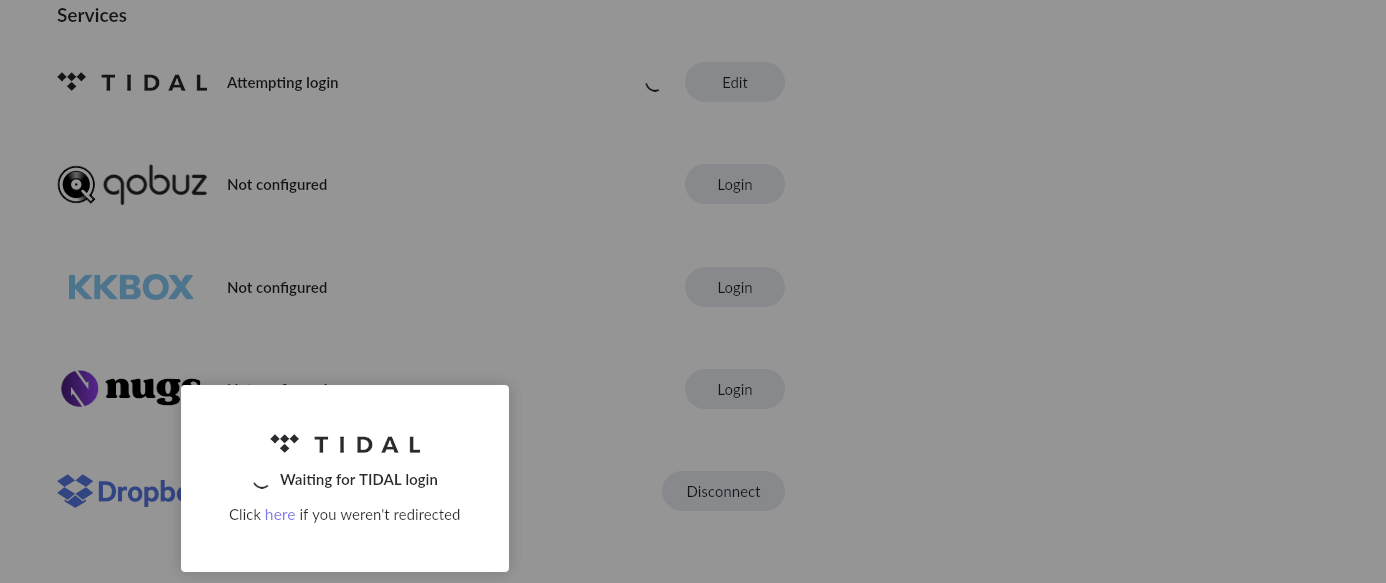
When I start Roon now I get a message that I am not logged into TIDAL so I hit the login button in Roon and Safari takes me to TIDAL and I am asked for my email and Password. I provide those and it says I am successfully logged into TIDAL and then I am taken back to Roon where I get the pinwheel of “waiting for TIDAL login” which never resolves.
I eventually get the message that the TIDAL login couldn’t be be done in the time allowed and goes back to the message that you aren’t currently logged into TIDAL.
I have tried stripping down the browser of ad blockers and allowing 2nd party access but nothing seems to work in terms of getting Roon to see my TIDAL login.
I am now in the Innous Sense interface and notice that it says the Innous Roon server is running version 2.66 and right below that it offers the following:
I am thinking I should try reverting to version 1.8 and see if I can get linked with TIDAL.
Thank you for your post and we’re sorry you’ve been caught in a frustrating login loop. This sounds like the browser is still intercepting the login redirect, or perhaps some stale session data remains cached.
First, reboot your Roon Server machine. From there, clear the cookies and cache in Safari on this iPad. Make sure Roon is closed on the iPad. Next, outside of Roon in Safari, navigate to the Tidal web page and login directly.
Now try opening Roon and ignoring the Tidal popup warning that you are not logged in. Instead, navigate directly to Settings → Services → Tidal in Roon and try to sign in there instead.
What do you see?
As a side note, please note that Roon 1.8 has been deprecated, and even if you were to downgrade, Tidal no longer supports the API integration with the legacy Roon build. This sounds like a frontend issue on the iPad or a Tidal login session mismatch rather than a fundamental problem with your Roon install. We should be able to resolve this without changing anything with the server.
We’ve not seen any replies and this topic thread will shortly auto-close. Are you able to login to Tidal successfully through Roon, or are you still having issues here?