Roon Nucleus. Don’t know model, OS etc. because I cannot access to view.
Networking Gear & Setup Details
I use a Wifi router supplied by internet service provider Comcast / Xfinity. I don’t see a model number. Router is connected directly to Nucleus via Ethernet cable. I run the Roon app. on 3 devices: Apple IPad, a Windows 10 Desktop, and /or my IPhone
Connected Audio Devices
I have a DAC connected via HDMI, that is then connected to my McIntosh integrated Amp
Number of Tracks in Library
Roughly 8,000 tracks
Description of Issue
Following a brief power failure…now the Roon Remote app can’t find the Roon Core. How do I know where the problem is? …with the Roon Core?, the Network? the remote access devices? No changes made to network devices or settings before/after outage. Network has come back up and all other (non-Roon) devices, computer, TV, etc. are all working normally. I tried powering off then on both the Roon Nucleus and my router…returns to the same state. I looked at the back of the Nucleus. Power white light is on. At the ethernet connection, there is an orange light glowing below/left, and a green light flashing below/right. The Roon Nucleus is plugged in to a surge protector. I have no reason to think the Nucleus was hit with any kind of electrical surge.
Thank you for the report and we’re sorry to hear about the incident. For due diligence, you can check the diagnostic status of the Nucleus+ by plugging the HDMI output into any TV or display. If you have the means at your disposal, please pass along a picture of any diagnostic information displayed.
In the meantime, our account servers are receiving an IP address from your Nucleus, so you should be able to access the Web GUI for the device if it’s connected. Please try turning on the device and leaving it connected via ethernet for several hours to give the logs a chance to reach our team’s servers.
I recommend opening the Nucleus Web Administration page as well and sharing a screenshot with the team. Please try restarting RoonOS.
Thanks for your response. Here are my comments regarding your suggestions.
I have no easy way to connect the Nucleus to a TV or Display via HDMI…but will keep investigating if I can do that.
You suggested that I could access the Eeb GUI and Web Administration Page. I don’t understand how I can do that if my access devices can’t see the Nucleus. So if I can’t access Roon Core from my computer, how can I visit these pages?
The Roon Core is powered up and attached via ethernet to my router (and has been for >24 hours) I will leave it up and attached. Can your team access remotely?
Please advise, and Thanks. We have to figure this out…I love my Roon.
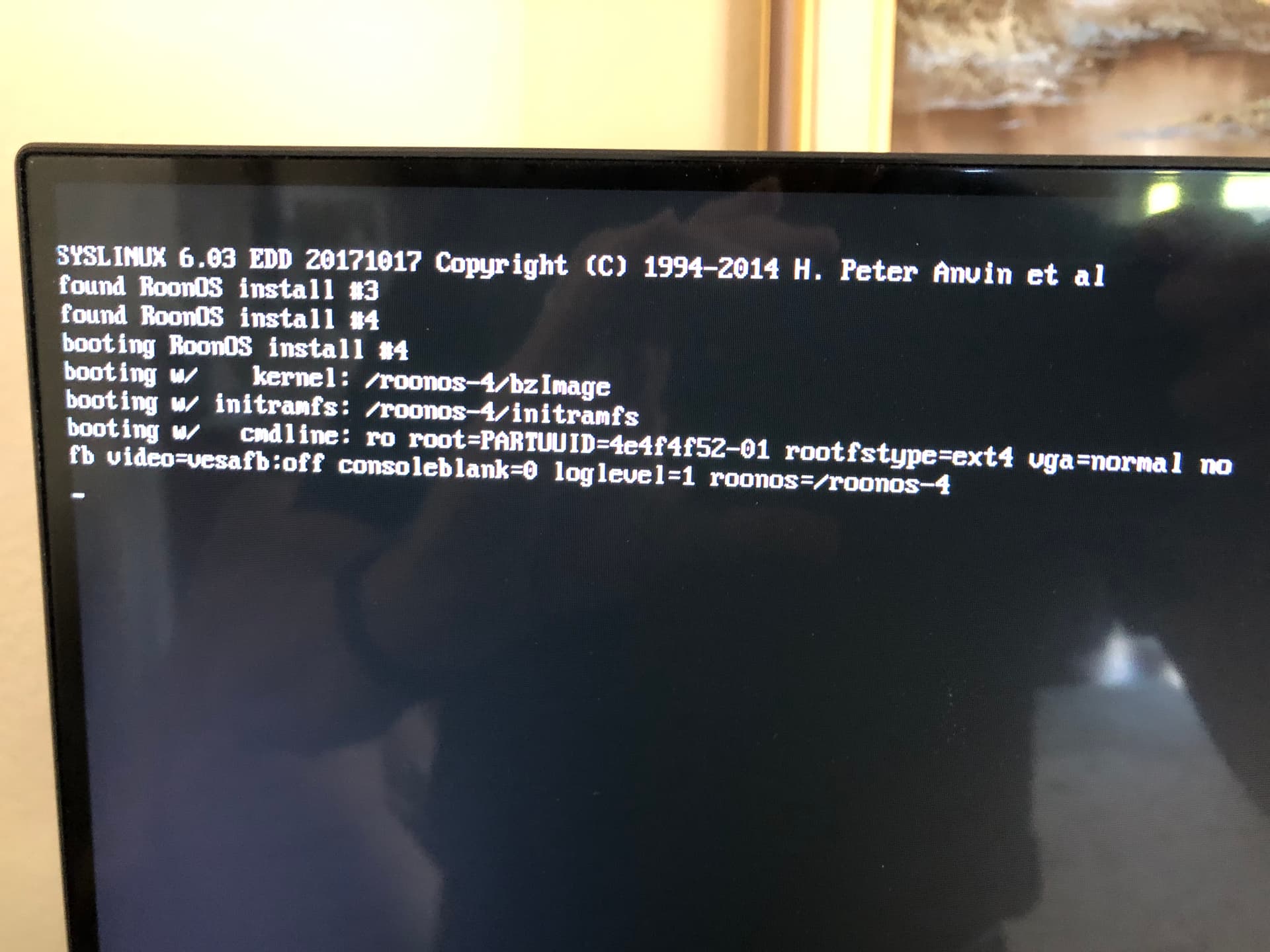
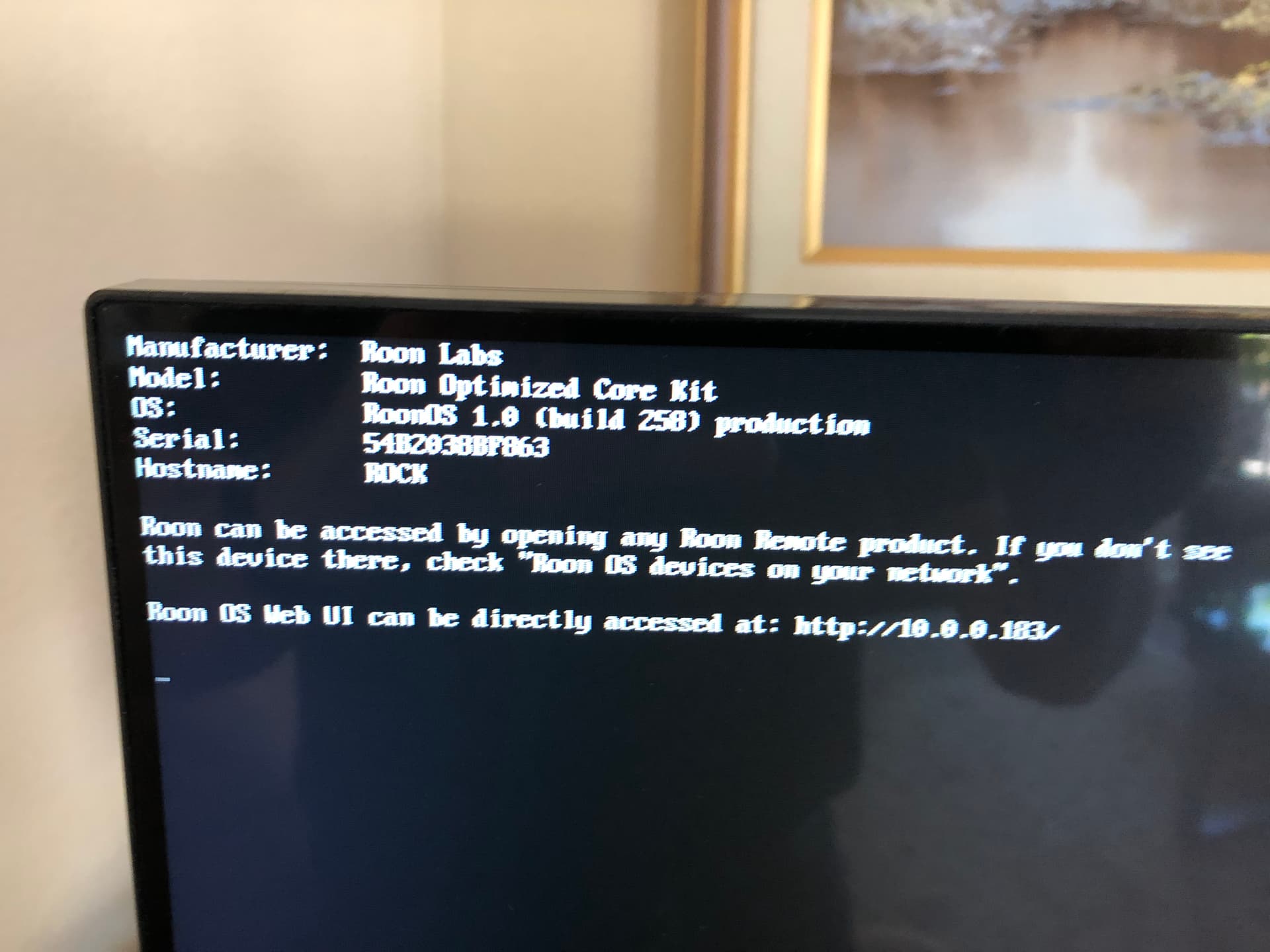
Per your recommendation, I was able to access the Web GUI by attaching a display. Attached are 2 screen photos. The first ran for a time apparently while diagnostics were running and the 2nd one apparently after completion. Does this tell you anything?
No change to my issue. I still cannot use my Roob system. When I open Roon on any of my remote devices, I get a screen that says: "Remote Connection Waiting for remote Core… Roon is still trying to connect, but it is taking longer than normal. Check that your Roon Core is on and connected. You may also want to check your network settings and firewall."
Then there is a button available that says: **“Select a different Core”
I am sorry, I had tried that. In attempting to get to that IP address, I get a timeout error: “The Site Cannot Be Reached” “10.0.0.183 Took too long to respond”.
Just to summarize background…I am trying to access from a PC where in all other respects I can access the internet via the same Wi-Fi and router…so there is nothing wrong with my network. Previous to a power failure, I could access the Roon Core from this same PC, so there would be no firewall issues.
So I can assume there is something wrong with the core…or since the core has a hard wired connection to the router, possibly there is something wrong with that connection or port.
I have had no access to my Roon system now for at least a couple of weeks.
I need more info. Why do you need the IP address of my PC? i.e. what will you do with it? Seems like a security risk to me to be giving out my personal PC’s IP address.
No, it’s not a security risk, because it’s an IP address inside your home network. Those addresses are not accessible from the internet, and in fact they are reused in millions of home networks because of this.
The IP address that you should not share is the unique public IP address of your router as it appears out on the internet.
Your Nucleus is saying that it has been assigned the IP address of 10.0.0.183, yet when you tried to reach it using the web browser on your PC, it did not respond. That could be because your PC is in a different subnet. That is why @Suedkiez asked the question. We’re just trying to diagnose the issue here.
Sorry I have taken so long to reply and don’t take that as an indication that this isn’t urgent to me! I was on vacation and out of touch. Thanks for the explanation on IP addresses and subnets…was helpful. I checked and it appears that my PC and Nucleus ARE on the same subnet. PC IP Address is 10.0.0.237 and as you said Nucleus is 10.0.0.183.
I am not that technically educated. But I doubt that the problem is at the device end. I use 3 different devices to access Roon. A Windows-10 PC, an Apple i-Pad and and an Apple i-Phone. All devices started failing to access Roon at the same time…can’t access the Roon Core, but all devices have no other network issue.
The Roon Nucleus is hardwired to my Router, It would seem that the issue almost has to be either in the Nucleus itself, the Nucleus Port that connects to the router, or the router port. Somehwere there, since everything else on my home internet is working fine…I am communicating to you over that WiFi connection.
Also, everything Roon was working fine using the same devices…no changes were made to settings on any device…and no changes were made to firewalls or anything. One day everthing was working on all devices, the next day all remote devices (using different OS) display the same or similar sounding errors. The only thing that happened that I am aware of in between is that we had a brief power failure in the middle of the night, (everything is plugged into surge protectors).
One of your responses says: “Weird because the Nucleus looks ok as far as it goes” Does that mean that you can remotely access my Nucleus from your end and check it out?
Thanks to all that are trying to help. Got to get this fixed…I am dying out here without my Roon!
Thanks, and look forward to continued help,
Tom Roush
Thanks for your reply. I’ve just noticed that in your second photo, your Nucleus is stating that the model is “Roon Optimized Core Kit”, rather than saying “Nucleus”
This is a sign that your SSD holding the Roon Operating System and the Roon Software is failing/has failed.
Just following up. I have been unable to use my Roon system now for well over a month…I first reported this problem on June 28. In the last update I saw from last Sunday, it appears that Geoff Coupe found something in the screen shots I had supplied. It also appears that Geoff turned the problem over to Connor…but I have heard nothing since. What do we do now?
Jam a paper clip in the reset hole of your router and start over. I wont say how many times my Netgear router has almost been launched off of the planet until I figured out that some of these POS seem to intermmittently retain some settings until they are reset.