Roon app not launching on QNAP and iPad after update (ref#JBTQY1)

Is Roon Server running?

· Yes, Roon Server is turned on and running.

What do you see on your screen?

· "Waiting for your Roon Server"

What happens if you press the "Select a different Roon Server" button?

· I don't see Roon Server.

Please try to restart your network setup by unplugging, waiting 30 seconds and then replugging in your networking gear.

· No, the issue remains the same

Please select how you've connected your Roon Server to the internet

· Roon Server is connected by *Ethernet*

Have you checked your firewall settings to ensure that Roon is allowed through?

· Roon still won't connect even after checking this aspect

Have you verified that Roon Server is on the same subnet as your Remotes?

· My Remotes and Server are on the same subnet and I still can't connect

Sometimes the issues can be resolved with a reinstall of your Roon Remote app. Let's try to perform a reinstall and see if it helps.

· I've reinstalled the Roon Remote but it did not help

What is the operating system of your Roon Server host machine?

· Roon on a *NAS* (Synology, QNAP, ASUSTOR)

Select any of the following components that are present in your local network setup

· None of the above

Describe the issue

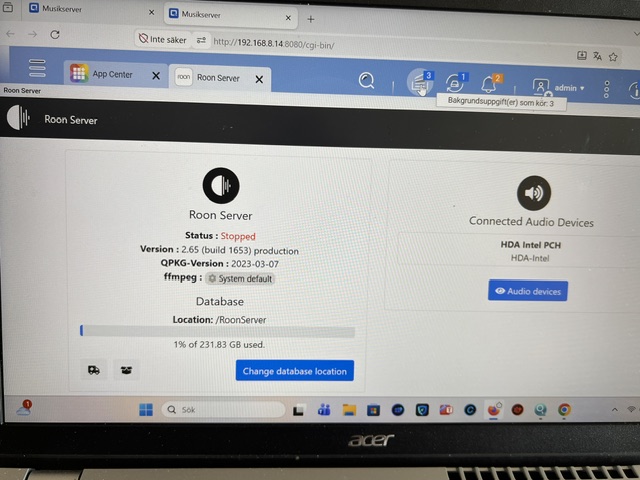
After the latest update it dont work, reinstalled app on Qnap and ipad etc. If i log on to server and click on open ( Roon app )

Describe your network setup

If I open roon app on server it says "stopped"

The Roon Server package no longer works, please switch to the official Docker image to run Roon Server on your NAS. See also:

Hello @Urban_Lindh

Thank you for reaching out. We completely understand it is frustrating to see your Roon Server suddenly stop working after the recent update.

To explain why this happened: the latest Roon update introduced new minimum system requirements. Because the native QNAP operating system relies on older software libraries that Roon can no longer support, the standard Roon Server app will no longer run and immediately switches to a “Stopped” status.

The good news is that your NAS is still perfectly capable of running Roon. To get everything working again, you simply need to transition to our official Docker-based installation. Running Roon inside a Docker container provides it with the modern, isolated environment it requires.

You can find the complete guide on how to make this transition here: Installing RoonServer on QNAP with Docker

Please take a look at the guide, and if you have any questions or get stuck at any point, just let us know here. We are happy to help!

Hi

I installd Linux and installed docker

Logged in to Tidal but my music did´t appear there( in Albums) and if i open Tidal from the menu it just skipps the tracks and refuses to play. Also having problems adressing my stored liberary on the Nas
Problem with music on NAS fixed, but Tidal is still not ok

Tidalnow works , my music is missing but that is a problem for tidal… Thanks