OS ROCK Linux Version 2.1 (build 271) production
Roon Server Version 2.57 (build 1598) production
Intel NUC13ANKi7 i7 CPU
16 GB RAM
Networking Gear & Setup Details
AT&T Vantiva/Commscope BGW620-700 router
Switch - Vimin unmanaged 8 Port 10G Ethernet Switch
No VPN on router
Who is your internet service provider?
AT&T
Please list the make and model of your modem and router?
AT&T Vantiva/Commscope BGW620-700 router
Do you have any additional network hardware, like additional routers or managed switches?
No
Does your network have any VPNs, proxy servers, or enterprise-grade security?
No
Connected Audio Devices
Nothing that didn’t work with my previous Service provider (Frontier) and eero Max router
Pi2Design Mercury V3 DDC
Description of Issue -
What is the exact port forwarding error message you see in the Roon Settings → ARC tab?
There doesn’t seem to be any router config setting to enable UpnP or autoconfig that I could find.
{
“ipv4_connectivity”: {“status”:“NetworkError”,“status_code”:504,“error”:“error: Error: ETIMEDOUT, response code: undefined, body: undefined connected? undefined”},
“ipv6_connectivity”: {“status”:“NetworkError”,“status_code”:504,“error”:“error: Error: ETIMEDOUT, response code: undefined, body: undefined connected? undefined”},
“external_ip”: {“actual_external_ip”:“108.aaa.bbb.ccc”,“actual_external_ipv6”:“2600:ddd:eee:fff:ggg:hhh:iii:jjj”,“router_external_ip”:“null”},
“natpmp_autoconfig”: {“status”:“NotFound”},
“upnp_autoconfig”: {“status”:“NotFound”},
“multinat_autoconfig”: {“status”:“Failed”,“error”:“No uPnP Routers found on LAN”}
}
@germay0653 thank you for your patience while we’ve diligently worked to reach every request for support with port forwarding. The diagnostics you’ve provided suggest that UPnP is not properly configured on your router.
Please first try the following steps:
Try to enable UPnP/NATPMP in the web administration interface for the router directly upstream from your RoonServer
Try to manually open the port in your router’s port forwarding configuration
Make sure the IP/Port matches the Port listed in Roon → Settings → ARC
Thanks for sharing the diagnostics — that output is very telling.
Unfortunately, we’ve seen this exact behavior many times with AT&T provider. Even when port forwarding is configured, these routers often still fail to expose the internal host correctly due to how their NAT CDN, and firewall layers are implemented. This results in ARC timing out on both IPv4 and IPv6 exactly like your logs show.
Because of this, the most reliable solution with AT&T equipment is to use Tailscale instead of port forwarding or UPnP.
Roon fully supports Tailscale on ROCK, and it bypasses AT&T’s NAT and firewall entirely by creating a secure point-to-point tunnel between your NUC and your phone.
You can follow the official setup guide here:
Let us know once you’ve tried Tailscale or if you need help getting it set up.
@germay0653, what @vadim stated is exactly what occurs on my network with AT&T. I have used Tailscale for well over a year now without any issues, ARC works fine with Tailscale over AT&T and was the only reliable solution we found after working through this with @vadim and other Roon developers.
Thanks for the response but I’m not using ARC from my phone, rather from a DAP, A&K KAAN Ultra, where I have no facility to install Tailscale.
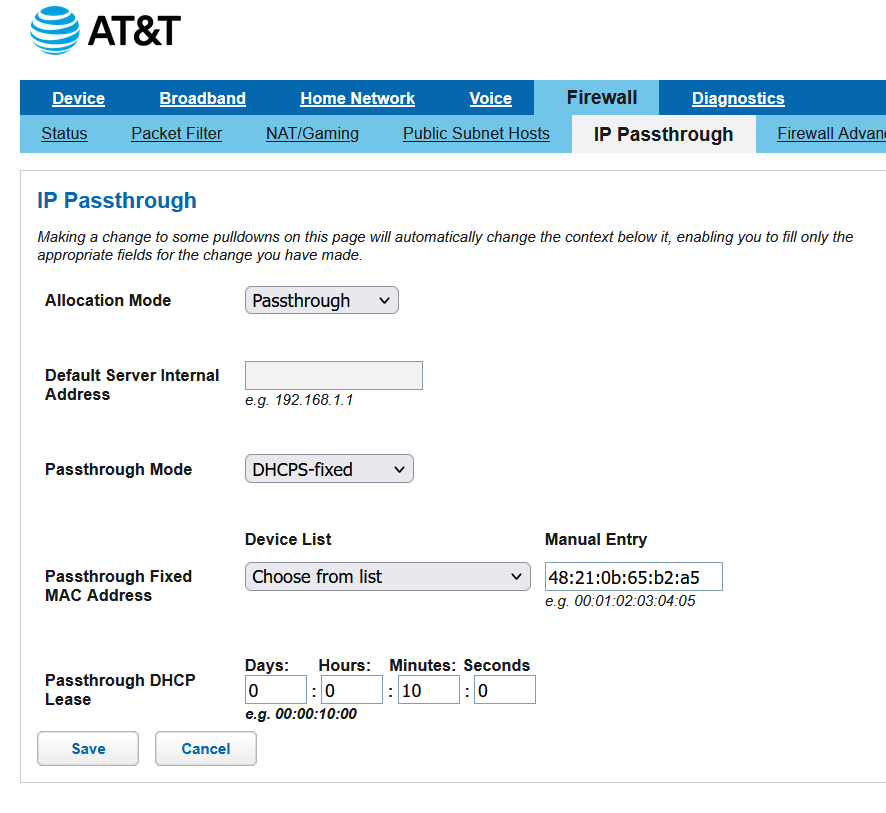
However, I did get into the router and set the Firewall IP Passthrough to allow the MAC address of the KAAN Ultra as shown below and it worked.
I had to restart the KAAN and the router but it resulted in success. I use my phone as a Mobile Hotspot for the KAAN which is hardwired to my high-end car audio system.
Thank you for providing the clear workaround here for other users with similar hardware.
Just to provide a precautionary note: what you’ve configured with IP Passthrough is similar to a DMZ, not port forwarding, which gives your KAAN Ultra a clear network path past most firewall restrictions. Since you tied it to the device’s MAC address, only the KAAN is affected, which limits exposure. For a DAP that’s only streaming audio without any other background network software, the risk is very low, and ussing your phone as a hotspot adds another layer of NAT/firewall protection.
So, overall, this setup is generally safe for your use case, but we would not recommend this method for a smartphone or any device with a broader attack surface than the DAP.
Is there any further assistance we can provide regarding this issue? This thread will automatically close due to inactivity without any further response from the OP.
I’m good, no need for further assistance. I’ll accept the risk to get it to work. The router manual and AT&T aren’t user friendly regarding an absolutely secure setup. It’s just too complicated for those who aren’t network admins with a hi level understanding to properly configure.