First of all, I’d like to say that I find the process of creating a ticket very cumbersome.
Do I now have to create three tickets, or is there an easier way?
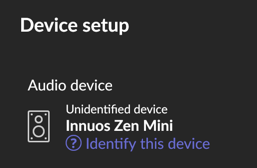
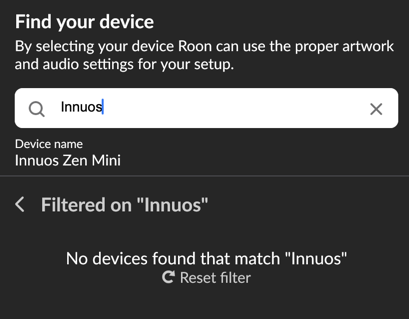
I use the Zen Mini MK3 as a Roon server. However, the device is listed as “Unidentified Device” in the Roon app ???
Maybe INNUOS is an unknown cheap garage company (?)
The icon for the device (ZenMini MK3). It is definitely NOT a speaker!!!
Scrolling on the iPhone is not smooth, but jerky. This is 100% not due to the iPhone 17 Pro Max, but to the app.
We recognize it can be annoying to fill out support intake forms. For context, the overall aim of the support intake process is to triage reports, generating automated diagnostics for your account that are relevant to the issue you’ve described. While cumbersome, years of statistics we’ve gathered in the Support section have demonstrated that restricting a single issue to a single topic thread actually results in a faster solution almost every time, even with overlapping issues. That’s simply an explanation; we’d be more than happy to assist with the three issues you’ve described here in this thread.
You mentioned ARC login issues. This is commonly caused by content blockers enabled in Safari - please check in your iOS Settings under Safari that content blockers are disabled, clear the cookies/cache, close ARC, and try again. Let us know if this doesn’t help.
Can you please share a screenshot elaborating on what you see in Roon? Are you referring to the Settings → Audio page? If you navigate to Zone Settings → Edit Icon, try restoring the Icon to default. Does it correct the Icon issue? Do you see the correct icon listed?
Is this a ProMotion-equipped iPhone? Your account diagnostics show two separate iOS devices, so please share the model of iPhone you’re using here.
Regarding the smoothness on your iPhone 17 Pro Max: we have been receiving such a report for a few months now and we are working on enabling 120 HZ support for Pro Motion Powered Apple Devices. This solution is yet to come.
Regarding your Innuos: Unfortunately, while exactly your Zen mini model is not integrated with Roon some others are. At this exact moment I am afraid that you might need to set up it manually. This is subject to change in the future.
Innuos has a long history with Roon and their ecosystem is built to accommodate Roon architecture. However, they are not a Roon Ready partner in the strictest sense.
But this isn’t the reason you’re not seeing the Innuos icon pre-populate. The real reason is that the Zone itself is standard ALSA system output; this is a generic Zone to RAAT, internally.
Concerning scrolling: please try the following on your iPhone.
Start a screen capture video, then open Roon. Do you notice that scrolling is smoother when you’re recording the screen?
What happens if you change the resolution or disable Pro Motion on this iPhone?