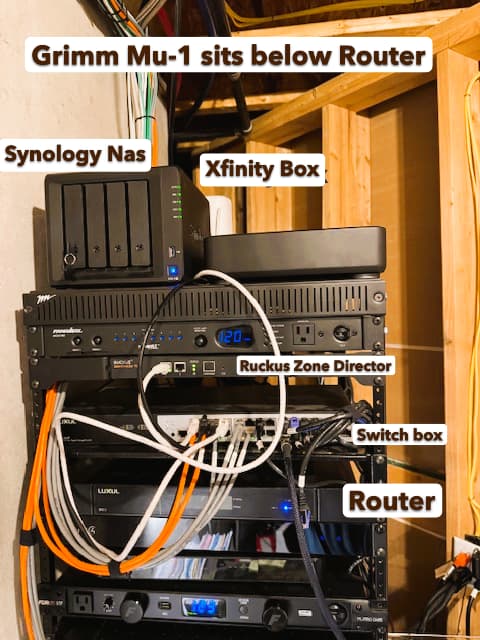
After the latest update I am making an attempt to get Roon ARC working. My Router is a LUXUL ABR-5000v1. My switch box is a LUXUL 2624 port. Everything is hardwired. I use a Grimm MU-1 as my streamer. My internet service is Xfinity.
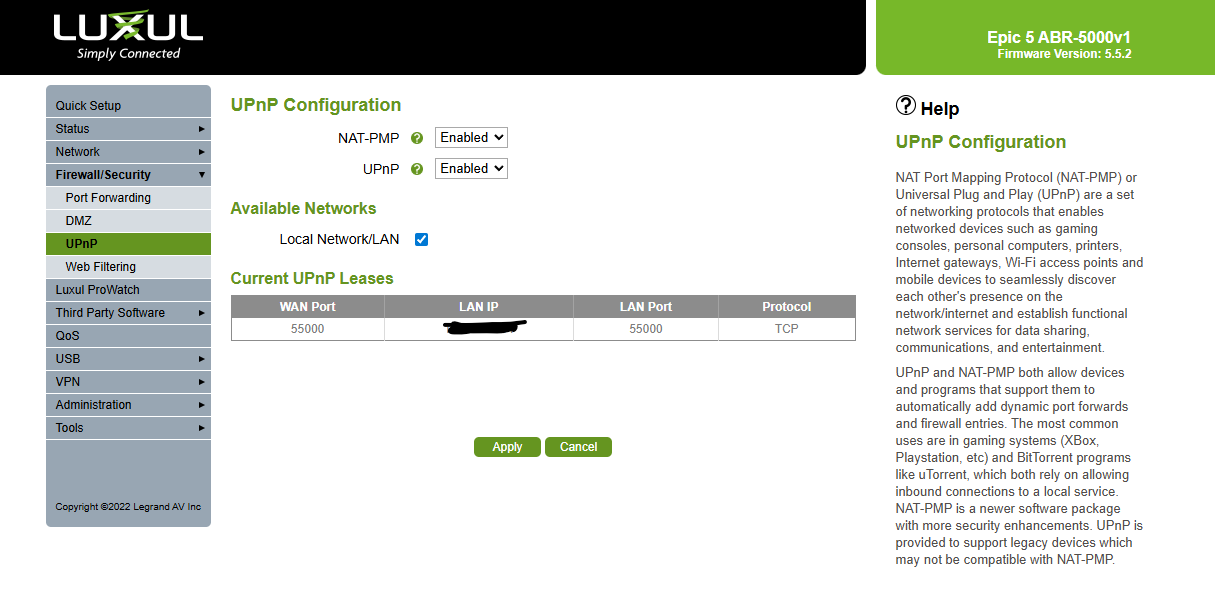
I went into my router and have everything set up as required…UPnP is enabled, I am using 55000 as requested and my ip matches the ip on my Grimm MU-1 for access and I have static ip addresses set up. I ma getting the error message that my UPnP should be enabled but as I wrote it is enabled.
Any guidance is appreciated. One last note is that I am able to download some music and play in offline mode via my Apple iPhone.
Thanks in advance.
Networking Gear & Setup Details
Who is your internet service provider?
Please list the make and model of your modem and router?
Do you have any additional network hardware, like additional routers or managed switches?
Does your network have any VPNs, proxy servers, or enterprise-grade security?
Connected Audio Devices
Description of Issue -
What is the exact port forwarding error message you see in the Roon Settings → ARC tab?
mjw
(You want nice, supportive? Call a damn helpline.)
2
mjw
(You want nice, supportive? Call a damn helpline.)
8
The diagnostics provided suggest there is a redundant layer of network address translation preventing port forwarding.
This can either be at the local-network level (commonly as a result of two routers), or at the level of your service provider (in the form of carrier-grade NAT).
Please confirm the following.
How many network devices you have, e.g., ISP supplied modem / router?
I have an Xfinity Modem that goes directly into my LUXUL router. Out of my Luxul Router I have one ethernet connection going directly to my LUXUL 2624 switch/port (24 ports). Coming from my Luxul 2624 I have approximately 15 WIRED devices connected via ethernet. The other ethernet cable coming from my LUXUL Router goes directly into my Ruckus Zone Director 1200 which has 2 WAP’s that supply wireless internet to my whole house. I have approximately 50-60 network devices at any given time. I did open up my router to allow approximately 240 separate IP addresses that can be issued with a 12 hour lease at any given time. Most of my audio and infrastructure have been issued static ip addresses. My ISP is out of Grand Rapids, Michigan. Hopefully, I understood your “ask” but bounce me back if you require further details.
Thanks for reaching out. The error you are seeing is related to multiple routers on your network, or on the ISP side (called CG-NAT). Just to confirm here, is the Xfinity box performing router duties as well, or is it acting only as a modem? Often times there are modem/router combo units, and for Roon to work properly the router part needs to be disabled (putting the modem into “bridge mode”, or turning off the DHCP server). Are you able to do this? If you have already checked this aspect and the issue is the same, it is then likely to be another router layre on the ISP side, and for this, you’ll need to get a static IP address from your ISP, or use a 3rd party VPN solution such as Tailscale. The below guide provides more details:
Thank you for your feedback. My Xfinity box is already in bridge mode; however, I will still double check. My specific router does provide modem/router duties. I have set up tailscale and it is active on my phone and another computer but I will need to re-read and get more familiar with Tailscale. One question I do have with Tailscale is about the port #? Do I use the 55000? I did read the Port Forward Troubleshooting. Does it look like I have everything else set up correctly?
Thanks!
mjw
(You want nice, supportive? Call a damn helpline.)
13
If you use Tailscale, remove port forwarding in the router(s), and set the port to 0 (zero) in the Roon app. You should turn off UPnP, too, if not used.
However, you should attempt to eliminate double-NAT from your network, and check with your ISP for CGNAT.
You guys were right on! My Xfinity box is NOT in bridged mode. I had to replace the box this summer and never put the new one in that mode. Here is my delimma…My audio system is connected to my LUXUL router which is mostly 5G (WootersHouse) and some 2.4ghz. The balance of my system 2.4ghz (WootersHouse2.4) side is working off the Xfinity box…things like Ring, my whole house thermostat, etc. For some reason those devices will not work well on my wireless / main LUXUL 2,4ghz side. Many devices do work off it but not everything. The other reason I have it set it up like I do is to have internet service if my main/bigger system goes down. Do you have any thoughts or tips based on that scenario?
Yep, that explains the MultipleNatFound — your Xfinity box is doing NAT, so with Luxul on top you get double NAT.
If you want to keep using the Xfinity 2.4 GHz for your Ring, thermostat, and other devices, you can leave it as is. In that case, to get Roon ARC working reliably through the double NAT, the easiest way is to use Tailscale VPN. It bypasses the NAT issue entirely, so your audio system on Luxul can connect to Roon ARC without problems, while your IoT devices continue to use the Xfinity 2.4 GHz.
This way you don’t have to change your current Wi‑Fi setup, and ARC will work fine.
Let us know please should you have more questions.
I do have tailscale on several devices. Where would I need to haveit installed? I have it on my desktop, laptop, phone and NAS and tested that is was up to date next week, but how do I specifically integrate it so it works on my phone remotely?
Since your Grimm Roon Server does not natively support Tailscale, you’ll have to set up what is called a Subnet Router on one of your Tailscale supported devices. To learn more about how to set this up, please see the below guide on their official page: