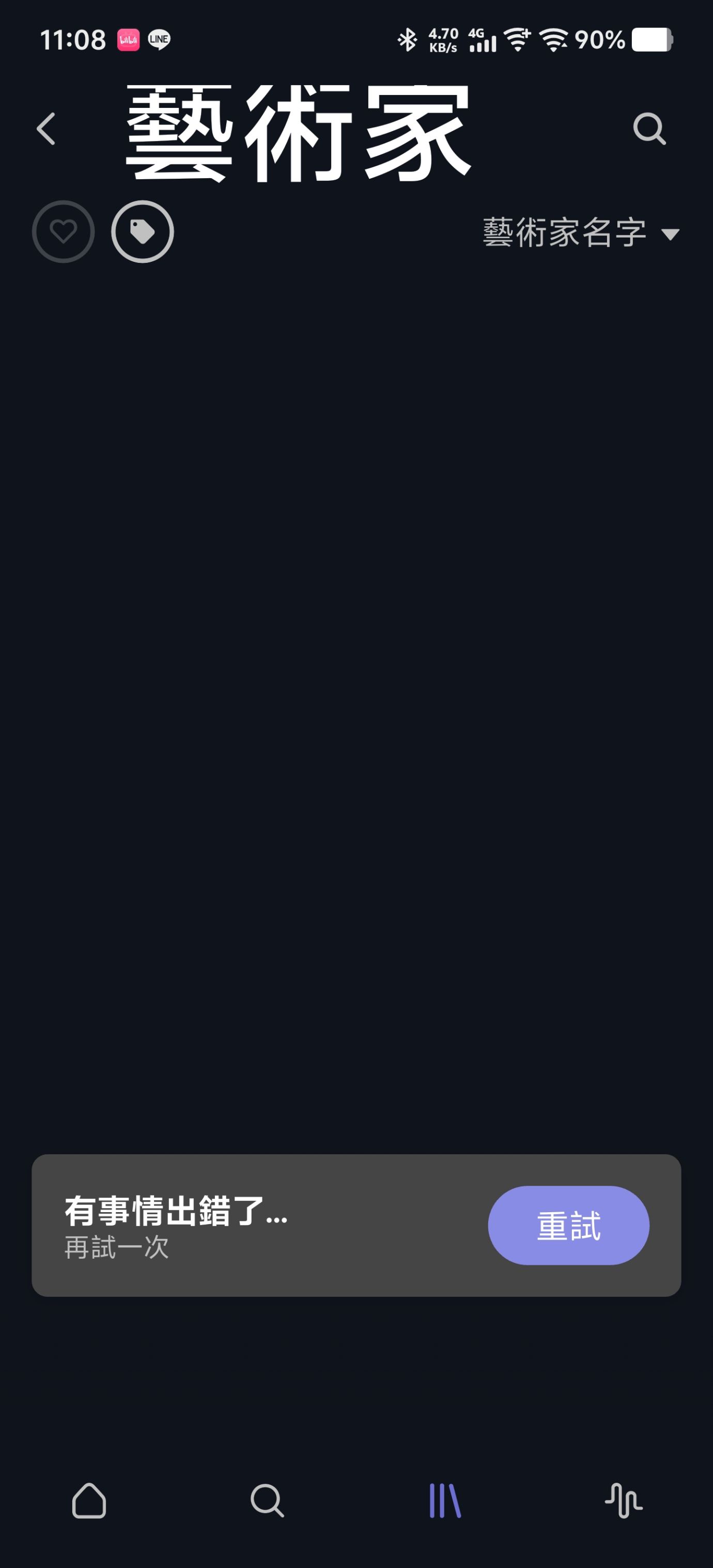
I’m experiencing an issue with Roon ARC where specific library tabs consistently fail to load on one particular device, while everything works fine on other devices and on the Roon Core itself.
Setup:
Roon Core: Windows PC
Affected device: vivo X200 Ultra (OriginOS)
Tested working device: Another Android phone (same Roon account, same Wi-Fi network)
Symptoms: On the vivo X200 Ultra, the following tabs in Roon ARC always show “Something went wrong / Try again”:
Tracks
Artists
Composers
Albums (personal library)
However, browsing non-library content (e.g. recommended albums, editorial content on the ARC home screen) works fine on the same device.
What I’ve confirmed:
Roon Core is working normally — all library tabs display correctly in the Roon desktop app on Windows
A second Android phone logged into the same account on the same Wi-Fi network works perfectly
Both phones were tested separately (not simultaneously), ruling out multi-device conflicts
The issue started suddenly — ARC was working correctly on the vivo device before
Troubleshooting already attempted (none resolved the issue):
Uninstalled and reinstalled Roon ARC
Cleared all app data and cache
Wiped system cache partition via Recovery Mode
Signed out and back into Tidal and Qobuz from Roon Core
Disabled private DNS, VPN, and ad blockers on the device
Granted unrestricted battery and background data permissions to ARC
Disabled forced dark mode for ARC at system level
Confirmed both devices are on the same Wi-Fi router (not different mesh nodes)
My interpretation: Since the issue is isolated to library/personal collection tabs only, and non-library browsing works fine, I suspect ARC is failing specifically when attempting to load large library index data on this device — but I cannot identify why this would affect one device and not another under identical network conditions.
Any insight or log analysis would be greatly appreciated. Happy to provide ARC or Core logs if needed.
Thanks.
Tell us about your home network
· ISP Modem/Gateway: Kbro Cable Modem (CODA-5310)
Distribution Switch/Router: Netgear [netgear gs308] (Located in the weak current box)
Audiophile Switch: Top Wing DATA ISO BOX
Connection: Roon Server is connected via Ethernet (Audioquest Pearl Cat600).
VPN/Firewall: No VPN active. Standard Windows Firewall.
Additional Details: The system involves an Eversolo T8 and PureAudio Lotus DAC5 Pro. Crucially, the network setup is 100% stable as other mobile devices (like iPhone/Samsung) can access Roon ARC and load the "Tracks" library perfectly on the exact same network. The issue is strictly isolated to the vivo X200 Ultra device.
You have already done a solid amount of narrowing here, and the device-specific behavior on the vivo X200 Ultra is the key detail. Since the library tabs work on your other Android phone and in the Roon Remote on Windows, this looks isolated to how Roon ARC is handling that handset.
In Roon ARC, sign out completely, then sign back in after a full device restart. If possible, also remove the device from any battery-saving or “app freezer” style feature that OriginOS may be applying in the background.
Try loading the same tabs on a different network, such as mobile data or another Wi-Fi connection, just to confirm whether the failure is tied to this device’s network stack rather than the network itself.
Let us know the exact local time + date when you next observe the issue, we’ll enable diagnostics for this device and check for clues around the timestamp you provide.
It would also help to know whether the tabs fail immediately, or after a short loading delay before the error appears.
Thanks for the prompt response. I have followed your instructions and here are the results:
I signed out of Roon ARC, fully restarted my vivo X200 Ultra, and signed back in. Battery optimization and background limits were already completely disabled for Roon ARC in OriginOS.
I tested this on my mobile data (Wi-Fi turned off) and the exact same issue persists.
The exact local time of the failure: April 7, 11:56 AM (Taipei Time, GMT+8).
Behavior: The error appears immediately upon tapping the tab.
Please enable diagnostics for my device and let me know if you need anything else to patch this device-specific bug.
Thank you for the incredibly detailed breakdown and troubleshooting you’ve already completed. It really helps us isolate exactly where the breakdown is occurring.
That said, we have to be transparent regarding the vivo X200 Ultra and OriginOS 5. The vivo X200 Ultra is a highly specialized piece of hardware running a regional operating system designed primarily for the Chinese market. These environments often implement deep-level changes to Android’s networking stack and background process management that differ significantly from the Global Android or iOS standards we use for our QA and development benchmarks.
Roon ARC functions differently than a standard streaming app; it requires a constant, high-integrity “handshake” with your server to index local library metadata. Because your other devices work perfectly on the same network, the issue isn’t your network or your server, it is likely an OS-level block within OriginOS that is preventing the ARC database from populating specific library views.
Because this device and its specific OS version are not part of our standard supported hardware list, we cannot guarantee a fix or provide a reliable timeline for a resolution. Custom ROMs like OriginOS often have “under-the-hood” restrictions on data indexing that third-party apps simply cannot override.
We will keep your logs on file to see if patterns emerge with other OriginOS users, but for a stable, supported experience, we recommend using a device running a standard Global Android or iOS distribution.
We appreciate your understanding as we navigate the complexities of regional hardware support.